# leaf
[](https://github.com/max-sixty/tend)
> **Experimental software; not ready for general use.**
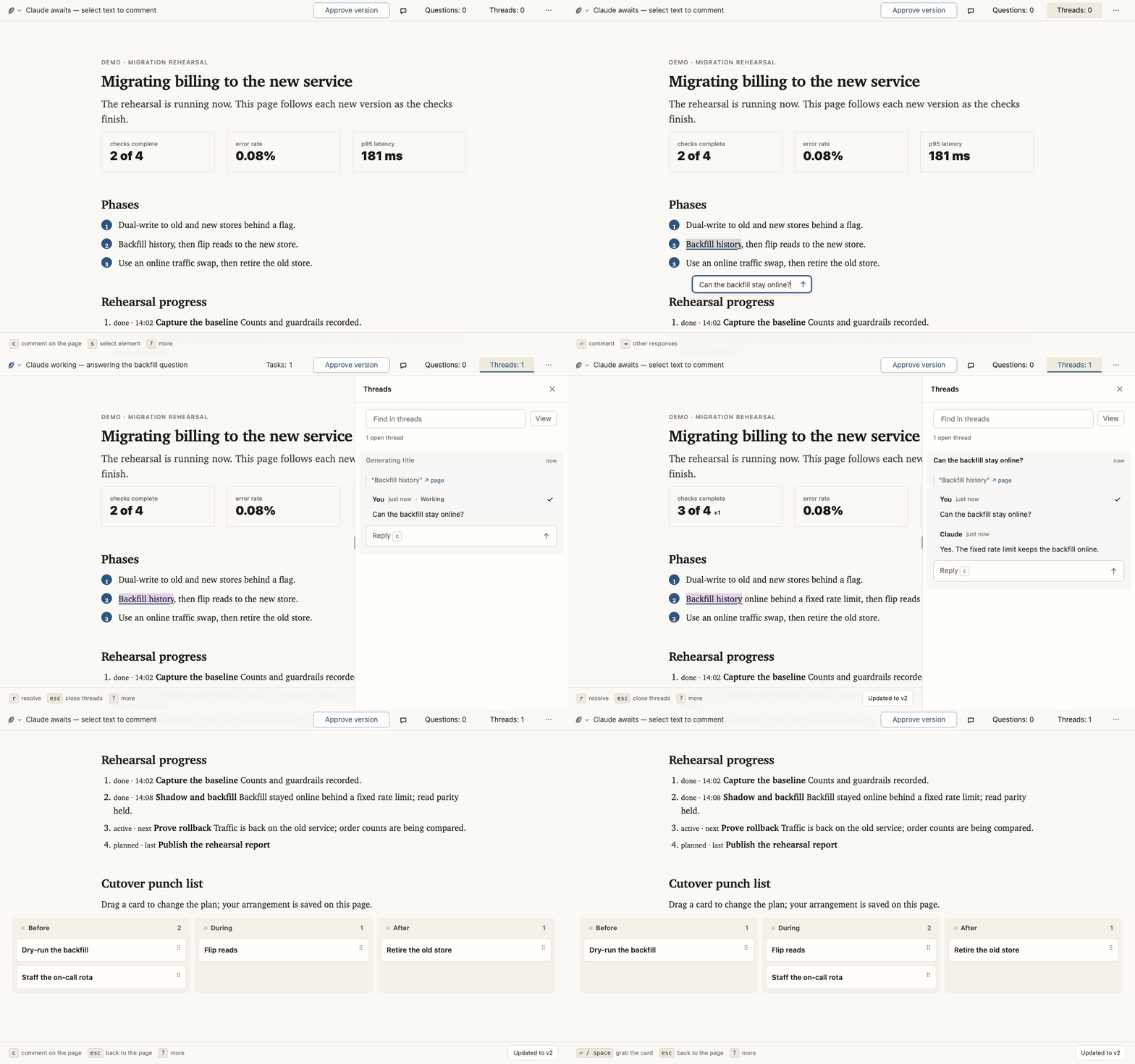
Leaf is generative UI for Claude Code and Codex. Review a plan, make a decision,
or follow live work in a page you can comment on and change. The agent responds by
revising the page.
<picture>
<source media="(prefers-color-scheme: dark)" srcset="https://raw.githubusercontent.com/max-sixty/leaf-assets/a419c29ec198d39d067533073b7d148173586b8e/demo/session-dark.png">
<img alt="A Leaf page with an anchored comment, the agent's reply, and a revised plan" src="https://raw.githubusercontent.com/max-sixty/leaf-assets/a419c29ec198d39d067533073b7d148173586b8e/demo/session-light.png">
</picture>
<details>
<summary>Watch the comment-and-revision loop</summary>
</details>
[Try Leaf on the home page](https://leaf.page/), where a small demo agent responds in your
private copy, or [explore the examples](https://leaf.page/examples/).
## Install
You need [`uv`](https://docs.astral.sh/uv/),
[`jq`](https://jqlang.github.io/jq/download/) 1.6 or newer on `PATH`, and a
browser that can reach the machine the agent runs on. No Leaf account or
configuration is required.
Users and package authors never need to build Leaf or run a package manager;
custom widgets are ordinary browser JavaScript.
Install the Leaf plugin, which includes the application, harness integration and
the Leaf skill. The skill supplies the agent's instructions; copying its directory
alone does not install the application.
Claude Code:
```
/plugin marketplace add max-sixty/leaf
/plugin install leaf@leaf
```
Codex:
```
codex plugin marketplace add max-sixty/leaf
codex plugin add leaf@leaf
```
Pi (a highly experimental trial, which the rest of these docs don't cover yet):
```
pi install git:github.com/max-sixty/leaf
```
Then ask: “Use Leaf to write up the options for this change.” The explicit skill is
`/leaf [topic]` in Claude Code, `$leaf [topic]` in Codex, and
`/skill:leaf [topic]` in Pi; without a topic, it
presents the work already under discussion.
The result opens in a browser page; its comments return to the same agent task.
<details>
<summary>Browser and environment requirements</summary>
Known functional limitations and accepted visual differences in current browsers
are recorded in [Browser support gaps](notes/browser-support.md).
The first run syncs the plugin's uv environment through your configured package
index. Render checks use the executable named by
`LEAF_BROWSER_EXECUTABLE`, `CHROME_PATH`, or `CHROME_BIN`, then installed Google
Chrome, then the first `google-chrome`, `google-chrome-stable`, `chrome`,
`chromium`, or `chromium-browser` on `PATH`.
Leaf needs Claude Code 2.1.196 or later, the first release whose hooks name the
turn they run in. On an earlier one, an update handed into a prompt you interrupt
waits until that turn ends before it is offered again.
In Claude Code, a background Stop hook watches the session's pages between turns.
Leaf's hooks module shows a line above the prompt for each page the session owns,
with a link, items waiting on you, the number of open threads and how many contain
unread replies, and the agent's activity or waiting status. Ctrl+X Tab
then Enter opens the first page in your browser, or, in a session you reached over
SSH, copies its link to your clipboard. Hooks modules are an early-access Claude
Code feature.
A page messages its session when input arrives while nothing watches it, as can
happen after you interrupt a turn. A session that bypasses permissions holds that
message for your approval unless Claude Code's `crossSessionInbound` setting is
`"accept"`.
</details>
<details>
<summary>Agent sandboxes</summary>
Leaf's hooks run outside an agent's sandbox, but `leaf` commands run wherever the
agent's shell commands do. The sandbox can block access to resources Leaf needs:
writes to its state in `~/.local/state/leaf`, a port on localhost for the page server, and
a browser for render checks.
In Claude Code, Leaf's hook starts a bridge outside the sandbox before the first
`leaf` command, and each sandboxed `leaf` command hands itself to the bridge
through the sandbox's network proxy. The first time in a session, Claude Code asks
whether to allow that connection. To allow it without asking, add `127.0.0.1` to Claude Code's settings,
such as `~/.claude/settings.json`:
```json
{ "sandbox": { "network": { "allowedDomains": ["127.0.0.1"] } } }
```
Allowing `127.0.0.1` lets every sandboxed command reach any server listening on
this machine's loopback, Leaf's bridge among them, and through the bridge run
`leaf` commands with your own access, as Leaf's hooks already run.
Codex's sandbox gives a command no such route, so Leaf's Codex plugin adds an MCP
server, `leaf`, which Codex starts outside the sandbox. In the sandbox the agent runs
`leaf` commands with the server's `run` tool. The first time, Codex asks whether to
allow the tool, for the session or always. Allowing it lets the agent run any `leaf`
command with your own access, including a package's scripts, with arguments it
chooses. To allow it without being asked, add this to `~/.codex/config.toml`:
```toml
[plugins."leaf@leaf".mcp_servers.leaf]
default_tools_approval_mode = "approve"
```
The agent's own edits to a page's files still run in Codex's sandbox, which lets
them write only the task's directory and the temporary directories. So Codex
refuses each edit to a page in Leaf's state home, or asks you to approve it. To let
the agent edit pages there, add the state home's `pages` directory to the sandbox's
writable roots in `~/.codex/config.toml`, inside the `[sandbox_workspace_write]`
table if you already have one:
```toml
[sandbox_workspace_write]
writable_roots = ["~/.local/state/leaf/pages"]
```
If you set `XDG_STATE_HOME`, the directory is `$XDG_STATE_HOME/leaf/pages`. Every
command the sandbox runs can then write every page's files, as it can the task's
directory. Where a task's sandbox lacks the line, the MCP server's first answer in
that task gives it to the agent to pass on.
</details>
## Explore and extend
- [How it works](https://leaf.page/how-it-works/): comments, decisions, live
revisions, and the widgets a page can use.
- [Examples](https://leaf.page/examples/): proposals, editable drafts, release
workspaces, and code reviews.
- [Extending](https://leaf.page/extending/): choose between page-local changes,
reusable packages, and Leaf's shared kernel. Your agent can build a widget a
task needs and use it in later pages.
- [Public contracts](skills/leaf/SKILL.md): authoring, serving, and continuing a
Leaf page.