# L👀K
[](https://www.npmjs.com/package/look-demo)
[](https://nodejs.org/)
**One command. Professional product demo videos.**
Turn any website into a polished demo video with AI-generated voiceover. No editing required.
<p align="center">
<img src="./docs/assets/logo.svg" alt="LooK" width="128">
<br>
<em>Generate beautiful product demos automatically</em>
</p>
```bash
npx look-demo quick https://your-app.com
```
That's it. You get a professional demo video in minutes.
## 📚 Documentation
| Guide | Description |
|-------|-------------|
| [Getting Started](./docs/GETTING_STARTED.md) | Installation and first demo |
| [CLI Reference](./docs/CLI_REFERENCE.md) | Complete command reference |
| [Web Editor](./docs/WEB_EDITOR.md) | Visual editing interface |
| [Live Recording](./docs/LIVE_RECORDING.md) | Real-time recording with preview |
| [Mobile Setup](./docs/MOBILE_SETUP.md) | Android/iOS app recording |
| [API Documentation](./docs/API.md) | Programmatic usage |
| [Customization](./docs/CUSTOMIZATION.md) | Cursors, effects, zoom modes |
| [Theme Presets](./docs/THEME_PRESETS.md) | Pre-built theme configurations |
| [Overlays & Effects](./docs/OVERLAYS_EFFECTS.md) | Captions, lower thirds, spotlights |
| [Export Formats](./docs/EXPORT_FORMATS.md) | GIF, thumbnail, platform presets |
| [Intelligent Pipeline](./docs/INTELLIGENT_PIPELINE.md) | AI orchestration & story arcs |
| [FAQ](./docs/FAQ.md) | Frequently asked questions |
| [Troubleshooting](./docs/TROUBLESHOOTING.md) | Common issues and solutions |
**Project:**
[Roadmap](./ROADMAP.md) • [Changelog](./CHANGELOG.md) • [Contributing](./CONTRIBUTING.md) • [Support](./SUPPORT.md)
## What It Does
1. **Records** your site with smooth cursor animations
2. **Analyzes** the UI using GPT-4 Vision
3. **Writes** a compelling voiceover script
4. **Narrates** with natural AI voice
5. **Exports** a polished video ready for YouTube, Twitter, etc.
## Installation
```bash
npm install -g look-demo
```
**Requirements:**
- Node.js 22.19+ (required by WebdriverIO 10)
- FFmpeg: `brew install ffmpeg` (Mac) or `apt install ffmpeg` (Linux)
- OpenAI API key: `export OPENAI_API_KEY=sk-...`
## Quick Start
### Fastest Way (Recommended)
```bash
look quick https://your-app.com
```
This uses smart defaults to create a great demo automatically.
### Full Control
```bash
look demo https://your-app.com \
--output demo.mp4 \
--duration 30 \
--voice nova \
--style professional \
--zoom-mode smart
```
### Just Preview (No Recording)
```bash
look demo https://your-app.com --dry-run
```
See the AI analysis and script before recording.
### Multi-Page Walkthrough
Want the AI to explore your entire site? Use the walkthrough command:
```bash
look walkthrough https://your-app.com --max-pages 5
```
This will:
1. **Discover** all pages on your site
2. **Prioritize** which pages are most important for a demo (features, pricing, etc.)
3. **Navigate** through them intelligently
4. **Generate** a coherent narrative across all pages
```bash
# Preview what pages will be visited
look walkthrough https://your-app.com --dry-run
# Focus on specific areas
look walkthrough https://your-app.com --focus pricing
look walkthrough https://your-app.com --focus technical
```
## Features
- **🎬 Smart Zoom** - Camera follows cursor with smooth, professional movement
- **🖱️ Cursor Effects** - Beautiful cursor with click ripple animations
- **🤖 AI Vision** - GPT-4V understands your UI and writes the script
- **🗣️ AI Voice** - Natural voiceover with OpenAI TTS
- **📹 60fps Recording** - Silky smooth browser capture
- **🎨 Pro Polish** - Color grading, vignette, motion blur
- **📱 Multi-Platform** - Export for YouTube, Twitter, Instagram, TikTok
- **🗺️ Site Explorer** - AI navigates through multiple pages automatically
- **🖥️ Web Editor** - Enterprise-grade visual editing interface
- **📋 Templates** - Pre-built configurations for common use cases
### Enterprise Features
- **🧠 Intelligent Orchestration** - 5-phase AI pipeline with quality scoring and auto-optimization
- **📊 Product Intelligence** - Auto-detects product category, value props, and target audience
- **🎭 Story Arcs** - 5 narrative templates: Problem→Solution, Feature Showcase, Journey, Before/After, Quick Demo
- **⏱️ Smart Pacing** - Content-aware timing that syncs with voiceover
- **🎬 Visual Moments** - Auto-detects animations, charts, forms for optimal capture
- **🎙️ Voice Enhancement** - SSML generation, multi-voice support, emotion markers
- **📝 Animated Captions** - Karaoke, pop, typewriter, fade subtitle styles
- **🎨 Lower Thirds** - Professional name/title overlays with animations
- **⌨️ Keyboard Visualizer** - Display shortcuts (Mac/Windows style)
- **🔍 Spotlight & Callouts** - Focus attention with arrows, badges, highlights
- **🎞️ Scene Transitions** - Fade, blur, slide, zoom between scenes
- **🖼️ GIF Export** - High-quality palette-optimized GIF conversion
- **📸 Auto Thumbnails** - AI-powered best frame selection
- **💧 Watermarks** - Text or logo overlays with positioning
- **📊 Progress Bars** - Visual timeline indicators
- **🎬 Intro/Outro** - Animated branded intro and CTA outro cards
## Web Editor
Start the visual editor for a more interactive experience:
```bash
look serve
```
### Features
- **First-run onboarding** - Guided tour of key features
- **Settings panel** - Configure API keys directly in the browser
- **Templates** - Pre-built demo configurations (SaaS, E-commerce, Portfolio, etc.)
- **Built-in docs** - Access documentation without leaving the editor
- **Live recording** - Real-time preview while recording
- **Timeline editing** - Visual editing of markers, zoom, and effects
- **Keyboard shortcuts** - Press `Shift + ?` to view all shortcuts
### API Key Setup
You can configure API keys in two ways:
1. **Environment variables** (CLI): `export OPENAI_API_KEY=sk-...`
2. **Web UI Settings**: Click ⚙️ Settings → API Keys → Enter your keys
See [Web Editor Guide](./docs/WEB_EDITOR.md) for full documentation.
## Options
### Demo Command
```bash
look demo <url> [options]
```
| Option | Description | Default |
|--------|-------------|---------|
| `-o, --output` | Output file path | `./demo.mp4` |
| `-d, --duration` | Video duration (seconds) | `25` |
| `-v, --voice` | TTS voice (nova, alloy, echo, fable, onyx, shimmer) | `nova` |
| `-s, --style` | Script style (professional, casual, energetic) | `professional` |
| `-p, --preset` | Export preset (youtube, twitter, instagram, tiktok) | `youtube` |
| `--zoom-mode` | Zoom behavior (none, basic, smart, follow) | `smart` |
| `--zoom-intensity` | Follow camera intensity (0-1) | `0.5` |
| `--max-zoom` | Maximum zoom level | `1.8` |
| `--skip-voice` | Generate video without voiceover | `false` |
| `--skip-analysis` | Skip AI analysis (faster) | `false` |
| `--reliable` | Use robust V2 engine | `false` |
| `--dry-run` | Preview script without recording | `false` |
### Cursor & Click Effects
| Option | Description | Default |
|--------|-------------|---------|
| `--cursor` | Cursor style (default, pointer, dot, circle, none) | `default` |
| `--cursor-size` | Cursor size in pixels | `24` |
| `--cursor-color` | Cursor color (hex) | `#000000` |
| `--click-effect` | Click effect (ripple, pulse, ring, spotlight, none) | `ripple` |
| `--click-color` | Click effect color (hex) | `#3B82F6` |
## Examples
```bash
# Quick demo - just works
look quick https://stripe.com
# Twitter-ready short video
look demo https://myapp.com -d 15 -p twitter
# Energetic style for launch
look demo https://myapp.com -s energetic -v alloy
# Silent demo (no voiceover)
look demo https://myapp.com --skip-voice
# Maximum zoom follow-cam
look demo https://myapp.com --zoom-mode follow --zoom-intensity 0.8
# Subtle, professional look
look demo https://myapp.com --zoom-mode basic --max-zoom 1.3
# Intelligent demo with AI orchestration
look demo https://myapp.com --intelligent --story-arc problem-solution
# Export as GIF for README
look gif video.mp4 --width 480 --fps 12 -o demo.gif
# Auto-generate YouTube thumbnail
look thumbnail video.mp4 --auto --preset youtube -o thumb.png
# Add animated captions
look captions video.mp4 --style karaoke --apply output.mp4
# Add lower third overlay
look overlay video.mp4 --lower-third "John Smith:CEO" -o output.mp4
# Batch process multiple sites
look batch --config demos.yaml --concurrency 2
```
## 📱 Mobile App Recording
Record demos of Android apps with Docker (no Android Studio setup required).
### Quick Start
```bash
# Start the Android emulator + Appium (first run takes 2-3 min)
look mobile-start
# Check when ready
look mobile-status
# Record your app
look mobile ./your-app.apk
# Stop when done
look mobile-stop
```
### Mobile Commands
| Command | Description |
|---------|-------------|
| `look mobile-start` | Start Android emulator + Appium in Docker |
| `look mobile-stop` | Stop the container |
| `look mobile-status` | Check if ready for recording |
| `look mobile-logs` | View container logs |
| `look mobile <app>` | Record a mobile app demo |
### Requirements
- Docker Desktop installed and running
- 8GB+ RAM available
- Your app as an `.apk` file
See [Mobile Setup Guide](./docs/MOBILE_SETUP.md) for full documentation and iOS instructions.
## How It Works
```
URL → Screenshot → GPT-4V Analysis → Script → Record Browser →
→ Add Cursor → Apply Zoom → Add Click Effects →
→ Color Grade → Generate Voice → Combine → Export
```
The magic is in the orchestration. LooK handles dozens of steps automatically to produce professional results.
## Troubleshooting
### "FFmpeg not found"
Install FFmpeg:
- **Mac:** `brew install ffmpeg`
- **Linux:** `sudo apt install ffmpeg`
- **Windows:** Download from ffmpeg.org
### "OpenAI API error"
Set your API key:
```bash
export OPENAI_API_KEY=sk-your-key-here
```
### Video looks choppy
- Ensure you have enough disk space
- Try reducing duration: `-d 15`
- Use a faster preset: `--preset twitter`
### Cursor not visible
- Check cursor style: `--cursor default`
- Increase size: `--cursor-size 32`
## License
All rights reserved. See [LICENSE](LICENSE).
## 🤝 Contributing
We welcome contributions! Here's how you can help:
### Quick Start for Contributors
1. **Fork the repository**
2. **Clone your fork:**
```bash
git clone https://github.com/YOUR_USERNAME/LooK.git
cd LooK
```
3. **Install dependencies:**
```bash
npm install
```
4. **Run tests:**
```bash
npm test
look test --full
```
5. **Make your changes**
6. **Submit a pull request**
### Ways to Contribute
- 🐛 **Report bugs** - [Open an issue](https://github.com/nirholas/LooK/issues)
- 💡 **Suggest features** - [Start a discussion](https://github.com/nirholas/LooK/discussions)
- 📖 **Improve docs** - Fix typos, add examples
- 🔧 **Submit PRs** - Bug fixes, new features
- ⭐ **Star the repo** - Show your support!
### Development Setup
```bash
# Install dependencies
npm install
# Run the CLI locally
node bin/repovideo.js demo https://example.com
# Start the web UI in dev mode
npm run dev:ui
# Build the web UI
npm run build:ui
```
### Code Style
- Use ES modules (`import`/`export`)
- Prefer async/await over callbacks
- Add JSDoc comments for public functions
- Keep commits focused and descriptive
See [ROADMAP.md](./ROADMAP.md) for planned features.
---
Built with ❤️ by [nichbot](https://github.com/nichbot)
## Documentation
Live app: **https://look.modelcontextprotocol.name** · Full documentation site: **https://look-docs.modelcontextprotocol.name/**
- [Getting started](docs/getting-started.md) covers install and first run.
- [Examples](docs/examples.md) has copy-paste snippets.
## Star History
[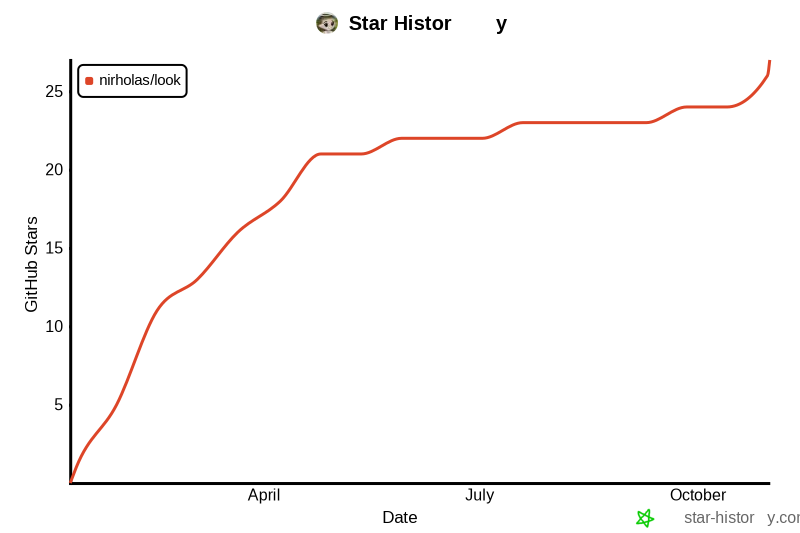](https://www.star-history.com/#nirholas/LooK&Date)
<!-- three.ws:growth -->
## Support the project
If LooK saves you time, **[star it on GitHub](https://github.com/nirholas/LooK)**. Stars are how other developers and AI agents find the repositories worth trusting, and they cost you one click.
Know someone who would use it? [Post on X](https://twitter.com/intent/tweet?text=LooK%3A%20CLI%20that%20turns%20any%20website%20into%20a%20polished%20product%20demo%20video%20with%20AI-generated%20voiceover&url=https%3A%2F%2Fgithub.com%2Fnirholas%2FLooK) · [Share on Bluesky](https://bsky.app/intent/compose?text=LooK%3A%20CLI%20that%20turns%20any%20website%20into%20a%20polished%20product%20demo%20video%20with%20AI-generated%20voiceover%20https%3A%2F%2Fgithub.com%2Fnirholas%2FLooK) · [Share on LinkedIn](https://www.linkedin.com/sharing/share-offsite/?url=https%3A%2F%2Fgithub.com%2Fnirholas%2FLooK) · [Submit to Hacker News](https://news.ycombinator.com/submitlink?u=https%3A%2F%2Fgithub.com%2Fnirholas%2FLooK&t=LooK%3A%20CLI%20that%20turns%20any%20website%20into%20a%20polished%20product%20demo%20video%20with%20AI-generated%20voiceover) · [Share on Reddit](https://www.reddit.com/submit?url=https%3A%2F%2Fgithub.com%2Fnirholas%2FLooK&title=LooK%3A%20CLI%20that%20turns%20any%20website%20into%20a%20polished%20product%20demo%20video%20with%20AI-generated%20voiceover)
## Built for AI agents too
Coding agents and LLM tooling can read this repo directly: [AGENTS.md](./AGENTS.md), [llms.txt](./llms.txt), [llms-full.txt](./llms-full.txt). Point an agent at `https://github.com/nirholas/LooK` and it has the context it needs.
## More from the same author
- [All repositories by nirholas](https://github.com/nirholas/nirholas#readme): the full catalog, grouped by topic
- [three.ws](https://three.ws): the platform for 3D AI agents with Solana wallets, a skill marketplace and x402 payments
- Questions or ideas: [open an issue](https://github.com/nirholas/LooK/issues) or [start a discussion](https://github.com/nirholas/LooK/discussions)
## Contributors
[](https://github.com/nirholas/LooK/graphs/contributors)
<!-- /three.ws:growth -->
<!-- nirholas:watermark -->
---
<p align="center">
Built by <a href="https://github.com/nirholas"><b>nirholas</b></a> · <a href="https://x.com/nichxbt">@nichxbt</a> · <a href="https://github.com/nirholas">github.com/nirholas</a>
</p>
<!-- /nirholas:watermark -->