<div align="center">
# 🔌 Plugin Delivery
<!-- three.ws:badges -->
[](https://github.com/nirholas/plugin.delivery/stargazers) [](https://github.com/nirholas/plugin.delivery/commits) [](https://github.com/nirholas/plugin.delivery/pulls) [](https://github.com/nirholas/plugin.delivery/blob/HEAD/AGENTS.md)
<!-- /three.ws:badges -->
**AI Function Call Plugins & Tools for SperaxOS**
**Source:** [github.com/nirholas/plugin.delivery](https://github.com/nirholas/plugin.delivery)
The plugin.delivery host is offline while hosting is being migrated. The `https://plugin.delivery/...` URLs in the manifests below are the canonical plugin identifiers and will resolve again once the migration completes; the plugin catalog itself ships in this repository under `public/`.
[📚 Docs](#documentation) • [🚀 Quick Start](#quick-start) • [📦 Templates](#plugin-templates) • [🎨 Plugin Types](#plugin-types) • [🔧 Development](#development)
</div>
---
## What Is Plugin Delivery?
AI plugin marketplace. SDK, gateway & developer tools for building function-calling plugins. OpenAPI compatible, multi-language support, Vercel edge deployment. Build chat plugins, AI tools & extensions. Primary use in cryptocurrency, DeFI, crypto trading, and blockchain analytics. Compatible with ERC-8004 agents.
| Feature | Description |
|---------|-------------|
| 📋 **Plugin Index** | JSON registry of AI-discoverable plugins |
| ⚡ **Gateway Service** | Secure proxy routing function calls to plugin APIs |
| 🛠️ **SDK** | TypeScript SDK for building custom plugins |
| 🎨 **Templates** | 6 starter templates for different plugin types |
| 🌍 **i18n** | 18 languages supported out of the box |
### How It Works
```
User: "What's the price of ETH?"
│
▼
┌─────────────────────────────────────────────────────────┐
│ SperaxOS discovers plugin from plugin.delivery index │
│ AI generates function call: getPrice(coin: "ethereum") │
│ Gateway routes request to CoinGecko API │
│ Response rendered in chat (JSON, Markdown, or UI) │
└─────────────────────────────────────────────────────────┘
│
▼
AI: "ETH is currently trading at $3,450..."
```
---
## Plugin Types
SperaxOS supports **4 distinct plugin types**, each optimized for different use cases:
| Type | Rendering | Best For | Complexity |
|------|-----------|----------|------------|
| **Default** | Server-rendered JSON → AI formats | Data APIs, lookups | ⭐ Simple |
| **Markdown** | Pre-formatted rich text | Documentation, reports | ⭐ Simple |
| **Standalone** | Full React/HTML app in iframe | Interactive dashboards | ⭐⭐⭐ Advanced |
| **OpenAPI** | Auto-generated from spec | Existing APIs | ⭐⭐ Medium |
### Default Plugins
Returns JSON data that the AI formats into natural language.
```json
{
"ui": {
"mode": "default"
}
}
```
**Use when:** You have an API that returns structured data and want the AI to explain results conversationally.
### Markdown Plugins
Returns pre-formatted Markdown that displays directly in chat.
```json
{
"ui": {
"mode": "markdown"
}
}
```
**Use when:** You want full control over formatting — tables, code blocks, headers, etc.
### Standalone Plugins (Artifacts)
Embeds a full React/HTML application in an iframe within the chat.
```json
{
"ui": {
"mode": "standalone",
"url": "https://your-plugin.com/ui",
"height": 400
}
}
```
**Use when:** You need rich interactivity — charts, forms, dashboards, embedded apps.
> 💡 **Standalone plugins are SperaxOS's superpower** — they enable experiences beyond what ChatGPT plugins can do.
### OpenAPI Plugins
Auto-generated from an OpenAPI 3.x specification. No custom code needed.
```json
{
"openapi": "https://your-api.com/openapi.json"
}
```
**Use when:** You already have an OpenAPI spec for your API.
---
## Artifacts, Embeds & Interactive UI
### What Are Artifacts?
Artifacts are **rich interactive content** that plugins can render directly in chat. Unlike plain text responses, artifacts can include:
- 📊 **Charts & Visualizations** (Chart.js, Recharts, D3)
- 📝 **Interactive Forms** (Input fields, buttons, selectors)
- 🎮 **Mini Applications** (Games, calculators, tools)
- 📄 **Rich Documents** (Formatted reports, tables)
### HTML Artifacts
Render raw HTML directly:
```typescript
// In your plugin API response
return {
type: 'html',
content: `
<div style="padding: 20px;">
<h2>Price Alert</h2>
<p>ETH crossed $3,500!</p>
</div>
`
};
```
### React Artifacts
Render React components (standalone plugins):
```tsx
// ui/page.tsx
export default function PriceChart({ data }) {
return (
<div className="p-4">
<LineChart data={data}>
<Line dataKey="price" stroke="#22c55e" />
</LineChart>
</div>
);
}
```
### iframe Embeds
Embed external content:
```json
{
"ui": {
"mode": "standalone",
"url": "https://tradingview.com/chart/?symbol=BTCUSD",
"height": 500
}
}
```
### Function Calls from UI
Standalone plugins can trigger additional function calls:
```typescript
import { speraxOS } from '@sperax/plugin-sdk/client';
// Trigger a new function call from your UI
speraxOS.triggerFunctionCall({
name: 'getTokenDetails',
arguments: { token: 'ETH' }
});
```
---
## Plugin Templates
Get started fast with our official templates:
| Template | Type | Description | Use Case |
|----------|------|-------------|----------|
| [**basic**](./templates/basic) | Default | Standard plugin with API endpoint | Simple data lookups |
| [**default**](./templates/default) | Default | Plugin with settings UI | Configurable plugins |
| [**markdown**](./templates/markdown) | Markdown | Rich text output | Formatted reports |
| [**openapi**](./templates/openapi) | OpenAPI | Auto-generated from spec | Existing APIs |
| [**settings**](./templates/settings) | Default | Plugin with user preferences | Personalized tools |
| [**standalone**](./templates/standalone) | Standalone | Full React application | Interactive dashboards |
### Using a Template
```bash
# Clone template to new directory
cp -r templates/standalone my-plugin
cd my-plugin
# Install dependencies
bun install
# Start development
bun dev
```
### Template Structure
```
templates/standalone/
├── public/
│ └── manifest.json # Plugin manifest
├── src/
│ ├── api/ # API endpoints
│ │ └── index.ts # Main handler
│ └── ui/ # React UI (standalone only)
│ └── page.tsx # UI component
├── package.json
└── README.md
```
---
## Quick Start
### 1. Install the SDK
The SDK is not published to the npm registry yet. Install it from a clone of this repository:
```bash
git clone https://github.com/nirholas/plugin.delivery.git
cd plugin.delivery
pnpm install
```
`@sperax/plugin-sdk` and `@sperax/chat-plugins-gateway` then resolve as workspace packages (see `pnpm-workspace.yaml`).
### 2. Create manifest.json
```json
{
"$schema": "https://plugin.delivery/schema.json",
"identifier": "my-crypto-plugin",
"api": [
{
"name": "getPrice",
"description": "Get cryptocurrency price",
"url": "https://my-plugin.vercel.app/api/price",
"parameters": {
"type": "object",
"properties": {
"coin": {
"type": "string",
"description": "Coin ID (e.g., bitcoin, ethereum)"
}
},
"required": ["coin"]
}
}
],
"meta": {
"title": "My Crypto Plugin",
"description": "Get real-time crypto prices",
"avatar": "🪙",
"tags": ["crypto", "prices"]
}
}
```
### 3. Create API Handler
```typescript
// api/price.ts
export default async function handler(req: Request) {
const { coin } = await req.json();
const res = await fetch(
`https://api.coingecko.com/api/v3/simple/price?ids=${coin}&vs_currencies=usd`
);
const data = await res.json();
return Response.json({
coin,
price: data[coin]?.usd,
timestamp: new Date().toISOString()
});
}
```
### 4. Deploy & Register
```bash
# Deploy to Vercel
vercel --prod
# Add to plugin index (submit PR or use Plugin Store)
```
---
## Documentation
| Guide | Description |
|-------|-------------|
| [📖 Plugin Development Guide](./docs/PLUGIN_DEVELOPMENT_GUIDE.md) | Complete development walkthrough |
| [📋 Plugin Manifest Reference](./docs/PLUGIN_MANIFEST.md) | Full manifest.json specification |
| [🎨 Plugin Types Guide](./docs/PLUGIN_TYPES.md) | Default, Markdown, Standalone explained |
| [🔌 SDK API Reference](./docs/SDK_API_REFERENCE.md) | Client SDK documentation |
| [🌐 OpenAPI Integration](./docs/OPENAPI_INTEGRATION.md) | Using OpenAPI specs |
| [💬 Communication Guide](./docs/COMMUNICATION_GUIDE.md) | Plugin ↔ Host messaging |
| [🎭 Artifacts Guide](./docs/ARTIFACTS_GUIDE.md) | Rich UI components |
| [⚡ Complete Guide](./docs/SPERAXOS_PLUGIN_COMPLETE_GUIDE.md) | Everything in one doc |
---
## Available Plugins
### Production
| Plugin | Description | Type | API |
|--------|-------------|------|-----|
| 🪙 **[CoinGecko Crypto](./src/coingecko.json)** | Prices, trends, market data for 1M+ tokens | OpenAPI | Free |
| 🦙 **[DeFiLlama Analytics](./src/defillama.json)** | TVL, yields, stablecoins, protocol metrics | Default | Free |
### Coming Soon
| Plugin | Description | Status |
|--------|-------------|--------|
| 📊 **DexScreener** | DEX pairs, volume, liquidity | Planned |
| 💼 **Portfolio Tracker** | Multi-chain wallet aggregation | Planned |
| ⛓️ **Chain Explorer** | Transaction lookup, gas prices | Planned |
---
## Development
### Prerequisites
- **Bun** 1.0+ (recommended) or Node.js 18+
- **Git**
### Setup
```bash
# Clone
git clone https://github.com/nirholas/plugin.delivery.git
cd plugins
# Install
bun install
# Dev server
bun dev
```
### Commands
| Command | Description |
|---------|-------------|
| `bun dev` | Start local dev server |
| `bun run format` | **Generate i18n translations (requires OpenAI API key)** |
| `bun run build` | Build plugin index |
| `bun test` | Run tests |
| `bun lint` | Lint code |
---
## Adding a New Plugin
### Step-by-Step Workflow
> ⚠️ **CRITICAL:** You MUST create both files or the build will fail:
> 1. `src/[plugin-name].json` - Plugin definition
> 2. `locales/[plugin-name].en-US.json` - Locale file (**REQUIRED**)
1. **Create plugin definition** in `src/[plugin-name].json`:
```json
{
"author": "Your Name",
"createdAt": "2025-12-29",
"homepage": "https://example.com",
"identifier": "my-plugin",
"manifest": "https://plugin.delivery/my-plugin/manifest.json",
"meta": {
"avatar": "🔌",
"description": "What your plugin does",
"tags": ["tag1", "tag2"],
"title": "My Plugin",
"category": "stocks-finance"
},
"schemaVersion": 1
}
```
2. **Create locale file** in `locales/[plugin-name].en-US.json` (**REQUIRED**):
```json
{
"meta": {
"title": "My Plugin",
"description": "What your plugin does",
"tags": ["tag1", "tag2"]
}
}
```
3. **Create manifest** in `public/[plugin-name]/manifest.json`:
```json
{
"$schema": "https://plugin.delivery/schema.json",
"identifier": "my-plugin",
"api": [
{
"url": "https://plugin.delivery/api/my-plugin/endpoint",
"name": "myFunction",
"description": "What this function does",
"parameters": {
"type": "object",
"properties": {
"param": { "type": "string", "description": "Parameter description" }
},
"required": ["param"]
}
}
],
"meta": {
"avatar": "🔌",
"title": "My Plugin",
"description": "What your plugin does"
},
"version": "1"
}
```
4. **Create API endpoints** in `api/[plugin-name]/[endpoint].ts`
5. **⚠️ REQUIRED: Create locale file** `locales/[plugin-name].en-US.json`:
```json
{
"meta": {
"title": "Your Plugin Title",
"description": "Your plugin description",
"tags": ["your", "tags"]
}
}
```
> **BUILD WILL FAIL** without this file. Copy `title`, `description`, and `tags` from your plugin's `meta` object.
6. **Run format** (generates i18n translations for 18 languages):
```bash
# Set OpenAI API key (required for i18n generation)
export OPENAI_API_KEY=sk-your-key-here
# Generate translations (creates all locale files from en-US)
bun run format
```
7. **Build** the plugin index:
```bash
bun run build
```
8. **Commit and push**:
```bash
git add src/[plugin-name].json locales/[plugin-name].*.json
git commit -m "feat: add [plugin-name] plugin"
git push
```
> ⚠️ **Important:** Always run `bun run format` before `bun run build` when adding new plugins. The format command uses OpenAI to generate translations for all 18 supported languages.
### Project Structure
```
plugins/
├── packages/
│ ├── sdk/ # @sperax/plugin-sdk
│ └── gateway/ # @sperax/chat-plugins-gateway
├── templates/ # Starter templates
│ ├── basic/
│ ├── default/
│ ├── markdown/
│ ├── openapi/
│ ├── settings/
│ └── standalone/
├── public/ # Static files (auto-generated)
│ ├── index.json # Plugin registry
│ └── openai/ # OpenAPI manifests
├── src/ # Plugin definitions
├── locales/ # i18n translations
├── docs/ # Documentation
└── api/ # Serverless functions
```
---
## Packages
Both packages live in this repository and are not published to the npm registry yet.
| Package | Description | Source |
|---------|-------------|--------|
| `@sperax/plugin-sdk` | Plugin SDK for building SperaxOS plugins | [`packages/sdk`](packages/sdk) |
| `@sperax/chat-plugins-gateway` | Gateway service for routing plugin calls | [`packages/gateway`](packages/gateway) |
### SDK Usage
```typescript
import {
pluginManifestSchema,
createPluginResponse,
PluginError
} from '@sperax/plugin-sdk';
// Client-side (in standalone UI)
import { speraxOS } from '@sperax/plugin-sdk/client';
```
---
## Gateway
The Plugin Gateway securely routes function calls from SperaxOS to plugin APIs:
```
SperaxOS → Gateway → Plugin API
│
├── Auth injection
├── Rate limiting
├── Request logging
└── Response transform
```
### Self-Hosting
```bash
# Clone gateway
cd packages/gateway
# Deploy
vercel --prod
# Set in SperaxOS
PLUGINS_GATEWAY_URL=https://your-gateway.vercel.app
```
---
## Contributing
We welcome contributions! See [CONTRIBUTING.md](./CONTRIBUTING.md).
### Submit a Plugin
1. **Option A:** Open a [Plugin Submission](https://github.com/nirholas/plugin.delivery/issues/new?template=plugin_submission.md) issue
2. **Option B:** Submit a PR adding your plugin to `src/`
### Requirements
- ✅ Valid manifest with working endpoints
- ✅ Tested in SperaxOS
- ✅ No API key required (or documented)
- ✅ en-US locale at minimum
---
## Links
| Resource | URL |
|----------|-----|
| 🌐 **Plugin Index** | [`public/index.json`](public/index.json) in this repository (the plugin.delivery host is offline while hosting is migrated) |
| 📦 **SDK** | [`packages/sdk`](packages/sdk) (workspace package, not yet published to npm) |
| 🐙 **GitHub** | [github.com/nirholas/plugins](https://github.com/nirholas/plugin.delivery) |
| 🐦 **Twitter/X** | [@nichxbt](https://x.com/nichxbt) |
[](https://vercel.com/new/clone?repository-url=https://github.com/nirholas/plugin.delivery)
---
## License
All rights reserved. See [LICENSE](LICENSE).
---
## 🌐 Live HTTP Deployment
**Plugin Delivery** is deployed and accessible over HTTP via [MCP Streamable HTTP](https://modelcontextprotocol.io/specification/2025-03-26/basic/transports#streamable-http) transport — no local installation required.
**Endpoint:**
```
https://modelcontextprotocol.name/mcp/plugin-delivery
```
### Connect from any MCP Client
Add to your MCP client configuration (Claude Desktop, Cursor, SperaxOS, etc.):
```json
{
"mcpServers": {
"plugin-delivery": {
"type": "http",
"url": "https://modelcontextprotocol.name/mcp/plugin-delivery"
}
}
}
```
### Available Tools (2)
| Tool | Description |
|------|-------------|
| `search_plugins` | Search AI plugins |
| `get_plugin_info` | Platform info |
### Example Requests
**Search AI plugins:**
```bash
curl -X POST https://modelcontextprotocol.name/mcp/plugin-delivery \
-H "Content-Type: application/json" \
-d '{"jsonrpc":"2.0","id":1,"method":"tools/call","params":{"name":"search_plugins","arguments":{"query":"weather"}}}'
```
**Platform info:**
```bash
curl -X POST https://modelcontextprotocol.name/mcp/plugin-delivery \
-H "Content-Type: application/json" \
-d '{"jsonrpc":"2.0","id":1,"method":"tools/call","params":{"name":"get_plugin_info","arguments":{}}}'
```
### List All Tools
```bash
curl -X POST https://modelcontextprotocol.name/mcp/plugin-delivery \
-H "Content-Type: application/json" \
-d '{"jsonrpc":"2.0","id":1,"method":"tools/list"}'
```
### Also Available On
- **[SperaxOS](https://github.com/nirholas/SperaxOS)** - source for the MCP marketplace. The hosted marketplace is offline while hosting is being migrated.
- **All 27 MCP servers** — See the full catalog at [modelcontextprotocol.name](https://modelcontextprotocol.name)
> Powered by [modelcontextprotocol.name](https://modelcontextprotocol.name) — the open MCP HTTP gateway
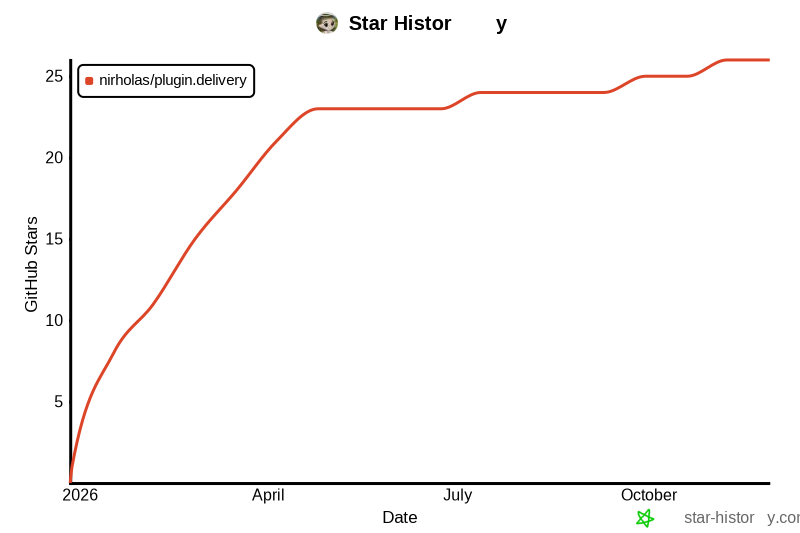
## Star History
[](https://www.star-history.com/#nirholas/plugin.delivery&Date)
<!-- three.ws:growth -->
## Support the project
If plugin.delivery saves you time, **[star it on GitHub](https://github.com/nirholas/plugin.delivery)**. Stars are how other developers and AI agents find the repositories worth trusting, and they cost you one click.
Know someone who would use it? [Post on X](https://twitter.com/intent/tweet?text=plugin.delivery%3A%20AI%20plugin%20marketplace&url=https%3A%2F%2Fgithub.com%2Fnirholas%2Fplugin.delivery) · [Share on Bluesky](https://bsky.app/intent/compose?text=plugin.delivery%3A%20AI%20plugin%20marketplace%20https%3A%2F%2Fgithub.com%2Fnirholas%2Fplugin.delivery) · [Share on LinkedIn](https://www.linkedin.com/sharing/share-offsite/?url=https%3A%2F%2Fgithub.com%2Fnirholas%2Fplugin.delivery) · [Submit to Hacker News](https://news.ycombinator.com/submitlink?u=https%3A%2F%2Fgithub.com%2Fnirholas%2Fplugin.delivery&t=plugin.delivery%3A%20AI%20plugin%20marketplace) · [Share on Reddit](https://www.reddit.com/submit?url=https%3A%2F%2Fgithub.com%2Fnirholas%2Fplugin.delivery&title=plugin.delivery%3A%20AI%20plugin%20marketplace)
## Built for AI agents too
Coding agents and LLM tooling can read this repo directly: [AGENTS.md](./AGENTS.md), [llms.txt](./llms.txt), [llms-full.txt](./llms-full.txt). Point an agent at `https://github.com/nirholas/plugin.delivery` and it has the context it needs.
## More from the same author
- [All repositories by nirholas](https://github.com/nirholas/nirholas#readme): the full catalog, grouped by topic
- [three.ws](https://three.ws): the platform for 3D AI agents with Solana wallets, a skill marketplace and x402 payments
- Questions or ideas: [open an issue](https://github.com/nirholas/plugin.delivery/issues) or [start a discussion](https://github.com/nirholas/plugin.delivery/discussions)
## Contributors
[](https://github.com/nirholas/plugin.delivery/graphs/contributors)
<!-- /three.ws:growth -->
<!-- nirholas:watermark -->
---
<p align="center">
Built by <a href="https://github.com/nirholas"><b>nirholas</b></a> · <a href="https://x.com/nichxbt">@nichxbt</a> · <a href="https://github.com/nirholas">github.com/nirholas</a>
</p>
<!-- /nirholas:watermark -->