# Seedance by Ace Data Cloud
[简体中文安装与首用指南](https://github.com/AceDataCloud/SeedanceMCP/blob/main/readme/README_zh_Hans.md)
<!-- mcp-name: io.github.AceDataCloud/mcp-seedance -->
[](https://pypi.org/project/mcp-seedance/)
[](https://pypi.org/project/mcp-seedance/)
[](https://www.python.org/downloads/)
[](https://opensource.org/licenses/MIT)
[](https://modelcontextprotocol.io)
A [Model Context Protocol (MCP)](https://modelcontextprotocol.io) server for AI video generation using [ByteDance Seedance](https://seedance.ai) through the [AceDataCloud API](https://platform.acedata.cloud?utm_source=github&utm_medium=referral&utm_campaign=evergreen&utm_content=seedance_mcp_readme_platform).
Generate AI videos directly from Claude, VS Code, or any MCP-compatible client.
## Use Seedance in Glama
Find the Ace-provided [Seedance source listing](https://glama.ai/mcp/servers/AceDataCloud/SeedanceMCP) or [remote connector](https://glama.ai/mcp/connectors/io.github.AceDataCloud/mcp-seedance). Follow the [Glama installation, API Token and first-use guide](https://github.com/AceDataCloud/SeedanceMCP/blob/main/readme/GLAMA.md). Public discovery and a successful personal connection are separate checks; generation uses your Ace account balance.
## Seedance in goose
Use the independent **Seedance by Ace Data Cloud** native goose plugin: [install and API Token guide](goose/README.md) · [简体中文](goose/README_zh_Hans.md). It reuses this MCP server and does not imply goose Marketplace or default-provider inclusion.
## Find the Seedance integration in the official MCP Registry
Open [Seedance in the official MCP Registry](https://registry.modelcontextprotocol.io/?q=io.github.AceDataCloud%2Fmcp-seedance), expand the matching `io.github.AceDataCloud` entry, and use its **Packages** or **Remotes** installation information in a client that consumes MCP catalogs. This is the Seedance integration provided by Ace Data Cloud; it is not an endorsement by the model vendor. The Registry is a directory, not the app that runs a tool.
Search for `mcp-seedance` (or `io.github.AceDataCloud/mcp-seedance`) to locate the exact entry. The official Registry search currently matches server names; spaces in a display title do not create extra search aliases. If your client does not consume the catalog, use the client-specific connection instructions below and check **Applications → General application** for your token, service permissions, balance and current price. Keep the original task ID when checking asynchronous results.
## Verify the connection before generating
After installation, discover the server's tools and call `seedance_list_models` with no arguments. This reference tool returns locally defined model or action information without calling a generation API. It does **not** validate your application key, account balance, service access, or current price. Your client's Chat model can still create separate charges.
To check authenticated access without creating media, query a task already owned by your application using the task-lookup tool and the **same original task ID**. If you have no existing task, stop after discovery/reference output; do not generate media just to test installation. Review [current pricing](https://platform.acedata.cloud/models?utm_source=github&utm_medium=referral&utm_campaign=evergreen&utm_content=seedance_mcp_readme_models) before any new generation.
For missing tools, reconnect and refresh the tool list. For 401/403, check the existing application's key, service permissions, Allowed APIs, expiration and usage limit before replacing credentials. Keep a task/trace ID for other failures, never your key; do not automatically retry a paid operation.
## Connect: hosted OAuth, API token, or local stdio
The hosted endpoint is `https://seedance.mcp.acedata.cloud/mcp`. Choose one route for the MCP client:
| Route | When to use it | Credential setup |
|---|---|---|
| Hosted OAuth | The client supports remote MCP OAuth | Add only the URL, then sign in to AceDataCloud and approve access. No token needs to be pasted into client configuration. |
| Hosted API token | The client cannot finish OAuth, or you need an explicit integration credential | Send an AceDataCloud API token in the `Authorization: Bearer …` header. Keep it in a local secret store or environment variable. |
| Local stdio | The client runs a local MCP process | Install `mcp-seedance` and pass `ACEDATACLOUD_API_TOKEN` to that process. It still calls the AceDataCloud API. |
The hosted service advertises OAuth metadata and Dynamic Client Registration (DCR). **DCR registers the client application; it is not an API key.** OAuth signs you in and the client sends the resulting Bearer token; it may reuse or create an API credential for the account. Browser sign-in still requires an AceDataCloud account. The hosted service can be metered: review [current service documentation](https://platform.acedata.cloud/documents/seedance-mcp?utm_source=github&utm_medium=referral&utm_campaign=evergreen&utm_content=seedance_mcp_readme_quick_start) and displayed pricing before a real operation. Do not configure both an OAuth login and a fixed `Authorization` header for the same server.
### Hosted OAuth examples
- **Claude and Claude Desktop chat:** Add a remote custom connector in `Customize → Connectors → Add custom connector`, enter `https://seedance.mcp.acedata.cloud/mcp`, select sign-in, and choose **Register automatically** if Claude asks how to register its OAuth client. Complete consent. Claude Desktop's local `claude_desktop_config.json` is a separate setup. [Claude connector guide](https://support.claude.com/en/articles/11175166-get-started-with-custom-connectors-using-remote-mcp).
- **Claude Code:** `claude mcp add --transport http --scope user seedance https://seedance.mcp.acedata.cloud/mcp`, then `claude mcp login seedance`. Check `/mcp`. [Claude Code MCP guide](https://code.claude.com/docs/en/mcp).
- **Cursor:** Add a remote server with only `https://seedance.mcp.acedata.cloud/mcp`. For a project, merge the entry below into `<project>/.cursor/mcp.json`; for personal use, use `~/.cursor/mcp.json`. [Cursor MCP guide](https://cursor.com/docs/mcp).
- **VS Code / Copilot:** Run **MCP: Add Server**, select HTTP, enter `https://seedance.mcp.acedata.cloud/mcp`, then finish the browser sign-in. New portable workspace configs use `<project>/.mcp.json`; the VS Code-specific format below uses `<project>/.vscode/mcp.json` or the user profile. Check **MCP: List Servers**. [VS Code MCP setup](https://code.visualstudio.com/docs/agent-customization/mcp-servers).
- **Codex:** `codex mcp add seedance --url https://seedance.mcp.acedata.cloud/mcp`, then `codex mcp login seedance`. Its user settings are in `~/.codex/config.toml`. [Official Codex MCP guide](https://developers.openai.com/codex/mcp/).
Cursor project config (OAuth):
```json
{
"mcpServers": {
"seedance": {"url": "https://seedance.mcp.acedata.cloud/mcp"}
}
}
```
VS Code-specific workspace config (OAuth):
```json
{
"servers": {
"seedance": {"type": "http", "url": "https://seedance.mcp.acedata.cloud/mcp"}
}
}
```
### Hosted API token
<!-- BEGIN TOKEN ONBOARDING -->
1. Open [Ace Data Cloud → Applications](https://platform.acedata.cloud/console/applications?utm_source=github&utm_medium=referral&utm_campaign=evergreen&utm_content=seedance_mcp_readme_api_key). Sign in, or register an account first.
2. Find **General application**. If it has not been created, choose **Initialize General Application**. A general key can use the services available to your account; a dedicated application's key is limited to its service. Check the required service/model access and [current pricing](https://platform.acedata.cloud/models?utm_source=github&utm_medium=referral&utm_campaign=evergreen&utm_content=seedance_mcp_readme_models).
3. Copy the **API Key** from the application card, or open **Keys / Manage Keys → Create** to create a separate key for this integration. Give it a recognizable name so you can revoke or rotate it independently.
4. When creating a key, review **Expiration Time**, **Set Usage Limitation**, and **Allowed APIs**. Enable only the restrictions you need, allow the operations you will call, then click **Create** and copy the token from the key list. Task lookup does not grant permission to submit a generation. Confirm the application's balance can cover your first request; any trial allowance is whatever your account currently displays.
5. Copy only the token value, without quotation marks, spaces, or `Bearer `. An API Key / API Token field expects this raw value; only a manually configured HTTP `Authorization` header needs the `Bearer ` prefix. A `platform-...` account-management token cannot replace a generation API key.
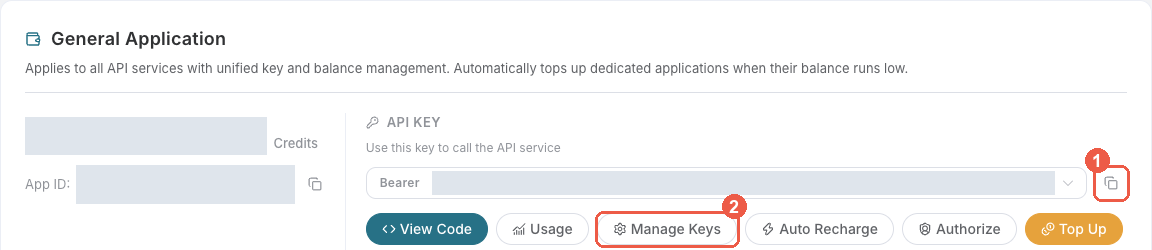
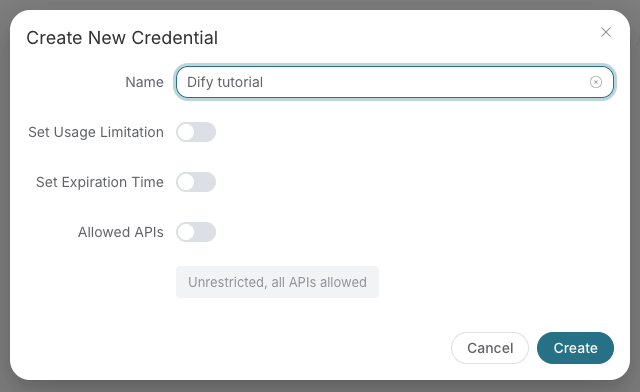
Save the key in the client's credential store or the environment variable shown below. Never put it in a prompt, shared workflow, screenshot, or Git commit. If authentication fails, check the full copied value, application/service access, expiration, usage limit, and balance before creating another key.
<!-- END TOKEN ONBOARDING -->
A fixed Bearer header bypasses OAuth. If the header is invalid, remove it before trying browser sign-in; keep the saved credential private.
For Claude Code, the shell expands the token when you add the server; treat the saved user MCP config as a secret:
```bash
export ACEDATACLOUD_API_TOKEN='YOUR_API_TOKEN'
claude mcp add --transport http --scope user seedance https://seedance.mcp.acedata.cloud/mcp \
--header "Authorization: Bearer $ACEDATACLOUD_API_TOKEN"
```
For a Claude Code project config, put a variable reference in `<project>/.mcp.json` and set that variable in the environment that launches Claude Code:
```json
{
"mcpServers": {
"seedance": {
"type": "http",
"url": "https://seedance.mcp.acedata.cloud/mcp",
"headers": {"Authorization": "Bearer ${ACEDATACLOUD_API_TOKEN}"}
}
}
}
```
Cursor uses a different environment-variable syntax in `~/.cursor/mcp.json` or an uncommitted project config:
```json
{
"mcpServers": {
"seedance": {
"url": "https://seedance.mcp.acedata.cloud/mcp",
"headers": {"Authorization": "Bearer ${env:ACEDATACLOUD_API_TOKEN}"}
}
}
}
```
In VS Code, run **MCP: Open User Configuration** and merge this server plus its masked input; `${input:...}` is for VS Code's user/workspace format and is not portable to the Agent Host `.mcp.json` format:
```json
{
"inputs": [
{"id": "acedata-seedance-token", "type": "promptString", "description": "AceDataCloud API token", "password": true}
],
"servers": {
"seedance": {
"type": "http",
"url": "https://seedance.mcp.acedata.cloud/mcp",
"headers": {"Authorization": "Bearer ${input:acedata-seedance-token}"}
}
}
}
```
For **Cline**, use its MCP configuration UI or CLI file `~/.cline/data/settings/cline_mcp_settings.json`; its remote transport value is `streamableHttp`. For **JetBrains AI Assistant**, add a remote URL from **Settings → Tools → AI Assistant → Model Context Protocol (MCP)**. For **Zed**, use a `context_servers` entry with the URL only for OAuth or add a local Bearer header. These clients have different configuration schemas; follow their current UI rather than copying another client's JSON. [Cline](https://docs.cline.bot/mcp/mcp-overview) · [JetBrains](https://www.jetbrains.com/help/ai-assistant/mcp.html) · [Zed](https://zed.dev/docs/ai/mcp).
### Local stdio
Install the package and give the local process an API token:
```bash
python -m pip install mcp-seedance
export ACEDATACLOUD_API_TOKEN='YOUR_API_TOKEN'
mcp-seedance
```
For Claude Desktop local MCP, merge this entry into the file opened by its developer settings (`~/Library/Application Support/Claude/claude_desktop_config.json` on macOS). `uvx` requires [uv](https://docs.astral.sh/uv/) on `PATH`:
```json
{
"mcpServers": {
"seedance": {
"command": "uvx",
"args": ["mcp-seedance"],
"env": {"ACEDATACLOUD_API_TOKEN": "YOUR_API_TOKEN"}
}
}
}
```
Keep this user-level file private. Self-hosted HTTP uses `mcp-seedance --transport http --port 8000`; expose it only with suitable network and TLS controls. Local execution still calls the AceDataCloud API.
[Example prompt](#verify-your-first-result)
### Verify your first result
> Generate a short video of clouds moving over a mountain, then retrieve the completed task and final video URL.
This is an example prompt, not a promised runtime or recorded success. Save the task ID, wait for terminal success, and inspect the final media.
### Check before using the service
1. `https://seedance.mcp.acedata.cloud/health` returning `{"status":"ok"}` checks endpoint reachability only.
2. Confirm that the MCP client loads tools. `seedance_list_models` is a reference tool; it does not verify downstream API access or balance.
3. If you need a full API check, call `seedance_generate_video` with your own valid input after reviewing [current service documentation](https://platform.acedata.cloud/documents/seedance-mcp?utm_source=github&utm_medium=referral&utm_campaign=evergreen&utm_content=seedance_mcp_readme_quick_start) and displayed pricing. If the result contains a task ID, call `seedance_get_task` on that same ID until terminal success or failure. Do not resubmit the operation just to check progress.
For **401**, check which auth route the client used and whether the token or OAuth session is valid. A **403** may mean an account permission or content moderation failure; read the returned error. Insufficient balance and downstream service failures need their own diagnosis. A listed tool or submitted task does not prove a successful result.
## Features
- **Text to Video** - Create AI-generated videos from text prompts
- **Image to Video** - Animate images with first frame, last frame, and reference image control
- **Multiple Models** - Support for Seedance 2.0 (incl. Fast/Mini, multimodal reference), 1.5 Pro, 1.0 Pro, 1.0 Pro Fast, 1.0 Lite T2V/I2V
- **Multiple Resolutions** - 480p, 720p (default), 1080p, and 4k output (2.5 supports 1080p; 4k: `doubao-seedance-2-0-260128` only)
- **Flexible Aspect Ratios** - 16:9, 9:16, 1:1, 4:3, 3:4, 21:9, and adaptive
- **Audio Generation** - Generate synchronized audio for videos (1.5 Pro and 2.0 series)
- **Service Tiers** - Default (priority) and Flex (cost-effective) processing
- **Task Tracking** - Monitor generation progress and retrieve results
## Tool Reference
| Tool | Description |
|------|-------------|
| `seedance_generate_video` | Generate AI video from a text prompt using ByteDance Seedance. |
| `seedance_generate_video_from_image` | Generate AI video using reference images with ByteDance Seedance. |
| `seedance_get_task` | Query the status and result of a video generation task. |
| `seedance_get_tasks_batch` | Query multiple video generation tasks at once. |
| `seedance_list_models` | List all available Seedance models with their capabilities and pricing. |
| `seedance_list_resolutions` | List all available resolutions and aspect ratios for Seedance. |
| `seedance_list_actions` | List all available Seedance API actions and corresponding tools. |
## Available Tools
### Video Generation
| Tool | Description |
| ------------------------------------ | ----------------------------------------------- |
| `seedance_generate_video` | Generate video from a text prompt |
| `seedance_generate_video_from_image` | Generate video using reference/start/end images |
### Tasks
| Tool | Description |
| -------------------------- | ---------------------------- |
| `seedance_get_task` | Query a single task status |
| `seedance_get_tasks_batch` | Query multiple tasks at once |
### Information
| Tool | Description |
| --------------------------- | --------------------------------- |
| `seedance_list_models` | List available Seedance models |
| `seedance_list_resolutions` | List available output resolutions |
| `seedance_list_actions` | List available API actions |
## Usage Examples
### Generate Video from Prompt
```
User: Create a video of a cat playing with a ball of yarn
Claude: I'll generate a video for you.
[Calls seedance_generate_video with prompt="A cute cat playfully batting a ball of yarn"]
```
### Animate an Image
```
User: Turn this image into a video: https://example.com/landscape.jpg
Claude: I'll create a video from your image.
[Calls seedance_generate_video_from_image with first_frame_url and appropriate prompt]
```
### Generate with Audio
```
User: Create a video of rain falling with sound
Claude: I'll generate a video with synchronized audio.
[Calls seedance_generate_video with prompt="Rain falling on a quiet street" and generate_audio=True, model="doubao-seedance-1-5-pro-251215"]
```
## Available Models
| Model | Description | Features |
| ------------------------------------- | ----------------- | -------------------------- |
| `doubao-seedance-2-5-260628` | 2.5 | Up to 30s and 1080p, edit/extend, multimodal reference |
| `doubao-seedance-2-0-fast-260128` | 2.0 Fast | Latest generation fast |
| `doubao-seedance-2-0-mini-260615` | 2.0 Mini | Latest generation, lightweight, cheapest 2.0 |
| `doubao-seedance-1-5-pro-251215` | 1.5 Pro | Audio generation, T2V, I2V |
| `doubao-seedance-1-0-pro-250528` | 1.0 Pro | High quality T2V, I2V |
| `doubao-seedance-1-0-pro-fast-251015` | 1.0 Pro Fast | Faster generation |
| `doubao-seedance-1-0-lite-t2v-250428` | 1.0 Lite T2V | Lightweight text-to-video |
| `doubao-seedance-1-0-lite-i2v-250428` | 1.0 Lite I2V | Lightweight image-to-video |
## Available Aspect Ratios
| Aspect Ratio | Description | Use Case |
| ------------ | -------------------- | -------------------------- |
| `16:9` | Landscape (default) | YouTube, TV, presentations |
| `9:16` | Portrait | TikTok, Instagram Reels |
| `1:1` | Square | Instagram posts |
| `4:3` | Traditional | Classic video format |
| `3:4` | Portrait traditional | Portrait content |
| `21:9` | Ultrawide | Cinematic content |
| `adaptive` | Adaptive | Auto-detect from image |
## Configuration
### Environment Variables
| Variable | Description | Default |
| ----------------------------- | --------------------------- | -------------------------------- |
| `ACEDATACLOUD_API_TOKEN` | Local stdio API token; hosted OAuth/client Bearer header is separate | Required for local stdio |
| `ACEDATACLOUD_API_BASE_URL` | API base URL | `https://api.acedata.cloud` |
| `ACEDATACLOUD_OAUTH_CLIENT_ID` | OAuth client ID (hosted mode) | — |
| `ACEDATACLOUD_PLATFORM_BASE_URL` | Platform base URL | `https://platform.acedata.cloud` |
| `SEEDANCE_DEFAULT_MODEL` | Default model | `doubao-seedance-2-0-260128` |
| `SEEDANCE_DEFAULT_RESOLUTION` | Default resolution | `720p` |
| `SEEDANCE_DEFAULT_RATIO` | Default aspect ratio | `16:9` |
| `SEEDANCE_DEFAULT_DURATION` | Default duration (seconds) | `5` |
| `SEEDANCE_REQUEST_TIMEOUT` | Request timeout in seconds | `1800` |
| `LOG_LEVEL` | Logging level | `INFO` |
### Command Line Options
```bash
mcp-seedance --help
Options:
--version Show version
--transport Transport mode: stdio (default) or http
--port Port for HTTP transport (default: 8000)
```
## Development
### Setup Development Environment
```bash
# Clone repository
git clone https://github.com/AceDataCloud/SeedanceMCP.git
cd SeedanceMCP
# Create virtual environment
python -m venv .venv
source .venv/bin/activate # or `.venv\Scripts\activate` on Windows
# Install with dev dependencies
pip install -e ".[dev,test]"
```
### Run Tests
```bash
# Run unit tests
pytest
# Run with coverage
pytest --cov=core --cov=tools
# Run integration tests (requires API token)
pytest tests/test_integration.py -m integration
```
### Code Quality
```bash
# Format code
ruff format .
# Lint code
ruff check .
# Type check
mypy core tools
```
### Build & Publish
```bash
# Install build dependencies
pip install -e ".[release]"
# Build package
python -m build
# Upload to PyPI
twine upload dist/*
```
## Project Structure
```
SeedanceMCP/
├── core/ # Core modules
│ ├── __init__.py
│ ├── client.py # HTTP client for Seedance API
│ ├── config.py # Configuration management
│ ├── exceptions.py # Custom exceptions
│ ├── server.py # MCP server initialization
│ ├── types.py # Type definitions
│ └── utils.py # Utility functions
├── tools/ # MCP tool definitions
│ ├── __init__.py
│ ├── video_tools.py # Video generation tools
│ ├── task_tools.py # Task query tools
│ └── info_tools.py # Information tools
├── prompts/ # MCP prompts
│ └── __init__.py # Prompt templates
├── tests/ # Test suite
│ ├── conftest.py
│ ├── test_client.py
│ ├── test_config.py
│ ├── test_integration.py
│ └── test_utils.py
├── deploy/ # Deployment configs
│ └── production/
│ ├── deployment.yaml
│ ├── ingress.yaml
│ └── service.yaml
├── .env.example # Environment template
├── .gitignore
├── CHANGELOG.md
├── Dockerfile # Docker image for HTTP mode
├── docker-compose.yaml # Docker Compose config
├── LICENSE
├── main.py # Entry point
├── pyproject.toml # Project configuration
└── README.md
```
## API Reference
This server wraps the [AceDataCloud Seedance API](https://platform.acedata.cloud/documents/seedance-videos?utm_source=github&utm_medium=referral&utm_campaign=evergreen&utm_content=seedance_mcp_readme_documents_seedance-videos):
- [Seedance Videos API](https://platform.acedata.cloud/documents/seedance-videos?utm_source=github&utm_medium=referral&utm_campaign=evergreen&utm_content=seedance_mcp_readme_documents_seedance-videos) - Video generation
- [Seedance Tasks API](https://platform.acedata.cloud/documents/seedance-tasks?utm_source=github&utm_medium=referral&utm_campaign=evergreen&utm_content=seedance_mcp_readme_documents_seedance-tasks) - Task queries
## Contributing
Contributions are welcome! Please:
1. Fork the repository
2. Create a feature branch (`git checkout -b feature/amazing`)
3. Commit your changes (`git commit -m 'Add amazing feature'`)
4. Push to the branch (`git push origin feature/amazing`)
5. Open a Pull Request
## Documentation
<!-- canonical-documentation -->
[Documentation](https://platform.acedata.cloud/documents/seedance-mcp?utm_source=github&utm_medium=referral&utm_campaign=evergreen&utm_content=seedance_mcp_readme_quick_start)
## License
MIT License - see [LICENSE](LICENSE) for details.
## Links
- [AceDataCloud Platform](https://platform.acedata.cloud?utm_source=github&utm_medium=referral&utm_campaign=evergreen&utm_content=seedance_mcp_readme_platform)
- [ByteDance Seedance](https://seedance.ai)
- [Model Context Protocol](https://modelcontextprotocol.io)
- [MCP Python SDK](https://github.com/modelcontextprotocol/python-sdk)
---
Made with love by [AceDataCloud](https://platform.acedata.cloud?utm_source=github&utm_medium=referral&utm_campaign=evergreen&utm_content=seedance_mcp_readme_platform)
## Cline setup / Cline 图文接入
[Seedance by Ace Data Cloud — English guide](https://github.com/AceDataCloud/MCPs/blob/4a2fb4e17d322bc22c5742ab3a5bd48b24ec5bdc/seedance/docs/cline.md) · [完整中文图文步骤](https://github.com/AceDataCloud/MCPs/blob/4a2fb4e17d322bc22c5742ab3a5bd48b24ec5bdc/seedance/docs/cline.md#中文步骤). The Cline marketplace submission is pending review as of 2026-10-18; the guide labels the manual fallback separately. / Cline 官方目录投稿仍待审核,手动接入不等于已上架。
## API parameter behavior
The default model remains `doubao-seedance-2-0-260128`. Omitted controls honor inline prompt options such as `--rs`, `--rt`, and `--dur`; explicit named arguments take precedence. Without either form, defaults remain 720p, 16:9 and 5 seconds. Seedance 2.5 first/last-frame mode defaults to its required `adaptive` ratio. Both generation tools expose camera and watermark controls. Seedance 2.5 accepts up to 30 images, 10 audio references and 10 video references (50 total), including audio-only reference; 2.0 has smaller limits. Read current pricing from the service page; USD conversion depends on the credit package.