| name | item-change-background |
| description | 商品换背景。白底商品图 → 逼真场景图,光影与投影匹配新环境。当用户说「换背景」「加场景」「白底转场景」「放到桌面上」时使用。 |
item-change-background — 商品图生成逼真场景图
白底商品图 → 有质感的实拍场景图。商品不动,环境换掉。
关键不是「贴一张背景」,而是接地投影、环境反光、光向一致——这三件事做不到,商品就像浮在背景上的贴纸。
生成效果示例
| 输入:商品图 |
|---|
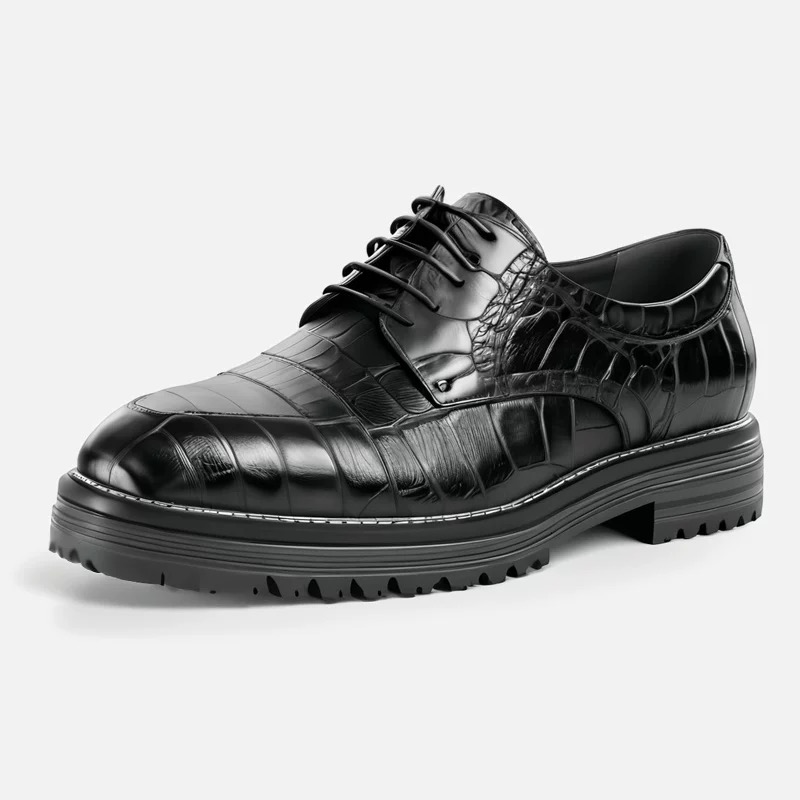 |
product-shoes.jpg — 黑色鳄鱼纹亮面皮革布洛克德比鞋,白底,800×800 |
实际执行的命令:
dlazy gpt-image-2 \
  --prompt 'Place this product into a photorealistic lifestyle scene. Keep the pair of black patent leather derby shoes 100% faithful: same glossy patent finish, same brogue perforation pattern, same lacing, same chunky lug sole, same proportions and camera angle. Replace the plain background with a warm autumn scene: a weathered wooden floor beside a window, a few dry maple leaves, soft late-afternoon side light casting a natural contact shadow under each shoe, blurred indoor background. The shoes must sit believably on the surface with correct perspective and grounded shadows. Photorealistic commercial product photography, no text, no watermark.' \
  --images docs/item-change-background/product-shoes.jpg \
  --size 1024x1024 --quality medium --imageFormat jpeg \
  --save docs/item-change-background/example-output.jpg
输出
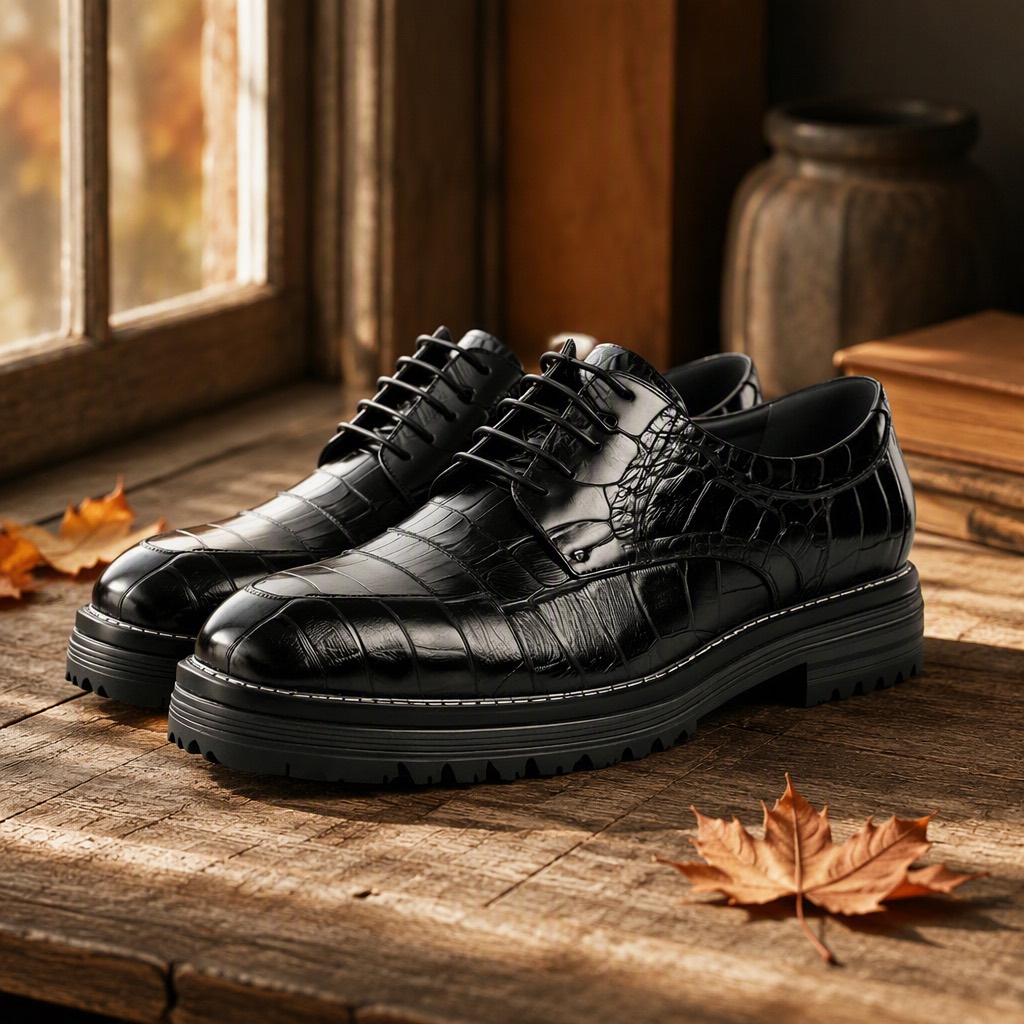
example-output.jpg — 1024×1024。鞋的鳄鱼纹压花、雕花孔、白色沿条明线与厚齿底保持不变;背景换成窗边旧木板 + 枫叶,午后侧光在鞋头形成高光,每只鞋下都有接地投影,木纹的暖色被亮面皮革轻微反射。
1、能力边界
| 方式 | 说明 |
|---|
| 文生背景 | 用文字描述目标场景,模型生成环境 |
| 上传背景 | 提供一张背景图,商品合成进去 |
| 能力 | 说明 |
|---|
| 背景模板 | 智能推荐 / 木棍衣杆 / 浅色木枝 / 自定义 |
| 商品类目 | 辅助判断合理场景(鞋 → 地面,美妆 → 台面,家居 → 房间) |
| 物理正确 | 接地投影、环境反光、光向与色温一致 |
不做:不改商品的外形、颜色、材质与 logo;不添加原图没有的商品部件;不生成误导性的使用场景(如非防水产品放进水里)。
2、输入素材规则
生成前先自检这几条硬性约束:
- 大小:20KB ~ 15MB
- 分辨率:大于 400×400
- 格式:jpg / jpeg / png / webp
输入建议
| 做法 | 说明 |
|---|
| ✅ 纯白/纯色底商品图 | 抠图边界最干净 |
| ✅ 商品完整、主视角 | 出画的部分放进场景后要靠编 |
| ✅ 光线均匀 | 原图有强方向光时,新场景的光向必须跟它一致 |
| ❌ 已在复杂场景里 | 先用 clothing-extraction 或抠图洗成白底 |
| ❌ 半透明/反光商品无参照 | 玻璃瓶、镜面商品要靠环境反光才真实,白底图信息不足 |
3、让商品「落地」的三条物理约束
这三句几乎决定成败,每次都要写:
1. 接地:sitting believably on the surface with correct perspective and a grounded contact shadow
2. 光向:light direction and colour temperature must match the shading already on the product
3. 反光:[环境元素] subtly reflected on the [商品材质], consistent with the scene
类目 → 合理场景对照
| 类目 | 合理场景 | 忌 |
|---|
| 鞋 | 木地板 / 石板路 / 台阶,商品接地 | 悬浮、放在布面上没有压痕 |
| 包 | 椅背 / 桌面 / 手提,带受力形变 | 硬挺立在半空 |
| 美妆 | 大理石台面 / 丝绒布 / 浴室台,带倒影 | 放在草地、户外 |
| 3C | 木桌 / 办公桌 / 深色台面,硬光勾边 | 温馨田园风 |
| 家居 | 完整房间透视,与家具比例合理 | 尺寸明显不对的房间 |
| 食品 | 餐桌 / 厨房台面 / 竹垫,暖光 | 冷调工业风 |
4、工具调用
本技能使用 dLazy 的 gpt-image-2(图像编辑模型;商品换背景的难点是「商品像素不动 + 环境重建 + 物理正确的光影耦合」,需要强区域保持与场景理解)。
调用方式
两种等价写法,选一种。统一入口会自动选后端、失败重试、建目录落盘、估算成本:
node scripts/gen.mjs --task item-change-background \
--prompt '<见下方 Prompt 模板>' \
--images <按下表顺序> \
--save output/item-change-background-<sku>.jpg
dlazy gpt-image-2 --prompt '...' --images ... --save output/item-change-background.jpg
参数约定(本技能固定用法)
| 参数 | 取值 | 理由 |
|---|
--images | [商品图](文生背景)/ [商品图, 背景图](上传背景) | 顺序即 prompt 中的 image 1 / 2 |
--size | 1024x1024(方图主图)/ 1024x1536(竖版场景) | 跟随主图规范 |
--quality | high(皮革、金属、玻璃等反光材质)/ medium(哑光材质) | 反光材质靠 high |
--imageFormat | jpeg | 通用格式 |
--batch | 2 ~ 4 | 场景构图随机性大 |
--save | docs/item-change-background/output-<sku>-<场景>.jpg | 按场景归档 |
Command Examples
dlazy gpt-image-2 \
--prompt 'Place this product into a photorealistic lifestyle scene. Keep the product 100% faithful: same shape, colour, material finish and logo. Replace the plain background with a weathered wooden floor beside a window, soft late-afternoon side light casting a natural contact shadow, blurred indoor background. The product must sit believably on the surface with correct perspective and grounded shadows. Photorealistic commercial product photography, no text.' \
--images docs/item-change-background/product-shoes.jpg \
--size 1024x1024 --quality medium
SRC=docs/item-change-background/product-shoes.jpg
KEEP='Keep the pair of black crocodile-embossed patent leather derby shoes 100% faithful: same glossy finish, same croc embossing pattern, same brogue perforation, same lacing, same white welt stitching, same chunky lug sole, same proportions and camera angle.'
PHYS='The shoes must sit believably on the surface with correct perspective and a grounded contact shadow under each shoe. Light direction and colour temperature must match the shading already on the product. Photorealistic commercial product photography, no text, no watermark.'
for S in wood street office autumn; do
case $S in
wood) SCENE='on a weathered wooden floor beside a window, soft late-afternoon side light, blurred indoor background' ;;
street) SCENE='on wet grey cobblestones after rain, reflections in the puddles, overcast diffused light' ;;
office) SCENE='on a dark polished stone floor in a modern office lobby, cool directional light, glass panels blurred behind' ;;
autumn) SCENE='on a wooden deck with a few dry maple leaves, warm golden-hour side light' ;;
esac
dlazy gpt-image-2 \
--prompt "Place this product into a photorealistic lifestyle scene. $KEEP Replace the plain background with a scene: $SCENE. $PHYS" \
--images "$SRC" --size 1024x1024 --quality high --imageFormat jpeg \
--batch 2 --save "docs/item-change-background/output-sku001-$S.jpg"
dlazy gpt-image-2 \
--prompt \
--images docs/item-change-background/product-shoes.jpg docs/item-change-background/bg.jpg \
--size 1024x1024 --quality high
dlazy gpt-image-2 --dry-run --prompt --images a.jpg --size 1024x1024 --quality high
延伸阅读
5、Prompt 模板
Place this product into a photorealistic lifestyle scene.

Keep the [商品品类 + 颜色 + 材质] 100% faithful: same [外形], same [材质光泽],
same [五金/缝线/纹理], same [logo 位置], same proportions and camera angle.

Replace the background with [场景描述:表面 + 环境 + 道具 + 光线].

The product must sit believably on the surface with correct perspective and a
grounded contact shadow. Light direction and colour temperature must match the
shading already on the product. [环境元素] subtly reflected on the [材质].

Photorealistic commercial product photography, no text, no watermark.
按问题追加的修正句
| 问题 | 追加到 prompt 末尾 |
|---|
| 商品像贴纸浮着 | Add a soft occlusion/contact shadow where the product meets the surface, and a faint ambient-occlusion darkening along the contact line. |
| 光向对不上 | The scene light must come from [方向], matching the highlight already on the product. |
| 抠图有白边 | Blend the product edges seamlessly into the scene; no cut-out halo, no white fringe. |
| 商品被改了 | Change only the background. Every pixel of the product must remain identical to image 1. |
| 反光材质假 | Render physically plausible reflections of the surrounding scene on the [材质] surface. |
| 商品太小 | The product must occupy at least 45% of the frame and be the sharpest element. |
6、执行流程
- 洗成白底:商品图如带复杂背景,先抠干净。
- 查类目 → 合理场景(第三节表格),避免物理上不成立的组合。
- 写商品保真句 → 写场景句 → 写三条物理约束(接地 / 光向 / 反光)。
- 反光材质用
--quality high。
--batch 2~4 出多张挑构图,落盘到 docs/item-change-background/。- 质检:是否接地(有没有投影和压痕)、光向是否一致、边缘有没有白边、商品本体是否被改。
7、常见问题
| 现象 | 原因 | 处理 |
|---|
| 商品像浮在背景上 | 缺接地投影 | 追加接地投影 + AO 暗化句 |
| 光向明显矛盾 | 未约束光向 | 追加指定光向句,与商品原有高光一致 |
| 边缘有白边 | 抠图残留 | 追加无白边融合句 |
| 商品细节被改 | 模型重绘了商品 | 追加 Change only the background. |
| 玻璃/金属反光很假 | 缺环境反光 | 追加环境反光句 + --quality high |
| 场景不合理(鞋在草地悬空) | 类目与场景不匹配 | 查第三节表格换场景 |
Tips
Visit https://dlazy.com for more information.
