# Show the Change
**“The AI says it's done. What should I actually look at?”**
A small Agent Skill that turns a specific project change into an explanation you can act on: what changed for you, where to see it, and what still needs checking. It is written for people who use coding agents but don't want to read a wall of diffs.
[中文](README.zh-CN.md) · [Read the skill](skills/show-the-change/SKILL.md) · [See a product example](examples/carousel-product-change.md) · [Download v0.1.1](https://github.com/LydiaTools/show-the-change/releases/tag/v0.1.1)
## One question after the agent finishes
> “Use Show the Change to explain what you changed in this project and how I can check it.”
The skill asks the agent to inspect the actual change, use your language, and point you to the relevant page or file. A description of source code is not treated as proof that a public website or installed app has changed.
## Try it without a terminal
If your coding agent can read public GitHub pages, open the project you want to understand and paste this request:
```text
Read https://github.com/LydiaTools/show-the-change/blob/main/skills/show-the-change/SKILL.md
and use it to explain what changed in this project and how I can check it.
For this request, explain only; don't change any files.
```
This asks the agent to read the instructions for this task; it does not install the skill. If the agent cannot open the link, use the installation option below or copy the [skill text](skills/show-the-change/SKILL.md) into the conversation. The result depends on the agent and the evidence available to it.
## Install for Codex
From the project where you want to use it, with Node.js 22.20+:
```bash
npx skills@1.7.4 add LydiaTools/show-the-change --skill show-the-change --agent codex
```
Then ask: **“Use $show-the-change to explain the latest change in this project in plain language. Tell me where to check it.”**
The optional third-party installer may download code. The skill is a set of instructions: it uses the agent you already have and does not bundle a model. Your agent's normal model access and costs still apply. The skill does not install Git hooks, block a push, publish a project, or independently verify a deployment.
To install manually, copy the complete [`skills/show-the-change`](skills/show-the-change/) directory to your agent's supported skills location. Restart or reload the agent if its documentation requires it.
## A real change, explained
The [product example](examples/carousel-product-change.md) explains a real image-tool change, shows its actual interface, and gives you steps to try. A [second example](examples/browser-agent-doc-change.md) distinguishes a documentation update from a product feature. A [release onboarding example](examples/release-onboarding.md) shows how to tell a clearer installation guide from a new software release. All three use public source changes and recorded checks; none is an independent evaluation of model behavior.
> **What changed for you:** Landscape, square and portrait photos can share one carousel frame without cropping their displayed edges. You can reorder the set and download a numbered ZIP.
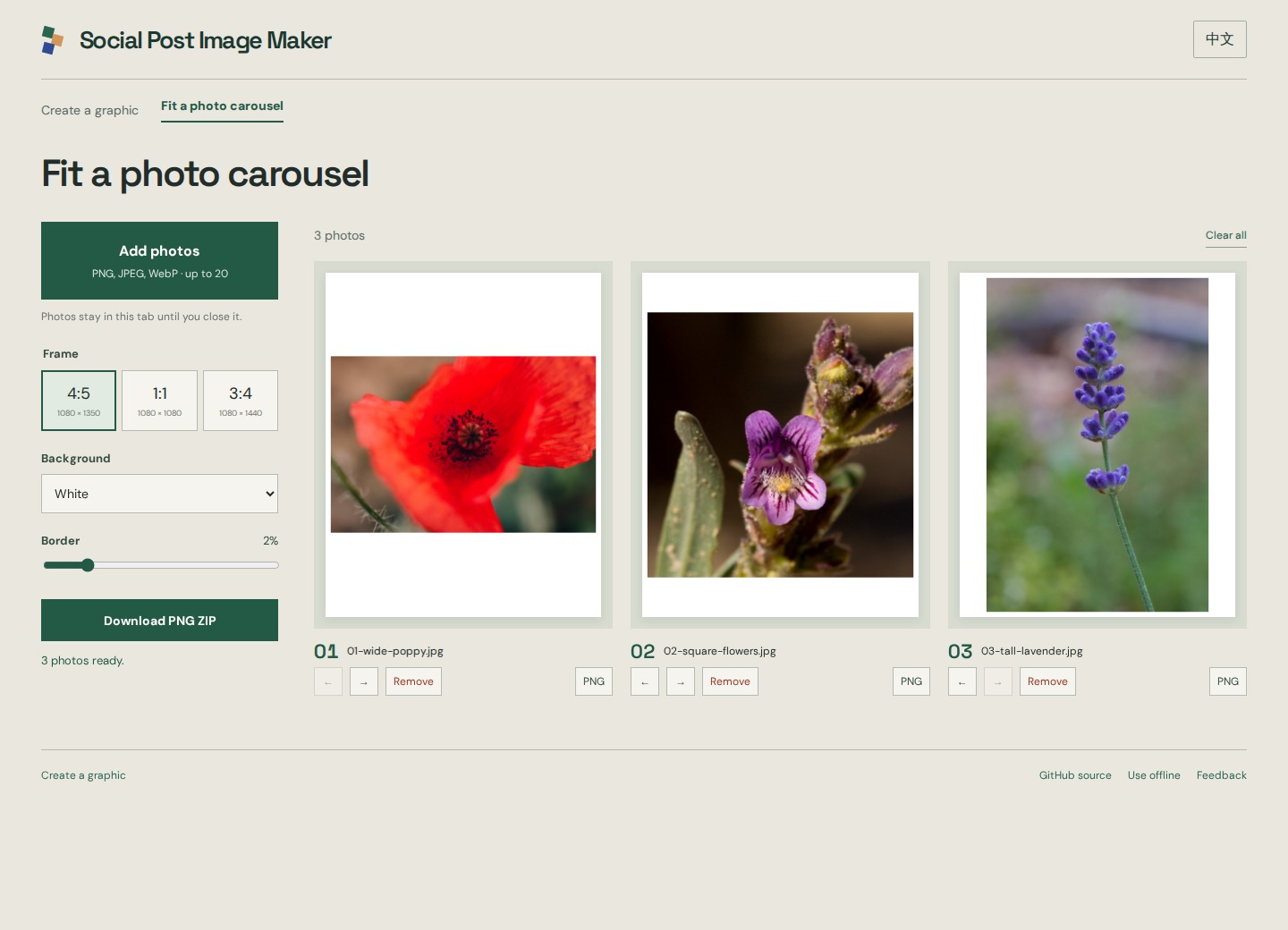
*This is the existing Aspectory app described in the example, not an interface for this skill. The screenshot uses separately credited CC0 practice photos; [provenance](https://github.com/LydiaTools/aspectory/blob/c8293abbc337aacd733cae5ef0a19607995fa951/docs/screenshots/PROVENANCE.md). The product example is in current source and is not in the earlier v0.1.0 preview ZIP.*
## What it can and cannot establish
- It can guide an agent to inspect the specified diff, working-tree state, or supplied artifacts and link relevant evidence.
- It asks the agent to distinguish an intended result from a test actually run, source code from a deployed page, and an untracked file from committed work.
- It can suggest a practical check. It cannot guarantee the explanation is correct, prove safety, or replace a code review or a real acceptance test.
- It has not been evaluated across agents or real users. Review the explanation and verify important results in the actual app.
The motivation came from public discussions of [Sphinx](https://news.ycombinator.com/item?id=50137950), which asks developers questions before pushing, and [Farol](https://news.ycombinator.com/item?id=50231349), which helps reviewers locate changes worth attention. Show the Change is an independently written explanation workflow; it does not include or claim endorsement from either project.
## Related projects
Looking for a different part of the workflow? These independent projects are worth a look:
- [Open Steps](https://github.com/kharmanskyi/open-steps) offers a broader set of plain-language skills, including session reports and checking another session's work. Show the Change focuses on explaining a particular change and where to see it.
- [product-engineer](https://github.com/Bubblegunn/product-engineer) combines skills for customer-facing explanations with a command-line checker for certain mismatches between a message and a diff.
These descriptions are based on their public documentation, not a side-by-side runtime comparison. Please check each project's own instructions and license.
## License
MIT. Issues and contributions are welcome.