# ProjectX
<p align="center">
<img width="100px" alt="Turborepo for Monorepo" src="https://user-images.githubusercontent.com/4060187/196936123-f6e1db90-784d-4174-b774-92502b718836.png">
<img width="100px" alt="React Router for Website" src="https://avatars.githubusercontent.com/u/64235328?s=200&v=4">
<img width="300px" alt="ProjectX logo" src="https://github.com/user-attachments/assets/eecd8520-1e78-4ec7-8a12-55b62e5771c6">
<img width="100px" alt="NestJS for Services" src="https://avatars.githubusercontent.com/u/28507035?s=200&v=4">
<img width="100px" alt="Temporal for Durable Executions" src="https://avatars.githubusercontent.com/u/56493103?s=200&v=4">
</p>
> **ProjectX** is a comprehensive full-stack template designed to simplify the development of scalable and resilient applications using **React** and **Temporal**. By integrating Temporal's advanced workflow orchestration with React's dynamic frontend framework, ProjectX enables developers to build applications with durable executions and seamless communication between services.
<details>
<summary><h2>Features 🧰</h2></summary>
- ⏳ Temporal TypeScript SDK running from a Turborepo monorepo<br/>
- 🧭 React Router v7 (Framework mode) + React Query<br/>
- 🎨 TailwindCSS v4<br/>
- 🧱 NestJS for APIs & microservices<br/>
- 🐳 Docker setup to run everything locally on any machine<br/>
- 🤖 AI-first with Cursor Rules + MCP servers & Claude Subagents + Skills<br/>
- 📚 Storybook for building UI components<br/>
- 📧 MJML for lightning-fast email templates<br/>
- 🛒 Stripe for checkout & payments<br/>
- 🪝 Ngrok for local integrations and webhooks<br/>
</details>
## Why Temporal? 🤔
<pre align="center" role="img" aria-label="ASCII Temporal">
████████╗███████╗███╗ ███╗██████╗ ██████╗ ██████╗ █████╗ ██╗
╚══██╔══╝██╔════╝████╗ ████║██╔══██╗██╔═══██╗██╔══██╗██╔══██╗██║
██║ █████╗ ██╔████╔██║██████╔╝██║ ██║██████╔╝███████║██║
██║ ██╔══╝ ██║╚██╔╝██║██╔═══╝ ██║ ██║██╔══██╗██╔══██║██║
██║ ███████╗██║ ╚═╝ ██║██║ ╚██████╔╝██║ ██║██║ ██║███████╗
╚═╝ ╚══════╝╚═╝ ╚═╝╚═╝ ╚═════╝ ╚═╝ ╚═╝╚═╝ ╚═╝╚══════╝
</pre>
### Challenges of Maintaining State in Distributed Systems
- Consistency
- Fault Tolerance
- Scalability
- Concurrency Control
- Security
**Temporal** is introduced here as a **Workflow Orchestration** tool for managing long-running operations **(durable execution)**, human-in-the-loop and system lifecycle **(state management, guaranteed completion with compensations and uniqueness)**.
You can use **Temporal** today to implement sequences of steps/actions in a specific order for your business processes **(workflows)**,
not only for communication between services **(Microservices Orchestration)** but also within **Monolithic** apps.
**Workflows** can react to asynchronous and external events **(signals, updates)**, aggregate data and perform actions **(activities)** with exponential retries **(retry policy)** and run for extended periods **(heartbeat)** if needed, then you can check the state of these executions at any time **(queries)**.
Additionally, workflows support scheduled and time-based executions with configurable delays to handle recurring business logic **(scheduling)**.
### Use Cases
• **Order Processing Systems:** Managing the lifecycle of orders from placement to fulfillment, including inventory checks, payment processing, and shipping.
• **User Onboarding:** Coordinating steps involved in onboarding new users, such as account creation, email verification, and initial setup tasks.
• **Data Pipelines:** Orchestrating data ingestion, transformation, and storage processes with reliability and scalability.
• **Batch Processing:** Handling large-scale batch jobs with retry mechanisms and progress monitoring.
## Getting Started 🚀
### Prerequisites 🧰
- [Docker Compose](https://docs.docker.com/compose/install)
- [Node.js 24](https://nodejs.org) (24.9 or later; the Jest suites load the ESM-only NestJS 12 packages through `require(esm)`)
- [Git](https://git-scm.com/downloads)
### Quick Setup 🛠️
1. **Clone and Setup Environment:**
```bash
git clone https://github.com/proyecto26/projectx.git
cd projectx
cp .env.example .env
```
2. **Start Development Environment:**
```bash
# Build and start all services (db, temporal, backend services)
docker-compose up -d
# Install dependencies and start web application
pnpm install
pnpm run dev:web
```
### Documentation 📚
For detailed information about the project, please refer to:
- [Architecture Overview](./docs/architecture/README.md)
- [Frontend Guide](./docs/frontend/README.md)
- [Backend Guide](./docs/backend/README.md)
## Project Structure Overview
<img width="1204" alt="image" src="https://github.com/user-attachments/assets/6a82fc7a-178a-42e1-8d27-fbb353422793" />
<details>
<summary><b>Markmap format 🍬</b></summary>
```markmap
#### Root Directory
- **package.json**: Contains the dependencies and scripts for the entire monorepo.
- **turbo.json**: Configuration for Turborepo, which manages the monorepo structure and build processes.
- **tsconfig.json**: Base TypeScript configuration shared across the project.
#### Apps
- **apps/auth**:
- **Purpose**: Handles user authentication and data retrieval.
- **Key Features**: Login, registration, and user profile management.
- **apps/order**:
- **Purpose**: Manages order processing, checkout, and payment handling.
- **Key Features**: Cart management, order tracking, and payment integration.
- **apps/product**:
- **Purpose**: Manages product catalog and inventory.
- **Key Features**: Product listing, details, and inventory management.
- **apps/web**:
- **Purpose**: The main web application interface.
- **Key Features**: User interaction with the system.
- **Configuration**:
- **tsconfig.json**: TypeScript configuration specific to the web app.
#### Packages
- **packages/core**:
- **Purpose**: Contains business logic and common utilities.
- **Key Features**: Shared functions and services used across backend applications.
- **packages/db**:
- **Purpose**: Manages database access using Prisma and the Repository pattern.
- **Key Features**: Database schema definitions and data access layers.
- **Documentation**:
- **README.md**: Provides details on database setup and usage.
- **packages/email**:
- **Purpose**: Handles email template creation and sending.
- **Key Features**: Uses MJML for templates and provides email sending services.
- **packages/models**:
- **Purpose**: Defines DTOs and common types.
- **Key Features**: Ensures consistency across web and backend services.
- **packages/ui**:
- **Purpose**: Contains UI components and themes.
- **Key Features**: Built with React and TailwindCSS, includes Storybook for component visualization.
- **Configuration**:
- **package.json**: Dependencies and scripts for the UI library.
- **tsconfig.json**: TypeScript configuration for the UI library.
- **packages/workflows**:
- **Purpose**: Temporal workflow orchestration utilities.
- **Key Features**: Shared workflow client and worker services.
- **packages/payment**:
- **Purpose**: Payment provider integrations.
- **Key Features**: Stripe and other payment gateway implementations.
```
</details>
## Code Generators 🏗️
ProjectX includes powerful Turborepo generators to scaffold new services quickly and consistently.
### Available Generators
| Command | Description |
|---------|-------------|
| `pnpm gen:service` | Create a basic NestJS microservice (like `product`) |
| `pnpm gen:temporal-service` | Create a NestJS service with Temporal workflows (like `auth`, `order`) |
| `pnpm gen:workflow` | Add a new workflow to an existing Temporal-enabled service |
### Creating a New Service
#### Basic Service (without Temporal)
```bash
pnpm gen:service
```
This will prompt you for:
- Service name (e.g., `inventory`, `notification`)
- Port number (auto-suggests next available)
- Description
- Optional modules (Email, Payment)
#### Temporal-Enabled Service
```bash
pnpm gen:temporal-service
```
Additional prompts:
- Initial workflow name (e.g., `process`, `handle`)
### Adding a Workflow to Existing Service
```bash
pnpm gen:workflow
```
Select the target service and provide workflow details.
### What Gets Generated
**Basic Service:**
```
apps/{serviceName}/
├── src/
│ ├── app/
│ │ ├── app.module.ts
│ │ ├── app.controller.ts
│ │ └── app.service.ts
│ ├── config/
│ │ ├── app.config.ts
│ │ ├── env.config.ts
│ │ └── swagger.config.ts
│ └── main.ts
├── test/
├── package.json
└── tsconfig.json
```
**Temporal Service (additional):**
```
├── src/
│ ├── app/activities/
│ │ ├── activities.module.ts
│ │ └── activities.service.ts
│ ├── config/
│ │ └── temporal.config.ts
│ └── workflows/
│ ├── index.ts
│ └── {workflowName}.workflow.ts
```
### Auto-Configuration
The generators automatically:
- Add `dev:{serviceName}` and `build:{serviceName}` scripts to root `package.json`
- Update `docker-compose.yml` with the new service configuration
- Configure the builder to include the new service in the build pipeline
### Post-Generation Steps
1. Add the environment variable to `.env`:
```bash
{SERVICE_NAME}_PORT={port}
```
2. Install dependencies:
```bash
pnpm install
```
3. Start the service:
```bash
pnpm dev:{serviceName}
```
## ProjectX CLI 🖥️
ProjectX includes an interactive CLI tool for a more developer-friendly experience when generating services and customizing the template.
### Running the CLI
```bash
# Interactive mode (recommended)
pnpm cli
# Or run specific commands
pnpm cli generate service
pnpm cli generate temporal-service
pnpm cli generate workflow
pnpm cli init
pnpm cli info
```
### CLI Commands
| Command | Description |
|---------|-------------|
| `pnpm cli` | Interactive mode - select what to do |
| `pnpm cli generate [type]` | Generate service or workflow |
| `pnpm cli init` | Initialize/customize project for your needs |
| `pnpm cli info` | Display project information |
### Initialize Command
The `init` command helps you customize the template for your own project:
```bash
pnpm cli init
```
This allows you to:
- **Rename the project**: Updates all package names and references from `@projectx/*` to `@your-project/*`
- **Clean up example services**: Remove auth, order, product services to start fresh
- **Update Docker configuration**: Adjust docker-compose.yml for your project name
### Example Workflow
```bash
# 1. Clone the template
git clone https://github.com/proyecto26/projectx.git my-app
cd my-app
# 2. Customize for your project
pnpm install
pnpm cli init
# - Enter your project name
# - Select customizations (rename, cleanup, etc.)
# 3. Generate your first service
pnpm cli generate temporal-service
# - Enter service name: "orders"
# - Select port: 8084
# - Add Email module: Yes
# - Initial workflow: "processOrder"
# 4. Start development
docker-compose up -d
pnpm dev
```
## Development Tools 🔧
### Monorepo Management
```bash
# View project structure
pnpm list --recursive --only-projects
# View dependency graph
turbo run build --dry-run --graph
# Run specific task across all packages
turbo run build
turbo run test
turbo run lint
# Run task for specific package
turbo run build --filter=@projectx/core
turbo run dev --filter=web
# Clear Turborepo cache
turbo run build --force
```
### UI Development
```bash
# Run Storybook
pnpm run storybook
```
### Package Management
```bash
# Add dependency to specific package
pnpm add <package> --filter=@projectx/core
# Add dev dependency to root
pnpm add -D <package> -w
# Update all dependencies
pnpm update --recursive
```
## Product Catalog MCP Server 🤖
The product service is also an [MCP](https://modelcontextprotocol.io) server, built with [`@nestjs/mcp`](https://docs.nestjs.com/mcp/overview), so an assistant can browse the store's catalog. It's read-only and serves the same public data as `GET /product`, `/product/categories` and `/product/:id`, without the products' download URLs. It needs no token.
| | Name | What it does |
| --- | --- | --- |
| Tool | `search_products` | Search available products by words (`query`), `category` and price range (`minPrice`, `maxPrice`), with `page` and `limit` (up to 50) |
| Tool | `get_product` | One product by `id` |
| Resource | `catalog://categories` | Every category with available products |
| Resource template | `product://{id}` | One product by id |
**Over HTTP.** With the product service running (`docker-compose up -d` or `pnpm dev:product`), it's at `http://localhost:8083/mcp` (Streamable HTTP). To add it to Claude Code:
```bash
claude mcp add --transport http projectx-catalog http://localhost:8083/mcp
```
**Over stdio.** Build the app (`pnpm build:product`), and let the client start it with `pnpm mcp:product` from the repository root. It reads the root `.env`, but `.env` uses Docker hostnames and `${...}` references that Nest doesn't expand, so pass a `DATABASE_URL` the host can reach:
```bash
claude mcp add projectx-catalog \
-e DATABASE_URL="postgresql://<user>:<password>@localhost:5432/<db>?schema=public" \
-- pnpm --silent mcp:product
```
Other clients take the same settings: the URL above, or the command `pnpm --silent mcp:product` with that `DATABASE_URL`. To inspect the server, run `npx @modelcontextprotocol/inspector` and connect to the URL with **Streamable HTTP**.
## Docker Configuration 🐳
Services defined in [docker-compose.yml](./docker-compose.yml):
- PostgreSQL with PostGIS
- Temporal server and UI
- Auth, Order, and Product services
### Common Commands
```bash
# Build fresh images
docker-compose build --no-cache
# Start services
docker-compose up -d
# Remove services and volumes
docker-compose down --volumes
```
## Notable Links 🤓
- [Get started with Temporal and TypeScript](https://github.com/temporalio/sdk-typescript)
- [Workflow Messages - TypeScript SDK](https://docs.temporal.io/develop/typescript/message-passing)
### Public Courses
- [Temporal 101 with TypeScript](https://temporal.talentlms.com/catalog/info/id:135)
- [Temporal 102: Exploring Durable Execution with TypeScript](https://temporal.talentlms.com/catalog/info/id:165)
- [Versioning Workflows with TypeScript](https://temporal.talentlms.com/catalog/info/id:171)
- [Interacting with Workflows with TypeScript](https://temporal.talentlms.com/catalog/info/id:207)
- [Securing Temporal Applications with TypeScript](https://temporal.talentlms.com/catalog/info/id:211)
- [Introduction to Temporal Cloud](https://temporal.talentlms.com/catalog/info/id:144)
- [Crafting an Error Handling Strategy with TypeScript](https://temporal.talentlms.com/catalog/info/id:244)
## Payment Providers
- Stripe:
- [Test Webhooks](https://dashboard.stripe.com/test/webhooks)
- [Stripe Webhook integration](https://docs.stripe.com/api/webhook_endpoints)
- [Stripe Checkout](https://docs.stripe.com/payments/checkout)
- [Webhooks Dashboard](https://dashboard.stripe.com/test/workbench/webhooks)
- [Automatic fulfillment Orders](https://docs.stripe.com/checkout/fulfillment)
- [Interactive webhook endpoint builder](https://docs.stripe.com/webhooks/quickstart)
- [Trigger webhook events with the Stripe CLI](https://docs.stripe.com/stripe-cli/triggers)
- [Testing cards](https://docs.stripe.com/testing#cards)
- Stripe commands for testing webhooks:
```bash
brew install stripe/stripe-cli/stripe
stripe login --api-key ...
stripe trigger payment_intent.succeeded
stripe listen --forward-to localhost:8081/order/webhook // or using the secure tunnel created by Ngrok
```
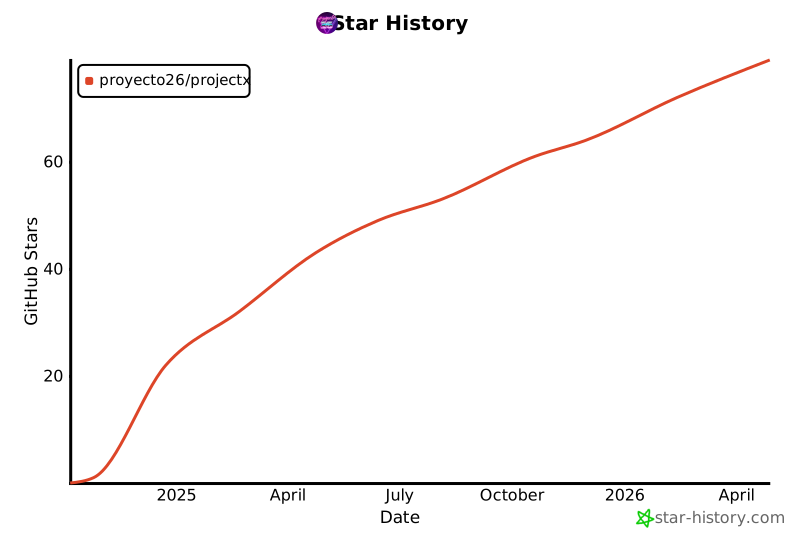
## Star History 🌟
[](https://star-history.com/#proyecto26/projectx&Date)
## Sponsors 💜
This project is free and open source. Sponsors help keep it maintained and growing.
[**Become a Sponsor**](https://github.com/sponsors/proyecto26) | [Sponsorship Program](https://proyecto26.com/sponsors/)
## Contribution 🤝
When contributing to this repository, please first discuss the change you wish to make via issue,
email, or any other method with the owners of this repository before making a change.
Contributions are what make the open-source community such an amazing place to learn, inspire, and create. Any contributions you make are **greatly appreciated** ❤️.
You can learn more about how you can contribute to this project in the [contribution guide](https://github.com/proyecto26/.github/blob/master/CONTRIBUTING.md).
## License ⚖️
This repository is available under the [MIT License](./LICENSE).
## Happy vibe coding 💯
Made with ❤️ by [Proyecto 26](https://proyecto26.com)
<pre role="img" aria-label="ASCII Made with Temporal">
╔╦╗╔═╗╔╦╗╔═╗╔═╗╦═╗╔═╗╦ <img width="150px" src="https://avatars0.githubusercontent.com/u/28855608?s=200&v=4" align="right">
║ ║╣ ║║║╠═╝║ ║╠╦╝╠═╣║
╩ ╚═╝╩ ╩╩ ╚═╝╩╚═╩ ╩╩═╝⠀⠀⠀⠀⠀⠀⠀⠀⠀⠀⠀⠀⠀
</pre>