| name | clothing-extraction |
| description | 从任意图提取干净商品平铺图。真人图 / 街拍图 → 白底平铺商品图。当用户说「提取衣服」「扒图」「转平铺」「抠成商品图」「从买家秀提取」时使用。 |
clothing-extraction — 从任意图中提取商品平铺图
任意一张图 → 干净的商品平铺图。这是 flat-lay 的逆操作。
最常见的用途是补素材:手上只有一张真人上身图 / 买家秀 / 竞品截图,但主图位需要一张干净平铺图;或者要把它作为 to-3d、fabric-on-body、flat-lay 的干净输入。
生成效果示例
| 输入:任意图 |
|---|
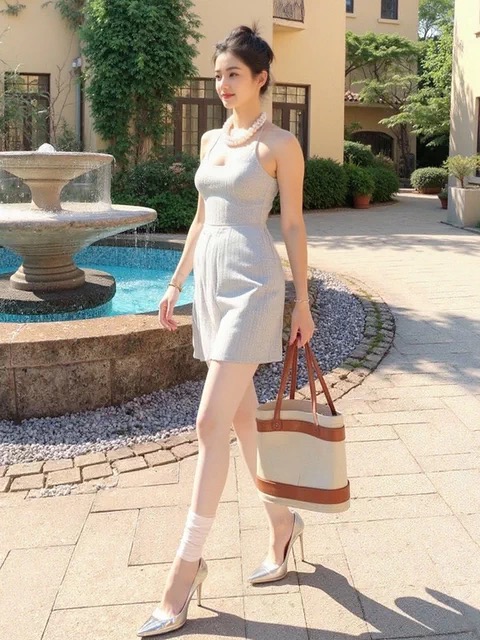 |
source-photo.jpg — 真人街拍图:浅灰针织连衣裙 + 珍珠项链 + 托特包 + 银色高跟鞋,480×640 |
实际执行的命令:
dlazy gpt-image-2 \
  --prompt 'Extract the garment worn by the model in this photo and render it as a clean e-commerce flat-lay. Output only the light-grey textured sleeveless knit mini dress with the mock neckline, laid flat and centred, front view, symmetric, fully unoccluded — remove the model, the pearl necklace, the tote bag, the shoes, the fountain and the whole background. Keep the garment 100% faithful: same light-grey colour, same knit texture, same neckline and armhole shape, same waist seam and hem length. Pure white seamless background, even soft studio light, subtle contact shadow. No person, no props, no text.' \
  --images docs/clothing-extraction/source-photo.jpg \
  --size 1024x1024 --quality medium --imageFormat jpeg \
  --save docs/clothing-extraction/example-output.jpg
输出
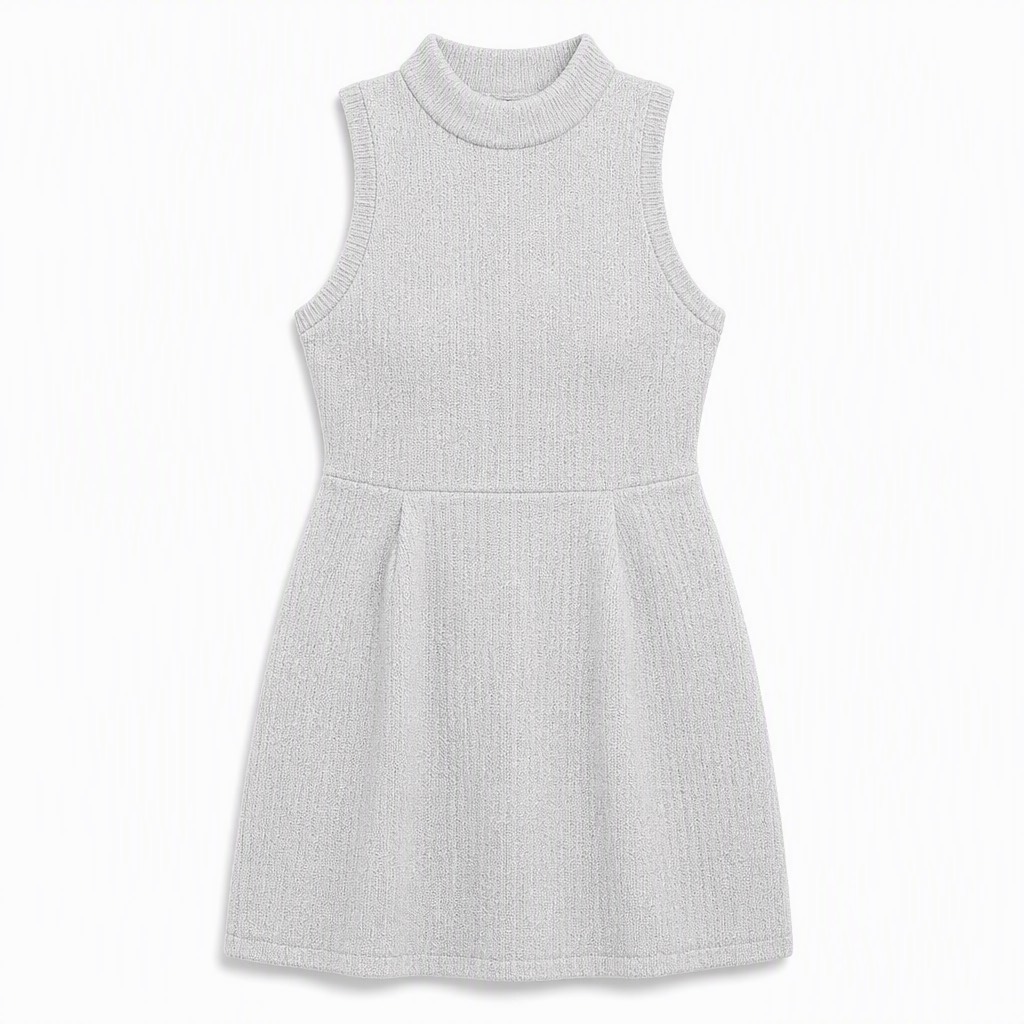
example-output.jpg — 1024×1024。模特、项链、托特包、高跟鞋与喷泉背景全部清除,只留连衣裙;摊平居中、左右对称,立领罗纹、袖窿形状、腰线接缝与裙长按原图还原,浅灰针织纹理保留。
1、能力边界
| 模板 | 说明 |
|---|
| 整套穿搭 | 一次识别全身多件,分别输出上装 / 下装 / 鞋 / 包的平铺图 |
| 上装正面 | 只提取上装,正面摊平 |
| 下装正面 | 只提取下装,正面摊平 |
| 自定义 | 自己描述要提取哪一件、以什么形态输出 |
| 能做 | 说明 |
|---|
| 去人去景 | 模特、道具、背景全部移除 |
| 摊平对称 | 输出正面、居中、左右对称的平铺形态 |
| 遮挡补全 | 被手臂/包袋挡住的部分按对称与常规版型推断补出 |
不做:不改颜色、图案与版型;不凭空添加原图没有的设计元素;不用于抹除他人品牌标识后冒充自有商品。
2、输入素材规则
生成前先自检这几条硬性约束:
- 大小:20KB ~ 15MB
- 分辨率:大于 400×400
- 格式:jpg / jpeg / png / webp
输入建议
| 做法 | 说明 |
|---|
| ✅ 商品在画面中占比大 | 占比越大,织法与图案还原得越准 |
| ✅ 正面或微侧角度 | 纯背面图推不出前襟结构 |
| ✅ 光线均匀 | 强阴影会被当成图案 |
| ⚠️ 遮挡区域 | 手臂、包、头发挡住的部分是推断出来的,不是还原——关键设计位被挡住时要人工确认 |
| ❌ 极小占比 / 严重模糊 | 只能得到一个大概的形状 |
3、提取指令的四段结构
【段1 · 指定目标】Output only the [唯一要保留的单品,写清品类+颜色+关键特征].
【段2 · 逐项清除】Remove the model, [列出画面里所有其他元素:配饰/包/鞋/道具/背景].
【段3 · 输出形态】Laid flat and centred, front view, symmetric, fully unoccluded.
【段4 · 保真项】Keep the garment 100% faithful: same [颜色], [织法/面料], [领口与袖型], [腰线与下摆长度].
段2 必须逐项点名。只写 remove the background 时,项链、包、鞋会被留在画面里当成商品的一部分。
整套穿搭 = 跑多次,每次段1 指定一件、段2 把其余全部列为要清除的对象。别指望一次输出多张。
4、工具调用
本技能使用 dLazy 的 gpt-image-2(图像编辑模型;提取的本质是「保留一个目标 + 清除其余 + 重构形态」,需要强指令跟随与对象级理解)。
调用方式
两种等价写法,选一种。统一入口会自动选后端、失败重试、建目录落盘、估算成本:
node scripts/gen.mjs --task clothing-extraction \
--prompt '<见下方 Prompt 模板>' \
--images <按下表顺序> \
--save output/clothing-extraction-<sku>.jpg
dlazy gpt-image-2 --prompt '...' --images ... --save output/clothing-extraction.jpg
参数约定(本技能固定用法)
| 参数 | 取值 | 理由 |
|---|
--images | [原图] | 单图输入 |
--size | 1024x1024(平铺图标准方图) | 平铺主图通常是方图 |
--quality | high | 织法与图案还原全靠这档 |
--imageFormat | png(想要留白边界更干净)/ jpeg | png 便于后续二次抠图 |
--batch | 2 ~ 3 | 遮挡补全有随机性 |
--save | docs/clothing-extraction/output-<件名>.jpg | 一件一个文件 |
Command Examples
dlazy gpt-image-2 \
--prompt 'Extract the garment worn by the model and render it as a clean e-commerce flat-lay. Output only the top. Remove the model, accessories, bag, shoes and the whole background. Laid flat and centred, front view, symmetric, fully unoccluded. Keep the garment faithful: same colour, texture, neckline and hem. Pure white seamless background, subtle contact shadow. No person, no props, no text.' \
--images docs/clothing-extraction/source-photo.jpg \
--size 1024x1024 --quality high
SRC=docs/clothing-extraction/source-photo.jpg
提取() {
dlazy gpt-image-2 \
--prompt "Extract one garment from this photo and render it as a clean e-commerce flat-lay. Output only $2. Remove the model, $3 and the whole background. Laid flat and centred, front view, symmetric, fully unoccluded; infer any occluded area from symmetry and standard garment construction. Keep it 100% faithful: same colour, same fabric texture, same neckline and armhole shape, same seams and hem length. Pure white seamless background, even soft studio light, subtle contact shadow. No person, no props, no text." \
--images "$SRC" --size 1024x1024 --quality high --imageFormat png \
--save "docs/clothing-extraction/output-$1.png"
}
提取 dress 'the light-grey sleeveless knit mini dress with the mock neckline' 'the pearl necklace, the tote bag, the shoes'
提取 bag 'the cream-and-tan canvas tote bag with leather handles' 'the dress, the pearl necklace, the shoes'
提取 shoes 'the pair of silver pointed-toe heels' 'the dress, the pearl necklace, the tote bag'
dlazy gpt-image-2 --dry-run --prompt '...' --images a.jpg --size 1024x1024 --quality high
延伸阅读
5、Prompt 模板
Extract the garment worn by the model in this photo and render it as a clean e-commerce flat-lay.

Output only [目标单品:品类 + 颜色 + 关键特征], laid flat and centred, front view,
symmetric, fully unoccluded — remove the model, [逐项列出其他元素], and the whole background.

Infer any occluded area from symmetry and standard garment construction.

Keep the garment 100% faithful: same [颜色], same [织法/面料纹理],
same [领口与袖型], same [腰线/接缝与下摆长度].

Pure white seamless background, even soft studio light, subtle contact shadow.
No person, no props, no text.
按问题追加的修正句
| 问题 | 追加到 prompt 末尾 |
|---|
| 配饰没被清掉 | 把漏掉的元素补进段2,并追加 Nothing but the garment may remain in the frame. |
| 输出还带着人体形状 | The garment must be laid completely flat — no body volume, no invisible mannequin effect. |
| 左右不对称 | Mirror-symmetric layout: both sleeves at the same angle and length, collar centred. |
| 图案被重排了 | Keep the print at its original position and scale relative to the garment body; do not tile or recentre it. |
| 颜色偏了 | Sample the colour from the source photo under neutral light; do not brighten or saturate. |
6、执行流程
- 看清原图:确认目标单品占比够大、角度可用、关键设计位没被挡住。
- 写段1:唯一目标,描述到能和画面里其他东西区分开。
- 写段2:把画面里所有其他元素逐项列出来清除(模特、配饰、包、鞋、道具、背景)。
- 写段3+段4:输出形态 + 保真项。
- 整套穿搭:用第四节的循环,一件一次。
--quality high 起跑 → --batch 2~3 挑图,落盘到 docs/clothing-extraction/。- 质检:是否只剩目标、是否完全摊平、左右是否对称、图案位置与颜色是否准;被遮挡区域要人工核对。
7、常见问题
| 现象 | 原因 | 处理 |
|---|
| 项链/包还在画面里 | 段2 没点名 | 逐项补齐,并追加 Nothing but the garment may remain. |
| 输出还是有身体轮廓 | 模型按 3D 理解了 | 追加 laid completely flat — no body volume |
| 两只袖子不一样长 | 未要求对称 | 追加镜像对称句 |
| 遮挡部位的设计错了 | 那部分是推断的 | 换一张遮挡更少的原图,或人工修正 |
| 颜色偏亮 | 模型自动提亮 | 追加取色约束句 |
| 想一次出整套 | 单次只出一件 | 用第四节循环逐件跑 |
Tips
Visit https://dlazy.com for more information.
