# Proof
[](https://automaze.io)
[](https://github.com/automazeio/proof/tree/main/skills)
[](https://github.com/automazeio/proof)
[](https://github.com/automazeio/proof/blob/main/LICENSE)
[](http://x.com/intent/follow?screen_name=aroussi)
[](https://github.com/automazeio/proof)
### A 10-second recording of your tests passing is worth more than a 200-line diff.
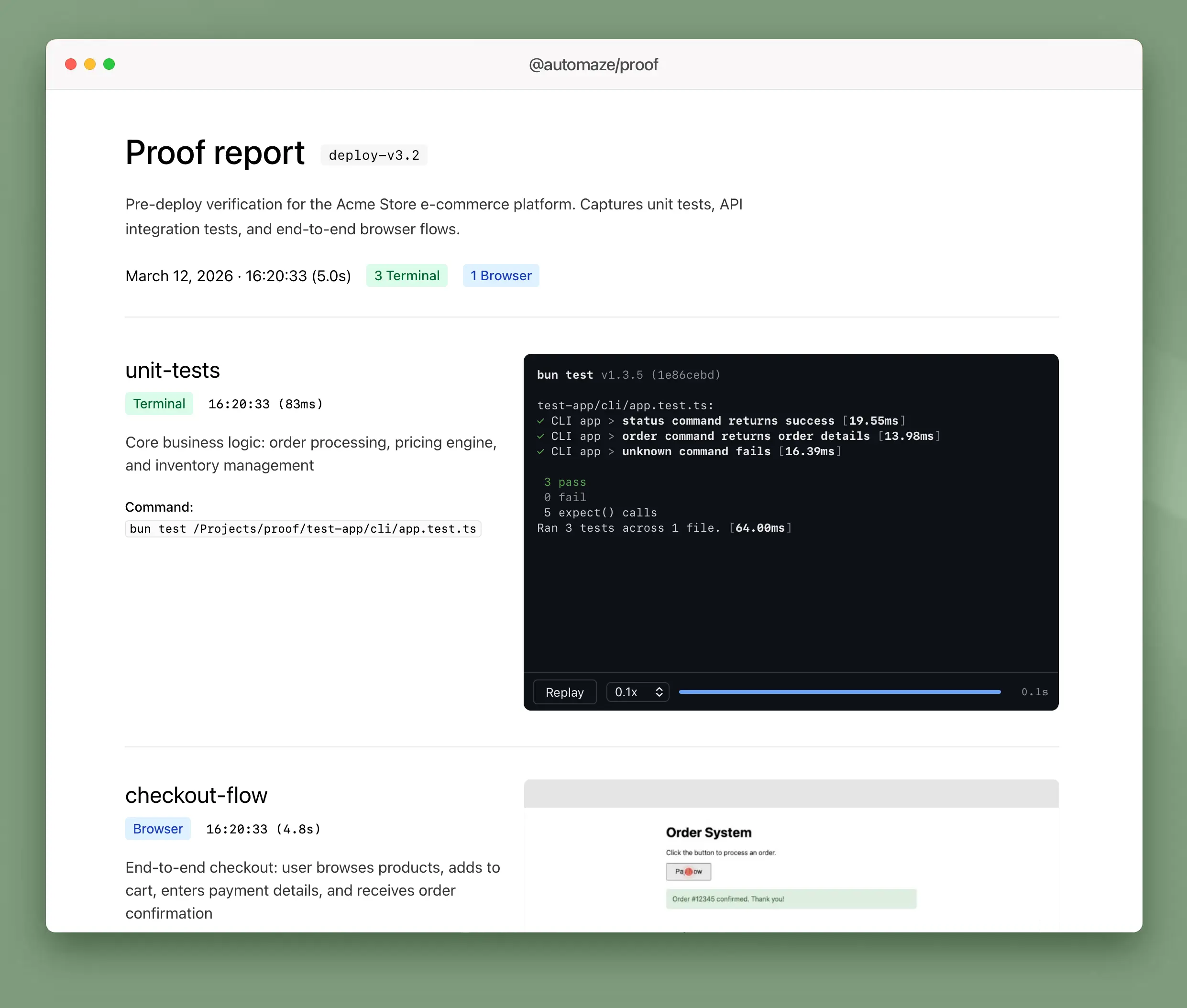
`proof` captures terminal output and browser interactions as shareable evidence -- animated HTML replays, videos, and structured reports. Run your tests through proof, get artifacts you can attach to PRs, send to stakeholders, or keep as a record.
> [!TIP]
> **Native mobile apps are supported.** Proof can record iOS Simulator and Android emulator screens while your XCUITest or Espresso tests run, with automatic tap indicator overlays. See [Simulator mode](#simulator-mode).
## Get started
```bash
# macOS / Linux
curl -fsSL https://automaze.io/install/proof | sh
# Windows (PowerShell)
irm https://automaze.io/install/proof | iex
# Homebrew
brew install automazeio/tap/proof
```
Or install via npm (requires Node.js):
```bash
npm install -g @automaze/proof
```
## What it produces
**Terminal capture** -- runs any command, records output with real timing into a self-contained HTML player. No dependencies, works offline, plays anywhere.
**Browser capture** -- runs Playwright tests with video recording, collects `.webm` files with optional cursor highlighting.
**Simulator capture** -- records iOS Simulator or Android emulator screen while running your tests. Automatically overlays red dot + ripple tap indicators at the exact positions of each tap.
**Report** -- a `proof.json` manifest per run, plus a generated markdown summary linking to all artifacts.
## Quick start
Use proof from TypeScript, Python, Go, or the CLI directly.
**TypeScript**
```typescript
import { Proof } from "@automaze/proof";
const proof = new Proof({ appName: "my-app", proofDir: "./evidence" });
await proof.capture({ command: "npm test", mode: "terminal", label: "unit-tests" });
await proof.report();
```
**Python** (`pip install automaze-proof`)
```python
from proof import Proof
p = Proof(app_name="my-app", proof_dir="./evidence")
p.capture(command="pytest tests/ -v", mode="terminal", label="unit-tests")
p.report()
```
**Go** (`go get github.com/automazeio/proof-go`)
```go
p, _ := proof.New(proof.Config{AppName: "my-app", ProofDir: "./evidence"})
p.Capture(proof.CaptureOptions{Command: "go test ./...", Mode: "terminal", Label: "unit-tests"})
p.Report(proof.ReportOptions{})
```
**CLI**
```bash
proof capture --app my-app --command "make test" --mode terminal --label unit-tests --dir ./evidence
proof report --app my-app --dir ./evidence
```
That's it. `evidence/` now contains an animated HTML replay of your test run and a manifest describing what was captured.
## SDKs
All SDKs are thin wrappers around the same CLI binary.
| Language | Package | Install |
|----------|---------|---------|
| TypeScript | [`@automaze/proof`](https://www.npmjs.com/package/@automaze/proof) | `npm install @automaze/proof` |
| Python | [`automaze-proof`](https://pypi.org/project/automaze-proof/) | `pip install automaze-proof` |
| Go | [`proof-go`](https://github.com/automazeio/proof-go) | `go get github.com/automazeio/proof-go` |
| Any language | CLI + JSON | `proof --json` with stdin/stdout |
## Terminal mode
Runs any shell command. Captures stdout/stderr with real timestamps. Produces:
- **`.cast`** -- asciicast v2, compatible with asciinema players
- **`.html`** -- self-contained player with play/pause, speed control (0.1x--4x), seek bar, and ANSI color rendering
Playback speed auto-adjusts based on recording duration so fast output is still readable at first play.
```typescript
await proof.capture({
command: "pytest tests/ -v",
mode: "terminal",
label: "api-tests",
description: "API integration tests",
});
```
Works with any test runner or command: `pytest`, `go test`, `cargo test`, `bun test`, `make check` -- anything that writes to stdout.
## Browser mode
Runs a Playwright test file with video recording enabled. Collects the `.webm` and copies it to the run directory.
```typescript
await proof.capture({
testFile: "tests/checkout.spec.ts",
mode: "browser",
label: "checkout",
description: "User completes checkout flow",
});
```
Requires `video: 'on'` in your `playwright.config.ts`.
### Device emulation
Capture with Playwright's built-in device descriptors (viewport, user-agent, touch emulation):
```typescript
// Single device
await proof.capture({
testFile: "tests/checkout.spec.ts",
mode: "browser",
device: "iPhone 14",
label: "checkout-mobile",
});
// Multiple devices in one call
await proof.capture({
testFile: "tests/checkout.spec.ts",
mode: "browser",
device: ["iPhone 14", "iPad Pro 11", "Desktop Chrome"],
label: "checkout",
});
```
### Custom viewports
Capture at specific viewport sizes without full device emulation:
```typescript
await proof.capture({
testFile: "tests/checkout.spec.ts",
mode: "browser",
viewport: ["390x844", "834x1194", "1440x900"],
label: "checkout",
});
```
`device` and `viewport` are mutually exclusive. When passing an array, proof runs the test once per entry and produces separate recordings for each.
### Cursor highlights
Optional. Adds a visible red cursor dot and click ripple to recordings:
```typescript
import { getCursorHighlightScript } from "@automaze/proof";
test("checkout", async ({ page }) => {
await page.addInitScript(getCursorHighlightScript());
await page.goto("http://localhost:3000");
});
```
## CLI
For non-TypeScript projects or CI pipelines:
```bash
# Capture terminal output
proof capture --app my-app --command "pytest tests/" --mode terminal --label tests
# Capture a Playwright test
proof capture --app my-app --test-file tests/checkout.spec.ts --mode browser
# Capture with device emulation
proof capture --app my-app --test-file tests/checkout.spec.ts --mode browser --device "iPhone 14"
# Capture at multiple viewports
proof capture --app my-app --test-file tests/checkout.spec.ts --mode browser --viewport "390x844,1440x900"
# Generate report
proof report --app my-app --format html
# Gate a pipeline on the wrapped command: exit with its code instead of 0
proof capture --app my-app --command "npm test" --mode terminal --fail-on-error
```
By default `proof capture` exits `0` even when the wrapped command fails (capturing evidence is separate from the command passing). Pass `--fail-on-error` (or set `PROOF_FAIL_ON_ERROR=1`) to propagate the wrapped command's exit code — handy in pre-push hooks and CI gates.
For automation, pipe JSON to stdin for multi-capture runs:
```bash
echo '{
"action": "capture",
"appName": "my-app",
"captures": [
{ "command": "pytest tests/", "mode": "terminal", "label": "api" },
{ "command": "go test ./...", "mode": "terminal", "label": "go" }
]
}' | proof --json
```
All CLI output is JSON to stdout.
## API reference
### `new Proof(config)`
```typescript
const proof = new Proof({
appName: "my-app", // Required. Used in directory path and manifest.
proofDir: "./evidence", // Default: os.tmpdir()/proof
run: "deploy-v2", // Default: HHMM of init time
browser: {
viewport: { width: 1280, height: 720 },
},
terminal: {
cols: 120, // Default: 120
rows: 30, // Default: 30
},
});
```
### `proof.capture(options)`
```typescript
const recording = await proof.capture({
command: "pytest tests/", // Required for terminal mode
testFile: "tests/orders.spec.ts", // Required for browser mode
testName: "should complete order", // Optional: Playwright -g filter
label: "order-flow", // Optional: filename prefix
mode: "terminal", // "browser" | "terminal" | "auto"
description: "Order flow tests", // Optional: stored in manifest
device: "iPhone 14", // Optional: Playwright device (string or string[])
viewport: "390x844", // Optional: custom viewport (string or string[])
});
recording.path // absolute path to artifact
recording.mode // "browser" | "terminal" | "simulator"
recording.duration // ms
recording.exitCode // exit code of the wrapped command (0 = success)
```
`capture()` always records the run and returns the `Recording` even when the wrapped command fails — check `recording.exitCode` to gate on the result. When `device` or `viewport` is an array, `capture()` returns `Recording[]` instead of a single `Recording`.
### `proof.report()`
Generates a markdown report from `proof.json`. Returns the report file path.
## Output structure
```
evidence/my-app/20260312/deploy-v2/
unit-tests-143012.cast # asciicast recording
unit-tests-143012.html # animated HTML player
checkout-143015.webm # browser video
proof.json # manifest (all entries)
report.md # generated summary
```
## Environment variables
| Variable | Description |
|----------|-------------|
| `PROOF_DIR` | Override default proof directory |
| `PROOF_MODE` | Override auto-detection (`browser` or `terminal`) |
| `PROOF_FAIL_ON_ERROR` | Set to `1` to exit with the wrapped command's exit code (same as `--fail-on-error`) |
## Simulator mode
Record your iOS Simulator or Android emulator while running UI tests. Tap indicators are overlaid automatically so reviewers can see exactly what was tapped.
> [!IMPORTANT]
> **Simulators must be installed locally.** Proof drives the simulator directly on your machine -- it does not provision or download simulators for you.
>
> - **iOS**: Xcode and at least one iOS Simulator runtime must be installed (via Xcode → Settings → Platforms). The simulator will be booted automatically if not already running.
> - **Android**: Android Studio and at least one AVD must be created (via Android Studio → Tools → Device Manager). The emulator will be booted automatically if not already running.
**iOS (XCUITest)**
```bash
proof capture \
--app my-app \
--mode simulator \
--platform ios \
--device-name "iPhone 17 Pro" \
--command "xcodebuild test \
-project MyApp.xcodeproj \
-scheme MyApp \
-destination 'platform=iOS Simulator,name=iPhone 17 Pro' \
-parallel-testing-enabled NO \
-disable-concurrent-destination-testing"
```
For pixel-accurate tap indicators, add `ProofTapLogger.swift` to your XCUITest target and replace `element.tap()` with `element.proofTap()`. Proof reads the tap log after the test and overlays red dot + ripple rings at the correct positions.
**Android (Espresso / UIAutomator)**
```bash
proof capture \
--app my-app \
--mode simulator \
--platform android \
--command "./run-espresso-tests.sh"
```
Write tap coordinates and relative timestamps to `/tmp/proof-android-taps.json` (or `$PROOF_TAP_LOG`) from your test script:
```json
[
{ "element": "Login", "x": 540, "y": 1200, "offsetMs": 1000 },
{ "element": "Submit", "x": 540, "y": 1800, "offsetMs": 3500 }
]
```
Proof overlays red dot + ripple indicators at each position. If no tap log is found, the video is still captured without indicators.
**Options**
| Flag | Description |
|------|-------------|
| `--platform` | `ios` or `android` |
| `--device-name` | Simulator/AVD name to boot (uses running device if omitted) |
| `--os` | iOS version filter, e.g. `18.4` |
| `--codec` | iOS recording codec: `h264` (default) or `hevc` |
## Requirements
- **Terminal mode**: No external dependencies
- **Browser mode**: `@playwright/test`, `video: 'on'` in Playwright config
- **Simulator mode (iOS)**: Xcode + Simulator, `ffmpeg` on PATH
- **Simulator mode (Android)**: Android SDK (`adb`, `emulator`), `ffmpeg` on PATH
- **Video duration**: `ffprobe` on PATH
## Agent Skill
Proof ships with an [agent skill](./skills/proof/) that teaches AI coding agents how to use it. When installed, agents automatically use `proof capture` instead of ad-hoc approaches like `tee` or raw Playwright runs.
**Benchmark** (Claude Sonnet 4.6, 3 eval scenarios, 14 assertions):
| | With Skill | Without Skill |
|---|---|---|
| **Pass Rate** | 100% | 28% |
| **Assertions Passed** | 14/14 | 4/14 |
The skill delivers a **+72 point pass rate improvement**. [Full benchmark results](./BENCHMARK.md)
---
## Support This Project
**Proof was developed at [Automaze](https://automaze.io) for developers who ship, by developers who ship**.
If Proof helps your team ship better software:
- ⭐ **[Star this repository](https://github.com/automazeio/proof)** to show your support
- 🐦 **[Follow @aroussi on X](https://x.com/aroussi)** for updates and tips
> [!TIP]
> **Ship faster with Automaze.** We partner with founders to bring their vision to life, scale their business, and optimize for success.
>
> **[Visit Automaze to book a call with me ›](https://automaze.io)**
## Other tools by Automaze
- [VibeProxy](https://github.com/automazeio/vibeproxy) - Native macOS menu bar app to use Claude Max & ChatGPT subscriptions with AI coding tools
- [CCPM](https://github.com/automazeio/ccpm) - Project management system for Claude Code using GitHub Issues and Git worktrees for parallel agent execution
- [Open Royalties](https://github.com/automazeio/open-royalties) - The missing funding framework for bootstrappers, indie hackers, and creators
---
## License
Apache 2.0. See [LICENSE](./LICENSE).