# project-starter
[](https://opensource.org/licenses/MIT)
[](https://code.claude.com)
[](https://github.com/CloudAI-X/claude-workflow-v2/pulls)
A universal Claude Code workflow plugin with specialized agents, skills, hooks, and mode commands for any software project. Compatible with [skills.sh](https://skills.sh) — works with Claude Code, Cursor, Codex, and 35+ AI agents.
---
## Quick Start
### Option 1: skills.sh (Recommended — Any Agent)
```bash
npx skills add CloudAI-X/claude-workflow-v2
```
Installs skills to Claude Code, Cursor, Codex, Windsurf, Cline, and 35+ other AI agents automatically.
### Option 2: npx (Claude Code — Full Plugin)
```bash
npx install-claude-workflow-v2@latest
```
Copies agents, commands, skills and hook scripts into `.claude/` and registers the hooks in `.claude/settings.json` (existing files and settings are kept). Two differences from a plugin install: commands are not namespaced (`/commit` instead of `/project-starter:commit`), and `permissionMode: acceptEdits` on the debugger, docs-writer, refactorer and test-architect agents takes effect (Claude Code ignores that field for plugin agents).
### Option 3: CLI (Per-Session)
```bash
# Clone the plugin
git clone https://github.com/CloudAI-X/claude-workflow-v2.git
# Run Claude Code with the plugin
claude --plugin-dir ./claude-workflow-v2
```
### Option 4: Agent SDK
```typescript
import { query } from "@anthropic-ai/claude-agent-sdk";
for await (const message of query({
prompt: "Hello",
options: {
plugins: [{ type: "local", path: "./claude-workflow-v2" }],
},
})) {
// Plugin commands, agents, and skills are now available
}
```
### Option 5: Install Permanently
```bash
# Add this repository as a marketplace, then install the plugin from it
claude plugin marketplace add CloudAI-X/claude-workflow-v2
claude plugin install project-starter@claude-workflow
```
### Verify Installation
After loading the plugin, verify it's working:
```
> /plugin
```
Tab to **Installed** - you should see `project-starter` listed.
Tab to **Errors** - should be empty (no errors).
These commands become available:
```
/project-starter:architect # Architecture-first mode
/project-starter:rapid # Ship fast mode
/project-starter:commit # Auto-generate commit message
/project-starter:verify-changes # Multi-agent verification
```
---
## What's Included
| Component | Count | Description |
| ------------ | ----- | ----------------------------------------------------------------------- |
| **Agents** | 7 | Specialized subagents for code review, debugging, security, etc. |
| **Commands** | 26 | Slash commands for workflows, output styles, planning, and onboarding |
| **Skills** | 14 | Knowledge domains with on-demand context loading |
| **Hooks** | 14 | Automation scripts for formatting, security, metrics, and notifications |
---
## Usage Examples
### Commands in Action
**Auto-commit your changes:**
```
> /project-starter:commit
Looking at staged changes...
✓ Created commit: feat(auth): add JWT refresh token endpoint
```
**Full git workflow:**
```
> /project-starter:commit-push-pr
✓ Committed: feat: add user dashboard
✓ Pushed to origin/feature/dashboard
✓ Created PR #42: https://github.com/you/repo/pull/42
```
**Verify before shipping:**
```
> /project-starter:verify-changes
Spawning verification agents...
├─ build-validator: ✓ Build passes
├─ test-runner: ✓ 42 tests pass
├─ lint-checker: ⚠ 2 warnings (non-blocking)
└─ security-scanner: ✓ No vulnerabilities
Ready to ship!
```
### Agents in Action
Agents spawn automatically based on your request:
**You say:** "The login is broken, users get 401 errors"
```
[debugger agent activated]
→ Checking auth middleware... found issue
→ Token validation uses wrong secret in production
→ Fix: Update AUTH_SECRET in .env.production
```
**You say:** "Review my changes"
```
[code-reviewer agent activated]
→ Analyzing 3 files changed...
✓ Logic is correct
⚠ Missing null check on line 42
⚠ Consider adding rate limiting to this endpoint
```
**You say:** "Add authentication to the API"
```
[orchestrator agent activated]
→ Breaking down into subtasks:
1. Design auth schema (applying the designing-architecture skill)
2. Implement JWT middleware
3. Add login/register endpoints
4. Write tests (spawning test-architect)
5. Update API docs (spawning docs-writer)
```
### Skills in Action
Skills provide domain knowledge automatically:
**You ask:** "How should I structure the payment service?"
```
[designing-architecture skill applied]
→ Recommending hexagonal architecture
→ Payment providers as adapters
→ Core domain isolated from infrastructure
```
**You ask:** "Make this endpoint faster"
```
[optimizing-performance skill applied]
→ Adding database indexes
→ Implementing response caching
→ Using pagination for large results
```
### Hooks in Action
Hooks run automatically on events:
**Security block (pre-edit):**
```
🚫 BLOCKED - Security issue detected in src/config.ts:
- Potential API key detected → Move to .env file and use environment variables (e.g., process.env.API_KEY)
```
**Auto-format (post-edit):**
The edited file is formatted silently with the project's own formatter; the hook prints nothing.
**Desktop notifications:**
```
🔔 "Claude needs input" - when waiting for your response
🔔 "Task complete" - when finished
```
---
## Commands Reference
All commands use the format `/project-starter:<command>`.
### Mode Commands (Output Styles)
| Command | Mode |
| ---------------------------- | --------------------------------------------- |
| `/project-starter:architect` | System design mode - architecture before code |
| `/project-starter:rapid` | Fast development - ship quickly, iterate |
| `/project-starter:mentor` | Teaching mode - explain the "why" |
| `/project-starter:review` | Code review mode - strict quality |
### Git Workflow (Inner-Loop)
| Command | Purpose |
| ------------------------------------ | ----------------------------------------- |
| `/project-starter:commit` | Auto-generate conventional commit message |
| `/project-starter:commit-push-pr` | Commit → Push → Create PR (full workflow) |
| `/project-starter:quick-fix` | Fast fix for lint/type errors |
| `/project-starter:add-tests` | Generate tests for recent changes |
| `/project-starter:lint-fix` | Auto-fix all linting issues |
| `/project-starter:sync-branch` | Sync with main (rebase or merge) |
| `/project-starter:summarize-changes` | Generate standup/PR summaries |
### Verification
| Command | Purpose |
| ---------------------------------- | --------------------------------------- |
| `/project-starter:verify-changes` | Multi-subagent adversarial verification |
| `/project-starter:validate-build` | Build process validation |
| `/project-starter:run-tests` | Tiered test execution |
| `/project-starter:lint-check` | Code quality checks |
| `/project-starter:security-scan` | Security vulnerability detection |
| `/project-starter:code-simplifier` | Post-implementation cleanup |
### Parallel
| Command | Purpose |
| ----------------------------------- | ---------------------------------------- |
| `/project-starter:parallel-review` | Review multiple files/dirs via subagents |
| `/project-starter:parallel-analyze` | Multi-perspective analysis via subagents |
### Planning & Refactoring
| Command | Purpose |
| ------------------------------------- | ------------------------------------------ |
| `/project-starter:plan` | Persistent PLAN.md with phase tracking |
| `/project-starter:refactor-guided` | 4-phase systematic refactoring with safety |
| `/project-starter:dependency-upgrade` | Safe dependency upgrades with rollback |
### Onboarding & Knowledge
| Command | Purpose |
| ----------------------------------------- | --------------------------------------------------------------- |
| `/project-starter:tutorial` | Interactive guided tutorial for new users |
| `/project-starter:bootstrap-repo` | 10-agent parallel repo exploration |
| `/project-starter:save-session-learnings` | Persist session discoveries to docs |
| `/project-starter:metrics` | Summarise the per-turn records in `.claude/agent-metrics.jsonl` |
---
## Agents
Agents are specialized subagents that Claude spawns automatically based on your task.
| Agent | Purpose | Auto-Triggers |
| ------------------ | -------------------------------- | ------------------------------------------------------------ |
| `orchestrator` | Coordinate multi-step tasks | "improve", "enhance", "build", "architecture", complex tasks |
| `code-reviewer` | Review code quality | "review", "PR review", "lint", code changes |
| `debugger` | Systematic bug investigation | Errors, crashes, memory leaks, timeouts, race conditions |
| `docs-writer` | Technical documentation | README, changelogs, migration guides, release notes |
| `security-auditor` | Security vulnerability detection | Auth, encryption, secrets, OAuth, JWT, CORS |
| `refactorer` | Code structure improvements | Tech debt, code smells, complexity reduction |
| `test-architect` | Design test strategies | Test plans, mocking, flaky tests, integration/E2E |
---
## Skills
Skills are knowledge domains that Claude uses autonomously when relevant.
| Skill | Domain |
| ----------------------------- | ----------------------------------------------------- |
| `analyzing-projects` | Understand codebase structure and patterns |
| `designing-tests` | Unit, integration, E2E test approaches |
| `designing-architecture` | Clean Architecture, Hexagonal, etc. |
| `optimizing-performance` | Speed up applications, identify bottlenecks |
| `managing-git` | Version control, conventional commits |
| `designing-apis` | REST/GraphQL patterns and best practices |
| `parallel-execution` | Multi-subagent parallel task execution patterns |
| `web-design-guidelines` | Self-contained UI audit (A11Y, PERF, RD, SEC, I18N) |
| `vercel-react-best-practices` | React/Next.js performance optimization (47 rules) |
| `convex-backend` | Convex backend development (functions, schemas, etc.) |
| `database-design` | Schema design, indexing, query optimization |
| `devops-infrastructure` | Docker, CI/CD, deployment, IaC, monitoring |
| `error-handling` | Error patterns, structured logging, retry/circuit |
| `security-patterns` | Auth, RBAC, secrets, CORS, rate limiting, headers |
---
## Hooks
Hooks run automatically on specific events.
| Hook | Trigger | Action |
| --------------------- | ------------- | ----------------------------------------------------------- |
| Security scan | Edit/Write | Blocks edits that contain potential secrets |
| File protection | Edit/Write | Blocks edits to lock files, .env files, .git |
| Auto-format | Edit/Write | Runs the project's prettier/black/gofmt by file type |
| TypeScript check | Edit/Write | Runs the project's `tsc --noEmit`, reports errors to Claude |
| Pre-commit check | Edit/Write | Flags debug statements & temp markers to Claude |
| Branch protection | Bash | Warns on commit/push on protected branches |
| Command logging | Bash | Logs every command to `.claude/command-history.log` |
| Environment check | Session start | Validates Node.js, Python, Git |
| Prompt analysis | User prompt | Suggests appropriate agents |
| Auto-verify | Task complete | Runs tests/lint, reports results |
| Doc update suggest | Task complete | Suggests CLAUDE.md updates for changes |
| Session metrics | Task complete | Logs timestamp, changed-file count, latest commit |
| Input notification | Input needed | Desktop notification |
| Complete notification | Task complete | Desktop notification |
---
## Examples
For detailed multi-agent orchestration examples, see the [examples/](./examples/) directory:
| Example | Description |
| -------------------------------------------------------------------------------- | ------------------------------------------------------ |
| [Comprehensive Code Review](./examples/orchestration/comprehensive-code-review/) | 6-agent sequential workflow for thorough code analysis |
| [Parallel Execution](./examples/orchestration/parallel-execution/) | Fan-out multi-subagent workflow for independent tasks |
The comprehensive-code-review example includes:
- **README.md** - Overview and quick start
- **workflow.md** - Exact prompts to use
- **verification.md** - How to verify it works
- **sample-outputs/** - Example agent outputs
---
## Configuration
### Add Permissions to Your Project
Copy the permissions template to your project:
```bash
mkdir -p /path/to/your/project/.claude
cp templates/settings.local.json.template /path/to/your/project/.claude/settings.local.json
```
This pre-allows a broad set of development commands so you don't get prompted every time. It includes interpreters and package runners (`python`, `npx`, `bun`), network tools (`curl`, `wget`) and `git push`, which together allow arbitrary code execution and data egress without a prompt — trim the list to what your project needs.
### Add Team Conventions
Copy the CLAUDE.md template to your project root:
```bash
cp templates/CLAUDE.md.template /path/to/your/project/CLAUDE.md
```
Then customize with your:
- Package manager commands
- Test/build/lint commands
- Code conventions
- Architecture decisions
### MCP Servers
Copy the MCP template to enable integrations like Slack, GitHub, Sentry:
```bash
cp templates/mcp.json.template /path/to/your/project/.mcp.json
```
Then configure the environment variables for the servers you want to use.
### GitHub Action (@.claude in PRs)
Enable Claude to respond to PR comments by installing the GitHub Action:
```
# Inside Claude Code, in your repository
> /install-github-app
```
This enables:
- Tag `@claude` in PR comments to get code suggestions
- Auto-update `CLAUDE.md` during code review
- Claude responds to review feedback automatically
**Example PR comment:**
```
@claude please add input validation to the email field
```
**Team workflow tip:** Use `@claude` to update your `CLAUDE.md` with learnings from code review:
```
@claude add a note to CLAUDE.md that we should always validate email format before API calls
```
---
## Extending the Plugin
### Add Custom Commands
Create `.md` files in `commands/`:
```markdown
---
allowed-tools: Bash(git:*), Read, Write
description: What this command does
argument-hint: "[optional arguments]"
---
[Command instructions here]
```
### Add Custom Agents
Create `.md` files in `agents/`:
```markdown
---
name: my-agent
description: What it does. Use PROACTIVELY when [triggers].
tools: Read, Write, Edit, Bash
model: sonnet
---
[Agent instructions here]
```
### Add Custom Skills
Create subdirectories in `skills/` with a `SKILL.md` file:
```markdown
---
name: my-skill
description: Guides [domain]. Use when [triggers].
---
[Skill knowledge and patterns here]
```
---
## Plugin Structure
```
claude-workflow/
├── .claude-plugin/
│ ├── plugin.json # Required: Plugin manifest
│ └── marketplace.json # Optional: Marketplace metadata
├── agents/ # 7 specialized agents
│ ├── orchestrator.md
│ ├── code-reviewer.md
│ ├── debugger.md
│ ├── docs-writer.md
│ ├── security-auditor.md
│ ├── refactorer.md
│ └── test-architect.md
├── commands/ # 26 slash commands
│ ├── architect.md # Output styles
│ ├── rapid.md
│ ├── mentor.md
│ ├── review.md
│ ├── commit.md # Git workflow
│ ├── commit-push-pr.md
│ ├── quick-fix.md
│ ├── add-tests.md
│ ├── lint-fix.md
│ ├── sync-branch.md
│ ├── summarize-changes.md
│ ├── verify-changes.md # Verification
│ ├── validate-build.md
│ ├── run-tests.md
│ ├── lint-check.md
│ ├── security-scan.md
│ ├── code-simplifier.md
│ ├── parallel-review.md # Parallel
│ ├── parallel-analyze.md
│ ├── plan.md # Planning & refactoring
│ ├── refactor-guided.md
│ ├── dependency-upgrade.md
│ ├── tutorial.md # Onboarding & knowledge
│ ├── bootstrap-repo.md
│ ├── save-session-learnings.md
│ └── metrics.md
├── skills/ # 14 knowledge domains
│ ├── analyzing-projects/
│ ├── convex-backend/
│ ├── database-design/
│ ├── designing-apis/
│ ├── designing-architecture/
│ ├── designing-tests/
│ ├── devops-infrastructure/
│ ├── error-handling/
│ ├── managing-git/
│ ├── optimizing-performance/
│ ├── parallel-execution/
│ ├── security-patterns/
│ ├── vercel-react-best-practices/
│ └── web-design-guidelines/
├── hooks/
│ ├── hooks.json # Hook configuration
│ └── 14 automation scripts # Pre/post tool, session, metrics, notifications
├── templates/ # User-copyable templates
│ ├── CLAUDE.md.template
│ ├── settings.json.template
│ ├── settings.local.json.template
│ ├── mcp.json.template
│ ├── mcp-servers-template.md
│ └── README.md
├── CLAUDE.md # Plugin development guidelines
└── README.md
```
---
## Requirements
- **Claude Code** v1.0.33 or later
- **Python 3** (for hook scripts)
- **Node.js** (optional, for npm commands)
- **Git** (for version control features)
---
## Multi-Agent Compatibility (skills.sh)
This repo is fully compatible with [skills.sh](https://skills.sh) — the universal agent skills platform. Our 14 skills work with **38+ AI coding agents**:
| Agent | Install Method |
| --------------- | -------------------------------------------------------------------- |
| **Claude Code** | `npx skills add CloudAI-X/claude-workflow-v2` or full plugin install |
| **Cursor** | `npx skills add CloudAI-X/claude-workflow-v2` |
| **Codex** | `npx skills add CloudAI-X/claude-workflow-v2` |
| **Windsurf** | `npx skills add CloudAI-X/claude-workflow-v2` |
| **Cline** | `npx skills add CloudAI-X/claude-workflow-v2` |
| **35+ more** | `npx skills add CloudAI-X/claude-workflow-v2` |
> **Note:** `npx skills add` installs **skills only**. For agents, commands and hooks as well, use `npx install-claude-workflow-v2@latest` or install the plugin (Option 5).
---
## Contributing
Contributions welcome! See [CONTRIBUTING.md](./CONTRIBUTING.md).
1. Fork the repository
2. Create a feature branch (`git checkout -b feature/amazing-feature`)
3. Commit your changes (`git commit -m 'feat: add amazing feature'`)
4. Push to the branch (`git push origin feature/amazing-feature`)
5. Open a Pull Request
---
## Star History
[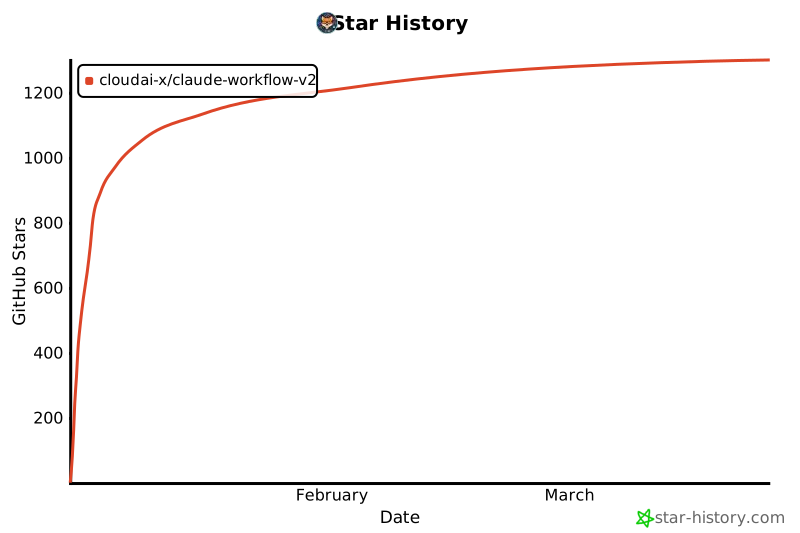](https://www.star-history.com/#CloudAI-X/claude-workflow-v2&type=date&legend=top-left)
## Credits
- Plugin created by [@cloudxdev](https://x.com/cloudxdev)
- Workflow patterns inspired by [Boris Cherny](https://x.com/bcherny) (creator of Claude Code)
## License
MIT - see [LICENSE](./LICENSE) for details.