<div align="center">
# Discord for AI Agents
### Run your Discord server by talking to Claude.
Describe what you want and Claude builds it: a whole community, a single channel, a new role, a welcome screen, an automod rule. No menus, no settings panels, no clicking around.
[](https://discord.gg/babcVNJBet)
[Quick Start](#quick-start) · [Try it](#try-it) · [Discord](https://discord.gg/babcVNJBet) · [Demo](#demo)
</div>
---
## Demo
[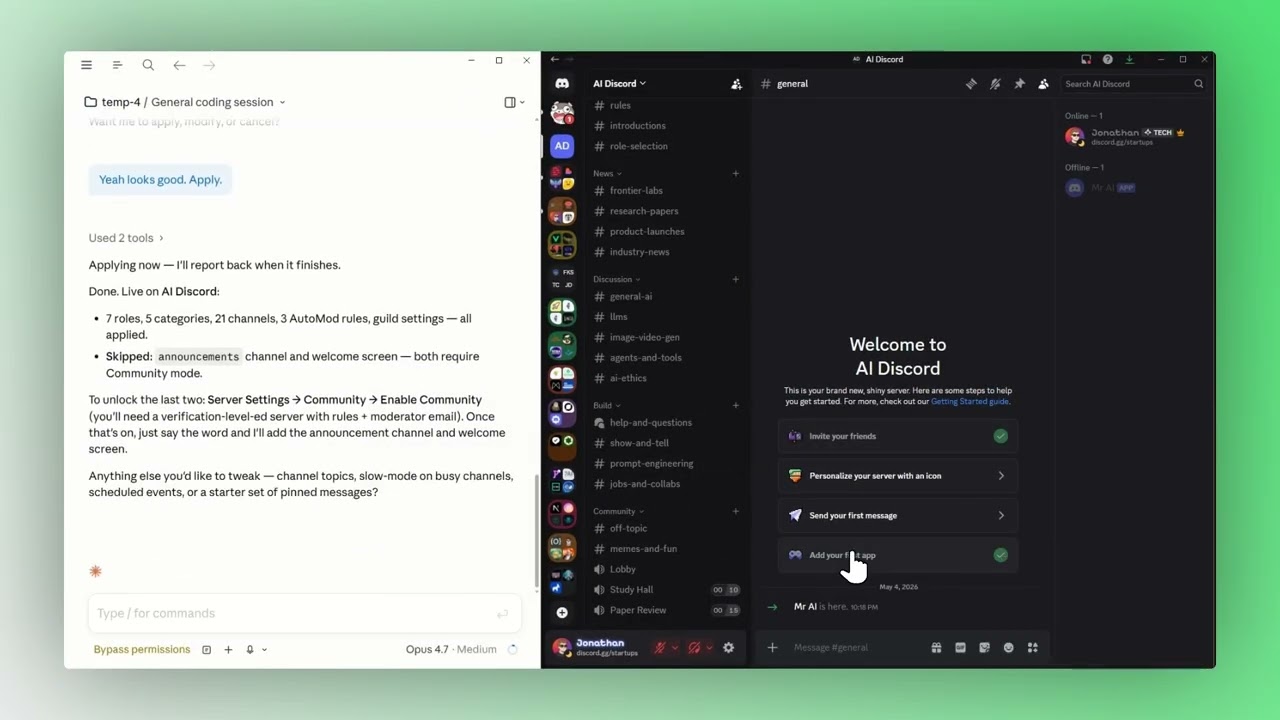](https://youtu.be/iujymigLrP0)
> Click the image to watch the walkthrough.
## Quick Start
**1. Install the plugin** — inside Claude Code, run:
```
/plugin marketplace add JCodesMore/jcodesmore-plugins
/plugin install discord@jcodesmore-plugins
```
Then fully **restart Claude Code** (quit the app and reopen) so the new skills load.
**2. Run the setup wizard** — type:
```
/discord:setup
```
Claude walks you through creating a Discord bot (or grabbing the token from one you already own), pasting it in, inviting it to a server, and locking in an active guild. The whole thing happens in chat.
**3. That's it.** Type `/discord` anytime — that's the do-anything front door. Talk to Claude like a friend who knows Discord inside-out.
## Try it
Everything routes through `/discord`. Talk to Claude like a friend who happens to know Discord inside-out:
- *"`/discord` make me a Magic: The Gathering trading server."* — designs and applies a full server template
- *"`/discord` apply the dev-community template to this server."* — picks a starter template, dry-runs, applies
- *"`/discord` create a #welcome channel under a category called Info, with a topic of 'Read the rules first.'"*
- *"`/discord` add a Moderator role with kick and ban perms, blurple color, and grant it to me."*
- *"`/discord` drop an embed announcement in #announcements with the stream schedule and a thumbnail."*
- *"`/discord` set up an AutoMod rule that blocks invite links for non-mods."*
- *"`/discord` configure the welcome screen with three intro channels and a friendly description."*
- *"`/discord` schedule a community game night in the Lobby voice channel for next Friday at 7pm."*
You can also just type `/discord` with no arguments to see the current bot + active server and get a menu of suggestions. The agent figures out which Discord primitives to call, validates inputs, and reports back what changed (and what failed, with Discord's actual error messages).
## What's inside
**51 Discord tools** wrapped in **two skills** and **one agent** — covering channels, roles, messages, embeds, AutoMod, onboarding, welcome screens, scheduled events, members, webhooks, and bulk server templates. `/discord` is the do-anything front door; `/discord:setup` is the one-shot configuration wizard.
| Capability | Try saying |
|---|---|
| Build a server from a prompt | *"`/discord` make me a server for [X]"* |
| Apply a starter template | *"`/discord` apply the gaming-community template"* |
| Channels & categories | *"`/discord` create a #general channel under Welcome"* |
| Roles & permissions | *"`/discord` add a Mod role with kick perms and grant it to me"* |
| Messages & embeds | *"`/discord` send a multi-field embed to #announcements"* |
| AutoMod rules | *"`/discord` block invite links from non-mods"* |
| Welcome screen | *"`/discord` set up a welcome screen with rules and intros"* |
| Scheduled events | *"`/discord` schedule a movie night for Saturday at 8pm"* |
| Members & moderation | *"`/discord` kick the user named X with reason: spam"* |
| Webhooks | *"`/discord` create a webhook in #releases and post the changelog"* |
| Anything else | `discord_raw_request` — direct REST escape hatch |
**Bundled server templates:** `gaming-community`, `study-group`, `dev-community`, `content-creator`. Compose your own as a JSON spec or describe what you want and let the architect agent draft one.
## Community
[**Discord**](https://discord.gg/babcVNJBet) — chat, help, show-and-tell · [**Issues**](https://github.com/JCodesMore/discord-for-ai-agents/issues) — bugs & feature requests · [**More plugins**](https://github.com/JCodesMore/jcodesmore-plugins)
<details>
<summary><b>Heads-up: <code>discord_apply_template</code> is create-only</b></summary>
Templates and the architect agent never delete or modify existing entities. Anything matching an existing channel/role/AutoMod rule by name is silently skipped. If you want a clean slate before applying, ask Claude to delete the existing channels first — but only do that on a fresh test guild, never on something with active conversations.
</details>
<details>
<summary><b>Bot token storage</b></summary>
The token you paste during `/discord:setup` is saved to `${CLAUDE_PLUGIN_DATA}/credentials.json` as plaintext JSON — that's a file under your Claude Code plugin data directory. Because you paste it in chat, it also lives in your local Claude Code session history file (the `.jsonl` for this conversation). Active-guild id and a verification timestamp live alongside it in `state.json`.
This is a local-machine trust model: anyone with read access to your home directory can read the token. Don't paste production bot tokens on shared computers. If a token leaks, reset it at <https://discord.com/developers/applications> → your app → **Bot** → **Reset Token** and re-run `/discord:setup`.
If you have a Discord owner account with 2FA enabled, also tick **Bot owner has MFA enabled** in `/plugin` config. Some destructive actions (kick, ban, certain deletes) require the MFA flag in production servers.
</details>
<details>
<summary><b>Making a bot manually</b></summary>
`/discord:setup` walks you through this in chat — these manual steps are here in case you'd rather do it before running the wizard:
1. Go to <https://discord.com/developers/applications> and click **New Application**.
2. Pick a name, accept the ToS, and open the **Bot** tab.
3. Click **Reset Token** → **Yes, do it!** → **Copy** the token. Keep it secret.
4. Optional: turn on **Server Members Intent** under Privileged Gateway Intents if you want member listing. (Not required for most admin tasks.)
5. Run `/discord:setup` in Claude Code and paste the token when asked. If your bot isn't in a server yet, the wizard generates an invite URL with the right permissions — open it in a browser and add the bot to a test server.
For full admin tasks, give the bot **Administrator** permission. You can scope it down later once you know exactly which permissions you need.
</details>
<details>
<summary><b>Advanced install (without the marketplace)</b></summary>
Clone and build it yourself:
```bash
git clone https://github.com/JCodesMore/discord-for-ai-agents.git
cd discord-for-ai-agents
npm install
npm run build
```
Then in Claude Code:
```
/plugin marketplace add file:///<absolute-path-to-repo>
/plugin install discord
```
**Requirements:** Node.js ≥ 18. Bot token from <https://discord.com/developers/applications>.
</details>
<details>
<summary><b>Built on</b></summary>
- [Model Context Protocol SDK](https://modelcontextprotocol.io/) — exposes Discord tools to Claude
- [@discordjs/rest](https://discord.js.org/docs/packages/rest/main) — REST client with rate-limit handling
- [discord-api-types](https://github.com/discordjs/discord-api-types) — typed Discord API routes
- [Zod](https://zod.dev/) — schema validation
</details>
## License
[Apache License 2.0](LICENSE) — © 2026 JCodesMore
> Not affiliated with, endorsed by, or associated with Discord Inc.
---
*Part of [jcodesmore-plugins](https://github.com/JCodesMore/jcodesmore-plugins).*