<div align="center">
<img src="docs/images/logo.png" alt="Snow AI CLI Logo" width="200"/>
# snow-ai
[](https://www.npmjs.com/package/snow-ai)
[](https://www.npmjs.com/package/snow-ai)
[](https://github.com/MayDay-wpf/snow-cli/blob/main/LICENSE)
[](https://nodejs.org/)
<a href="https://www.producthunt.com/products/snow-cli/launches/snow-cli?embed=true&utm_source=badge-featured&utm_medium=badge&utm_campaign=badge-snow-cli" target="_blank" rel="noopener noreferrer"><img alt="Snow CLI - Agentic coding in your terminal | Product Hunt" width="250" height="54" src="https://api.producthunt.com/widgets/embed-image/v1/featured.svg?post_id=1084735&theme=light&t=1776848197707"></a>
**English** | [中文](README_zh.md)
**QQ Group**: 910298558
**Telegram**: [https://t.me/snow_cli](https://t.me/snow_cli)
_Agentic coding in your terminal_
</div>
## Snow App
> **Snow App** is the desktop coding client for Snow CLI. Download it here: [https://github.com/MayDay-wpf/snow-app](https://github.com/MayDay-wpf/snow-app)
## Thanks Developer
<a href="https://github.com/MayDay-wpf/snow-cli/graphs/contributors">
<img src="https://contrib.rocks/image?repo=MayDay-wpf/snow-cli" />
</a>
## Sponsors
<table width="100%" align="center">
<thead>
<tr>
<th width="50%">Sponsor</th>
<th width="50%">Description</th>
</tr>
</thead>
<tbody>
<tr>
<td align="center">
<a href="https://www.packyapi.ai/"><img src="docs/images/packyapi.jpg" alt="PackyCode" width="360"/></a>
<br/>
<a href="https://www.packyapi.ai/"><b>PackyCode</b></a>
</td>
<td>Access leading AI models through PackyCode with one API endpoint and one API key. Enjoy fast, reliable access with automatic failover and dedicated high-speed routes for Codex and Claude Code.<br/>Get started with $1 in free credits, a discount on your first top-up, and savings of up to 80% on eligible routes. Pay in RMB with no currency conversion markups or extra top-up fees.<br/><a href="https://www.packyapi.ai/">Sign up through the link</a> and start building today.</td>
</tr>
<tr>
<td align="center">
<a href="https://go.apimart.ai/gh-snow-cli"><img src="docs/images/apimart.jpg" alt="APIMart" width="360"/></a>
<br/>
<a href="https://go.apimart.ai/gh-snow-cli"><b>APIMart</b></a>
</td>
<td>APIMart is a low-cost API platform for AI image & video generation — GPT-Image-2 from $0.006/image, 160+ images per dollar. One async API covers both image and video: submit a task, get an ID, fetch results via polling or callback. Batch tens of thousands of images without timeouts, switch models without changing code. Pay-as-you-go with no monthly fee — <a href="https://go.apimart.ai/gh-snow-cli">sign up here</a> to get started.</td>
</tr>
<tr>
<td align="center">
<a href="https://bloome.im/app?ref=MayDaywpf&utm_medium=github&utm_source=MayDay-wpf-snow-cli-ivor-202607"><img src="docs/images/bloome-home.png" alt="Bloome" width="360"/></a>
<br/>
☁️ <a href="https://bloome.im/app?ref=MayDaywpf&utm_medium=github&utm_source=MayDay-wpf-snow-cli-ivor-202607"><b>Bloome</b></a>
</td>
<td>AI-agent IM platform — multiple AI agents (Claude, ChatGPT, DeepSeek…) collaborate in one shared chat: they hand off tasks, cross-check each other, and refine until it's right. Zero setup, runs in the cloud, shareable with your team. Try it 👉 <a href="https://bloome.im/app?ref=MayDaywpf&utm_medium=github&utm_source=MayDay-wpf-snow-cli-ivor-202607">Bloome</a></td>
</tr>
<tr>
<td><a href="https://www.jetbrains.com/">JetBrains</a></td>
<td>Open Source Project Sponsor, providing free IDE licenses</td>
</tr>
</tbody>
</table>
## Relay Station Recommendations
> The relay stations listed here are mutual recommendation partnerships, not commercial sponsorships. Any relay station that provides a Snow CLI usage tutorial and a test account for availability verification is welcome to join.
| Relay Station | Link |
| ------------- | ------------------------------------------------------ |
| ccapi | [https://ccapi.ztxfkw.top/](https://ccapi.ztxfkw.top/) |


<h3>Recommend using fonts: <a href="https://github.com/SpaceTimee/Fusion-JetBrainsMapleMono">JetBrains Maple Mono NF</a> </3>
<h3>Recommended Terminal Combination for Windows Users</h3>
- **PowerShell 7+**: Modern cross-platform PowerShell, offering stronger features and better compatibility
- GitHub: https://github.com/PowerShell/PowerShell
- **Windows Terminal**: Modern terminal application, supporting multi-tab, split-screen, and GPU accelerated rendering
- GitHub: https://github.com/microsoft/terminal
**Installation**:
```bash
# Install using winget (built-in for Windows 10/11)
winget install Microsoft.PowerShell
winget install Microsoft.WindowsTerminal
# Or install using the Microsoft Store
```
## Installation
Install Snow CLI globally via npm:
```bash
npm install -g snow-ai
```
After installation, run:
```bash
snow
```
## Documentation
- [Installation Guide](docs/usage/en/01.Installation%20Guide.md) - System requirements, installation (update, uninstall) steps, IDE extension installation
- [First Time Configuration](docs/usage/en/02.First%20Time%20Configuration.md) - API configuration, model selection, basic settings
- [Startup Parameters Guide](docs/usage/en/19.Startup%20Parameters%20Guide.md) - Command-line parameters explained, quick start modes, headless mode, async tasks, developer mode
### Advanced Configuration
- [Proxy and Browser Settings](docs/usage/en/03.Proxy%20and%20Browser%20Settings.md) - Network proxy configuration, browser usage settings
- [Codebase Setup](docs/usage/en/04.Codebase%20Setup.md) - Codebase integration, search configuration
- [Sub-Agent Configuration](docs/usage/en/05.Sub-Agent%20Configuration.md) - Sub-agent management, custom agents, **project Markdown agents (#194)**
- [Sensitive Commands Configuration](docs/usage/en/06.Sensitive%20Commands%20Configuration.md) - Sensitive command protection, custom command rules
- [Hooks Configuration](docs/usage/en/07.Hooks%20Configuration.md) - Workflow automation, **additionalContext inject / beforeSubAgentStart / type:context (#194)**
- [Theme Settings](docs/usage/en/08.Theme%20Settings.md) - Interface theme configuration, custom color schemes, simplified mode
- [Third-Party Relay Configuration](docs/usage/en/16.Third-Party%20Relay%20Configuration.md) - Claude Code relay, Codex relay, custom headers configuration
### Feature Guide
- [Command Panel Guide](docs/usage/en/09.0.Command%20Panel%20Guide.md) - Detailed description of all available commands, usage tips, shortcut key reference (split into 09.1~09.7 sub-documents by category)
- [Command Injection Mode](docs/usage/en/10.Command%20Injection%20Mode.md) - Execute commands directly in messages, syntax explanation, security mechanisms, use cases
- [Vulnerability Hunting Mode](docs/usage/en/11.Vulnerability%20Hunting%20Mode.md) - Professional security analysis, vulnerability detection, verification scripts, detailed reports
- [Headless Mode](docs/usage/en/12.Headless%20Mode.md) - Command line quick conversations, session management, script integration, third-party tool integration
- [Keyboard Shortcuts Guide](docs/usage/en/13.Keyboard%20Shortcuts%20Guide.md) - All keyboard shortcuts, editing operations, navigation control, rollback functionality
- [MCP Configuration](docs/usage/en/14.MCP%20Configuration.md) - MCP service management, configure external services, enable/disable services, troubleshooting
- [Async Task Management](docs/usage/en/15.Async%20Task%20Management.md) - Background task creation, task management interface, sensitive command approval, task to session conversion
- [Skills Command Detailed Guide](docs/usage/en/18.Skills%20Command%20Detailed%20Guide.md) - Skill creation, usage methods, Claude Code Skills compatibility, tool restrictions
- [LSP Configuration and Usage](docs/usage/en/17.LSP%20Configuration.md) - LSP config file, language server installation, ACE tool usage (definition/outline)
- [SSE Service Mode](docs/usage/en/20.SSE%20Service%20Mode.md) - SSE server startup, API endpoints explanation, tool confirmation flow, permission configuration, YOLO mode, client integration examples
- [Custom StatusLine Guide](docs/usage/en/21.Custom%20StatusLine%20Guide.md) - User-level StatusLine plugins, hook structure, override behavior, bilingual examples
- [Team Mode Guide](docs/usage/en/22.Team%20Mode%20Guide.md) - Multi-agent collaboration, parallel task execution, team management
- [Custom Search Engine Guide](docs/usage/en/23.Custom%20Search%20Engine%20Guide.md) - User-level search engine plugins, engine contract, enable flag, minimal template
- [Privacy Settings Guide](docs/usage/en/24.Privacy%20Settings%20Guide.md) - Local privacy filter API deployment, Snow CLI privacy configuration, tool result redaction, and troubleshooting
- [Buddy Companion Guide](docs/usage/en/25.Buddy%20Companion%20Guide.md) - Terminal buddy companion commands, hatching, species selection, interaction, mute, and reset
### Recommended ROLE.md
- [Recommended ROLE.md](docs/role/en/01.Snow%20CLI%20Plan%20Every%20Step.md) - Recommended behavior guidelines, work mode, and quality standards for the Snow CLI terminal programming assistant
- Bilingual documentation: English (primary) / [Chinese](docs/role/zh/01.Snow%20CLI%20一步一规划.md)
- Maintenance rule: Keep Chinese and English structures aligned; tool names remain unchanged
---
## Development Guide
### Prerequisites
- **Node.js >= 18.x** (Requires ES2020 features support)
- npm >= 8.3.0
Check your Node.js version:
```bash
node --version
```
If your version is below 18.x, please upgrade first:
```bash
# Using nvm (recommended)
nvm install 18
nvm use 18
# Or download from official website
# https://nodejs.org/
```
### Build from Source
```bash
git clone https://github.com/MayDay-wpf/snow-cli.git
cd snow-cli
npm install
npm run link # builds and globally links snow
# to remove the link later: npm run unlink
```
### IDE Extension Development
#### VSCode Extension
- Extension source located in `VSIX/` directory
- Download release: [mufasa.snow-cli](https://marketplace.visualstudio.com/items?itemName=mufasa.snow-cli)
#### JetBrains Plugin
- Plugin source located in `Jetbrains/` directory
- Download release: [JetBrains plugin](https://plugins.jetbrains.com/plugin/28715-snow-cli/edit)
### Project Structure
```
source/ # Source code
├── agents/ # AI agents implementation
├── api/ # LLM API adapters
├── hooks/ # React hooks for conversation
├── i18n/ # Internationalization
├── mcp/ # Model Context Protocol
├── prompt/ # System prompt templates
├── types/ # TypeScript type definitions
├── ui/ # UI components (Ink)
└── utils/ # Utility functions
bundle/ # Build output (single-file executable)
dist/ # TypeScript compilation output
docs/ # Documentation
JetBrains/ # JetBrains plugin source
scripts/ # Build and utility scripts
VSIX/ # VSCode extension source
```
### User Configuration Directory
After running snow, `.snow/` directory is created in your home folder:
```
~/.snow/ # User configuration directory
├── log/ # Runtime logs (local, can be deleted)
├── profiles/ # Configuration profiles
├── sessions/ # Conversation history
├── tasks/ # Async tasks
├── hooks/ # Workflow hooks
├── config.json # API configuration
├── settings.json # Unified settings (includes mcpServers)
└── ... # Other config files
```
## Friendly links
- [Linux DO](https://linux.do)
## Star History
[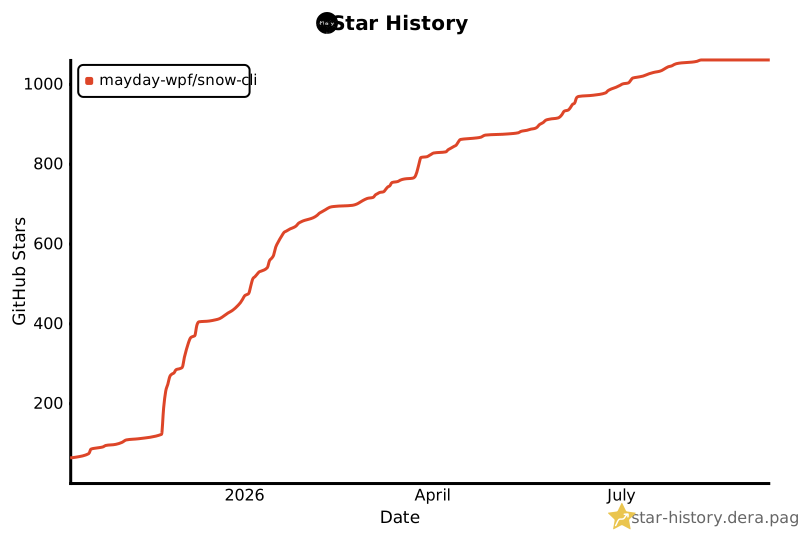](https://star-history.dera.page/#MayDay-wpf/snow-cli&Date)