# ARFun — webcam body tracking into Godot
[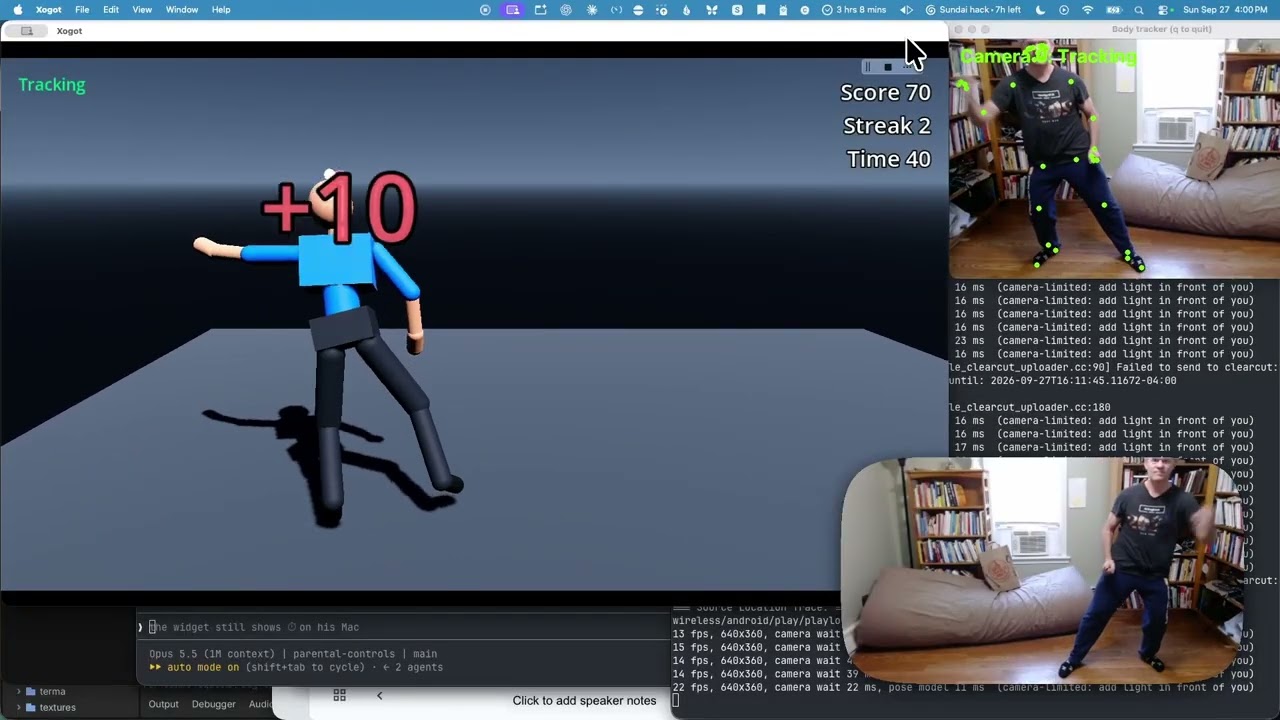](https://youtu.be/oeDKybBkrgw)
▶️ **[Watch the demo on YouTube](https://youtu.be/oeDKybBkrgw)**
This prototype was built during the
[Build a Video Game with your Child](https://www.nerdyparentsclub.org/events) workshop,
offered through the [Nerdy Parents Club of Cambridge](https://nerdyparents.org).
It was made with [Xogot](https://xogot.com), a Mac-friendly version of
[Godot](https://godotengine.org), the open source game engine.
```
webcam → tracker/tracker.py (MediaPipe Pose) → UDP 127.0.0.1:4242 → pose_receiver.gd (Godot)
```
## Run it
1. Open this project in Xogot and press Play. The main scene is `body3d.tscn` (3D rigged
mannequin); `main.tscn` is the 2D stick-figure/gesture demo.
2. In a terminal:
```bash
cd tracker
uv run tracker.py
```
The first run downloads Google's pose model (~6 MB) and macOS asks for camera
permission for your terminal app. Stand back so your upper body and hips are in frame.
- `uv run tracker.py --test` sends a fake animated pose (no camera) for testing the Godot side.
- `--camera 1` picks another camera, `--no-preview` hides the webcam window.
- If tracking stutters or drops out while Xogot is in front, macOS App Nap is throttling the
tracker because its preview window is covered. Run with `--no-preview`, or keep part of the
preview window visible. The tracker prints its frame rate every 5 seconds.
## 3D mannequin (`body3d.tscn`)
- `mannequin.gd` builds a `Skeleton3D` (Hips → Spine → Chest → Neck → Head, arms, hands,
legs, feet) in a T-pose facing the camera, with a capsule attached to each bone.
- `pose_driver_3d.gd` uses MediaPipe's 3D *world* landmarks (meters, hip-centered):
hips/chest/head get a full orientation from the hip, shoulder and ear lines, and every
limb bone is swung to point along your matching limb. It works like a mirror.
- Limbs that are out of view relax back to the rest pose. Tune `smoothing`,
`follow_sideways` and `sideways_range` on the root node.
## Ball game (`BallGame` node in `body3d.tscn`)
Raise both hands above your head (or press Space) to start a 60-second round. Balls fly
at the character; touch them with an arm, hand, leg or foot to score. Every 5 hits in a row
adds a bonus. Balls get faster and more frequent as the round goes on. See `ball_game.gd`.
Sounds: a hit plays a soft thump plus a glass chime that climbs in pitch with your streak;
a miss plays an error tone. They come from Kenney's
[Impact Sounds](https://kenney.nl/assets/impact-sounds) and
[Interface Sounds](https://kenney.nl/assets/interface-sounds) packs, CC0 (`sfx/Kenney_*_License.txt`).
## Game menu
The game opens on a menu. Hold your **left** hand above your head for about a second to pick
the Ball Game, or your **right** hand for Ping Pong (or click a card / press 1 or 2).
Press **Esc** in any game to come back to the menu. See `game_menu.gd`.
## Ping Pong (`PingPong` node in `body3d.tscn`)
You hold a paddle in your right hand at the near end of a regulation table; a CPU plays the
far end and serves every point. Raise both hands (or press Space) to start; first to 11 wins.
- Simplified table-tennis rules: the ball must bounce once on the other side. Hitting the net,
hitting it out, or letting it bounce twice on your side loses the point.
- Touching the ball with the paddle is enough: returns are aim-assisted over the net, since
webcam tracking is only ~15 fps. Swinging sideways steers the shot and swinging fast makes it
faster, and the CPU misses fast shots more often.
- The table (`ping_pong/ping_pong_table.tscn`) and paddle (`ping_pong/paddle.tscn`) were built
with the [Xogot Modeler](https://blog.xogot.com/xogot-modeler/): regulation 2.74 × 1.525 m top
at 76 cm with beveled edges, 2 cm edge lines and a 3 mm center line, a 15.25 cm net with posts
and clamps, and a metal under-frame with legs and rubber feet.
- Game logic is in `ping_pong/ping_pong_game.gd`. Table bounce and paddle sounds are from
Kenney's Impact Sounds pack (CC0).
## Using a Mixamo character
1. On mixamo.com pick a character → Download → **FBX Binary**, **T-pose**.
2. Save it in `characters/` (e.g. `characters/Amy.fbx`). That folder is git-ignored, since
Mixamo's license doesn't allow redistributing the raw character files.
3. Set `character_scene` on the `Body3D` root node to the .fbx (and `character_scale` if
the character is small or large). The Mannequin is hidden automatically.
The driver recognizes Mixamo bone names (`mixamorig_LeftArm`, …) with any prefix.
## 2D gestures (`main.tscn`)
- **Lean** your torso left/right → the blue block walks.
- **Both hands above your head** → jump.
Tune `LEAN_THRESHOLD`, `MOVE_SPEED`, etc. at the top of `pose_receiver.gd`.
## Notes
- The project uses the **Compatibility** renderer. Skinned meshes (like Mixamo characters)
don't render in the running game with it under Xogot; the **Mobile** renderer fixes that,
but Xogot's embedded game view then shows only a zoomed-in quarter of the screen.
- `mediapipe` is pinned `<1`: version 1.0.1 crashes on macOS when creating the
PoseLandmarker ("Check failed: service_ Service is unavailable").
- Landmark indices follow MediaPipe's 33-point pose model
(0 nose, 11/12 shoulders, 13/14 elbows, 15/16 wrists, 23/24 hips, 25/26 knees, 27/28 ankles).