# pi-ask-user
A Pi package that adds an interactive `ask_user` tool for collecting user decisions during an agent run.
## Demo
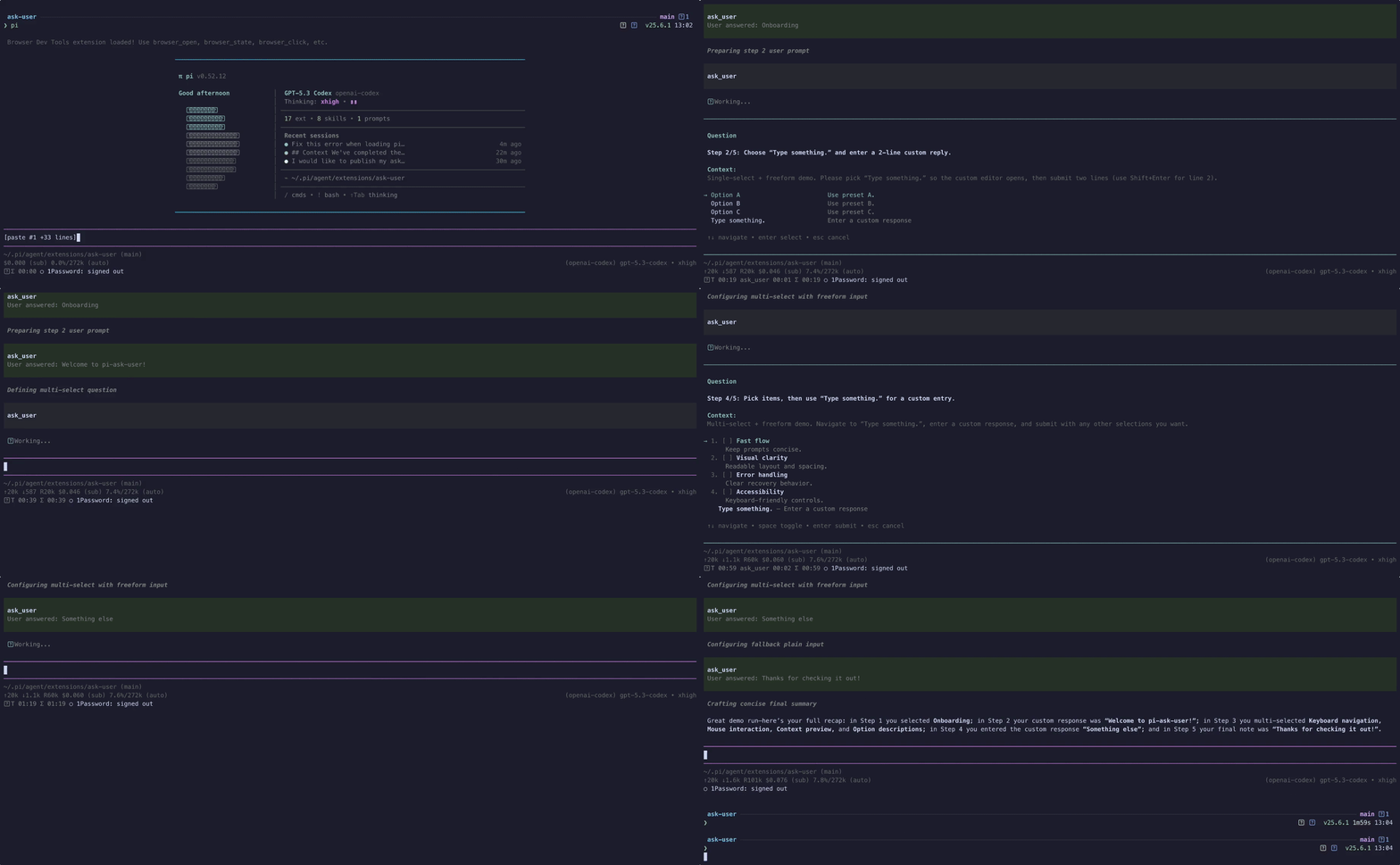
High-quality video: [ask-user-demo.mp4](https://github.com/edlsh/pi-ask-user/blob/main/media/ask-user-demo.mp4)
## Features
- Searchable single-select option lists with wrapped titles and descriptions
- Responsive split-pane details preview on wide terminals, with a persistent single-column preference
- Multi-select option lists
- Batches of 2-4 independent questions in one prompt, with a review page before submitting
- Optional freeform responses
- User-toggleable extra context on structured selections
- Context display support
- Responsive context collapse that keeps the question and choices visible on small terminals without discarding full context
- Configurable display mode: `overlay` (modal, default) or `inline` (rendered directly in the flow)
- Runtime overlay toggle: press the configured overlay-toggle key (`alt+o` by default, configurable per call, via env var, or in `ask-user.json`) while the prompt is open to temporarily hide/show the popup so you can read prior agent output, then press it again to bring it back
- Pi-TUI-aligned keybinding and editor behavior
- Custom TUI rendering for tool calls and results
- System prompt integration via `promptSnippet` and `promptGuidelines`
- Optional timeout for auto-dismiss in both overlay and fallback input modes
- `herdr:blocked` lifecycle events while waiting for interactive input
- Structured response and cancellation `details` for session state reconstruction
- Graceful fallback when interactive UI is unavailable
- Bundled `ask-user` skill for mandatory decision-gating in high-stakes or ambiguous tasks
## Bundled skill: `ask-user`
This package now ships a skill at `skills/ask-user/SKILL.md` that nudges/mandates the agent to use `ask_user` when:
- architectural trade-offs are high impact
- requirements are ambiguous or conflicting
- assumptions would materially change implementation
The skill follows a "decision handshake" flow:
1. Gather evidence and summarize context
2. Ask one focused question via `ask_user`
3. Wait for explicit user choice
4. Confirm the decision, then proceed
See: `skills/ask-user/references/ask-user-skill-extension-spec.md`.
## Install
```bash
pi install npm:pi-ask-user
```
## Tool name
The registered tool name is:
- `ask_user`
## Parameters
| Parameter | Type | Default | Description |
|-----------|------|---------|-------------|
| `question` | `string?` | — | The question to ask the user. Each call needs `question` or `questions`; when both are sent, `question` is only shown as the batch heading |
| `questions` | `{question, context?, options?, allowMultiple?, allowFreeform?}[]?` | — | 2-4 independent questions shown together, used instead of `question`. Set `context`, `options`, `allowMultiple`, and `allowFreeform` on each entry; passing them at the top level as well is an error. The remaining parameters apply to the whole batch. See [Asking several questions at once](#asking-several-questions-at-once) |
| `context` | `string?` | — | Relevant context summary shown before the question |
| `options` | `{title, description?}[]?` | `[]` | Multiple-choice options. The schema is a flat object shape (no `anyOf`, which some provider proxies strip or reject); plain strings and common alias keys (`label`, `text`, `value`, `name`, `option`) are still accepted at runtime |
| `allowMultiple` | `boolean?` | `false` | Enable multi-select mode |
| `allowFreeform` | `boolean?` | `true` | Add a "Type something" freeform option |
| `allowComment` | `boolean?` | env var, settings file, or `false` | Expose a user-toggleable extra-context option in the custom UI (`ctrl+g` or the toggle row) and collect an optional comment in fallback dialogs |
| `displayMode` | `"overlay" \| "inline"?` | env var, settings file, or `"overlay"` | Controls custom UI rendering: `overlay` shows the centered modal (current behavior), `inline` renders without overlay framing |
| `singleSelectLayout` | `"auto" \| "list"?` | env var, settings file, or `"auto"` | Use the responsive details pane automatically or always render descriptions below their options |
| `contextExpanded` | `boolean?` | env var, settings file, or `false` | Start with oversized context expanded. Per-call value overrides `PI_ASK_USER_CONTEXT_EXPANDED` |
| `overlayToggleKey` | `string?` | env var, settings file, or `"alt+o"` | Shortcut for hiding/showing the overlay popup (overlay mode only). Pi-TUI key spec, e.g. `"alt+o"`, `"ctrl+shift+h"`. Pass `"off"` to disable. |
| `commentToggleKey` | `string?` | env var, settings file, or `"ctrl+g"` | Shortcut for toggling the optional comment/extra-context row when `allowComment: true`. Pass `"off"` to disable. |
| `timeout` | `number?` | — | Auto-dismiss after N ms and return `null` if the prompt times out |
## Example usage shape
```json
{
"question": "Which option should we use?",
"context": "We are choosing a deploy target.",
"options": [
{ "title": "staging" },
{ "title": "production", "description": "Customer-facing" }
],
"allowMultiple": false,
"allowFreeform": true,
"allowComment": true,
"displayMode": "inline"
}
```
`displayMode: "inline"` uses the same interaction logic but skips overlay mode when calling `ctx.ui.custom(...)`. RPC/headless fallback behavior is unchanged.
## Asking several questions at once
Use `questions` for 2-4 decisions that are independent of each other and whose prerequisites are already settled. Anything that depends on another answer belongs in a later `ask_user` call.
```json
{
"questions": [
{
"question": "Which database should the service use?",
"context": "Both are supported by the ORM; the service is single-region.",
"options": [
{ "title": "Postgres", "description": "Managed, JSONB support" },
{ "title": "SQLite", "description": "No extra infrastructure" }
]
},
{
"question": "Which deploy target?",
"options": [{ "title": "Fly.io" }, { "title": "Cloudflare" }],
"allowFreeform": false
},
{ "question": "Anything else we should know before starting?" }
],
"timeout": 300000
}
```
The prompt shows one page per question plus a review page. Confirming a page records its answer and moves to the next unanswered question, then to the review page. `tab` / `shift+tab` switch pages without losing filters, drafts, or checked options, and number keys on the review page jump back to a question. Only the review page submits. If questions are still unanswered, the first press warns and a second press submits them as skipped. Questions without options open straight in a text editor.
In RPC/headless mode the questions are asked one after another with the fallback dialogs. There is no review page there, so cancelling any question cancels the whole batch.
## Personal preferences
Defaults can be configured in a settings file or through environment variables. Per-call tool parameters override both.
### Settings file
Create `~/.pi/agent/ask-user.json` (or `<agent-dir>/ask-user.json` when `PI_CODING_AGENT_DIR` is set):
```jsonc
{
"displayMode": "inline",
"singleSelectLayout": "list",
"allowComment": false,
"contextExpanded": false,
"overlayToggleKey": "alt+o",
"commentToggleKey": "ctrl+g",
"emitFullEvents": false
}
```
All keys are optional; unknown keys and wrong-typed values are ignored, matching the env-var behavior. Shortcut keys accept the same `"off"` / `"none"` / `"disabled"` disables and Pi-TUI key specs as the tool parameters. The file is read on every `ask_user` call, so edits apply without restarting Pi. A file that exists but is not valid JSON fails the call with the path in the error, so a configuration mistake is visible instead of silently ignored.
**Privacy:** Setting `"emitFullEvents": true` in this file shares answers and prompt context with other installed extensions through lifecycle events, including selections, comments, freeform text, and offered options on cancellation. Keep it `false` (the default) unless an extension you trust needs that data. See [Events](#events) and [#51](https://github.com/edlsh/pi-ask-user/issues/51).
### Environment variables
Configure per-launch defaults by setting these in your shell profile (`~/.zshrc`, `~/.bash_profile`, etc.):
```bash
export PI_ASK_USER_DISPLAY_MODE=inline
export PI_ASK_USER_SINGLE_SELECT_LAYOUT=list
export PI_ASK_USER_ALLOW_COMMENT=true
export PI_ASK_USER_OVERLAY_TOGGLE_KEY=alt+h
export PI_ASK_USER_COMMENT_TOGGLE_KEY=alt+c
export PI_ASK_USER_CONTEXT_EXPANDED=true
```
Environment variables must be present in the process that launches Pi. If Pi is launched from a desktop app or a different shell, changes in `~/.zshrc` may not be inherited; launch Pi from a terminal where `echo $PI_ASK_USER_DISPLAY_MODE` shows the expected value. Environment variables win over `ask-user.json`, so one-off launches such as `PI_ASK_USER_DISPLAY_MODE=inline pi` still work while the settings file holds the persistent defaults.
### Display mode
Effective order:
1. Per-call `displayMode` parameter (if provided)
2. `PI_ASK_USER_DISPLAY_MODE` (if set to `"overlay"` or `"inline"`)
3. `displayMode` in `ask-user.json`
4. Fallback default: `"overlay"`
Unrecognised values are silently ignored and fall back to `"overlay"`.
### Single-select layout
Effective order:
1. Per-call `singleSelectLayout` parameter (if provided)
2. `PI_ASK_USER_SINGLE_SELECT_LAYOUT` (when set to `list` or `auto`)
3. `singleSelectLayout` in `ask-user.json`
4. Fallback default: `auto`
`auto` shows the details pane on wide terminals. `list` keeps descriptions below their options at every width.
### Optional comments
Effective order:
1. Per-call `allowComment` parameter (if provided)
2. `PI_ASK_USER_ALLOW_COMMENT` (`true`, `1`, `yes`, or `on`; corresponding false values are also accepted)
3. `allowComment` in `ask-user.json`
4. Fallback default: `false`
### Context expansion
Oversized context collapses behind a one-line summary so the question and choices stay visible. To start expanded instead:
1. Per-call `contextExpanded` parameter (if provided)
2. `PI_ASK_USER_CONTEXT_EXPANDED` (`true`, `1`, `yes`, or `on`; corresponding false values are also accepted)
3. `contextExpanded` in `ask-user.json`
4. Fallback default: `false`
`ctrl+e` still toggles from whichever state the prompt opened in.
### Shortcuts
Effective order for both `overlayToggleKey` and `commentToggleKey`:
1. Per-call parameter (if provided)
2. Matching env var (`PI_ASK_USER_OVERLAY_TOGGLE_KEY` / `PI_ASK_USER_COMMENT_TOGGLE_KEY`)
3. Matching key in `ask-user.json` (`overlayToggleKey` / `commentToggleKey`)
4. Built-in defaults: `alt+o` and `ctrl+g`
Pass `"off"`, `"none"`, or `"disabled"` (at any level) to disable the shortcut entirely. Invalid specs are silently dropped and the next source is used. Specs follow the Pi-TUI [`KeyId`](https://github.com/earendil-works/pi-mono/blob/main/packages/tui/src/keys.ts) format: `[mod+]...key` where modifiers are `ctrl`, `shift`, `alt`, `super`, in any order, joined by `+` (e.g. `ctrl+g`, `alt+shift+x`, `escape`, `tab`).
## Controls
While an `ask_user` prompt is open:
| Key | Action |
|-----|--------|
| `alt+o` (configurable via `overlayToggleKey`) | Hide/show the overlay popup so you can read the agent's prior output. Available in `overlay` mode only. The first time you hide it, a notification reminds you which key brings it back. |
| `ctrl+g` (configurable via `commentToggleKey`) | Toggle the optional comment/extra-context row (when `allowComment: true`). |
| `ctrl+e` | Expand or collapse oversized context while choosing an option. If another configured ask shortcut owns it, the prompt shows `ctrl+x` or `ctrl+y` instead. |
| `enter` | Confirm the focused option, submit a freeform response, or submit/skip an optional comment. In a batch, confirming records the answer; on the review page it submits. |
| `esc` | Clear the search filter, exit freeform/comment mode, or cancel the prompt. In a batch, cancelling cancels every question. |
| `↑` / `↓`, `ctrl+k` / `ctrl+j` | Navigate options. `ctrl+k` / `ctrl+j` (vim-style) work while typing in searchable prompts without disturbing the filter. On a batch's review page they scroll the answers. |
| `tab` / `shift+tab` | Single question: move down/up through the options. Batch: switch to the next/previous question or the review page. |
| `1`-`4` | Batch review page: jump back to that question. |
If you prefer never to see the overlay, set `displayMode: "inline"` per call or `PI_ASK_USER_DISPLAY_MODE=inline` globally.
### Cancellation
Aborting a tool call dismisses its active prompt, including freeform and RPC dialogs. Cancelling or timing out an optional RPC comment cancels the whole answer; press Enter with an empty comment to submit the selection without a comment.
The custom UI uses one timeout for the prompt. In the dialog fallback, the configured timeout applies separately to each dialog stage of a single question. A batch has one deadline for all of its questions, in the custom UI and in the dialog fallback.
### Mobile-sized terminals
If context wraps beyond the available decision area, `ask_user` collapses it into a one-line summary so the question and at least one choice remain visible. Press the context key shown in the prompt (`ctrl+e` by default) to expand or collapse the complete context; expanded context remains bounded and scrollable with the existing prompt-scroll keys in both display modes.
### Tern
With [pi-tern](https://github.com/edlsh/pi-tern) in a [Tern](https://stencil.so) pane, the prompt is a native sheet laid out like omp's ask dialog: question tabs for a batch, the question and context as markdown, the options as a clickable list, a native editor for custom responses and comments, a review page and an action bar. Keys still go to `ask_user` as in any terminal. The tool card shows each question over all of its options, with a check on the chosen ones. Both hooks use pi-tern's global symbols, so nothing changes when pi-tern isn't installed.
### Events
While an interactive prompt is open, the extension emits `herdr:blocked` with `{ active: true, label: "Waiting for user response" }`. It emits `{ active: false }` in `finally`, including cancellation and error paths. Hosts without a listener are unaffected.
When a displayed prompt resolves with an answer or cancellation, it emits `ask:answered` or `ask:cancelled`. Calls aborted before a prompt opens emit neither outcome event. Every installed extension receives these, so by default they carry only what is needed to correlate the prompt with its outcome:
```typescript
// ask:answered
{ question: string; response: { kind: "selection" | "freeform" } }
// ask:cancelled
{ question: string }
```
A batch publishes nothing until the user submits it. Then each answered question emits `ask:answered` and skipped questions emit nothing; a cancelled batch emits `ask:cancelled` for every question. Batch events carry the same payload plus the question's position:
```typescript
{ ...payload, batch: { index: number; total: number } }
```
Set `PI_ASK_USER_EMIT_FULL_EVENTS=true` (or `1`, `yes`, `on`), or `"emitFullEvents": true` in `ask-user.json`, to restore the full payloads — `context`, the offered `options` on cancel, and the complete `response` including selections, comment, and freeform text. Leave it unset unless another extension you trust needs the answer itself; the full response is always available to the agent through the tool result's `details`.
## Known limitations
- **Overlays cannot draw over inline images** ([#8](https://github.com/edlsh/pi-ask-user/issues/8)). Pi-TUI's overlay compositor skips rows occupied by terminal images (Kitty/iTerm2 graphics), so an `ask_user` overlay that intersects an image is partially or fully invisible. This must be fixed upstream in pi-tui (`compositeLineAt` returns image rows unchanged). Until then, `displayMode: "inline"` (or `PI_ASK_USER_DISPLAY_MODE=inline`) sidesteps the overlay compositor entirely and should keep the prompt visible.
## Result details
Answers and cancellations include structured prompt `details` for rendering and session state reconstruction:
```typescript
type AskResponse =
| { kind: "selection"; selections: string[]; comment?: string }
| { kind: "freeform"; text: string };
interface AskToolDetails {
question: string;
context?: string;
options: QuestionOption[];
response: AskResponse | null;
cancelled: boolean;
}
```
A `questions` batch returns separate details; the single-question shape above is unchanged:
```typescript
interface AskBatchDetails {
kind: "batch";
questions: Array<{ question: string; context?: string; options: QuestionOption[] }>;
// Index-aligned with questions; empty when the batch was cancelled.
answers: Array<{ status: "answered"; response: AskResponse } | { status: "skipped" }>;
cancelled: boolean;
}
```
Malformed options, invalid `questions` batches, unavailable interactive UI, and UI failures throw so Pi records a failed tool call rather than a successful answer. These host-created error results do not guarantee either details shape. Error rendering also accepts older stored results with `details: { error: string }`.
## Contributing
See [CONTRIBUTING.md](https://github.com/edlsh/pi-ask-user/blob/main/CONTRIBUTING.md) for development setup and checks.
## Changelog
See [CHANGELOG.md](https://github.com/edlsh/pi-ask-user/blob/main/CHANGELOG.md).
README の元ファイルを読む