<div align="center">
<img src="assets/memoria-logo.png" alt="Memoria Logo" width="300"/>
# Memoria
**The World's First Git for AI Agent Memory**
*Snapshot · Branch · Merge · Rollback — for memory, not code.*
> Git made code safe to change. Memoria makes memory safe to change.
[](https://github.com/matrixorigin/Memoria/actions/workflows/test.yml)
[](https://github.com/matrixorigin/Memoria/releases)
[](https://github.com/matrixorigin/Memoria/stargazers)
[](https://github.com/matrixorigin/Memoria/releases)
[](LICENSE)
[](https://modelcontextprotocol.io)
[](https://github.com/matrixorigin/matrixone)
[](https://arxiv.org/abs/2604.03927)
[Quick Start](#-quick-start) · [Memoria in Astra](#-memoria-in-astra) · [Why Memoria](#-why-memoria) · [Research](#-research-foundation) · [See It in Action](#-see-git-for-data-in-action) · [API Reference](#-api-reference) · [Architecture](#-architecture) · [Development](#-development) · [Citation](#-citation)
</div>
---
## Overview
Memoria is a **persistent memory layer** for AI agents with Git-level version control.
Every memory change is tracked, auditable, and reversible — snapshots, branches, merges, and time-travel rollback, all powered by [MatrixOne](https://github.com/matrixorigin/matrixone)'s native Copy-on-Write engine.
> **A core memory component of [MatrixOrigin's Astra](https://github.com/matrixorigin/Astra).**
>
> Astra runs the agent. Memoria helps it remember across sessions. [MatrixOne](https://github.com/matrixorigin/matrixone) powers the data storage and search.
>
> [Using Astra?](#-memoria-in-astra) · [Use Memoria with another agent](#-quick-start)
<table>
<tr>
<td align="center" width="33%">
**🔀 Git for Memory**
Zero-copy branching, instant snapshots, point-in-time rollback — version control for every memory mutation
</td>
<td align="center" width="33%">
**🔍 Semantic Search**
Vector + full-text hybrid retrieval finds memories by meaning, not just keywords
</td>
<td align="center" width="33%">
**🛡️ Self-Governing**
Auto-detects contradictions, quarantines low-confidence memories, maintains audit trails
</td>
</tr>
</table>
<table>
<tr>
<td align="center" width="33%">
**🔒 Private by Default**
Local embedding model option — no data leaves your machine
</td>
<td align="center" width="33%">
**🧠 Cross-Conversation**
Preferences, facts, and decisions persist across sessions
</td>
<td align="center" width="33%">
**📋 Full Audit Trail**
Every memory mutation has a snapshot + provenance chain
</td>
</tr>
</table>
### Supported Agents
<p align="center">
<a href="https://kiro.dev"><img src="https://img.shields.io/badge/Kiro-00C853?style=for-the-badge&logo=data:image/svg+xml;base64,PHN2ZyB4bWxucz0iaHR0cDovL3d3dy53My5vcmcvMjAwMC9zdmciIHZpZXdCb3g9IjAgMCAyNCAyNCI+PHRleHQgeD0iNCIgeT0iMTgiIGZvbnQtc2l6ZT0iMTYiIGZpbGw9IndoaXRlIj5LPC90ZXh0Pjwvc3ZnPg==&logoColor=white" alt="Kiro"/></a>
<a href="https://cursor.sh"><img src="https://img.shields.io/badge/Cursor-000000?style=for-the-badge&logo=cursor&logoColor=white" alt="Cursor"/></a>
<a href="https://docs.anthropic.com/en/docs/claude-code"><img src="https://img.shields.io/badge/Claude_Code-D97757?style=for-the-badge&logo=anthropic&logoColor=white" alt="Claude Code"/></a>
<a href="https://openai.com/index/introducing-codex/"><img src="https://img.shields.io/badge/Codex-412991?style=for-the-badge&logo=openai&logoColor=white" alt="Codex"/></a>
<a href="https://geminicli.com"><img src="https://img.shields.io/badge/Gemini_CLI-4285F4?style=for-the-badge&logo=google&logoColor=white" alt="Gemini CLI"/></a>
<a href="plugins/openclaw/README.md"><img src="https://img.shields.io/badge/OpenClaw-FF6B6B?style=for-the-badge" alt="OpenClaw"/></a>
<a href="plugins/hermes/README.md"><img src="https://img.shields.io/badge/Hermes-8B5CF6?style=for-the-badge" alt="Hermes"/></a>
</p>
<p align="center"><i>Works with any MCP-compatible agent</i></p>
---
## 🧠 Memoria in Hermes
Memoria is available from the Hermes plugin catalog. Log in at
[Memoria](https://thememoria.ai) and create/copy a memory-service API key, then run:
```bash
hermes plugins install memoria --yes-deps --enable
hermes memory setup
hermes memory status
```
In the interactive setup, select **memoria**, paste your API key at the masked
prompt, and choose whether to enable automatic capture (off by default). Confirm
that status reports `memoria`, installed and `available`, then exit any existing
conversation and start a new one with `hermes`. Status checks local readiness;
verify a live write using the [complete Hermes guide](plugins/hermes/README.md).
The free Memoria Cloud requires no local Memoria server or database. Self-hosting,
fixed GitHub installation and named profiles are covered in the same guide.
---
## 🧩 Memoria in Astra
In [Astra](https://github.com/matrixorigin/Astra), Memoria stores and retrieves facts, preferences, decisions, and session summaries so agents can reuse knowledge across conversations. Memory changes can be reviewed and rolled back.
| How you use it | Where to start |
|----------------|----------------|
| **Hosted Astra** | Memoria is already running for you. Follow the [Astra quick start](https://github.com/matrixorigin/Astra#quick-start). |
| **Self-hosted Astra** | Astra's deployment includes compatible Memoria and MatrixOne services. Follow [Astra's Docker setup](https://github.com/matrixorigin/Astra#self-host-with-docker). |
| **Memoria with other agents** | Use Memoria independently via MCP. Follow the [Memoria quick start](#-quick-start) below. |
For example, search your memories from Astra:
```bash
astra memory search "deployment preferences"
```
---
## 🚀 Quick Start
<details open>
<summary><b>☁️ Memoria Cloud (Recommended — no Docker, no database)</b></summary>
<br/>
**1. Sign up** at [thememoria.ai](https://thememoria.ai/auth) and get your token
**2. Install & configure**
```bash
curl -sSL https://raw.githubusercontent.com/matrixorigin/Memoria/main/scripts/install.sh | bash
cd your-project
memoria init -i # Select "Remote" mode, paste your token
```
**3. Restart & verify** — restart your AI tool, then ask: *"Do you have memory tools available?"*
</details>
<details>
<summary><b>🐳 Self-Hosted (Docker — full data control)</b></summary>
<br/>
```bash
# 1. Start MatrixOne + API
git clone https://github.com/matrixorigin/Memoria.git
cd Memoria
docker compose up -d
# 2. Install CLI
curl -sSL https://raw.githubusercontent.com/matrixorigin/Memoria/main/scripts/install.sh | bash
# 3. Configure your AI tool
cd your-project
memoria init -i # Select "Embedded" mode
```
Restart your AI tool, then ask: *"Do you have memory tools available?"*
</details>
<details>
<summary><b>🦞 OpenClaw Plugin</b></summary>
<br/>
Use the native OpenClaw plugin: [OpenClaw Plugin Setup](plugins/openclaw/README.md)
```bash
# ensure memoria CLI exists
command -v memoria >/dev/null || curl -sSL https://raw.githubusercontent.com/matrixorigin/Memoria/main/scripts/install.sh | bash -s -- -y -d ~/.local/bin
# install & enable
openclaw plugins install @matrixorigin/memory-memoria
openclaw plugins enable memory-memoria
# cloud-first setup
openclaw memoria setup --mode cloud --api-url <MEMORIA_API_URL> --api-key <MEMORIA_API_KEY> --install-memoria
openclaw memoria health
```
</details>
Or download binaries directly from [GitHub Releases](https://github.com/matrixorigin/Memoria/releases). For detailed setup, see [Setup Skill](skills/setup/SKILL.md).
---
## 💡 Why Memoria?
| Capability | Memoria | Letta / Mem0 / Traditional RAG |
|---|---|---|
| **Git-level version control** | Native zero-copy snapshots & branches | File-level or none |
| **Isolated experimentation** | One-click branch, merge after validation | Manual data duplication |
| **Audit trail** | Full snapshot + provenance on every mutation | Limited logging |
| **Semantic retrieval** | Vector + full-text hybrid search | Vector only |
| **Self-governance** | Automatic contradiction detection & quarantine | Manual cleanup |
---
## 🔬 Research Foundation
Memoria's Git-for-Data layer is backed by [**Version Control System for Data with MatrixOne**](https://arxiv.org/abs/2604.03927), our arXiv paper on bringing Git-like workflows directly into a cloud-native database.
The paper describes how MatrixOne's immutable storage and MVCC architecture make `clone`, `branch` / `tag`, `diff`, `merge`, and `revert` practical at terabyte scale without loading whole datasets into memory. Memoria applies the same foundation to AI-agent memory, so every memory change can be isolated, reviewed, merged, or rolled back with database-native consistency.
---
## 🎬 See Git for Data in Action
<p align="center">
<img src="assets/git4data-story-writing-demo.svg" alt="Animated Memoria Git-for-Data demo showing an author branching a story draft, merging a better plot direction into the main storyline, and rolling back the last two unsatisfying beats." width="100%"/>
</p>
A story-writing scenario demonstrates the core concept: an author has accepted story beats on `main`, opens an experimental branch for a different plot direction, merges the stronger draft back, and rolls back when the newest beats don't work.
<details>
<summary><b>What the demo shows</b></summary>
- **Main storyline** — accepted story beats live on `main`
- **Experimental branch** — the author tries a new plot turn without rewriting canon
- **Merge** — the stronger draft is promoted back into the main storyline
- **Rollback** — the last two bad turns are discarded, and writing resumes from a safe snapshot
</details>
---
## 📖 Steering Rules
Steering rules teach your AI agent **when and how** to use memory tools. Without them, the agent has tools but no guidance — like having a database without knowing the schema.
| Rule | Purpose |
|------|---------|
| `memory` | Core memory tools — when to store, retrieve, correct, purge |
| `session-lifecycle` | Bootstrap at conversation start, cleanup at end |
| `memory-hygiene` | Proactive governance, contradiction resolution, snapshot cleanup |
| `memory-branching-patterns` | Isolated experiments with branches |
| `goal-driven-evolution` | Track goals, plans, progress across conversations |
**File locations:** Kiro: `.kiro/steering/*.md` · Cursor: `.cursor/rules/*.mdc` · Claude: `.claude/rules/*.md` · Codex: `AGENTS.md` · Gemini CLI: `GEMINI.md` + `.gemini/*.md`
After upgrading: `memoria rules --force`
<details>
<summary><b>Example: Conversation Lifecycle</b></summary>
```
┌─────────────────────────────────────────────────────────────────────────────┐
│ CONVERSATION START │
│ ┌─────────────────────────────────────────────────────────────────────┐ │
│ │ 1. memory_retrieve(query="<user's question>") ← load context │ │
│ │ 2. memory_search(query="GOAL ACTIVE") ← check active goals │ │
│ └─────────────────────────────────────────────────────────────────────┘ │
├─────────────────────────────────────────────────────────────────────────────┤
│ MID-CONVERSATION │
│ ┌─────────────────────────────────────────────────────────────────────┐ │
│ │ • User states preference → memory_store(type="profile") │ │
│ │ • User corrects a fact → memory_correct(query="...", new="...") │ │
│ │ • Topic shifts → memory_retrieve(query="<new topic>") │ │
│ └─────────────────────────────────────────────────────────────────────┘ │
├─────────────────────────────────────────────────────────────────────────────┤
│ CONVERSATION END │
│ ┌─────────────────────────────────────────────────────────────────────┐ │
│ │ 1. memory_purge(topic="<task>") ← clean up working memories │ │
│ │ 2. memory_store(type="episodic") ← save session summary │ │
│ └─────────────────────────────────────────────────────────────────────┘ │
└─────────────────────────────────────────────────────────────────────────────┘
```
</details>
<details>
<summary><b>Example: Goal-Driven Evolution</b></summary>
```
You: "I want to add OAuth support to the API"
AI: → memory_search(query="GOAL OAuth") ← check for existing goal
→ memory_store(content="🎯 GOAL: Add OAuth support\nStatus: ACTIVE", type="procedural")
... works on implementation, stores progress as working memories ...
→ memory_store(content="✅ STEP 1/3: Added OAuth routes", type="working")
→ memory_store(content="❌ STEP 2/3: Token refresh failed — need to fix expiry logic", type="working")
... next conversation ...
AI: → memory_search(query="GOAL ACTIVE") ← finds OAuth goal
→ memory_search(query="STEP for GOAL OAuth") ← loads progress
"Last time we were working on OAuth. Step 2 failed on token refresh. Want to continue?"
... goal completed ...
AI: → memory_correct(query="GOAL OAuth", new_content="🎯 GOAL: OAuth — ✅ ACHIEVED")
→ memory_store(content="💡 LESSON: Token refresh needs 5min buffer before expiry", type="procedural")
→ memory_purge(topic="STEP for GOAL OAuth") ← clean up working memories
```
</details>
<details>
<summary><b>Example: Branch for Risky Experiments</b></summary>
```
You: "Let's try switching from PostgreSQL to SQLite"
AI: → memory_branch(name="eval_sqlite")
→ memory_checkout(name="eval_sqlite")
... experiments on branch, stores findings ...
→ memory_diff(source="eval_sqlite") ← preview changes
→ memory_checkout(name="main")
→ memory_merge(source="eval_sqlite") ← or delete if failed
```
</details>
---
## 📚 API Reference
### Core Tools
| Tool | Description |
|------|-------------|
| `memory_store` | Store a new memory |
| `memory_retrieve` | Retrieve relevant memories (call at conversation start) |
| `memory_search` | Semantic search across all memories |
| `memory_correct` | Update an existing memory |
| `memory_purge` | Delete by ID or topic keyword |
| `memory_list` | List active memories |
| `memory_profile` | Get user's memory-derived profile |
| `memory_feedback` | Record relevance feedback (useful/irrelevant/outdated/wrong) |
| `memory_capabilities` | List available memory tools |
<details>
<summary><b>Snapshots & Branches</b></summary>
| Tool | Description |
|------|-------------|
| `memory_snapshot` | Create named snapshot |
| `memory_snapshots` | List snapshots with pagination |
| `memory_snapshot_delete` | Delete snapshots by name, prefix, or age |
| `memory_rollback` | Restore to snapshot |
| `memory_branch` | Create isolated branch |
| `memory_branches` | List all branches |
| `memory_checkout` | Switch branch |
| `memory_merge` | Merge branch back |
| `memory_branch_delete` | Delete a branch |
| `memory_diff` | Preview merge changes |
</details>
REST clients can use [cached-count snapshot listing](docs/snapshot-listing.md)
to avoid historical count queries and exclude automatic safety snapshots.
<details>
<summary><b>Maintenance</b></summary>
| Tool | Description |
|------|-------------|
| `memory_governance` | Quarantine low-confidence memories (1h cooldown) |
| `memory_consolidate` | Detect contradictions (30min cooldown) |
| `memory_reflect` | Synthesize insights (2h cooldown) |
> `memory_rebuild_index`, `memory_observe`, `memory_get_retrieval_params`, `memory_tune_params`, `memory_extract_entities`, and `memory_link_entities` are available via REST API but hidden from MCP tool listing — they are ops/debug tools not intended for agent use.
</details>
### Memory Types
| Type | Use for | Example |
|------|---------|---------|
| `semantic` | Project facts, decisions | "Uses Go 1.22 with modules" |
| `profile` | User preferences | "Prefers pytest over unittest" |
| `procedural` | Workflows, how-to | "Deploy: make build && kubectl apply" |
| `working` | Temporary task context | "Currently debugging auth module" |
| `episodic` | Session summaries | "Session: optimized DB, added indexes" |
Full API details: [API Reference Skill](skills/api-reference/SKILL.md)
Retry-safe single-memory writes: [Idempotent store protocol](docs/api/idempotent_store.md).
Trusted adapter content preservation: [Content-filter policy](docs/api/content_filter_policy.md).
---
## 🔧 Commands
| Command | Description |
|---------|-------------|
| `memoria init -i` | Interactive setup wizard |
| `memoria status` | Show config and rule versions |
| `memoria rules` | Update steering rules (auto-detect, `--tool`, or `-i`) |
| `memoria mcp` | Start MCP server |
| `memoria serve` | Start REST API server |
| `memoria benchmark` | Run benchmark suite |
---
## 🤖 For AI Agents
If you're an AI agent helping a user set up Memoria:
1. **Load the [Setup Skill](skills/setup/SKILL.md)** — it has step-by-step instructions
2. **Ask before acting**: which AI tool? · database mode? · embedding service? *(Self-Hosted only)*
3. **Run `memoria init -i`** in the user's project directory
4. **Tell user to restart** their AI tool, then **verify** with `memory_retrieve("test")`
> **Self-Hosted only:** Configure embedding BEFORE first MCP server start — dimension is locked into schema.
---
## 🏗️ Architecture
```
Cloud / Remote Mode:
┌─────────────┐ MCP (stdio) ┌──────────────────┐ HTTP/REST ┌──────────────────┐
│ AI Agent │ ◄─────────────────► │ Memoria CLI │ ◄──────────────► │ Memoria Cloud │
│ │ store / retrieve │ (MCP bridge) │ Bearer token │ API Server │
└─────────────┘ └──────────────────┘ └──────────────────┘
Self-Hosted / Embedded Mode:
┌─────────────┐ MCP (stdio) ┌──────────────────────────────────────┐ SQL ┌────────────┐
│ AI Agent │ ◄─────────────────► │ Memoria MCP Server │ ◄──────────► │ MatrixOne │
│ │ store / retrieve │ ├── Canonical Storage │ vector + │ Database │
│ │ │ ├── Retrieval (vector / semantic) │ fulltext │ │
│ │ │ └── Git-for-Data (snap/branch/merge)│ │ │
└─────────────┘ └──────────────────────────────────────┘ └────────────┘
```
For codebase details, see [Architecture Skill](skills/architecture/SKILL.md).
---
## 🛠️ Development
```bash
make up # Start MatrixOne + API
make test # Run all tests
make release VERSION=0.2.0 # Bump, tag, push
```
**Developer documentation** (for contributing to Memoria):
| Skill | Description |
|-------|-------------|
| [Architecture](skills/architecture/SKILL.md) | Codebase layout, traits, tables |
| [API Reference](skills/api-reference/SKILL.md) | REST endpoints, request/response |
| [Deployment](skills/deployment/SKILL.md) | Docker, K8s, multi-instance |
| [Plugin Development](skills/plugin-development/SKILL.md) | Governance plugins |
| [Release](skills/release/SKILL.md) | Version bump, CI/CD |
| [Local Embedding](skills/local-embedding/SKILL.md) | Offline embedding build |
---
## 📝 Citation
If you use Memoria in academic work, or refer to its Git-for-Data foundation for AI-agent memory, please cite the MatrixOne paper that describes the underlying data version control design:
```bibtex
@misc{gou2026versioncontrolsystemdata,
title={Version Control System for Data with MatrixOne},
author={Gou, Hongshen and Tian, Feng and Wang, Long and Deng, Nan and Xu, Peng},
year={2026},
eprint={2604.03927},
archivePrefix={arXiv},
primaryClass={cs.DB},
doi={10.48550/arXiv.2604.03927},
url={https://arxiv.org/abs/2604.03927}
}
```
---
## 🌟 Community
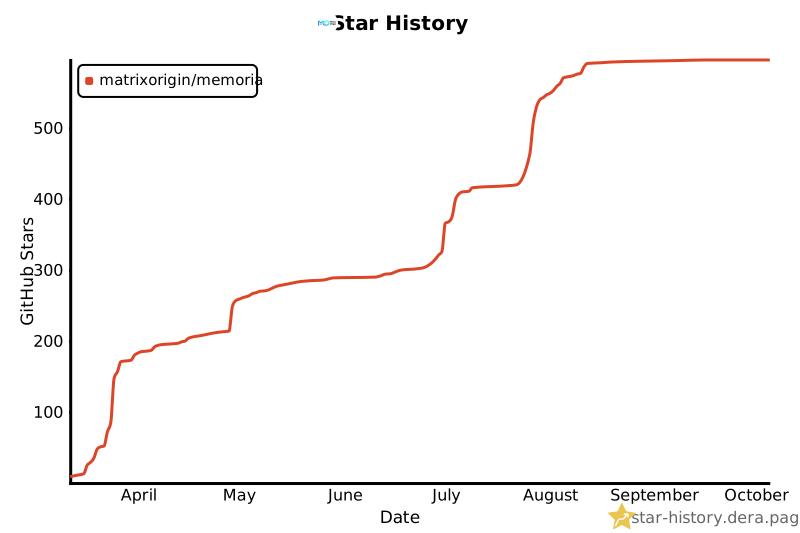
We'd love your support! If Memoria helps you, consider giving us a star.
[](https://star-history.dera.page/#matrixorigin/Memoria&type=Date)
**Contributing** — See the [developer documentation](#-development) above and check out our [issue templates](https://github.com/matrixorigin/Memoria/issues/new/choose) for bug reports, feature requests, and more.
---
## License
Apache-2.0 © [MatrixOrigin](https://github.com/matrixorigin)