<!--
Copyright © Advanced Micro Devices, Inc., or its affiliates.
SPDX-License-Identifier: MIT
-->
# ROCm CLI

[](LICENSE.TXT)
```
██████╗ ██████╗ ██████╗███╗ ███╗ ██████╗██╗ ██╗
██╔══██╗██╔═══██╗██╔════╝████╗ ████║ ██╔════╝██║ ██║
██████╔╝██║ ██║██║ ██╔████╔██║ ██║ ██║ ██║
██╔══██╗██║ ██║██║ ██║╚██╔╝██║ ██║ ██║ ██║
██║ ██║╚██████╔╝╚██████╗██║ ╚═╝ ██║ ╚██████╗███████╗██║
╚═╝ ╚═╝ ╚═════╝ ╚═════╝╚═╝ ╚═╝ ╚═════╝╚══════╝╚═╝
Local AI on AMD GPUs — one binary, zero setup
```
ROCm CLI is a command-line tool for setting up and running local AI on AMD GPUs, with a
full-screen terminal user interface (TUI) dashboard for GPU telemetry, model serving, and chat.
It ships as a single prebuilt binary for Linux and Windows (x86_64), needs no
Python, Rust, or existing ROCm install, and includes inference engine adapters
for Lemonade and vLLM.
<!-- platform-support-table-start -->
| Platform | Prebuilt binary | Notes |
|---|---|---|
| Linux (x86_64) | Yes | Ubuntu 24.04 or newer; full support, including the live dashboard and both inference engines |
| Windows (x86_64) | Yes | CLI and Lemonade serving; live dashboard shows GPU/CPU/memory but not the serving-instance registry; no vLLM |
| WSL2 (x86_64) | Yes (Linux binary) | Ubuntu 24.04 or newer; full support, including the live dashboard |
| macOS | No | No official installer, release, CI, or QA coverage |
<!-- platform-support-table-end -->
For WSL2 setup and diagnosis, see [docs/wsl.md](docs/wsl.md).
Live dashboard telemetry works on Windows too, but shows only GPU/CPU/memory —
the serving-instance registry view needs the `rocmdashd` unix socket, so it's
Linux/WSL2 only (see [Interactive interfaces](#interactive-interfaces)). vLLM
serving is Linux or WSL2 only (see [docs/vllm.md](docs/vllm.md)).
The minimum supported Linux release, native or under WSL2, is Ubuntu 24.04. On
other distributions the equivalent requirement is glibc 2.38 with
`GLIBCXX_3.4.32`: that is what the Lemonade engine is linked against, and every
published build of it needs those versions, so there is no older release to fall
back to. Ubuntu 22.04 ships glibc 2.35 and cannot run it; Ubuntu 24.04 provides
glibc 2.39 and `GLIBCXX_3.4.33`.
> [!IMPORTANT]
> **Tech Preview:** This software is provided as-is, without warranty or
> guarantee of stability. APIs, commands, and behavior might change without
> notice. Intended for experimentation and early feedback only.
## Demos
### ROCm CLI
Inspect the environment, discover engines and models, find a running service,
and chat with a locally served model:
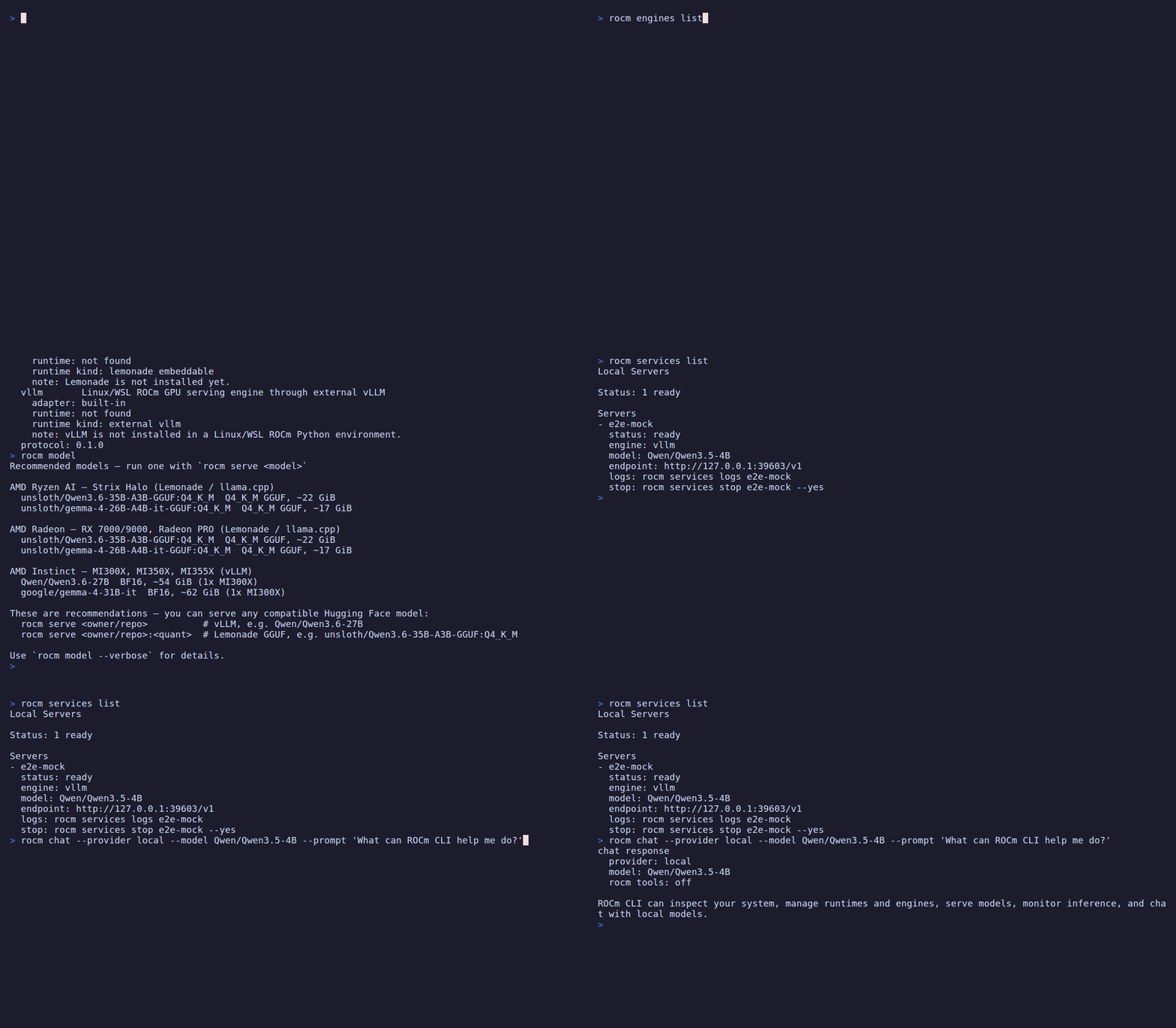
### ROCm Console
Explore simulated GPU telemetry, model serving, and offline chat in the
full-screen Console:

<!--
The GIFs above are generated in CI and served from the orphan `media` branch;
they are never committed to source branches. See docs/demos.md to regenerate or
add a demo. Until the demo-gifs workflow has run once, these links 404.
-->
## Installation
The installer downloads a prebuilt bundle, verifies its SHA-256 checksum,
installs the `rocm` and `rocmd` binaries into `~/.local/bin`, and adds that
directory to your shell `PATH`. Rerun it any time to upgrade. `rocm uninstall`
removes the binaries, and undoes the `PATH` change too when no other program
lives in that directory.
### Linux and WSL2 (x86_64)
```bash
curl -fsSL https://raw.githubusercontent.com/ROCm/rocm-cli/main/install.sh | sh
```
This tracks the default `release` channel. For nightly builds, pass the
`nightly` channel instead:
```bash
curl -fsSL https://raw.githubusercontent.com/ROCm/rocm-cli/main/install.sh | sh -s -- nightly
```
### Windows (x86_64, PowerShell)
```powershell
irm https://raw.githubusercontent.com/ROCm/rocm-cli/main/install.ps1 | iex
```
This tracks the default `release` channel. For nightly builds, set
`ROCM_CLI_CHANNEL` to `nightly` first:
```powershell
$env:ROCM_CLI_CHANNEL = "nightly"
irm https://raw.githubusercontent.com/ROCm/rocm-cli/main/install.ps1 | iex
```
### Verify the installation
Open a new terminal so the updated `PATH` takes effect, then run:
```bash
rocm version
```
The output shows the ROCm CLI version with its release tag or branch and commit
hash, the ROCm SDK that ROCm CLI would use on this computer, and the GPU driver
version. A successful install prints the CLI version line. The SDK and driver
lines read `not detected` when none is found, which is expected on a computer
where you haven't installed ROCm or a driver yet.
If the shell reports `rocm: command not found`, confirm that the install
directory is on your `PATH`. That is `~/.local/bin` on Linux,
`%USERPROFILE%\.local\bin` on Windows, or the folder you set with
`ROCM_CLI_INSTALL_DIR`.
## Build from source
Building requires [Rust](https://rustup.rs/); the pinned toolchain in
`rust-toolchain.toml` (currently 1.96.0) installs automatically through `rustup`.
```bash
git clone https://github.com/ROCm/rocm-cli
cd rocm-cli
cargo build --release
```
This produces the two binaries under `target/release/`:
- `rocm`: the CLI and interactive interfaces
- `rocmd`: the background telemetry daemon used by the dashboard
Run without installing:
```bash
cargo run --release --bin rocm -- examine
```
Or copy the release binaries onto your `PATH`:
```bash
install -m 0755 target/release/rocm target/release/rocmd ~/.local/bin/
```
See [CONTRIBUTING.md](https://github.com/ROCm/rocm-cli/blob/main/CONTRIBUTING.md) for the full development setup, test
commands, and commit-signing requirements.
## First run
Launch ROCm CLI with no arguments:
```
rocm
```
With no arguments on an interactive terminal, `rocm` opens the **launcher**, a
small front-door menu that gets you to the common tasks:
- **Set up this system**: install or update ROCm
- **Serve a model**: run a model on your GPU
- **Diagnose & fix**: check GPU, driver, and ROCm
- **Chat**: talk to a local or API-backed model
- **Open full dashboard →**: escalate into the live dashboard (`rocm dash`)
Pick a row with the arrow keys and `Enter`. Press `q` or `Ctrl-C` to quit.
`Ctrl-C` quits from the launcher and the dashboard alike and restores your
terminal.
The one exception is the dashboard's console for a **running** job, where
`Ctrl-C` keeps its existing meaning of "cancel this job" and does not quit. Once
that job finishes, `Ctrl-C` quits there too.
If a model is still being served, quitting asks for confirmation first. This
covers `q`, the Esc menu's `Quit` row, and `/quit` or `/exit` in chat, from the
launcher or from a dashboard or chat session opened directly. The prompt names
the model and the real `rocm services stop <id> --yes` command to stop it. From
the dashboard, pressing `s` instead jumps straight to the Services overlay to
stop it there. Declining (`n` or Esc) returns to where you were. Confirming
(`y` or Enter) quits anyway, and the model keeps running in the background.
Unlike `q`, `Ctrl-C` always quits immediately without asking, with the same
running-job exception as above. See
[Developer manual QA](https://github.com/ROCm/rocm-cli/blob/main/docs/manual-testing.md)
for the Windows and launcher-hosted-session details.
On a non-interactive terminal (or piped output), `rocm` prints a one-shot status
summary instead of opening the launcher.
## Interactive interfaces
`rocm` ships two terminal UIs built on [ratatui](https://ratatui.rs/):
### The launcher (`rocm`)
The lightweight hub described above. It runs the guided **Set up**, **Serve**,
**Diagnose**, and **Chat** flows in place, and hands off to the full dashboard
when you need live instruments. This is the default surface for everyday use;
the legacy full-screen setup assistant has been retired.
### The dashboard (`rocm dash`)
The full-screen telemetry dashboard shows every instrument and action on one screen.
It auto-starts an embedded `rocmd` daemon when none is running, then presents
five tabs (switch with `Tab`/`Shift+Tab` or number keys `1`–`5`):
| Tab | What it shows |
|---|---|
| **Home** | At-a-glance status: GPU, active runtime, running servers |
| **ROCm** | Guided ROCm and runtime actions with inline details |
| **Serving** | Start, inspect, and manage model servers |
| **Observe** | Live GPU utilization, instances, and benchmark telemetry |
| **Chat** | Assistant chat backed by a local server or configured provider |
Live mode works on Windows too, but shows only GPU/CPU/memory — the
serving-instance registry needs the Unix domain socket telemetry, so that view
is Linux/WSL2 only. Use `rocm dash --demo` for a synthetic session that runs
anywhere without a GPU or daemon.
## Configure ROCm and serve a model
Before serving a model, check whether a managed ROCm runtime is already
configured:
```
rocm examine
```
When `active_runtime_status` reports `ready`, you can serve a model now. A
machine can also have an existing ROCm install that `rocm examine` reports as
`legacy_rocm_status: detected_unmanaged`, alongside the managed runtime. To
install a runtime, or to get a different version or configuration, run:
```
rocm install sdk
```
This downloads TheRock ROCm wheels and a matching PyTorch stack into a managed
environment. Running `rocm install sdk` creates a managed runtime alongside any
legacy install.
ROCm CLI supports ROCm 7.14, 10.0, and 10.1. Without `--version`,
`rocm install sdk` currently installs ROCm 7.14. To install ROCm 10.0 or 10.1,
add `--version`. If ROCm CLI can't tell which exact GPU arch this computer has,
or you want a different one, also add `--family` with the raw `gfx` code from
`rocm examine`. For example: `--version 10.1.0 --family gfx1200`.
Running `rocm install sdk` when a managed runtime is already the active default
asks first, because the new install takes over as the active default; see
[ROCm installation](https://github.com/ROCm/rocm-cli/blob/main/README.md#rocm-installation)
for that gate, the flags that approve it without a prompt, and the ROCm 10 and
newer requirements.
After the install finishes, serve a model:
```
rocm serve qwen
```
`qwen` is a built-in alias for a small assistant model that serves out of the
box. You can also serve any compatible Hugging Face model directly. See
[Model serving](#model-serving) for the GGUF versus safetensors rule, because which
form works depends on the engine your GPU selects.
## Quick reference
| Command | Description |
|---|---|
| `rocm` | Open the launcher menu (setup, serve, diagnose, chat, dashboard) |
| `rocm examine` | Check GPU, ROCm install, engines, and managed folders |
| `rocm diagnose` | Match this machine against known ROCm, PyTorch, and llama.cpp failure modes |
| `rocm diagnose --model <model>` | Say whether a model will run here, before downloading it; for a GGUF, estimate the largest context that fits |
| `rocm diagnose --report` | Show what this machine would contribute to a problem report, and send nothing |
| `rocm fix [<fix-id>]` | Apply a fix reported by `rocm diagnose` |
| `rocm install sdk` | Install TheRock ROCm wheels into a managed Python environment |
| `rocm install driver` | Install the AMD kernel driver on Linux; on Windows, report the display driver version and age (installs nothing) |
| `rocm serve <model>` | Start a local OpenAI-compatible model server |
| `rocm remote serve <machine> <model>` | Serve a model on another GPU machine over your private network |
| `rocm dash` | Open the full-screen telemetry dashboard |
| `rocm bench load --endpoint <url>` | Load-test a local OpenAI-compatible endpoint |
| `rocm setup status` | Show first-time setup state |
| `rocm version` | Print the ROCm CLI version, release tag or branch, and commit hash, plus the ROCm SDK and GPU driver in use |
| `rocm completions <shell>` | Print a shell completion script (bash, zsh, fish, elvish, powershell) |
## Commands
### Examine
```
rocm examine [--json] [--framework auto|pytorch|llama-cpp|skip]
```
Checks this computer's GPU, ROCm install, engines, and managed setup
folders. Run this command first to see whether a system is ready and what
`rocm install sdk` and `rocm serve` will see. `--json` emits a
machine-readable report for diagnosis tooling instead of the human-readable
summary. `--framework` controls which ML framework the `--json` report probes
for its ROCm build and compiled GPU architectures:
- `auto` (the default) tries PyTorch, then falls back to llama.cpp.
- `pytorch` or `llama-cpp` probe only that framework.
- `skip` runs no framework probe at all, which is fastest and still enough to
answer GPU and driver questions.
`--framework` only affects the JSON report, not the human-readable one.
On Windows, the human-readable summary also shows the AMD display driver's
`driver_version` and `driver_date`, and a `driver_age` line. `driver_age`
compares the driver date with the release of the first HIP SDK for Windows
(27 July 2023). AMD publishes no minimum driver version for the HIP SDK or for
the Lemonade Vulkan backend, so this is a hint to look at the driver, not a
statement that the driver is broken. The date is only a floor: it cannot judge
newer GPUs such as gfx120X, gfx1150 and gfx1151, which may need newer drivers.
`rocm diagnose` lists the same finding as
`fix-22-display-driver-old` with a WEAK score. Its advice is AMD's support
page and a restart after the install. The entry is advice about the host, not a
cause of any reported symptom, so when nothing else matches, `rocm diagnose`
still says where to file it upstream. rocm-cli never installs drivers on
Windows. The Vulkan driver version is not shown.
### Diagnose and fix
```
rocm diagnose [--symptom TEXT] [--top N] [--json] [--distro [NAME] | --report [--send]]
rocm diagnose --model <model> [--context-size N] [--kv-cache-type f16|q8_0|q4_0] [--json]
rocm fix [<fix-id>] [--yes] [--dry-run] [--device-index N] [--json]
```
`diagnose` matches this machine against a fixed catalog of known
ROCm, PyTorch, and llama.cpp misconfigurations and ranks what it finds. It can
only recognize failure modes that are in the catalog: no match means "not
recognized", not "nothing is wrong". In that case it points you at where to
report the symptom.
Each result prints an `id:` and an `apply with:` command. The leading `#1`, `#2`
are ranking positions for reading order only. `rocm fix` takes the id, not the
position.
`rocm diagnose` takes these flags:
- `--symptom` takes raw error text to sharpen keyword scoring.
- On Windows, `diagnose` also checks the age of the Visual C++ runtime, not
only whether it is there. The runtime in `System32` must be 14.40 or newer
(`fix-21-msvc-redist-outdated`). Programs built with a recent toolset, such
as the llama.cpp server that Lemonade installs, crash with an access
violation in `MSVCP140.dll` on an older one. `rocm examine --json` shows the
version it read as `msvc_redist_version`. `rocm fix` only prints the update
plan, including a `winget install` line; it never runs the install.
- `--top` caps how many matches are shown in the human-readable output
(default 5). `--json` always emits the full, untruncated report.
- `--distro` diagnoses a WSL distribution from the Windows host instead of
this machine (nothing needs to be installed inside the distribution; name
it only when more than one is installed). Inspecting remotely this way
skips checks that need to read the distribution's own environment
(`HSA_OVERRIDE_GFX_VERSION`, `PATH`, the framework and ROCm pairing) and the
library and shared-memory checks (`fix-18-comgr-conflict`,
`fix-19-shm-too-small`). Run `rocm diagnose` inside the distribution for
those.
- `--report` shows exactly what this machine would contribute to a problem
report, and sends nothing. There is no automatic transport, and there will be
none: a report leaves a machine only by its owner's own action. A `--model`
given with it is not assessed (a report carries no model verdict), so a GGUF
reference is not looked up on Hugging Face for it.
- `--send`, which requires `--report`, additionally offers a prefilled mail
carrying that report. It still sends nothing: the mail opens already filled
in with the content `--report` just printed, addressed to `ROCmCLI@amd.com`,
and it leaves the machine only when you send it yourself. Requiring
`--report` is what guarantees the content is shown before the mail is
offered. The mail goes from your own mail account, so it carries your
address even though the report does not, and the CLI says so each time it
offers one.
The `--report` content is deliberately narrow (a schema version, the matched entry, whether
a fix was offered for it, the GPU architecture and which compatibility
matrix snapshot it was checked against, the OS family, distribution and
major version, the ROCm release, the inference engine and its release, the
CLI version), and it carries no host name, user name, file path, or error
text.
The ROCm release and the inference engine's release are each cut
back to a release, so a build number that would narrow toward one machine
never appears there; the CLI's own version is the exception, since it names
the tool that wrote the report instead of something read off the machine.
The distribution is checked against a list of known names instead of
being repeated from the machine.
Hardware that is not on AMD's published
compatibility matrix produces no report at all, and the CLI says why. So
does a WSL machine, for a different reason: this CLI does not inspect the
GPU on WSL yet, so it cannot confirm the hardware is on the compatibility
matrix and says that instead of claiming the architecture could not be
read.
With `--send`, a mail client opens only when you asked and the machine looks like
a desktop you are at; over SSH, with no display, or with `ROCM_NO_BROWSER`
set, the address and the link are printed instead, which is also what
happens on a machine with no mail client. It is not combinable with
`--json`, which exists for scripts, and a script is not a person who can
read a mail before sending it. Note that a mail carries your address, which
the report itself does not. The dashboard offers the same path on its Diagnose
screen: `p` shows the report, and `s` asks before it runs `--report --send`.
`fix` applies a known fix by the `id:` that `diagnose` reported, not the
ranking position noted above, which isn't a stable name. Run it with no id
to list the whole catalog.
Each fix carries a marker saying what happens on
this machine: AUTO (this command carries out the change), NEEDS-ARG (it will,
once given the argument it names), PRINT-ONLY (it prints the steps for you to
run yourself, usually because the right command depends on a choice only you
can make, sometimes because it also needs sudo or a reboot), or DIAGNOSE-ONLY
(no reliable fix exists, so running it names the problem, changes nothing, and
exits 0). `info-20-gpu-no-rocm-support` is the entry marked DIAGNOSE-ONLY
today: a GPU that ROCm has never shipped a runtime build for is a fact about the
hardware, not something an install or a setting can put right.
`rocm fix` takes these flags:
- `--dry-run` shows any fix's plan without changing anything.
- `--yes` skips the interactive confirmation once you've reviewed it. Without
it, a fix that changes files or settings asks `[y/N]` (default: no). When
stdin is not a terminal it prints the plan and refuses with exit code 5,
changing nothing; answering no also exits 5. Fixes that only print steps
never ask.
- `--device-index` pins the discrete GPU index for `fix-9-igpu-dgpu`, marked
NEEDS-ARG; without it, that fix only prints the `rocminfo` (Linux) or
`hipInfo.exe` (Windows) query needed to find the index and makes no change.
- `--json`, used without a fix id, prints the catalog manifest as JSON. It
applies no fix and exits 0. Together with a fix id it is refused, with exit
code 1.
### ROCm installation
```
rocm install sdk [--channel release|nightly] [--format wheel|tarball]
[--version x.y.z | --build-date YYYY-MM-DD]
[--family gfx110X-all] [--prefix PATH] [--devel] [--dry-run]
[--approve-replacing-active-default] [--yes]
rocm install driver [--dkms] [--yes] [--dry-run] [--reconcile]
rocm update [--apply] [--runtime KEY] [--activate] [--dry-run]
[--json] [--timeout-secs SECS] [--yes]
```
`install sdk` downloads TheRock ROCm wheels into a Python environment managed
by ROCm CLI. ROCm CLI supports ROCm 7.14, 10.0, and 10.1. Without `--version`,
it currently installs ROCm 7.14. To install 10.0 or 10.1, follow the steps under
ROCm 10 and newer, below.
To remove ROCm CLI and what it manages, see
[Logs and cleanup](#logs-and-cleanup).
#### GPUs with no ROCm build
Some AMD GPUs are detected but have no ROCm SDK build at all. The Vega iGPU in
Renoir, Lucienne, Cezanne and Barcelo APUs — the Radeon Vega graphics in Ryzen
4000 and 5000 mobile and desktop parts, reported as `gfx90c` — is one of them.
For these, `install sdk` stops and says no ROCm SDK build exists for that GPU,
instead of listing package families to try. It does the same when you name such
a target yourself with `--family gfx90c`: the request is refused, and no other
family is substituted for it. `rocm examine` reports the same conclusion on a
`rocm_support` line (see [Examine](#examine)).
These GPUs still work with the Vulkan backend, which needs no ROCm SDK.
#### Compiler toolchain (--devel)
Pass `--devel` to also install the compiler and headers needed to build GPU
code. This roughly doubles the download.
`--devel` isn't an addition to an existing runtime. A runtime is identified by
the packages it was installed from, so running `rocm install sdk` and later
`rocm install sdk --devel` at the same version leaves you with **two**
side-by-side runtimes. The second is a fresh full install, not a toolchain
bolted onto the first, and it becomes active.
To tell the two apart:
- `rocm runtimes list` marks each runtime `toolchain=included` or
`toolchain=excluded`.
- `rocm examine` reports the active runtime's toolchain as
`active_runtime_toolchain`.
- `rocm storage remove-old-installs` counts the two kinds separately, so
neither evicts the other.
To reclaim the space, uninstall the one you don't want with
`rocm runtimes uninstall <runtime-key>`.
#### Approval prompt
If no managed runtime is the active default, `install sdk` doesn't prompt.
Otherwise it asks first, because the new install becomes the active default.
The prompt applies to any install, including a `--family` or `--channel` you
haven't installed before, as it does for a same-family upgrade.
To approve without a prompt, for example in scripts or CI, where the prompt
would otherwise refuse:
- `--approve-replacing-active-default` approves the change of active default.
The refusal message recommends it, and ROCm CLI's own non-interactive
surfaces (chat, MCP, and the dashboard) pass it.
- `--yes` gives the same approval and also approves installing required system
packages, such as OpenMPI for vLLM. That requires `sudo`, so use it only where
something can answer a sudo password prompt. An unattended job can't, unless
it has passwordless sudo configured.
#### Install location
In the default managed install root, the root and its manifest are keyed by
version. An upgrade or downgrade keeps the previous install on disk. Only a
same-version reinstall reuses the same root.
`--prefix` changes this. The folder you name is used as-is for every version, so
successive installs into one prefix replace each other in place. If the venv
already there no longer runs its own Python, it is removed outright and rebuilt.
The approval prompt doesn't cover this, because it asks only about changing the
active default runtime, not about what a named prefix loses.
#### ROCm 10 and newer
ROCm 10 and newer ship from a different source layout. You opt in by pinning the
version with `--version`. These versions select their device payload by exact
GPU arch, so when ROCm CLI can't resolve one for this computer (it detects only
a family of GPUs, or none), or you want to target a different GPU, also pass
`--family` with the raw `gfx` code instead of a family label:
```
rocm install sdk --version 10.1.0 --family gfx1200 --dry-run
```
A family label such as `--family gfx120X-all` is rejected for those versions
instead of being resolved to a guess, because the ROCm 10 packages publish one
payload per exact arch and there is no bucket payload to fall back to. Run
`rocm examine` to see the arch this machine reports. If ROCm CLI detects a GPU
family but not the exact arch, the error names the command to re-run. If it
detects no GPU, pass the raw `gfx` code yourself.
For ROCm 10, `install sdk` pins torchaudio itself, because its metadata names no
ROCm build. When a torchaudio release has been verified on hardware for the
requested ROCm line (the exact torchaudio the vLLM ROCm 10.x install pins for
that line, where it pins one instead of a series), it pins that build.
Otherwise, or when that build isn't published for the requested ROCm version on
this Python and platform, it pins the newest build published for that ROCm
version. The `torchaudio_selection:` line in the plan says that build isn't
hardware-verified, as a `Note:` in a real install's log does. Newest isn't
always right: the index has published a CPU-only torchaudio under the same
`+rocm` label as working builds. The install stops with an error when the
requested version publishes no torchaudio for this Python and platform.
It then asks `uv` to resolve Torch and torchvision from their published
dependency metadata alongside the pinned torchaudio. Before it creates or
changes a managed runtime, it validates that every selected framework package
carries the same ROCm build identifier.
Nothing about this happens on its own. Without a `--version` of 10 or newer,
`install sdk` resolves the same release and nightly sources as before. It doesn't
quietly retry against the ROCm 10 sources when a lookup finds nothing; it tells
you what it couldn't find instead.
#### Driver installation
`install driver` installs the AMD kernel driver on Linux, using DKMS or a native
package. On bare metal it defaults to the floating `latest` amdgpu release;
set `ROCM_CLI_AMDGPU_DRIVER_VERSION` to pin a specific one. This replaces the
older `ROCM_CLI_AMDGPU_VERSION`/`ROCM_CLI_AMDGPU_PACKAGE_RELEASE` pair, which
pinned a fixed default and are no longer read; the plan is refused while either is still set,
so an old pin is never silently turned into `latest`.
On Ubuntu, the plan uses the `repo.radeon.com/amdgpu` suite matching the
release (`jammy` 22.04, `noble` 24.04, `resolute` 26.04). If `amdgpu-dkms` from
a previous installation is already present, the plan's first command prints a
warning naming the removal command (`apt-get autoremove -y amdgpu-dkms`); it
never removes the old driver itself, and the install continues after the
warning. This applies to every apt-based distro the DKMS flow covers (Ubuntu
and Debian 12/13).
Approving (`--yes`) a plan that is `supported: false` (an
undocumented distro, or a refused version override) installs nothing and exits
non-zero, after printing the plan.
`install driver` never asks for confirmation. Without `--yes`, in a terminal or
not, it prints the plan, changes nothing, and exits 0. A plan that would install
something is marked `approval: required`.
On Windows, `install driver` is validate-only: it installs and changes nothing,
with or without `--yes`, and it starts no driver command. It prints the AMD
display driver version and date, and whether the date is older than the first
HIP SDK for Windows, 27 July 2023 (`outdated: yes`, `no` or `unknown`). Next to
`outdated: no` it repeats that the date cannot judge newer GPUs such as
gfx120X, gfx1150 and gfx1151. For an
old driver it also names the fix id `fix-22-display-driver-old`. Run
`rocm diagnose` for the advice. AMD publishes no minimum driver version, so an
old date is a hint to look at the driver, not a finding that it is broken. See
[Examine](#examine).
#### Updates
`update` checks for a newer ROCm package.
| Flag | Description |
| --- | --- |
| `--apply` | Installs the update. Never prompts and needs no approval flag, because selecting a runtime to update is the approval. Leaves the active default alone unless you add `--activate`. |
| `--dry-run` | Previews what `--apply` would do without changing anything. Doesn't require `--apply`. |
| `--runtime`, `--activate` | Require `--apply` or `--dry-run`. |
| `--json` | Prints the check result as a single line of JSON instead of text. Conflicts with `--apply` and `--dry-run`. |
| `--timeout-secs` | Bounds the network calls of the check. Requires `--json`. Conflicts with `--apply`. |
| `--yes` | Accepted for consistency with other mutating commands, but grants nothing on `update`. The approval line the update path prints never credits it. |
### Runtime management
Manage multiple side-by-side ROCm runtimes:
```
rocm runtimes list
rocm runtimes activate <runtime-key> [--restart-services [--yes]]
rocm runtimes rollback [--restart-services [--yes]]
rocm runtimes uninstall <runtime-key> [--yes] [--dry-run]
rocm runtimes import <manifest-file> [--replace]
rocm runtimes adopt --python <path> [--root <path>] [--runtime-id ID]
[--runtime-key KEY] [--channel LABEL] [--replace]
```
`list` shows each runtime's version, GPU family, mode, and whether it carries
the compiler toolchain (`toolchain=included|excluded`). Runtimes are told apart
by the packages they were installed from, not by version alone, so one version
can appear more than once: a `--devel` install and a plain one of the same
version are two separate runtimes, as are two installs that resolved different
GPU device payloads.
`activate` and `rollback` change which runtime the next install or server
picks up. A server that is already running is not moved: it keeps serving on
the runtime it started with until it is restarted. Both commands count the
servers they leave behind and name each one, from what those servers themselves
recorded:
```
services_on_previous_runtime: 2
- svc-a engine=vllm recorded_runtime=<old-runtime-key>
- svc-b engine=vllm recorded_runtime=<old-runtime-key>
note: those keep serving on their recorded runtime until they are restarted; run `rocm runtimes activate <runtime-key> --restart-services --yes` to move them
```
When nothing is left behind the count is `services_on_previous_runtime: 0`. A
running server whose record names no runtime is counted separately under
`services_with_unrecorded_runtime:`, because what it loaded cannot be read back
from the record. Only servers on an engine that brings its own runtime
(`lemonade`) are never counted; an `env_id` recorded in a service record is not
a pin and does not exempt the server. The same summary appears in the
`rocm install sdk` and `rocm update --apply --activate` reports, which activate
a runtime without taking `--restart-services` themselves — which is why the note
names the `rocm runtimes activate` invocation that does, rather than a flag to
add to whatever was just run.
The note's command re-activates the runtime that is already active, which moves
the servers without moving the runtime. Re-activating the active runtime prints
`changed_from_runtime_key: <unchanged>` and keeps the existing rollback target.
Add `--restart-services` to move those servers onto the newly active runtime
rather than leave them behind; each one is put on the new runtime and then
restarted. Moving a server also clears any `env_id` stored in its record; the
engine writes its own back on the next launch. That restarts running servers,
so it requires `--yes` and never prompts, the same as
`rocm services restart <service-id> --yes`.
After each restart the command waits up to 45 seconds for the server to answer
an inference request, and the summary lists the outcomes separately:
```
services_restarted: 1
- svc-a
services_restarted_not_yet_serving: 1
- svc-b status=starting (check `rocm services logs svc-b` if it does not come up)
services_restart_failed: 1
- svc-c: <error>
```
- `services_restarted` lists servers that answered an inference request.
- `services_restarted_not_yet_serving` lists servers that were respawned but had
not answered when the wait ended. The command still exits 0 for these; if one
does not come up, check `rocm services logs <service-id>`.
- `services_restart_failed` lists servers that could not be restarted, and the
command exits with an error.
Servers are handled one at a time and a failure does not stop the rest: every
failure is named in the summary and its record is put back on the runtime it
last ran on. After a failure the server is read back: one that is still live
stays counted under `services_on_previous_runtime`, and one that is not is
reported as stopped by the attempt. The error says which is which. Read
`rocm services logs <service-id>` first — a restart that just failed is likely
to fail the same way again — then start a stopped server with
`rocm services restart <service-id> --yes` once the cause is fixed.
`runtimes uninstall` prompts `[y/N]` (default: no) unless `--yes` is passed.
Outside an interactive terminal it prints the plan and refuses with exit code 1,
removing nothing, so `--yes` is required there. `--dry-run` prints the plan and
exits without prompting or making changes.
`adopt` registers an existing TheRock-based Python environment as a managed
runtime. It does not work with standard ROCm package installs (for example,
`/opt/rocm`); use `rocm install sdk` instead. Without `--root`, the environment
folder is the one that holds the `--python` interpreter's `bin` (or `Scripts`)
folder; an interpreter anywhere else is refused until you pass `--root`.
### Disk space
Each ROCm runtime keeps its own multi-gigabyte folder, so installing or
updating a few times adds up. `rocm storage` shows where the space went and
frees the parts that are safe to remove:
```
rocm storage [report [--json]]
rocm storage remove-old-installs [--keep N] [--dry-run] [--yes]
rocm storage remove-downloads [--dry-run] [--yes]
```
Both removal commands list what they would remove, then ask `[y/N]` (default:
no) unless `--yes` is passed. Outside an interactive terminal, when there is
something to remove, they refuse with exit code 1 and remove nothing, so `--yes`
is required there. `--dry-run` never asks.
`remove-old-installs` keeps the two most recent installs for each channel,
format, GPU family, and toolchain choice, and never touches the install in use,
the rollback target, or a folder ROCm CLI did not create. "Most recent" means
most recently installed instead of highest version, so after a deliberate
downgrade the older version counts as the newer install.
Because the count applies per channel, format, GPU family, and toolchain
choice, a machine that has tried several channels keeps `--keep` installs for
each of them. A runtime-only install never evicts a `--devel` one, because the
two are separate runtimes serving different purposes instead of newer and
older versions of the same thing. Anything it declines to remove is listed with
the reason, and `--dry-run` shows the whole plan without changing anything.
`remove-downloads` clears cached archives that ROCm CLI can download again; a
cache folder that is a link to somewhere else is left alone instead of
being followed. The two archive rows the report prints are tagged
`note: can be downloaded again; safe to remove`, so it is visible which rows
`remove-downloads` acts on.
The report also lists `local server records`: one JSON record plus the engine's
log for each `rocm serve --managed` launch, kept after the server stops.
`rocm services list --all` lists them, and no `rocm storage` command removes
them. It also lists the `uv` package cache, the Hugging Face model cache, and
downloaded models. Those last three are shared with other tools, and no
`rocm storage` command removes them. `rocm uninstall` removes downloaded models
along with the data directory. On a default installation, keeping them takes
both `--keep-data` and `--keep-config`; see [Logs and cleanup](#logs-and-cleanup).
### Inference engines
```
rocm engines list
rocm engines install <engine> [--runtime-id KEY] [--python-version X.Y] [--reinstall]
[--yes]
rocm engines shell <engine> [--runtime-id KEY | --env-id ID] [--shell PATH]
```
Supported engines: `lemonade`, `vllm`, `aim`.
`rocm engines install lemonade` also keeps Lemonade's llama.cpp backend paired
with the ROCm SDK in use, and rewrites the two pins it owns
(`therock.version` and `llamacpp.rocm-stable` in `resources/backend_versions.json`)
to do so. If installing an already-pinned backend fails, it restores those two
pins from the cached Lemonade archive (it does not download), prints a warning,
and installs once more; see
[Lemonade backend alignment](https://github.com/ROCm/rocm-cli/blob/main/docs/engine-plugins.md#lemonade-backend-alignment-on-engine-install) for the details and for
`ROCM_CLI_DISABLE_LEMONADE_BACKEND_ALIGNMENT`, which turns both off.
`--yes` approves the system-package installs vLLM needs (OpenMPI, libatomic and
libnuma), including a `sudo` password prompt. `engines install` never asks for
confirmation. Without `--yes`, a Linux host with root or passwordless `sudo`
installs a missing package anyway, and one that would need a password prints the
commands to run while the install continues. With `--yes`, a failed OpenMPI
install is an error; a failed libatomic or libnuma install only warns. On
Windows these installs are skipped.
### Will a model run here?
Ask before downloading anything:
```
rocm diagnose --model <model> [--context-size N] [--kv-cache-type f16|q8_0|q4_0] [--json]
```
Answers from the curated recipe and this machine's GPU, in seconds. It
downloads no weights. For a curated model it makes no network call. The
verdict is `ready`, `degraded`, `blocked`, or `undetermined`. A `ready` answer
also names the engine `rocm serve` would use; a `blocked` one names curated
models that would run here instead.
`undetermined` is a real answer, not a failure. You get it when any of these is
true:
- The recipe catalog could not be read.
- This machine's GPU memory could not be measured. This includes an integrated
GPU (APU), where the CLI can't yet read the memory pool the engine uses.
- The model is not one of the curated recipes. [`rocm model --verbose`](#curated-models)
lists all of them, including recipes hidden from the default list.
None of these says anything about whether the model fits, so none of them is
reported as though it did. `rocm serve` still accepts a model outside the
catalog, but for anything other than a GGUF, `diagnose` cannot tell you in
advance how it will go.
#### A GGUF model outside the catalog
Pass a local `.gguf` path, or `owner/repo:QUANT` for a file on Hugging Face
(for example `owner/repo:Q4_K_M`, or an exact file name ending in `.gguf`, with
its directory when the file is in one and another file shares its name:
`owner/repo:dir/model-Q4_K_M.gguf`; a bare name means the file at the top of the
repository when there is one). On Hugging Face, a multimodal projector (an `mmproj`
file shipped beside a vision model) is never picked as the model, and naming one
by its file name is answered as such, with the repository's model files named
instead. A local projector file is not recognised as one; it is read like any
other GGUF. A file that
exists on this machine is read as that file even when its name looks like
`owner/repo:QUANT`. A bare
`owner/repo`, with no quantization, names a repository rather than a file and
is answered like any other model outside the catalog: undetermined, with
nothing read.
Instead of a recipe's minimum, `diagnose` reads the file's header, which holds
the layer count, the KV head count and head width, and the tensor shapes. For
a remote file that is one listing request for the repository (up to 16 MiB, to
find the file and its size), a `HEAD` request for a file the listing does not
size, then a few megabytes fetched by HTTP range request (set
`HF_ENDPOINT` to use a mirror); the weights are never downloaded. A remote read
has two minutes in all, so on a slow link it can take that long to fail. No
token is sent, so a gated or private repository cannot be read.
It then estimates weights, plus the KV cache at `--context-size` (default 4096)
and `--kv-cache-type` (default `f16`), plus a compute buffer and a runtime
reserve, against this GPU's dedicated VRAM:
```
rocm diagnose --model owner/repo:Q4_K_M --context-size 32768 --kv-cache-type q8_0
```
The answer is labelled `ESTIMATED: fits at N tokens` or `ESTIMATED: does not
fit at N tokens`, never `ready` or `blocked`: in `--json` the `verdict` stays
`undetermined` and the figures are under `model.estimate`. It reports the
largest context that fits with that KV cache type. When the file does not fit
at the size you asked for, it lists what would make it fit: a smaller context,
a q8_0 or q4_0 KV cache (llama.cpp needs flash attention for a quantized V
cache, and the estimate assumes it is on), a smaller quantization, or keeping
some layers on the CPU. Those are llama.cpp options (`--ctx-size`, `--cache-type-k`/`-v`,
`--n-gpu-layers`): **`rocm serve` does not take a context size, KV cache type
or GPU layer count yet**, so none of them is printed as a `rocm serve` command.
The KV cache is exact for a plain full-attention model, and the weights are the
file's own size from its tensor offsets, less the input embedding, which
llama.cpp keeps in host memory -- except for a model with tied embeddings (no
separate output layer), where llama.cpp uses the same tensor for the output
layer on the GPU, so there it is counted. That case was not measured, and
counting it can only overstate the figure. Only the compute buffer and the
runtime reserve are allowances, calibrated against real loads of two dense
full-attention models on one MI300X with llama.cpp b9752, flash attention on:
a Llama-3.1-8B-shaped and a Qwen2.5-1.5B-shaped GGUF, each with its own output
layer.
No mixture-of-experts, state-space, hybrid or sliding-window model was among
them. How close the estimate came to those
loads, and why that describes the fit rather than a bound, is written down once,
in the
[`gguf_fit` module documentation](https://github.com/ROCm/rocm-cli/blob/main/crates/rocm-core/src/gguf_fit.rs).
A model with sliding-window, state-space or mixture-of-experts layers was not
measured. A sliding-window model's KV cache is sized as if every layer attended
over the whole context, which can only overstate it, so it still gets a verdict.
A state-space or hybrid model's recurrent state is not counted, and a
mixture-of-experts model's compute buffer was not measured, so for those the
figures are shown with this GPU's memory but with no fits / does-not-fit verdict
(`cannot_estimate`, reason `unmeasured_layout`): a "fits" that is too low would
be worse than no answer. Many current open models are mixture-of-experts or
hybrid, so for a large share of them this gives the memory figures and leaves
the comparison to the reader. A header without the feed-forward or embedding width,
which size the compute buffer, is treated the same way (reason
`missing_metadata`, with the figures). Another
GPU, engine build or batch size can miss by more, so leave headroom. The figures
are compared with the total dedicated VRAM of the GPU with the most of it that
ROCm can see, the same figure a curated model's minimum is compared with, not
with what other processes have left free. When a device-visibility variable
(`HIP_VISIBLE_DEVICES`, `ROCR_VISIBLE_DEVICES`, `CUDA_VISIBLE_DEVICES`) is set on
a host whose GPUs differ in memory, the report says that the mapping between the
mask and `amd-smi`'s numbering has not been verified on such a host, so the
figure may be for a different card; that mapping has not been checked on a
multi-GPU machine. Where memory cannot be read, the memory the model needs is
shown and nothing is compared. The memory figures are whole MiB, each rounded
up, and the verdict is decided on their sum, so what is printed always adds up.
The largest context is also capped at the context length the model was trained
for. `--context-size` takes 1 to 16777216 tokens. Passing `--context-size` or
`--kv-cache-type` for a curated model changes nothing, because a recipe's memory
minimum is fixed; the report says so. Under `--report` the model is not assessed
at all, so nothing is fetched for it, and `--context-size` and `--kv-cache-type`
are ignored along with `--model`; a note on stderr names the flags that were
ignored.
On an integrated GPU (APU), where the CLI can't read the memory
pool the engine uses, and on a host with no GPU or an unreadable one, the
answer stays `undetermined` but still shows what the file needs. Layouts the
formula does not describe (a file that is one shard of a split model, latent
attention, a model with no attention layers) are reported as such rather than
estimated.
### Curated models
```
rocm model [--verbose]
```
`rocm model` (alias `rocm models`) lists the recommended local models, grouped by
the hardware they target. Pass `--verbose` to list every recipe, including ones
hidden from the default list, with details such as aliases, data type, minimum
GPU memory, and preferred engines. The AMD Inference Microservices (AIM) Docker
images are among the hidden recipes: `--verbose` shows each one's supported GPU
families, the GPU count it needs per family, and whether it needs a Hugging Face
token (`requires_hf_token=yes`), and
`rocm serve <model> --engine aim` runs it (needs a reachable Docker daemon).
AIM entries are hand-maintained and record when they were last verified;
`rocm model --verbose` warns when one is over 180 days old (see
`docs/aim-catalog.md`).
### Model serving
Start a local OpenAI-compatible model server:
```
rocm serve <model> [--engine lemonade|vllm|aim]
[--device gpu_required|gpu_preferred]
[--gpu auto|<index>]
[--runtime-id KEY | --env-id ID]
[--host HOST] [--port PORT]
[--verbose] [--foreground | --managed] [--wait]
[--no-smoke-test]
[--allow-public-bind] [--require-api-key] [--api-key KEY]
[--temperature TEMP] [--top-p PROB] [--max-tokens N]
[--gpu-memory-utilization FRACTION] [--tool-call-parser NAME]
[--engine-env KEY=VALUE]...
```
`--engine aim` runs the model in a Docker container instead of a host
process; it requires a reachable Docker daemon and is Linux/WSL2 only.
`--engine-env` passes an extra environment variable through to the engine's
own process/container (repeatable); currently only `aim` consumes these (e.g.
`AIM_PROFILE_ID`). `KEY=VALUE` values are visible in the detached child's
argv and in `rocm services list --json`, so do not put secrets there; pass a
bare `KEY` (e.g. `--engine-env HF_TOKEN`) to forward the value from your
current environment without storing it. A service restarted by the daemon
after a crash (with the `server-recover` automation enabled) inherits the
daemon's environment, not yours, so a forwarded secret must also be set
there. `ROCM_CLI_AIM_READY_TIMEOUT_SECS` raises the 5-minute readiness wait
for a cold-start model download.
`--port` is optional on the default loopback host (`127.0.0.1`): omit it and
`rocm serve` picks the first free port in `11435`-`11535`, checking both
rocm-cli's own records and the OS. The non-interactive plan output (piped
output, or the Dash approval card) shows `Port: automatic; endpoint shown
after launch` while the launch is in flight and prints the concrete endpoint
once the port is actually leased; the interactive deployment summary table
only ever shows the final resolved endpoint. Pass `--port` explicitly to pin
one; on `127.0.0.1`, an explicit loopback port already reserved by another
managed service is rejected up front, naming that service and how to free it
(`rocm services stop <service-id> --yes`). A port held by an untracked process
is rejected too, but without naming the holder. `--host` to anything other
than the default
loopback address (`localhost`, `::1`, `0.0.0.0`, or any other address)
requires an explicit `--port`: automatic selection only probes `127.0.0.1` and
cannot promise a free port anywhere else. An explicit `--port` on such a host
is refused when a live managed service already holds that port on the same
address (`localhost` counts as both loopback addresses) or on a wildcard
listener that covers it (`0.0.0.0` for IPv4 addresses, `::` for any); the OS is not probed on such a
host, so any other clash is reported by the engine when it starts.
`rocm services restart` and `rocmd`'s automatic recovery are deliberately
stricter about hosts than that launch check: they refuse to bring a service
back on a port that any other live managed service has recorded, whatever host
that service is bound to, because a `0.0.0.0` listener also covers the loopback
address.
`--gpu-memory-utilization` (a fraction above 0.0 and up to 1.0 of each GPU's
total VRAM) and `--tool-call-parser` (for example `hermes`, `llama3_json`, or
`mistral`, which also turns on automatic tool choice) apply to vLLM only. Lower
the memory fraction when a small model shouldn't reserve most of a large card.
`--require-api-key` makes a loopback endpoint require an API key too, which
matters when something else republishes the port. A public bind generates a key
automatically unless you supply one. Set `ROCM_SERVE_API_KEY` rather than
passing `--api-key`, so the secret stays out of your shell history and the
process table.
`--temperature` (>= 0.0), `--top-p` (0.0-1.0), and `--max-tokens` (> 0) set
server-wide sampling defaults for the launched engine. They apply only to
`vllm` and `lemonade`; other engines reject them. For vLLM they are folded
into a single `--override-generation-config` JSON object (`--max-tokens` maps
to vLLM's `max_new_tokens`); for Lemonade they pass straight through as
llama.cpp's `--temperature`, `--top-p`, and `--n-predict` flags. Each control
is optional and independent, so omit any of them to keep the engine's own
default.
`rocm serve` only reuses an already-running service for the same engine and
model if its sampling controls (and other recipe settings) match the ones
requested this time; otherwise it errors out instead of silently serving with
different settings. If you previously started a service with `--temperature`
(or another sampling flag) and now run `rocm serve` for the same model without
flags, or with different ones, stop the existing service first (`rocm
services stop <service-id> --yes`) or match the original flags.
Likewise, an explicit `--port` that differs from the port the running service
is already on is refused rather than silently ignored; omit `--port` to reuse
the running service, or stop it first to serve on the new port.
By default the server runs in the background under ROCm CLI's supervision and
prints a deployment summary: a progress indicator while it starts, then a table
with the status, the full inference endpoint, the API-qualified model name, and a
quick smoke test (time to first token and approximate tokens per second). Control
returns to your shell with the server still running; manage it later with `rocm
services` (below).
`--verbose` (or `--foreground`) instead attaches to the server in the current
terminal and streams every engine log line. Use it to debug a startup problem.
The server still runs as a managed background process, so while streaming you
can:
- Press **Ctrl-D** to detach. The log stream stops, your shell comes back, and
the server keeps running. Manage it afterward with `rocm services`.
- Press **Ctrl-C** to stop the server instead. If the stop answers that it
could not confirm the server's process exited, the command prints the same
report as `rocm services stop` on stderr and exits with an error. If the stop
itself fails, the command says why on stderr, signals the server process
directly and exits 0; if that signal fails too, it says so on stderr.
`--managed` is the explicit form of the default background behavior.
`--wait` keeps `rocm serve` waiting until the server answers requests or its
engine gives up (vLLM and AIM after 5 minutes by default; raise it with
`ROCM_CLI_VLLM_READY_TIMEOUT_SECS` / `ROCM_CLI_AIM_READY_TIMEOUT_SECS`), instead
of returning `starting` after 45 seconds; if the server exits first (crashes, is killed, or is stopped with
`rocm services stop`), it fails with an error that points at the server's logs
instead of waiting forever. Ctrl-C ends the wait and leaves the server starting
in the background; a generated API key (public bind) is printed when the wait
begins, so interrupting the wait does not lose it. It cannot be combined with `--foreground` or `--verbose`, and
when the model is already being served and still starting, it waits on that
server instead (an already-serving one is reported at once). Watch the download with
`rocm logs --service <id> --follow` from another terminal.
`--no-smoke-test` skips the post-startup inference probe.
Which model form to pass depends on the engine your GPU selects. The Lemonade
engine (Ryzen AI or Radeon) serves llama.cpp **GGUF** models. Pass a GGUF repo
with an explicit quantization variant, for example,
`rocm serve unsloth/Qwen3-0.6B-GGUF:Q4_0`.
The vLLM engine (Instinct) serves
**safetensors** repos, such as `rocm serve Qwen/Qwen2.5-1.5B-Instruct`.
A safetensors-only id has no GGUF build, so serving it through Lemonade fails
instead of silently substituting a different model.
Some models (such as Llama) are gated and require Hugging Face authentication.
Log in with `huggingface-cli login` or set `HF_TOKEN` in your environment
before serving gated models. The exception is `--engine aim`, whose container
does not read your environment on its own: export `HF_TOKEN` and pass
`--engine-env HF_TOKEN` (see above), or `rocm serve` refuses a gated AIM image
before pulling anything.
`--gpu` selects which AMD GPU the server runs on. `auto` (the default) probes
per-GPU VRAM (through `amd-smi`, or the amdgpu DRM sysfs counters when `amd-smi`
is not installed) and picks the lowest-numbered GPU that is idle and not already
used by another ROCm CLI server (managed or foreground), falling back to the GPU
with the most free memory. Pass a single index (`--gpu 1`) to pin a specific
device. An index the machine does not have is refused before anything starts,
and the error lists the indices that exist. On Windows the index is checked
against the AMD display adapters Windows reports (and against the `amd-smi`
count when that works, whichever is lower). That list can include an adapter the
ROCm runtime does not support, so on Windows the check can still accept an index
the runtime cannot use; it is a guard against a mistyped index, not a guarantee
the device is usable. If neither the Windows list nor `amd-smi` can be read, the
index is used unchecked and `rocm serve` prints a warning on stderr saying so.
If a visibility mask is set but cannot be applied (on Windows `HIP_VISIBLE_DEVICES`
holding an empty value, a UUID, or an ordinal past the adapters Windows lists; on
Linux a mask when the GPU lists could not be read but `amd-smi` still gives a
count), the index is still refused when it is at or past the GPU count, and one
below the count is accepted with a warning that the mask was not applied. When
`amd-smi` gives a count and no mask is set, the Windows list is not queried.
The selected GPU is exposed to the engine through `HIP_VISIBLE_DEVICES`. Serving
one model across multiple GPUs is not supported. Because selection uses the
`amd-smi` ordinal but is applied through `HIP_VISIBLE_DEVICES`, ROCm CLI warns
when `ROCR_VISIBLE_DEVICES` is set, because the two orderings can diverge.
#### Reuse is exempt from the no-GPU refusal
Under the default `gpu_required` policy, `rocm serve` on a host with no usable
AMD GPU fails fast with `no usable AMD GPU detected`, before any engine is
prepared or downloaded. A `rocm serve` that matches an **already-running
managed service for the same engine and model** now skips that refusal and
prints the reuse summary instead. This is a real change to a refusal you may be
relying on: on a GPU-less host, `rocm serve <model>` can now succeed where it
previously always failed.
The exemption is limited to that case, and nothing else about `gpu_required`
changes. The reused service was vetted against the policy at its own launch,
and the reusing invocation launches no process and does no GPU work. A live
service for a different engine does not soften the refusal, and neither does one
for a model whose name does not overlap — those still fail fast with the usual
message and prepare nothing.
Matching the engine and model is necessary but not sufficient. The exemption
applies only when the service would *actually* be reused, and that is decided by
exactly the predicate the launch itself applies: the recipe settings must match
(the sampling-control rule under [Model serving](#model-serving) above), a
`--require-api-key` request must be satisfiable by a service that already has a
key, and the service's recorded device policy must satisfy this one — a
`gpu_required` serve is not reused from a service recorded as `cpu_only`. That
is the only policy pair refused; any other combination, including a record that
predates the field and so names no policy at all, is accepted. (No `rocm serve`
can record a `cpu_only` service today — `--device cpu_only` is refused outright,
since CPU is not a fallback path here — so that term is a guard, not a refusal
you will meet.) A live service that fails any of those is not reusable, so it
buys no bypass: `rocm serve` refuses on the GPU instead, which is the accurate
message and leaves your running server alone. (Telling you to stop it and re-run
would not help: the re-run would have nothing left to reuse and would hit the
same GPU refusal.)
Two limits are worth stating exactly, because they are easy to read as stronger
than they are:
- **Model names are matched leniently.** The check that decides whether reuse is
even worth asking about uses the same two-way substring match the service
listings use, so a live `qwen3-8b-instruct` service opens it for
`rocm serve qwen`. On a GPU-less host that invocation then does engine
preparation — possibly printing `Preparing <engine> for GPU serving...` and
installing — *before* the refusal it ultimately gets, and if that preparation
fails you get its error rather than the GPU one. Leniency is deliberate:
tightening it would silently break legitimate reuse by short name. Only a
model name that does not overlap is guaranteed to refuse first with nothing
prepared.
- **The exemption does not apply with an explicit `--gpu <index>`.** It skips
the no-usable-GPU bail, not the pinned-index check that follows it — and that
check refuses *every* index on a host with no usable GPU, because there is no
visible ordinal for one to name. So `rocm serve <model> --gpu 0` is refused on
a GPU-less host whether or not a reusable service is running, and so is
`--gpu 1`, and so on. The exemption applies under the default `--gpu auto`.
#### When a serve runs out of GPU memory
When a vLLM serve that **this command launched** fails to become ready and its
engine log shows an out-of-memory failure, the deployment summary adds a note
confirming the attempt ran out of GPU memory, naming the two knobs that can fix
it — `--gpu-memory-utilization <fraction greater than 0 and at most 1>` and
`--gpu <index>` — warning that lowering the reservation will not help if the
model simply does not fit, and printing a
`rocm diagnose --symptom '<your failing line>'` command for the full
busy-GPU-versus-model-too-large breakdown. A failing line that cannot be placed
in a shell-quoted argument intact — one containing an apostrophe, for instance —
is replaced by a canonical vLLM OOM symptom, which reports the same cause.
A line carrying **terminal control bytes** that an *escape sequence* is part of
— vLLM's colourised logger, or a repaint that moves the cursor with something
like `ESC[1A` or clears the row with `ESC[2K` — is the one case where the two
surfaces can print different commands for the same failure, and both are sound.
(A bare carriage-return repaint is not that case: the log is split on `\r`, so
the allocator line comes back as a clean segment carrying no escape and the two
surfaces quote it identically.) The engine's own failure
message refuses the raw line and falls back to the canonical symptom. The serve
summary reads the log *after* the engine has echoed its tail into it as the rows
a terminal would have drawn, so the note quotes that rendered row — real text the
terminal printed, carrying no control bytes — instead. See
[docs/vllm.md](https://github.com/ROCm/rocm-cli/blob/main/docs/vllm.md) for the
flag itself and the quoting rule each printed command follows.
The note is deliberately narrow, so its absence is not evidence that memory was
fine. It appears only when all of the following hold:
- The engine is vLLM. It is the only engine with `--gpu-memory-utilization`.
- You are looking at the **interactive deployment summary** — the default
background managed launch with a terminal on stdout. A piped, redirected, or
otherwise scripted run prints the plain machine-readable form
(`readiness: <status>`), which carries no *post-launch* notes — it still
prints the pre-launch planning lines, including the low-VRAM `note:` when
amd-smi reports a tight card, so a `note:` in piped output is never this one —
and `--verbose`/`--foreground` streams the engine log in your terminal instead,
where the traceback is already in front of you. Either way, the log is on
disk: `rocm services logs <service-id>`.
- The service **failed to become ready** (recorded status `starting`). A `ready`
service, or a `running` one whose endpoint is up while the model is still
loading, is healthy and is never given memory advice.
- The log tail carries a real allocator failure — `HIP out of memory`,
`CUDA out of memory`, `hipErrorOutOfMemory`, or a `torch.OutOfMemoryError`
corroborated by an allocator message. A bare "out of memory" phrase from the
kernel OOM killer or an unrelated subprocess does not qualify, and a failure
with no memory signature is never dressed up as one.
- **This** invocation launched the process. A `rocm serve` that reuses an
already-running service launches nothing, and its summary carries no log path
at all, so the running service's log is never read and this invocation is
never blamed for another process's failure. Read that service's own log with
`rocm services logs <service-id>` instead.
- **The failing line is still near the end of the log.** The summary reads a
fixed tail of the engine log, and it reads it *after* the engine has appended
its own failure message — which echoes that same tail back — to the file. A
launch that OOMs and then logs another ~80 lines of shutdown can therefore push
the allocator line out of the window the summary sees, and no note appears even
though the engine's own message (in `rocm services logs <service-id>`, or in
`--verbose`/`--foreground` output) names the OOM. The engine's message is the
authority on whether the launch ran out of memory; this note is the convenience
copy.
If the pre-launch low-VRAM warning already printed the
`--gpu-memory-utilization` advice for the selected GPU, the OOM note drops that
one sentence rather than repeating it; the rest of the note — the confirmation,
the model-too-large caveat, and the `diagnose` command — still appears.
Manage background servers started with `--managed`:
```
rocm services list [--all] [--json]
rocm services logs <service-id> [--follow]
rocm services stop <service-id> --yes
rocm services restart <service-id> --yes
rocm services remove <service-id> --yes
rocm services prune [--older-than-hours <n> | --any-age] [--dry-run] [--yes]
```
`stop` reports a server stopped only once every recorded process is confirmed
gone. If it cannot confirm that, it prints `Local server stop not confirmed` on
stderr and exits with an error. It keeps the record, which still names the
processes, and any endpoint key, which the server may still be enforcing. It
names each process that, or a process under it, did not exit after it was
signaled; for a process it could not verify as the server's, it signals nothing
and names an operating-system command to check on it. It does not suggest
running the stop again: when only a process under the recorded one survived, a
second stop can report the server stopped while that process still runs.
`restart` starts a server again only once its stop has confirmed that every
recorded process is gone; if the stop cannot confirm that, it says so, starts
nothing, and leaves the stop request recorded.
After the stop confirms, `restart` takes the same launch lock `rocm serve` uses
and re-checks the port before it respawns: if another live managed service is
now recorded on that port, or (on the default `127.0.0.1` host only) the port is
bound by another process, it refuses and the service stays stopped (`rocm services list` shows it). The lock wait is
bounded (5 seconds), unlike `rocm serve`'s: if a launch still holds the lock,
`restart` fails saying the server was stopped but not restarted and names
`rocm services restart <id> --yes` to run once that launch finishes.
`remove` deletes one record that is no longer running, together with its log,
its engine state file, and its endpoint key file; a running server is refused,
so stop it first. `prune` does the same in bulk, always leaves running servers
alone, and additionally clears leftover files whose record is already gone.
Removal destroys both the log and the `restart` option for the records it
takes, so `prune` only considers records untouched for 24 hours. Age is
measured from when the record file was last written, so a stop, a restart, or a
status correction all count as touching it. Pass `--older-than-hours <n>` for a
different threshold, or `--any-age` to take every record that is not running
however recent. That is the flag `prune` names in its own summary when it
reports how many records it kept for being too recent. The two cannot be
combined.
A file whose record has not been written *yet* belongs to a server
that is still starting, not to something left behind, so `prune` waits for any
managed launch already under way to finish publishing its record before it looks
at the directory. That wait lasts as long as the launch does and has no timeout,
so it is usually imperceptible but is not bounded: on an interactive terminal
`prune` prints `Waiting for a launch already under way…` while it waits,
including under `--dry-run`. That notice goes to stderr and is suppressed when
stderr is not a terminal, so a piped or scripted prune waits silently. The same
lock runs in the other direction, so a `rocm serve`
started while a `prune` is scanning waits for the prune.
`--json` prints the service records verbatim, for scripting and for the remote
orchestration below.
### Remote machines (preview)
Run a model on a different GPU machine and reach it from your own. Both machines
join a [Tailscale](https://tailscale.com) network; the GPU machine serves the
model on its own loopback address and publishes that port onto the network, so
the endpoint keeps working after the command exits and answers from any of your
machines instead of only the one that started it.
```console
rocm remote targets [--tag <tag>]
rocm remote doctor <machine> [--symptom <text>]
rocm remote serve <machine> <model> [--engine <engine>] [--gpu <index>]
[--tailnet-port <port>] [--install-rocm]
rocm remote status [<session>]
rocm remote attach <session>
rocm remote stop <session> [--force]
```
`targets` lists machines on your network. It does not check whether they can
actually serve, which is what `doctor` is for. `serve` prepares the machine
(installing the CLI if it is missing), starts the model, publishes the endpoint
and prints the address together with an API key.
**The endpoint is reachable by every machine on your network that your network's
access rules allow**, not just yours. That API key is what stops anyone else
from using it, so `rocm remote` always sets one. This differs from local serving, which is
credential-free because only your own machine can reach it.
`status` reports the model and the endpoint separately, because either can fail
alone: a healthy model with no endpoint needs `attach`, not a restart. `stop`
withdraws the endpoint and stops the model, and keeps the session listed if it
cannot confirm both. Use `--force` to forget one whose machine is gone.
Communication with the machine uses your existing `ssh` setup. Set
`ROCM_REMOTE_SSH_CONFIG` to point at a configuration file other than the
default.
### Dashboard
```
rocm dash [--demo] [--replay <file>]
```
Full-screen TUI with Home, ROCm, Serving, Observe,
and Chat tabs. It shows GPU
utilization graphs, active serving instances, benchmark results, guided actions,
and a chat tab backed by any configured provider. See
[Interactive interfaces](#interactive-interfaces) for the tab breakdown.
For `rocm dash`:
- `--demo` runs a deterministic synthetic session with no GPU or daemon needed.
It works on all platforms.
- `--replay <file>` replays a recorded NDJSON session.
- Live mode works on Windows too, but shows only GPU/CPU/memory — there's no
`rocmdashd` unix socket to connect to there, so the serving-instance
registry view stays empty (Linux and WSL2 get the full live view).
### Bench
```
rocm bench load --endpoint URL [--model NAME] [--concurrency N,N,...]
[--isl N] [--osl N] [--requests N] [--out FILE] [--auto-ramp]
```
Saturates a local OpenAI-compatible endpoint and reports rough client-side
throughput. It is a local smoke test, **not** an official ROCm or AMD benchmark.
`load` measures raw serving throughput with synthetic single-shot requests
(the vLLM `benchmark_serving` shape); it does not reproduce agent-shaped,
multi-turn, long-context tool traffic and isn't comparable to `*-agent-bench`
quality harnesses.
Flags and output for `rocm bench load`:
- `--endpoint` is the OpenAI-compatible URL shown by `rocm services list` (a
plain host address without `/v1` also works). Only `http://` is accepted;
`https://` endpoints are rejected outright, because the load generator has no
TLS backend compiled in.
- `--concurrency` sweeps a comma-separated list of levels (default
`1,8,32,64`, each 1-128); `--auto-ramp` ignores `--concurrency` and instead
ramps `1,2,4,8,16,32,64,128` automatically, stopping early once generation
throughput plateaus or the request queue backs up.
- `--isl` and `--osl` (input and output sequence length, default 1024 each) accept
1-32768, and `--requests` (default 128) accepts 1-10000.
- Results are written to `--out` (default `<data-dir>/bench/results.csv`,
where `<data-dir>` is `~/.rocm` unless overridden), intended to match the
path the daemon tails to feed the dashboard's **Observe** tab. The CLI's
default output path and the daemon's tailed path are computed
independently, so if either the CLI's data dir or the daemon's
`bench_results_dir` config has been customized, confirm they still point
at the same file.
### Chat
```
rocm chat [--provider local|openai|anthropic] [--model NAME] [--prompt TEXT] [--tools]
[--temperature TEMP] [--top-p PROB] [--max-tokens N]
```
Chat with an AI provider from the terminal. In an interactive terminal,
`rocm chat` without `--prompt` opens the dashboard chat, where you switch
providers with `/provider <name>`. With `--prompt`, or with input piped to
standard input, it sends one prompt and prints the reply.
- `--provider` selects `local` (a model that `rocm serve` runs on this machine,
the default), `openai`, or `anthropic`. A cloud provider needs setup
first: run `rocm config enable-provider <provider>` and
`rocm config set-provider-key <provider>`. See [Configuration](#configuration).
- `--tools` lets an OpenAI-compatible provider request ROCm tool calls.
- `--provider`, `--model`, and `--tools` apply to the one-prompt form. The
dashboard chat ignores them.
- `--temperature`, `--top-p`, and `--max-tokens` are optional sampling controls
forwarded to the request. Each is independent, so omit any of them to use the
provider's default.
In the interactive chat session, if no local engine is reachable and no API
key or URL is configured, chat falls back to the no-key ChatGPT OAuth sign-in.
That backend logs a warning and ignores all three sampling flags. This is an
upstream rig-core limitation that ROCm CLI can't forward around; see
[#664](https://github.com/ROCm/rocm-cli/issues/664). The non-interactive
`--prompt` and piped-input path never reaches this fallback.
### ComfyUI
Install and manage ComfyUI for image generation (alias: `rocm comfy`):
```
rocm comfyui install [--runtime-id KEY] [--reinstall] [--dry-run] [--yes]
rocm comfyui start [--host HOST] [--port PORT] [--no-open-browser] [--yes]
rocm comfyui stop [--yes]
rocm comfyui status
rocm comfyui logs [--lines N]
rocm comfyui models-path
```
None of `install`, `start`, or `stop` ever prompt for confirmation; `--yes` is
accepted on each for consistency with other mutating commands but currently
has no effect.
`install --reinstall` replaces ComfyUI's code in its `source/` folder (the
folder that contains the `models path:` it prints):
- **Deleted and replaced:** the top-level files and folders the installed
ComfyUI release shipped, which rocm-cli records when it installs one, plus
`__pycache__/`.
- **Kept:** `models/` (the folder `models-path` prints), `user/` (saved
workflows and settings), `output/`, `input/`, `custom_nodes/`, `datasets/`
and `extra_model_paths.yaml`. They are never moved, copied or deleted. Files
a new release adds inside them are added alongside yours; where both have a
file of the same name, yours is kept, and a folder you replaced with a
symlink is not written into.
- **Set aside:** an entry of yours whose name the new release starts shipping
(an `app/` of yours when a release adds `app/`, say) is renamed to
`<name>.rocm-cli-kept-<time>` rather than deleted. The reinstall lists it
under `set aside:` with its new name.
- **Left in place:** anything else, such as `.git/`, a `venv/`, `styles.csv`,
logs or `temp/`. The reinstall lists these.
An install made before rocm-cli recorded what its release shipped has nothing
to tell release code from your entries. There, the entries with the names the
new release ships are deleted and replaced instead, including one of yours of
the same name, and the reinstall lists them under `replaced:`; everything else
is left in place. On Windows, names that differ only in case (`readme.md`,
`README.md`) count as the same entry, as they do on its file systems.
The new copy is unpacked before the existing one is touched, so a failed
download, or a download that is not a ComfyUI release (no `main.py` at its
top), leaves the install as it was; such a download is not kept, so the next
attempt downloads again. `--reinstall --dry-run` names the folder
whose code would be replaced, which of the kept folders it holds, and whether
an entry of yours named like the new release's code would be set aside or
replaced; which entries those are is only known once the new release is
downloaded. A reinstall is refused while the ComfyUI that `rocm comfyui start`
launched is running or still starting, and its dry run says so; stop it with
`rocm comfyui stop` first. This is checked before the download and again just
before the code is replaced, so a ComfyUI started during the download is
caught too. If rocm-cli's saved record of that ComfyUI cannot be read, the
reinstall says so and is not refused, since `stop` cannot read it either. If a
reinstall is interrupted part-way, or stops part-way (because a file it must
delete or move is in use, say), `start` refuses to launch the half-replaced
folder, and `start`, `status`, the answer to
`rocm "what is the comfyui status"` and the failed reinstall name the
`rocm comfyui install --runtime-id <key>` command that finishes it. If the
install fails after the new code is in place (in the GPU check, say), the
error names that command too, and what was replaced or set aside.
### Automations
```
rocm automations list
rocm automations enable <watcher-id> [--mode observe|propose|contained]
rocm automations disable <watcher-id>
```
Automations are optional background checks, called watchers, that can propose or
apply changes automatically. `list` shows the available watchers and their IDs.
`enable` turns one on, and `--mode` sets how far it can act:
- `observe` reports what it finds and changes nothing.
- `propose` queues a suggested change for you to approve, for watchers that can
make one.
- `contained` lets a watcher act on its own only where that is safe. Today only
`server-recover` does: it restarts a managed service that failed. The other
watchers stay review-gated or record only in this mode.
Enabled watchers run in a background helper process (`rocm daemon`), which
`enable` starts, and `rocm serve` starts too while any watcher is on. All
watchers are off by default, so serving a model starts no helper. The helper
exits on its own within a few seconds once no watcher is enabled; disable each
enabled watcher to stop it. `rocm daemon --status` shows whether it is running.
The helper is not tied to a service: while a watcher is enabled it outlives
`rocm services stop`, and that command, like `rocm uninstall`, says so.
### Configuration
Show or change ROCm CLI's saved settings: the default engine and runtime,
which runtime each engine prefers, local GPU telemetry opt-in, and the
provider used for chat, automations, and ambiguous natural-language plans
(including enabling providers and storing their API keys).
```
rocm config show
rocm config set-default-engine <engine>
rocm config clear-default-engine
rocm config set-default-runtime <runtime-id>
rocm config clear-default-runtime
rocm config set-engine <engine> [--runtime-id KEY | --env-id ID | --clear]
rocm config set-telemetry local|off
rocm config set-planner-provider <provider>
rocm config clear-planner-provider
rocm config enable-provider <provider>
rocm config disable-provider <provider>
rocm config set-provider-key <provider>
rocm config clear-provider-key <provider>
```
### Setup
```
rocm setup status
rocm setup reset
```
Manage first-time setup state. `status` shows whether first-time setup has
completed. `reset` clears the recorded completed or dismissed state. Nothing
auto-triggers onboarding from this alone; to open it manually, run `rocm dash`,
switch to the **Observe** tab, and press `n`. ROCm installs, API keys, and
provider settings are left untouched.
### Logs and cleanup
```
rocm logs [--service <service-id> [--follow]] [--search TERM ...] [QUERY ...]
rocm services logs <service-id> [--follow]
rocm uninstall [--yes] [--dry-run]
[--keep-binaries] [--keep-config] [--keep-data] [--keep-cache]
[--force-dev-binaries]
```
`--follow` (`-f`) keeps printing a server's new log output, such as a model
download's progress, until the server stops (a server that ends `failed` makes the command exit
non-zero), and prints `Service <id> is ready.` when it finishes starting. Ctrl-C
ends the follow and leaves the server running. On a terminal, a `Ctrl-C stops following, the server keeps running. Following <id>`
line stays on the row under the newest output. Piped or redirected output keeps
stdout to the log text alone: the hint (once), `is ready.` and `stopped following.`
lines go to stderr. A server that is already `failed` when the follow starts exits
non-zero too, after printing its log.
`rocm uninstall` removes four categories of files that ROCm CLI manages on this
computer: its binaries, configuration, data, and caches. It lists what it will
do and asks `[y/N]` (default: no) before doing it. Use `--dry-run` to only list,
and `--yes` to skip the confirmation. It does not create the folders it reports
on: with `--keep-binaries`, on a computer where ROCm CLI never ran, it says there
is nothing to remove. Outside an interactive terminal, when there is something
to remove, it refuses with exit code 1 and removes nothing unless you pass
`--yes`. Each `--keep-*` flag skips the removal of one category:
- `--keep-binaries` keeps the installed ROCm CLI binaries.
- `--keep-config` keeps your saved settings.
- `--keep-data` keeps app data such as logs, services, engines, downloaded
models, the managed ROCm SDK installs, and the managed `uv` package cache.
- `--keep-cache` keeps the caches under the cache directory. It doesn't cover
the managed `uv` package cache, which `--keep-data` controls.
By default, the configuration and data directories are both `~/.rocm`, and the
cache directory is `~/.rocm/cache`. The `ROCM_CLI_CONFIG_DIR`,
`ROCM_CLI_DATA_DIR`, and `ROCM_CLI_CACHE_DIR` environment variables move them;
when only `ROCM_CLI_DATA_DIR` is set, the cache directory moves with it, to
`<data directory>/cache`. A cache that an earlier version kept at `~/.rocm/cache`
while only `ROCM_CLI_DATA_DIR` was set is no longer used or removed by `rocm
uninstall`; delete it by hand if you don't need it. `uninstall` removes a category's directory
unless you keep that category, so on a default installation a flag doesn't
protect its files by itself. To keep your settings and data, pass `--keep-config`
and `--keep-data` together. Run with `--dry-run` first to confirm what is kept.
The binaries it removes include the running `rocm.exe` on Windows. It also
undoes the `PATH` change the installer made: the marked block in your shell
profile, or the user `PATH` entry the Windows installer recorded adding. That
change stays when other programs live in the same folder, since they may rely
on it (the review names them), and with `--keep-binaries`. A `PATH` line you
wrote yourself is never touched. The `PATH` change is undone first: if it can't
be, nothing is removed, so you can fix the cause and run `rocm uninstall` again.
Each step is reported as it finishes, so if a later step fails, the output
still shows what was already removed.
On Linux, if a config, data, or cache folder is a link to somewhere else (for
example a cache moved to a bigger disk), `rocm uninstall` removes the link and
leaves the folder it points to alone, whether or not the setting ends in a `/`.
If `rocm uninstall` cannot check whether one of those folders is there (for
example, a link on the way loops back on itself), it stops with an error naming
the folder before anything is removed.
When you run `rocm` from a cargo `target` build, `uninstall` skips binary
removal. Pass `--force-dev-binaries` to remove the ROCm CLI binaries in that build
directory.
Before removing anything, `uninstall` prints warnings about two situations:
- Managed service records exist. `uninstall` doesn't stop their background
processes.
- Remote sessions exist. For each one, run `rocm remote stop <session>` first.
Otherwise the model keeps running on the remote machine with its endpoint
published, and the record that tracked it is gone.
It also lists the shared caches it leaves in place, when they live outside the
ROCm CLI directories: a `uv` package cache that `UV_CACHE_DIR` or the default
`~/.cache/uv` points to, and the Hugging Face model cache. Delete them yourself
if you no longer need them.
### Shell completions
`rocm completions <shell>` prints a completion script for the given shell to
stdout. Supported shells are `bash`, `zsh`, `fish`, `elvish`, and `powershell`.
```
rocm completions <bash|zsh|fish|elvish|powershell>
```
Install the script for your shell:
```
# bash (per-user, no sudo; add this line to ~/.bashrc to persist)
source <(rocm completions bash)
# bash (system-wide; requires the bash-completion package)
rocm completions bash | sudo tee /etc/bash_completion.d/rocm > /dev/null
# zsh (per-user; the directory must be on $fpath and compinit must run)
mkdir -p ~/.zsh/completions
rocm completions zsh > ~/.zsh/completions/_rocm
# then in ~/.zshrc, before `compinit`:
# fpath=(~/.zsh/completions $fpath)
# autoload -Uz compinit && compinit
# fish
mkdir -p ~/.config/fish/completions
rocm completions fish > ~/.config/fish/completions/rocm.fish
# elvish (run once; re-running appends a duplicate block to rc.elv)
mkdir -p ~/.config/elvish
rocm completions elvish >> ~/.config/elvish/rc.elv
# powershell (current session only; to persist, append the output to $PROFILE)
rocm completions powershell | Out-String | Invoke-Expression
```
## Contributing
See [CONTRIBUTING.md](CONTRIBUTING.md).
## More docs
- [Architecture and module map](https://github.com/ROCm/rocm-cli/blob/main/docs/architecture.md)
- [Testing and verification](https://github.com/ROCm/rocm-cli/blob/main/docs/testing.md)
- [Developer manual QA](https://github.com/ROCm/rocm-cli/blob/main/docs/manual-testing.md)
- [Engine plugin policy](https://github.com/ROCm/rocm-cli/blob/main/docs/engine-plugins.md)
- [vLLM adapter](https://github.com/ROCm/rocm-cli/blob/main/docs/vllm.md)