메뉴
저장소 README를 불러오는 중…
수집된 skill 1개 중 1개를 표시합니다.
Query and analyze SEC filings using EdgarTools
원문 언어: 영어
이 프롬프트를 복사해 사용 중인 AI 어시스턴트에 입력하세요.
Follow https://skillsmp.com/skill-install/prompt.md to install Agent Skills from https://github.com/dgunning/edgartools.
README 원본 파일: README.md
<a href="https://github.com/dgunning/edgartools"> <img src="https://raw.githubusercontent.com/dgunning/edgartools/main/docs/images/edgartools-mark.svg" alt="EdgarTools logo" align="left" height="80" hspace="20"> </a> # EdgarTools — Python Library for SEC EDGAR Filings <br clear="left"> <p> <a href="https://pypi.org/project/edgartools"><img src="https://img.shields.io/pypi/v/edgartools.svg" alt="PyPI - Version"></a> <a href="https://pypi.org/project/edgartools"><img src="https://img.shields.io/pypi/pyversions/edgartools.svg" alt="Python versions"></a> <a href="https://github.com/dgunning/edgartools/actions"><img src="https://img.shields.io/github/actions/workflow/status/dgunning/edgartools/python-hatch-workflow.yml" alt="Build status"></a> <a href="https://pepy.tech/project/edgartools"><img alt="Monthly downloads" src="https://static.pepy.tech/badge/edgartools/month"></a> </p> **EdgarTools** is a Python library for SEC EDGAR filings as structured data: financial statements, insider trades, fund holdings, proxy statements and dozens of other filing types, through one consistent Python API. SEC publishes every filing since 1994 for free, and almost none of it is ready to use; EdgarTools turns a filing into a typed Python object. Free and open source, MIT-licensed. **[Docs](https://edgartools.readthedocs.io/en/latest/)** · **[Cheat sheet](https://edgartools.readthedocs.io/en/latest/quick-guide/)** · Agents: **[Skill](https://edgartools.readthedocs.io/en/latest/ai/skills/)** · **[MCP server](https://edgartools.readthedocs.io/en/latest/ai/mcp-setup/)** · Hosted: **[edgar.tools](https://www.edgar.tools)** 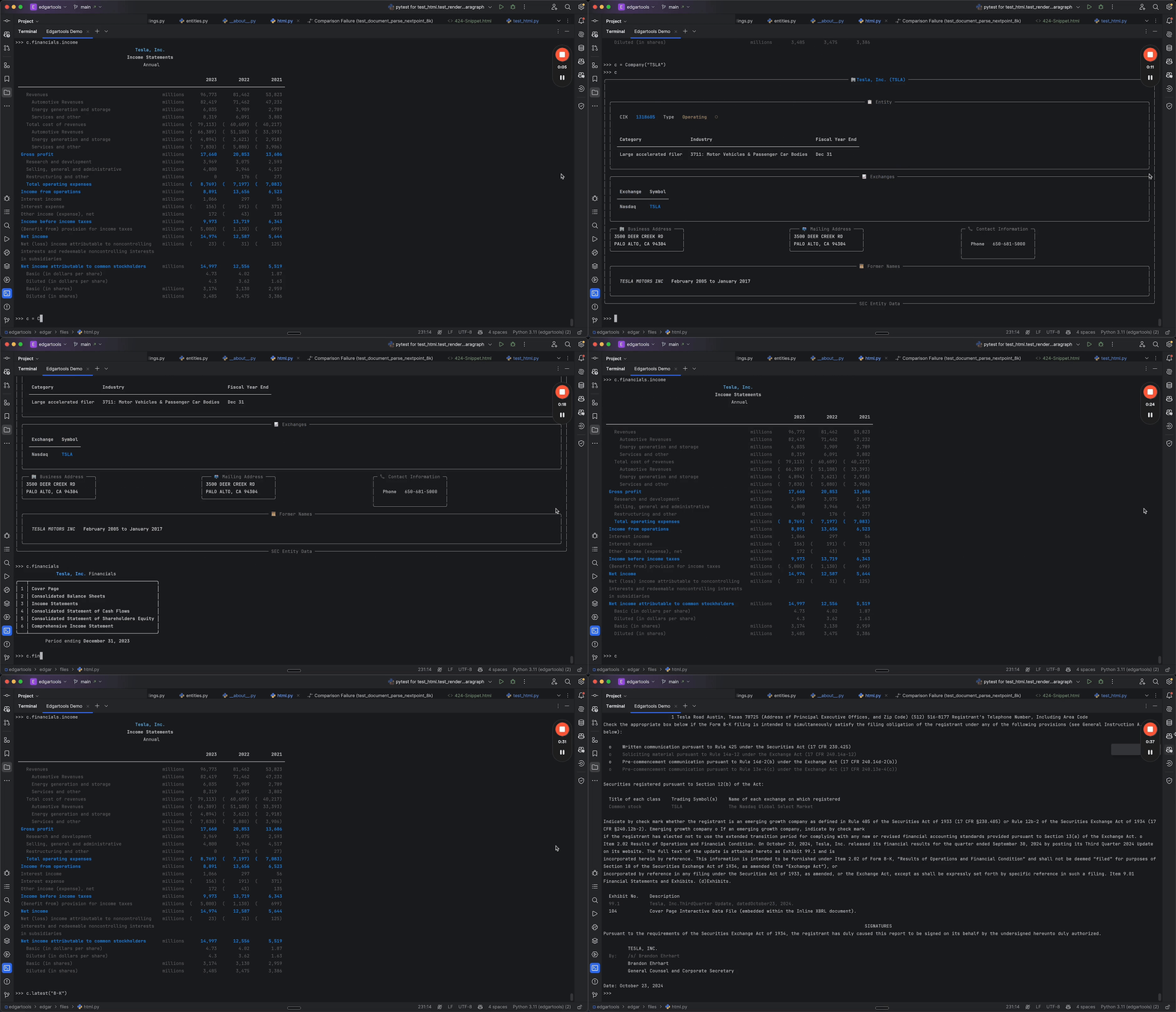 ## Quick Start **1. Install.** The package is `edgartools`; the module you import is `edgar`. Python 3.11+. ```bash uv add edgartools # or: pip install edgartools ``` **2. Identify yourself to the SEC.** EDGAR requires a contact email on every request. There is no key, signup or rate-limit tier. ```python from edgar import Company, set_identity set_identity("your.name@example.com") ``` **3. Get data.** ```python # Five fiscal years of standardized income statement, from XBRL Company("NVDA").income_statement(periods=5) #> Total Revenue $215.9B $130.5B $60.9B ``` ## Why not just call SEC's APIs? `data.sec.gov` gives you JSON facts and filing indexes. Everything past that is your code. EdgarTools does that part: - **Section text and markdown.** Item 1A, Item 7 or any Item of a 10-K or 10-Q as text, and whole filings as markdown for RAG. Raw HTML is where hand-rolled parsers break. - **Parsed forms, not XML.** 13F holdings, Form 4 transactions, N-PORT portfolios and 8-K items as typed objects and DataFrames. - **Statements that line up.** Rows standardized across filers, so "Total Revenue" means the same thing for a bank and a chipmaker, plus discrete quarters (Q4 derived from the 10-K) and trailing twelve months. - **Search and plumbing.** Full-text search over filing content, the live filing feed, rate limiting, caching and offline storage. It runs in your own process, MIT-licensed, with no API key and no vendor quota; SEC's fair-access limit of 10 requests a second still applies, and EdgarTools keeps to it. ## What you can do ### Full-text search across SEC filings Search the text of every filing since 2001, not just form types and dates. ```python from edgar import search_filings # Every 10-K filed since 2025 that mentions tariffs results = search_filings("tariff", forms="10-K", start_date="2025-01-01") hit = results[0] hit.accession_number, hit.form, hit.filed, hit.company # a hit's fields; filed is the filing date hit.get_filing() # the Filing behind a hit, ready for .obj() or .markdown() # Structured: 8-Ks that reported a cybersecurity incident (Item 1.05) in 2025 search_filings(forms="8-K", items="1.05", start_date="2025-01-01", end_date="2025-12-31") #> 19 total ``` [Full-text search guide →](https://edgartools.readthedocs.io/en/latest/guides/full-text-search/) ### Financial statements over several years ```python Company("MSFT").income_statement(periods=10) # also .balance_sheet() and .cash_flow_statement() ``` [Financial Statements guide →](https://edgartools.readthedocs.io/en/latest/guides/financial-data/) ### One metric across companies Pick rows by their standardized label, never by position: the first row of an income statement is not always total revenue. ```python import pandas as pd revenue = { ticker: Company(ticker).income_statement(periods=3, as_dataframe=True) .set_index("label").filter(like="FY").loc["Total Revenue"] / 1e9 for ticker in ["JPM", "PFE", "CAT"] } pd.DataFrame(revenue).round(1) # $ billions #> FY 2025 182.4 62.6 67.6 ``` ### Quarterly figures and trailing twelve months ```python nvda = Company("NVDA") nvda.get_ttm_revenue() # the last four quarters, summed nvda.income_statement(period="quarterly", periods=8) # discrete quarters; Q4 is derived from the 10-K ``` ### Sections and markdown for RAG ```python filing = Company("NVDA").latest("10-K") filing.markdown() # the whole filing as markdown tenk = filing.obj() tenk.risk_factors # Item 1A as text tenk["Item 1C"] # any Item by number ``` [Sections guide →](https://edgartools.readthedocs.io/en/latest/concepts/data-objects/) ### Find filings, by anything ```python from edgar import find, get_current_filings, get_filings get_filings(2025, 4, form="10-K") # every 10-K filed in Q4 2025 get_current_filings() # the live feed, as SEC posts it find("0000320193-25-000079") # an accession number, CIK or ticker ``` [Finding filings guide →](https://edgartools.readthedocs.io/en/latest/guides/searching-filings/)   ### 13F institutional holdings ```python thirteenf = Company("BRK.A").get_filings(form="13F-HR").latest().obj() thirteenf.holdings # one row per security: Issuer, Cusip, Ticker, SharesPrnAmount, Value, ... ``` [Institutional Holdings guide →](https://edgartools.readthedocs.io/en/latest/guides/thirteenf-data-object-guide/)  ### Insider trades from Form 4 ```python form4 = Company("TSLA").get_filings(form="4").latest().obj() form4.to_dataframe() # buys, sells, grants and exercises ``` [Insider Trades guide →](https://edgartools.readthedocs.io/en/latest/insider-filings/)  ### Fund holdings from N-PORT ```python from edgar import Fund Fund("VOO").get_portfolio() # the latest N-PORT holdings as a DataFrame ``` [Fund Portfolios guide →](https://edgartools.readthedocs.io/en/latest/guides/nport-data-object-guide/) ### 8-K events and earnings releases ```python eightk = find("0001045810-26-000073").obj() # NVIDIA, 2026-08-26 eightk.items # ['Item 2.02', 'Item 9.01'] eightk.earnings # the EX-99.1 press release tables, parsed ``` [Current Events guide →](https://edgartools.readthedocs.io/en/latest/eightk-filings/) ## Library or hosted? **EdgarTools** is this library: free, MIT-licensed, running in your own Python process. **[edgar.tools](https://www.edgar.tools)** is the hosted platform built on it: the same parsing, kept running and current, with every answer cited to its filing. You are not paying for the parsing; you are paying for it to be run and answerable. No feature is ever removed from the library to sell the platform. | If you want to… | Use | |---|---| | Build something that runs: pipelines, backfills, backtests, model corpora, notebooks, custom joins, anything repeated across hundreds of names or run inside your own network | **The library** | | Ask, not build: what the companies you cover filed and what changed since last time, who sold, who holds it, one person across every company they touch, screens across a universe, alerts, cited answers to forward or share with a team. From a browser, a phone, Excel, Claude or ChatGPT, or an agent that cannot run Python | **[edgar.tools](https://app.edgar.tools)**. Free account to start | | Own a maintained dataset (insider trades, 13F, BDC portfolios, material events), every row traceable to its filing, without running the pipeline | **[edgar.tools data licensing](https://www.edgar.tools/data)** | | Fetch one known filing or one JSON document, once, from a script | **Neither**: call EDGAR directly | Both have an MCP server: the library's runs locally (see AI Integration below), and edgar.tools' is hosted at [app.edgar.tools/mcp](https://app.edgar.tools/mcp). Attach one per client, not both: they overlap and split your assistant's routing. ## AI integration EdgarTools ships an agent skill and a local MCP server, both in the `ai` extra. For an assistant that cannot run Python, use the hosted connector from the section above instead. ```bash pip install "edgartools[ai]" python -c "from edgar.ai import install_skill; install_skill()" # the skill, for Claude Code and Claude Desktop ``` The MCP server works with any MCP client. For Claude Desktop, add it to `claude_desktop_config.json`: ```json { "mcpServers": { "edgartools": { "command": "uvx", "args": ["--from", "edgartools[ai]", "edgartools-mcp"], "env": { "EDGAR_IDENTITY": "Your Name your.email@example.com" } } } } ``` `uvx` needs [uv](https://docs.astral.sh/uv/); without it, `pip install "edgartools[ai]"` and run `python -m edgar.ai`. Setup for other clients: [MCP server guide](https://edgartools.readthedocs.io/en/latest/ai/mcp-setup/) · [Skill guide](https://edgartools.readthedocs.io/en/latest/ai/skills/). ## Support the project The SEC changes filing formats and ships a new XBRL taxonomy every year. Sponsorship is what keeps the parsers current and pays for new ones as new disclosures appear. - **[GitHub Sponsors](https://github.com/sponsors/dgunning)**: monthly or one-time. Companies can sponsor on their existing GitHub bill. - **[Buy Me a Coffee](https://www.buymeacoffee.com/edgartools)**: a one-time thank-you. - **[Consulting](https://www.edgar.tools/consulting)**: help from the library's author with SEC data pipelines and financial AI built on it. <p align="center"> <a href="https://github.com/sponsors/dgunning" target="_blank"> <img src="https://img.shields.io/badge/Sponsor-30363D?style=for-the-badge&logo=GitHub-Sponsors&logoColor=EA4AAA" alt="Sponsor on GitHub" height="44"> </a> <a href="https://www.buymeacoffee.com/edgartools" target="_blank"> <img src="https://img.shields.io/badge/Buy_me_a_coffee-FFDD00?style=for-the-badge&logo=buymeacoffee&logoColor=black" alt="Buy Me A Coffee" height="44"> </a> </p> ## Docs, help and contributing - [Documentation](https://edgartools.readthedocs.io/en/latest/) · [Cheat sheet](https://edgartools.readthedocs.io/en/latest/quick-guide/) · [Notebooks](https://edgartools.readthedocs.io/en/latest/notebooks/) · [Blog](https://www.edgartools.io) - Questions go to [Discussions](https://github.com/dgunning/edgartools/discussions); bugs and feature requests to [Issues](https://github.com/dgunning/edgartools/issues). - Contributions are welcome, including AI-assisted ones. Read the [contributing guide](https://github.com/dgunning/edgartools/blob/main/CONTRIBUTING.md) and point your assistant at [AGENTS.md](https://github.com/dgunning/edgartools/blob/main/AGENTS.md). EdgarTools is distributed under the [MIT License](https://github.com/dgunning/edgartools/blob/main/LICENSE.txt). <!-- mcp-name: io.github.dgunning/edgartools -->