| name | meme-image |
| description | Generate image memes via the memegen.link API for embedding in blog posts,
essays, and other markdown contexts. The API is stateless, free, no auth
required — every meme is fully specified in its URL. Use this skill when
the user asks for an image meme, a galaxy-brain diagram, a Drake post, an
expanding-brain comparison, a Distracted Boyfriend, or any classic meme
template populated with custom text. Also use when adding visual rhythm
to a long post — the screen heuristic below codifies how often. Do not use
this for SVG illustrations, diagrams, or visual explainers — those are
different (frontend-design, or the SVG guidance in franklin-essay, a
separate optional skill that may not be installed). This skill is
specifically for the recognizable meme templates that carry humor in their
format.
|
meme-image
Generate image memes via memegen.link, a free,
stateless, public API where the URL is the complete specification of the
meme. No auth, no signup, no rate limits to worry about for normal blog use.
The output is a PNG (or JPG, GIF, WebP) that you embed in markdown with a
standard  tag.
When to use this skill
Use when the user asks for:
- a meme image to put in a blog post or essay
- a "galaxy brain" / "expanding brain" comparison
- a "drake" yes/no comparison
- "two buttons" choice meme
- "distracted boyfriend"
- "change my mind"
- "this is fine"
- any other recognizable meme template populated with their custom text
- a quick visual joke that needs the cultural shorthand of a known template
- visual rhythm in a long post (see screen heuristic below)
Do NOT use this skill when:
- the user wants an original SVG illustration (use frontend-design or
inline SVG)
- the user wants a diagram or flowchart (use mermaid)
- the user wants an actual photograph (use image search or web fetch)
- the visual carries a thesis the post can't afford to be light about
(legal documents, condolences, medical writing, anything marked as
serious)
The screen heuristic
A reader on a phone sees about 400–600 words of body text per scroll,
depending on font size and line-height. On gwern-typography (Franklin's
blog) it's closer to 400 because the leading is generous. The pulse of
a well-designed long post follows this rhythm:
Every 400–500 words, the reader meets a visual element to rest on.
That element doesn't have to be a meme. It can be:
- an image meme (this skill)
- a text meme block (greentext, dialogic, escalation list — see
text-meme-injection skill)
- an SVG illustration
- a mermaid diagram
- an embedded map
- a footnote that pays off when clicked
- a pull quote
- a section header
But it has to be something — a moment where the reading eye gets a
break before the next paragraph block. Mobile is the binding
constraint — desktop fits more words per screen, but design for the
tighter reader. Posts that violate this rhythm (walls of prose for
800+ words) feel enfadonhos on mobile no matter how good the writing.
Posts that overdo it (visual every 100 words without breathing room)
feel like content marketing.
For a 2,000-word post, the 400–500-word cadence means ~4–5 visual
rests; for 2,500 words, ~5–6. This is the same cadence the
text-meme-injection skill uses for inline memes in non-serious
registers — the two skills share one rhythm. Image memes are heavier
than other rest types and should account for roughly 1/4 to 1/3 of
the rests in a meme-friendly register; the remaining rests are text
memes, diagrams, SVGs, maps, footnotes, pull quotes, and section
headers.
Default register
Unless the user explicitly marks a post as serious, assume
non-serious register. Most posts on Franklin's blog are
philosophical-but-irreverent, deadpan-Borges-coded — exactly the
register where memes belong as native vocabulary, not as decoration.
This means:
- Multiple image memes per post are expected, not exceptional.
- Image memes can sit anywhere a visual rest is needed, not only at
openings or as set pieces.
- The reflexive landing rule still applies but is gentler — a single
hedging sentence after a thesis-bearing meme is enough; the meme
doesn't need a full exoneration paragraph. Memes that don't carry
a contestable thesis (pure tonal pieces) need no reflexive landing
at all.
- No two image memes within ~500 words of each other — they need
breathing room to land separately.
The serious-register rules (one image meme max, only at openings, full
reflexive landing) apply only when the user explicitly says "this post
is serious" or the topic is legal, grief, illness, abuse, addiction,
suicide, medical, or condolences.
How memegen.link URLs work
The URL is the spec. Format:
https://api.memegen.link/images/{template_id}/{line1}/{line2}/.../{lineN}.{ext}
template_id — short ID from the templates list (e.g., gb for
galaxy brain, drake, cmm for change my mind, pooh, db for
distracted boyfriend, fine for this is fine, bus for two guys
on a bus)lineN — text for each text slot in the template, in orderext — png (default), jpg (smaller), gif or webp (animated
if template supports)
Encoding rules
In URL path text:
- space → underscore
_ or dash -
- literal underscore →
__
- literal dash →
--
- newline →
~n
- question mark →
~q
- apostrophe →
~s
- quotation →
~d
- percent →
~p
- hash →
~h
Avoid spaces, slashes, and exotic punctuation when you can. Most blog
memes work with plain ASCII alphanumeric plus underscores.
Query parameters
Append ?param=value¶m2=value2 to customize:
width=600 — set width in pixelsheight=600 — set height; if both width and height set, image is
paddedfont=impact / font=titilliumweb / font=notosans — change fontlayout=top — for some templates, force text to top instead of
splitstyle=<name> — for templates with multiple styles (rare, but
exists for ds, pigeon, etc.)
Examples
Galaxy brain, four lines:
https://api.memegen.link/images/gb/Know_thyself/Nothing_in_excess/E/If_you_want_to_talk_to_the_Oracle_go_to_Delphi.png?width=600
Drake, two lines:
https://api.memegen.link/images/drake/Cogito_ergo_sum/Loxias_says_cross_the_Halys.png?width=500
Two guys on a bus, two lines:
https://api.memegen.link/images/bus/My_persona/My_persona_after_self-disclosing.png?width=600
This is fine, two lines:
https://api.memegen.link/images/fine/2500_years_uptime/no_plans_to_ship_a_fix.png?width=500
Change my mind, single line:
https://api.memegen.link/images/cmm/Sócrates_was_the_first_red-teamer.png?width=500
Listing available templates dynamically
The memegen.link template catalog grows. New templates appear; old
ones occasionally get reorganized. Hardcoded lists go stale. Always
read the full live catalog before choosing a template — every time,
not only when you're unsure one exists. The shortlist reference
file is a memory aid, not the menu, and memory is exactly where
template-default bias lives: the reflex reaches for the half-dozen
templates that come to mind, and "comes to mind" is the bias, not a
fit signal. Reading the full list first puts the non-obvious
templates back in play.
Full list (a couple hundred templates; always read the live catalog
for the current list):
curl -s https://api.memegen.link/templates/ | python3 -c "
import json, sys
data = json.load(sys.stdin)
print(f'Total: {len(data)}')
for t in data:
    print(f\"  {t['id']:25s} | lines={t.get('lines','?')} | {t.get('name','')}\")
"
Filtered by keyword (e.g., looking for politicians, animals, brain
memes):
KEYWORD="brain"
curl -s https://api.memegen.link/templates/ | python3 -c "
import json, sys, os
data = json.load(sys.stdin)
keyword = os.environ.get('KEYWORD', '').lower()
for t in data:
    name = t.get('name', '').lower()
    tid = t.get('id', '').lower()
    if keyword in name or keyword in tid:
        print(f\"  {t['id']:25s} | lines={t.get('lines','?')} | {t.get('name','')}\")
"
Each template's full spec (lines, styles, example):
curl -s "https://api.memegen.link/templates/gb"
When the user mentions a meme by colloquial name and the obvious ID
doesn't match (e.g., they say "expanding brain" → try gb; they say
"galaxy brain" → also gb; they say "drake hotline bling" → try
drake), the dynamic catalog is the source of truth, not memory.
Draw against your defaults
Reading the catalog is necessary but not sufficient. Even with the
full couple-hundred-template list in front of you, the hand still
drifts to the marquee templates (drake, gb, tb, db, fine,
cmm) — and a post whose central move is a reject/prefer binary
will pull drake like a magnet, which is exactly when the obvious
choice is least examined. So after reading the catalog and before
settling on a template, draw a random handful and look at them.
The draw is mandatory to perform. It is never mandatory to use.
curl -s https://api.memegen.link/templates/ | python3 -c "
import json, sys, random
d = json.load(sys.stdin)
for t in random.sample(d, 12):
    print(f\"  {t['id']:18s} | lines={t.get('lines','?')} | {t.get('name','')}\")
"
For each drawn template ask one question only: does it carry a real
beat in this specific post? Most won't — a draw of 12 might yield two
fits or zero, and that is the expected outcome, not a failed draw.
Never use a template just because it came up; function-first still
governs, so if the beat is a clean comparison and drake carries it
best, drake wins even against everything the draw surfaced. When
presenting options, report the draw honestly — say which drawn
templates fit and which didn't; the discards show the search was real.
The payoff is debiasing, not randomness. A draw that ends with the
obvious template is a success if you confirmed it beat the
alternatives; a draw that surfaces a better non-obvious fit — rollsafe
over drake for a "found the loophole" beat — is the case the rule
exists for.
Template shortlist (reference file)
A non-exhaustive shortlist of known-good templates for essay-style
posts — grouped by function (comparison and duality, escalation,
single thesis, reaction, choice, stonks) — lives in
references/shortlists.md, relative to this skill's directory. It is
a memory aid, not the menu: always treat the live API catalog as
canonical. For specific cultural references not in the shortlist, run
the keyword-filtered catalog command above.
How to embed in markdown
Standard markdown image syntax works:
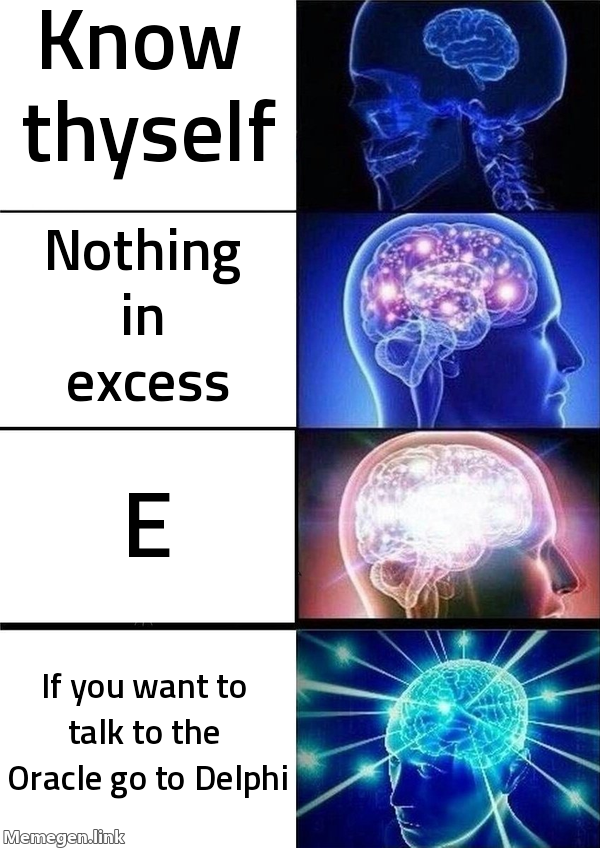
For better presentation in essay-style posts, wrap in a <figure>:
<figure class="meme">
  <img
    src="https://api.memegen.link/images/gb/Know_thyself/Nothing_in_excess/E/If_you_want_to_talk_to_the_Oracle_go_to_Delphi.png?width=600"
    alt="Galaxy brain meme: four expanding brains paired with 'Know thyself', 'Nothing in excess', 'E', and 'If you want to talk to the Oracle, go to Delphi'."
    loading="lazy"
  />
  <figcaption>The three Delphic inscriptions plus, eventually, Borland's 1995 joke about database connectivity.</figcaption>
</figure>
Always include alt text describing the meme content for accessibility.
Always include loading="lazy" because memegen images come from a
third party — defer until the user scrolls there.
Workflow
When the user asks for a meme or when adding visual rhythm:
- Identify the function. Is this a comparison (drake, pooh,
bus), an escalation (gb, gru), a single thesis (cmm,
philosoraptor), a categorical confusion (fry, spiderman), a "this
is fine" framing, a reaction? The template carries half the joke;
pick wrong and the line text won't save it.
- Read the full live catalog, then run the random draw per "Draw
against your defaults" above. Don't rely on the shortlist or on
memory, and don't guess template IDs.
- Compose the lines. Keep each line short — 3 to 8 words is
ideal, anything over 12 words breaks layout. Memegen wraps text
but doesn't shrink fonts dramatically; long text just looks
crowded.
- Build the URL. Use underscores for spaces, encode special
characters per the rules above. Always include
?width=500 or
?width=600 for blog use — native template sizes are often huge.
- Test the URL (recommended for production posts) by curl-ing
it and checking the result is a valid PNG above 5KB. Memegen
sometimes returns a tiny placeholder for invalid templates.
- Embed with figure + alt + lazy. Don't skip alt text; meme
accessibility matters.
- Check distance from other memes. Default minimum spacing
between two image memes is ~800 words. Below 600 words feels like
crowding. Exception: if there are other visual elements between
them (text meme, SVG, mermaid, footnote), the spacing can drop to
~500 words because the eye has rested between. The rule is "no two
image memes within 800 words of each other unless the prose
between them already has a different visual rest."
Density guidelines (non-serious register, default)
For a Franklin-style post (Borges-light, irreverent, philosophical):
- Posts under 800 words: 1 image meme is plenty, often zero.
- Posts 800–1500 words: 1–2 image memes, well-spaced.
- Posts 1500–2500 words: 2–3 image memes, plus other visual
rests (text memes, SVG, mermaid, footnotes). Aim for the screen
heuristic — visual rest every 400–500 words.
- Posts over 2500 words: 3–4 image memes maximum. Beyond that,
the visual register starts dominating the prose and the post
feels like a content-marketing listicle.
For serious register (when explicitly marked as such), apply the old
single-image-meme rule and require full reflexive landing.
When the user wants a meme but no template fits
Three options, in order of preference:
- Use the closest template anyway — the cultural shorthand
still helps the joke land even if not perfectly fitted.
- Custom background — memegen supports
?background=URL to
overlay text on any image you provide. Useful when the writer
has a specific image in mind and wants meme-style impact text on
it.
- Fall back to inline SVG meme — for galaxy-brain-shaped or
drake-shaped jokes where the cultural template isn't quite
right, an SVG illustration can carry the same structural humor
without invoking the specific cultural reference.
API limits
memegen.link has no published rate limit and is free. For blog use
this is irrelevant. The service has been online and stable since
2014. Embedding URLs in posts is a soft dependency on a third-party
service — if memegen.link goes down, your memes break. Acceptable
risk for a personal blog; not acceptable for high-stakes production.
For mission-critical use, generate the meme once and self-host the
resulting image.
What to deliver
When the user asks for a meme:
- The complete embeddable markdown ready to paste into a post.
- The bare URL as a separate line, in case they want to test
it first or use it elsewhere.
- One sentence explaining the choice of template — why this
format carries the joke better than alternatives. Brief, not a
lecture.
If proposing multiple meme options for a post, present them as
numbered candidates with image + caption + reasoning, and let the
user pick.
When adding rhythm-memes (not single requests, but distributing
visual rests across a long post), present them as a numbered list of
proposed insertion points with the meme URL and one-line reasoning
for each. Let the user accept/reject individually.
