# OpenPanel - Web Hosting Control Panel
**OpenPanel** is a web hosting control panel built around containers. Every user gets a fully isolated environment: dedicated web server, dedicated database, private network, and scoped file storage - delivering VPS-grade security on shared hardware.
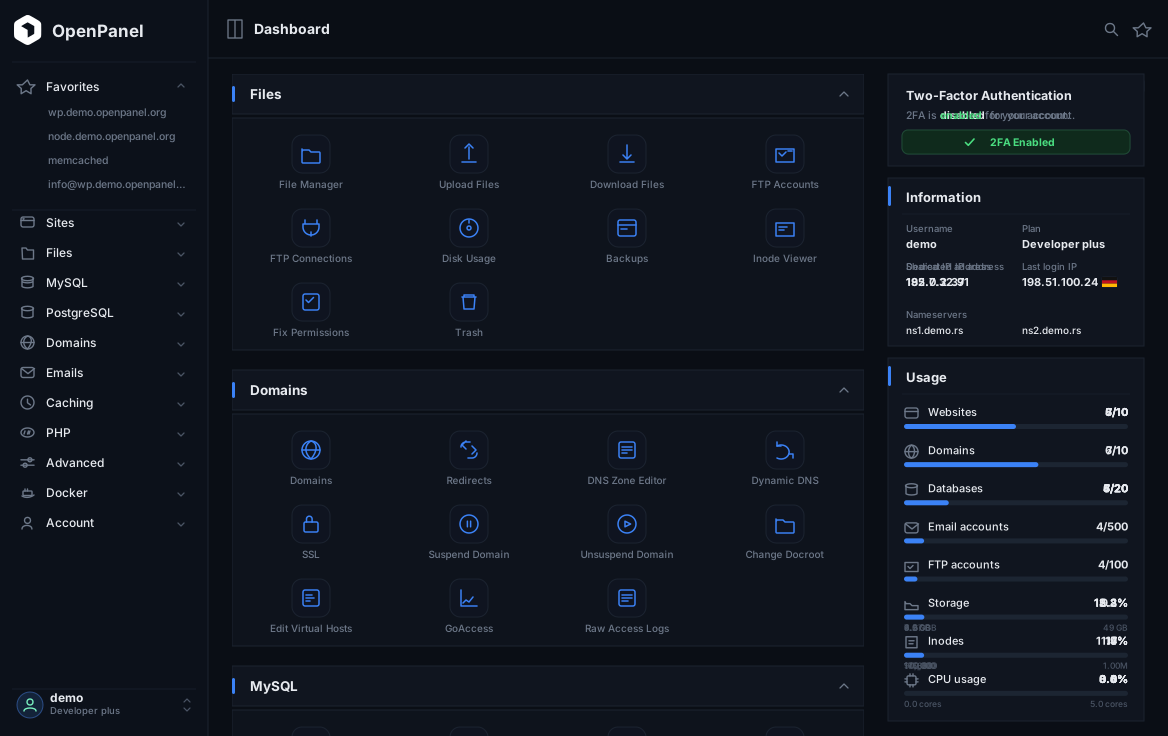
> Available as a free community edition and a fully-supported commercial version.
## What is OpenPanel?
<!--start: description-->
**OpenPanel** is a web hosting control panel that uses containers to give every hosting user a completely isolated environment. Unlike traditional control panels that share a single Apache, MySQL, or PHP runtime across all users, OpenPanel provisions a dedicated Podman context per user: each with their own web server container, database container, PHP-FPM containers, private network, and storage volume.
The result: VPS-level isolation on shared hosting infrastructure, without the VPS price tag.
<!--end: description-->
```
╔════════════════════════════════════════════════════════════════╗
║ 🖥️ OPENPANEL SERVER ║
╠════════════════════════════════════════════════════════════════╣
║ • 🎛️ OpenPanel - user control panel ║
║ • ⚙️ OpenAdmin - administration panel ║
║ • 🌐 Caddy – Reverse Proxy & SSL ║
║ • 🔍 BIND9 – DNS Server ║
║ • 🔍 phpMyAdmin – shared by all users ║
║ • 🗄️ MySQL – User Management & Metadata ║
╚════════════════════════════════════════════════════════════════╝
│
┌──────────────────────────────────────────┼──────────────────────────────────────────┐
│ │ │
▼ ▼ ▼
┌─────────────────────────────────┐ ┌─────────────────────────────────┐ ┌─────────────────────────────────┐
│ 👤 USER 1 │ │ 👤 USER 2 │ │ 👤 USER 3 │
├─────────────────────────────────┤ ├─────────────────────────────────┤ ├─────────────────────────────────┤
│ 🌐 Web Server: │ │ 🌐 Web Server: │ │ 🌐 Web Server: │
│ • Nginx + Varnish │ │ • OpenLitespeed │ │ • Apache + Varnish │
│ │ │ │ │ │
│ ⚡ Applications: │ │ ⚡ Applications: │ │ ⚡ Applications: │
│ • site1.com → PHP 8.4 │ │ • api.site.com → Node.js 20.1 │ │ • classic.com → PHP 7.0 │
│ • site2.com → PHP 8.2 │ │ • main.site.com → PHP 8.3 │ │ • modern.com → PHP 8.1 │
│ • legacy.com → PHP 7.0 │ │ │ │ • vintage.com → PHP 5.6 │
│ │ │ │ │ • api.site.com → Python 3.11 │
│ │ │ │ │ │
│ 🗄️ Databases: │ │ 🗄️ Databases: │ │ 🗄️ Databases: │
│ • MySQL 8.0 │ │ • MariaDB 10.11 │ │ • Percona MySQL │
│ │ │ │ │ • PostgreSQL │
├─────────────────────────────────┤ ├─────────────────────────────────┤ ├─────────────────────────────────┤
│ 📊 Resource Limits: │ │ 📊 Resource Limits: │ │ 📊 Resource Limits: │
│ • CPU: 2 cores │ │ • CPU: 4 cores │ │ • CPU: 1 core │
│ • RAM: 4 GB │ │ • RAM: 8 GB │ │ • RAM: 2 GB │
│ • Storage: 50 GB SSD │ │ • Storage: 100 GB SSD │ │ • Storage: 25 GB SSD │
└─────────────────────────────────┘ └─────────────────────────────────┘ └─────────────────────────────────┘
```
## Why choose OpenPanel for your hosting business?
**OpenPanel** offers a distinct advantage over other hosting panels by providing each user with an isolated environment and tools to fully manage it. This ensures that your users enjoy full control over their environment, simillar to a VPS experience. They can effortlessly run multiple PHP versions, modify server configurations, view domain logs, restart services, set limits, configure backups and more.
**Why use OpenPanel for your hosting business?**
- focus on [security](https://openpanel.com/docs/articles/security/securing-openpanel/)
- billing integrations: [FOSSBilling](https://openpanel.com/docs/articles/extensions/openpanel-and-fossbilling/), [WHMCS](https://openpanel.com/docs/articles/extensions/openpanel-and-whmcs/), [Blesta](https://openpanel.com/docs/articles/extensions/openpanel-and-blesta/), paymenter.org[^1]
- dedicated [MySQL, Percona or MariaDB per user](https://openpanel.com/docs/articles/containers/how-to-set-mysql-mariadb-per-user-in-openpanel/)
- dedicated [Apache, Nginx, OpenLitespeed, Openresty + Varnish per user](https://openpanel.com/docs/articles/containers/how-to-set-nginx-apache-varnish-per-user-in-openpanel/)
- [detailed activity log](https://openpanel.com/docs/panel/account/account_activity/#recorded-actions) for all user actions.
- low maintenance: each user manages [their own services](https://openpanel.com/docs/panel/advanced/services/) and [backups](https://openpanel.com/docs/panel/files/backups/)
- Import accounts from [cPanel](https://openpanel.com/docs/articles/transfers/import-cpanel-backup-to-openpanel/) and [CyberPanel](https://github.com/stefanpejcic/CyberPanel-to-OpenPanel) backups
- [white label](https://openpanel.com/docs/articles/dev-experience/customizing-openpanel-user-interface/)
[^1]: not actively maintained
## OpenPanel vs OpenAdmin
- The **OpenAdmin** offers an administrator-level interface where you can efficiently handle tasks such as creating and managing users, setting up hosting plans, and editing OpenPanel settings.
- The **OpenPanel** interface is the client-level panel where end-users can manage their containers: edit settings, configure limits, manage backups, create websites and more.
## Supported OS
OpenPanel is a truly [OS-agnostic](https://www.techtarget.com/whatis/definition/agnostic) control panel. Supported OS:
<!-- OS_TEST_RESULTS_START -->
| Operating System | Version | Last Tested | Status | Average install time[^2] | Notes |
|---|---|---|---|---|---|
| Ubuntu | 24 | 2026-10-24 07:52 UTC | ✅ Pass | 2m16s | **recommended for AMD CPU** |
| Ubuntu | 26 | 2026-10-24 07:43 UTC | ✅ Pass | 3m1s | |
| Debian | 12 | 2026-10-24 08:00 UTC | ❌ Fail | 1m25s | |
| Debian | 13 | 2026-10-24 08:04 UTC | ✅ Pass | 2m9s | |
| AlmaLinux | 9.7 | 2026-09-07 11:46 UTC | ✅ Pass | 1m42s | **recommended for ARM CPU** |
| AlmaLinux | 10 | 2026-10-24 07:00 UTC | ✅ Pass | 9m35s | |
| OracleLinux | 10 | | | | |
| RockyLinux | 9.6 | | | | |
| RockyLinux | 10 | 2026-10-24 08:12 UTC | ❌ Fail | | |
| CentOS | 9.5 | | | | |
| CentOS | 10 | 2026-10-24 07:29 UTC | ✅ Pass | 8m41s | |
<!-- OS_TEST_RESULTS_END -->
[^2]: Average installation time for [the install script](https://openpanel.org/) on a VPS with the following specifications: 2 CPU cores and 2 GB of RAM.
## Installation
Install on any supported VPS or dedicated server with a single command:
```bash
bash <(curl -sSL https://openpanel.org)
```
For full installation options and configuration flags: [https://openpanel.com/install](https://openpanel.com/install)
## Documentation
- [OpenAdmin - Admin panel documentation](https://openpanel.com/docs/admin/intro/)
- [OpenPanel - End-user panel documentation](https://openpanel.com/docs/panel/intro/)
- [Guides and How-to](https://openpanel.com/docs/articles/intro/)
- [OpenCLI - Terminal commands](https://openpanel.com/docs/articles/opencli/)
## Team
<table id='team'>
<tr>
<td id='stefanpejcic'>
<a href='https://github.com/stefanpejcic'>
<img src='https://github.com/stefanpejcic.png' width='140px;'>
</a>
<h4 align='center'><a href='https://pejcic.rs'>Stefan Pejčić</a></h4>
</td>
<td id='radovanjecmenica'>
<a href='https://github.com/radovanjecmenica'>
<img src='https://github.com/radovanjecmenica.png' width='140px;'>
</a>
<h4 align='center'><a href='https://jecmenica.rs'>Radovan Ječmenica</a></h4>
</td>
<td id='petar'>
<a href='https://github.com/p3t4rc'>
<img src='https://github.com/p3t4rc.png' width='140px;'>
</a>
<h4 align='center'>Petar Ćurić</h4>
</td>
</td>
<td id='lazar'>
<a href='https://github.com/lazarunl'>
<img src='https://github.com/lazarunl.png' width='140px;'>
</a>
<h4 align='center'>Lazar K.</h4>
</td>
</tr>
</table>
Special thanks to all [contributors](https://github.com/stefanpejcic/OpenPanel/graphs/contributors) for extending and improving _OpenPanel_.
## Contribute
Check out [CONTRIBUTING.md](https://github.com/stefanpejcic/OpenPanel/blob/main/CONTRIBUTING.md) for more information on how to help with _openpanel_.
## License
- OpenAdmin and OpenPanel UI are distributed under EULA.
- OpenCLI and configuration files are distributed under Commons Attribution-NonCommercial (CC BY-NC) license.
<hr />
<h2 align="center">
✨ All openpanel docs are hosted on <a href="https://openpanel.com/">openpanel.com</a> ✨
</h2>
<hr />