# OpenAIMCP
<!-- mcp-name: io.github.AceDataCloud/mcp-openai -->
<!-- mcp-name: io.github.AceDataCloud/mcp-gpt-image -->
A [Model Context Protocol (MCP)](https://modelcontextprotocol.io) server for OpenAI API access using [AceDataCloud](https://platform.acedata.cloud?utm_source=github&utm_medium=referral&utm_campaign=evergreen&utm_content=openai_mcp_readme_platform).
Interact with OpenAI models for chat completions, image generation, text embeddings, and more — directly from Claude, VS Code, or any MCP-compatible client.
The AceDataCloud distribution is `mcp-openai-pro`. The unrelated
`mcp-openai` package on PyPI is not maintained by AceDataCloud. Update existing
`uvx` configurations to the new package name; the hosted MCP URL is unchanged.
## Use GPT Image in Glama
The [GPT Image-only Glama guide](https://github.com/AceDataCloud/OpenAIMCP/blob/main/readme/GLAMA.md) uses the published `mcp-openai-pro --profile gpt-image` package and its five image/task tools. The [existing OpenAIMCP source listing](https://glama.ai/mcp/servers/AceDataCloud/OpenAIMCP) is the general server; it is **not** a dedicated GPT Image Connector. A separate Glama profile listing and ordinary install flow remain unverified.
## GPT Image in goose
Use the independent **GPT Image by Ace Data Cloud** native goose plugin: [install and API Token guide](goose/README.md) · [简体中文](goose/README_zh_Hans.md). It reuses this MCP server and does not imply goose Marketplace or default-provider inclusion.
## GPT Image service profile
Use [GPT Image by Ace Data Cloud](https://github.com/AceDataCloud/OpenAIMCP/blob/main/GPT_IMAGE.md) when you only need image generation, editing and task retrieval. It runs `mcp-openai-pro --profile gpt-image`, exposes five image/task tools, requires an explicit GPT Image model, and shares this package's maintained API client. The general OpenAI server remains unchanged. The separate `mcp-gpt-image` Registry entry is active at `2026.10.18.2` (read back 2026-10-19), matching the public package. A catalog client must preserve `--profile gpt-image`; do not substitute the generic remote or infer that every client install has been verified.
## Regional catalog visibility
The Platform catalog hides OpenAI image API/model entries and companion image guides in mainland China (`cn`). This is catalog presentation metadata, not a new MCP-side API restriction or removal of the global image tools. Check the current Platform catalog and account access before submitting; a local model list does not verify regional availability. The package remains `mcp-openai-pro`.
## Features
- **Chat Completions** — Access GPT-4, GPT-4o, GPT-5, o1, o3, o4-mini, and many more models
- **Responses API** — Extended model variant support including dated releases and search-preview models
- **Image Generation** — Create images with gpt-image-1, gpt-image-2, GPT Image 2.5/2.6 Flare/Sunburst standard, reverse or official variants, dall-e-3, and nano-banana models
- **Image Editing** — Modify existing images with AI
- **Text Embeddings** — Generate vector representations with text-embedding-3 models
- **Audio** — Convert text to speech and transcribe audio with whisper-1 or gpt-transcribe
## Image quality
For generation and editing, GPT Image models accept `quality: "auto"`, `"low"`, `"medium"` or `"high"`. GPT Image 2.5 and 2.6 Flare/Sunburst, including their `:reverse` and `:official` variants, additionally accept `"xhigh"` and `"max"`. Official variants bill actual token usage; check current pricing and usage rather than treating a pre-request estimate as the final charge. DALL-E 3 generation accepts `"hd"` or `"standard"`; DALL-E 2 accepts only `"standard"`.
`gpt-image-2.5-flare:reverse` and `gpt-image-2.5-sunburst:reverse` are explicit aliases of their unsuffixed models for both generation and editing. Keep the full requested name. GPT Image 2/2.5 unsuffixed and `:reverse` models bill per successful image at a base price of **0.19 Credits/image**; account discounts and final charges follow current pricing and usage records. During recovery, 2.0/2.5 reverse requests may be fulfilled by compatible GPT Image 2.5 Flare without changing the requested model or per-image billing.
## Chat and Responses billing
Accepted compatible-model requests are billed by the selected model's input, output and cache usage, not a fixed fee per request or interface format. Chat Completions `prompt_tokens` and the Responses input total include reported cached tokens; the cached portion is charged at the corresponding cache price. Current model prices and the response's `usage.cost` are authoritative. Billing support does not expand the MCP tools' published model lists or grant account access.
## Connect: hosted OAuth, API token, or local stdio
The hosted endpoint is `https://openai.mcp.acedata.cloud/mcp`. Choose one route for the MCP client:
| Route | When to use it | Credential setup |
|---|---|---|
| Hosted OAuth | The client supports remote MCP OAuth | Add only the URL, then sign in to AceDataCloud and approve access. No token needs to be pasted into client configuration. |
| Hosted API token | The client cannot finish OAuth, or you need an explicit integration credential | Send an AceDataCloud API token in the `Authorization: Bearer …` header. Keep it in a local secret store or environment variable. |
| Local stdio | The client runs a local MCP process | Install `mcp-openai-pro` and pass `ACEDATACLOUD_API_TOKEN` to that process. It still calls the AceDataCloud API. |
The hosted service advertises OAuth metadata and Dynamic Client Registration (DCR). **DCR registers the client application; it is not an API key.** OAuth signs you in and the client sends the resulting Bearer token; it may reuse or create an API credential for the account. Browser sign-in still requires an AceDataCloud account. The hosted service can be metered: review [current service documentation](https://platform.acedata.cloud/documents/openai?utm_source=github&utm_medium=referral&utm_campaign=evergreen&utm_content=openai_mcp_readme_quick_start) and displayed pricing before a real operation. Do not configure both an OAuth login and a fixed `Authorization` header for the same server.
### Hosted OAuth examples
- **Claude and Claude Desktop chat:** Add a remote custom connector in `Customize → Connectors → Add custom connector`, enter `https://openai.mcp.acedata.cloud/mcp`, select sign-in, and choose **Register automatically** if Claude asks how to register its OAuth client. Complete consent. Claude Desktop's local `claude_desktop_config.json` is a separate setup. [Claude connector guide](https://support.claude.com/en/articles/11175166-get-started-with-custom-connectors-using-remote-mcp).
- **Claude Code:** `claude mcp add --transport http --scope user openai https://openai.mcp.acedata.cloud/mcp`, then `claude mcp login openai`. Check `/mcp`. [Claude Code MCP guide](https://code.claude.com/docs/en/mcp).
- **Cursor:** Add a remote server with only `https://openai.mcp.acedata.cloud/mcp`. For a project, merge the entry below into `<project>/.cursor/mcp.json`; for personal use, use `~/.cursor/mcp.json`. [Cursor MCP guide](https://cursor.com/docs/mcp).
- **VS Code / Copilot:** Run **MCP: Add Server**, select HTTP, enter `https://openai.mcp.acedata.cloud/mcp`, then finish the browser sign-in. New portable workspace configs use `<project>/.mcp.json`; the VS Code-specific format below uses `<project>/.vscode/mcp.json` or the user profile. Check **MCP: List Servers**. [VS Code MCP setup](https://code.visualstudio.com/docs/agent-customization/mcp-servers).
- **Codex:** `codex mcp add openai --url https://openai.mcp.acedata.cloud/mcp`, then `codex mcp login openai`. Its user settings are in `~/.codex/config.toml`. [Official Codex MCP guide](https://developers.openai.com/codex/mcp/).
Cursor project config (OAuth):
```json
{
"mcpServers": {
"openai": {"url": "https://openai.mcp.acedata.cloud/mcp"}
}
}
```
VS Code-specific workspace config (OAuth):
```json
{
"servers": {
"openai": {"type": "http", "url": "https://openai.mcp.acedata.cloud/mcp"}
}
}
```
### Hosted API token
<!-- BEGIN TOKEN ONBOARDING -->
1. Open [Ace Data Cloud → Applications](https://platform.acedata.cloud/console/applications?utm_source=github&utm_medium=referral&utm_campaign=evergreen&utm_content=openai_mcp_readme_api_key). Sign in, or register an account first.
2. Find **General application**. If it has not been created, choose **Initialize General Application**. A general key can use the services available to your account; a dedicated application's key is limited to its service. Check the required service/model access and [current pricing](https://platform.acedata.cloud/models?utm_source=github&utm_medium=referral&utm_campaign=evergreen&utm_content=openai_mcp_readme_models).
3. Copy the **API Key** from the application card, or open **Keys / Manage Keys → Create** to create a separate key for this integration. Give it a recognizable name so you can revoke or rotate it independently.
4. When creating a key, review **Expiration Time**, **Set Usage Limitation**, and **Allowed APIs**. Enable only the restrictions you need, allow the operations you will call, then click **Create** and copy the token from the key list. Task lookup does not grant permission to submit a generation. Confirm the application's balance can cover your first request; any trial allowance is whatever your account currently displays.
5. Copy only the token value, without quotation marks, spaces, or `Bearer `. An API Key / API Token field expects this raw value; only a manually configured HTTP `Authorization` header needs the `Bearer ` prefix. A `platform-...` account-management token cannot replace a generation API key.
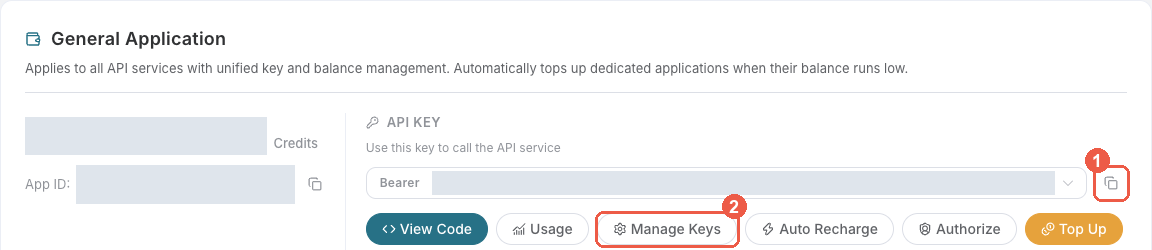
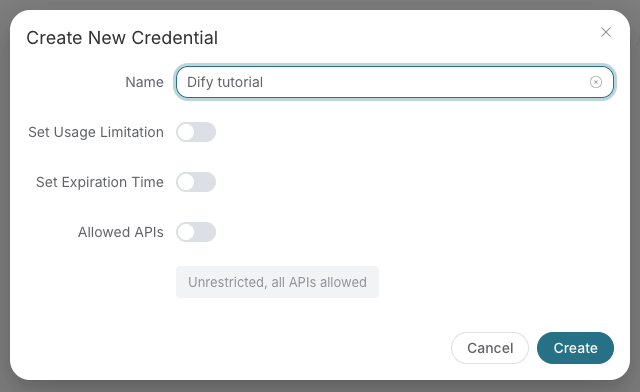
Save the key in the client's credential store or the environment variable shown below. Never put it in a prompt, shared workflow, screenshot, or Git commit. If authentication fails, check the full copied value, application/service access, expiration, usage limit, and balance before creating another key.
<!-- END TOKEN ONBOARDING -->
A fixed Bearer header bypasses OAuth. If the header is invalid, remove it before trying browser sign-in; keep the saved credential private.
For Claude Code, the shell expands the token when you add the server; treat the saved user MCP config as a secret:
```bash
export ACEDATACLOUD_API_TOKEN='YOUR_API_TOKEN'
claude mcp add --transport http --scope user openai https://openai.mcp.acedata.cloud/mcp \
--header "Authorization: Bearer $ACEDATACLOUD_API_TOKEN"
```
For a Claude Code project config, put a variable reference in `<project>/.mcp.json` and set that variable in the environment that launches Claude Code:
```json
{
"mcpServers": {
"openai": {
"type": "http",
"url": "https://openai.mcp.acedata.cloud/mcp",
"headers": {"Authorization": "Bearer ${ACEDATACLOUD_API_TOKEN}"}
}
}
}
```
Cursor uses a different environment-variable syntax in `~/.cursor/mcp.json` or an uncommitted project config:
```json
{
"mcpServers": {
"openai": {
"url": "https://openai.mcp.acedata.cloud/mcp",
"headers": {"Authorization": "Bearer ${env:ACEDATACLOUD_API_TOKEN}"}
}
}
}
```
In VS Code, run **MCP: Open User Configuration** and merge this server plus its masked input; `${input:...}` is for VS Code's user/workspace format and is not portable to the Agent Host `.mcp.json` format:
```json
{
"inputs": [
{"id": "acedata-openai-token", "type": "promptString", "description": "AceDataCloud API token", "password": true}
],
"servers": {
"openai": {
"type": "http",
"url": "https://openai.mcp.acedata.cloud/mcp",
"headers": {"Authorization": "Bearer ${input:acedata-openai-token}"}
}
}
}
```
For **Cline**, use its MCP configuration UI or CLI file `~/.cline/data/settings/cline_mcp_settings.json`; its remote transport value is `streamableHttp`. For **JetBrains AI Assistant**, add a remote URL from **Settings → Tools → AI Assistant → Model Context Protocol (MCP)**. For **Zed**, use a `context_servers` entry with the URL only for OAuth or add a local Bearer header. These clients have different configuration schemas; follow their current UI rather than copying another client's JSON. [Cline](https://docs.cline.bot/mcp/mcp-overview) · [JetBrains](https://www.jetbrains.com/help/ai-assistant/mcp.html) · [Zed](https://zed.dev/docs/ai/mcp).
### Local stdio
Install the package and give the local process an API token:
```bash
python -m pip install mcp-openai-pro
export ACEDATACLOUD_API_TOKEN='YOUR_API_TOKEN'
mcp-openai-pro
```
For Claude Desktop local MCP, merge this entry into the file opened by its developer settings (`~/Library/Application Support/Claude/claude_desktop_config.json` on macOS). `uvx` requires [uv](https://docs.astral.sh/uv/) on `PATH`:
```json
{
"mcpServers": {
"openai": {
"command": "uvx",
"args": ["mcp-openai-pro"],
"env": {"ACEDATACLOUD_API_TOKEN": "YOUR_API_TOKEN"}
}
}
}
```
Keep this user-level file private. Self-hosted HTTP uses `mcp-openai-pro --transport http --port 8000`; expose it only with suitable network and TLS controls. Local execution still calls the AceDataCloud API.
### Check before using the service
1. `https://openai.mcp.acedata.cloud/health` returning `{"status":"ok"}` checks endpoint reachability only.
2. Confirm that the MCP client loads tools. `openai_get_usage_guide` is a reference tool; it does not verify downstream API access or balance.
3. If you need a full API check, call `openai_generate_image` with your own valid input after reviewing [current service documentation](https://platform.acedata.cloud/documents/openai?utm_source=github&utm_medium=referral&utm_campaign=evergreen&utm_content=openai_mcp_readme_quick_start) and displayed pricing. If the result contains a task ID, call `openai_get_task` on that same ID until terminal success or failure. Do not resubmit the operation just to check progress.
For **401**, check which auth route the client used and whether the token or OAuth session is valid. A **403** may mean an account permission or content moderation failure; read the returned error. Insufficient balance and downstream service failures need their own diagnosis. A listed tool or submitted task does not prove a successful result.
## Available Tools
| Tool | Description |
|------|-------------|
| `openai_chat_completion` | Create chat completions using OpenAI models |
| `openai_create_response` | Create responses using the Responses API |
| `openai_generate_image` | Generate images from text descriptions |
| `openai_edit_image` | Edit existing images with AI |
| `openai_create_embedding` | Create text embedding vectors |
| `openai_text_to_speech` | Convert text to spoken audio |
| `openai_transcribe_audio` | Transcribe audio from a URL |
| `openai_list_chat_models` | List available chat/completion models |
| `openai_list_image_models` | List available image models |
| `openai_list_embedding_models` | List available embedding models |
| `openai_get_usage_guide` | Get comprehensive usage guide |
## Supported Models
### Chat Completion Models
- **GPT-6.1 Terra**: `gpt-6.1-terra` works with `openai_chat_completion` and `openai_create_response`. Start with `reasoning_effort="low"` for Chat or `reasoning={"effort": "low"}` for Responses; supported levels are `low`, `medium`, `high`, `xhigh`, and `max`, not `none` or `minimal`. Inputs above 272,000 tokens use long-context pricing; check current account access and prices.
- **MiMo**: `mimo-v2.6-pro` and `mimo-v2.6-flash` are available through `openai_chat_completion` with the corresponding service permission. This release covers text Chat Completions only, not images, audio, video, web search, Responses or Messages. Set `thinking={"type": "enabled"}` or `{"type": "disabled"}` and use `max_completion_tokens` for the total reasoning/output budget. Tools must be `type="function"` with `tool_choice="auto"`; execute tools in your application and preserve assistant `reasoning_content`, `tool_calls` and matching `tool_call_id` when continuing. The MCP tool returns complete JSON and rejects `stream=true` before calling the API. Reported cached input is included in `prompt_tokens`, and reasoning output is included in `completion_tokens`; do not count either twice.
- **GPT-5.6 Sol Fast**: `gpt-5.6-sol-fast`, supported by both `openai_chat_completion` and `openai_create_response`. Existing defaults are unchanged.
- **GPT-5 Series**: gpt-5.5, gpt-5.5-pro, gpt-5.4, gpt-5.4-pro, gpt-5.2, gpt-5.1, gpt-5, gpt-5-mini, gpt-5-nano
- **GPT-4 Series**: gpt-4.1, gpt-4.1-mini, gpt-4.1-nano, gpt-4o, gpt-4o-mini, gpt-4
- **Reasoning**: o4-mini, o3, o3-mini, o3-pro, o1, o1-mini, o1-pro
### Image Models
- gpt-image-1, gpt-image-1.5, gpt-image-2, gpt-image-2:reverse, gpt-image-2:official, gpt-image-2.5-flare, gpt-image-2.5-flare:reverse, gpt-image-2.5-flare:official, gpt-image-2.5-sunburst, gpt-image-2.5-sunburst:reverse, gpt-image-2.5-sunburst:official, gpt-image-2.6-flare, gpt-image-2.6-flare:reverse, gpt-image-2.6-flare:official, gpt-image-2.6-sunburst, gpt-image-2.6-sunburst:reverse, gpt-image-2.6-sunburst:official, dall-e-3, dall-e-2, nano-banana, nano-banana-2-lite, nano-banana-2, nano-banana-2.1, nano-banana-pro
- GPT Image `:official` variants settle from actual text-input, image-input, and image-output tokens.
- Nano Banana 2.1 supports generation and editing using exactly `nano-banana-2.1`; there is no `nano-banana-2.1:official` variant. For multiple images use `n` with the default URL response; `b64_json` requires `n=1`. These tools use OpenAI's `size` parameter, not the dedicated NanoBanana tools' `resolution` parameter.
### Embedding Models
- text-embedding-3-small, text-embedding-3-large
- `text-embedding-ada-002` is retired. Re-embed documents and rebuild existing indexes
when migrating; do not mix old-model vectors with text-embedding-3 vectors.
### Audio Transcription Models
- whisper-1, gpt-transcribe
## Usage Examples
### Chat Completion
```
openai_chat_completion(
messages=[{"role": "user", "content": "Explain quantum computing in simple terms"}],
model="gpt-4.1"
)
```
### Image Generation
```
openai_generate_image(
prompt="A serene Japanese garden with cherry blossoms at sunset, photorealistic",
model="gpt-image-1",
size="1024x1024"
)
```
### Text Embeddings
```
openai_create_embedding(
input="The quick brown fox jumps over the lazy dog",
model="text-embedding-3-small"
)
```
## Configuration
| Variable | Description | Default |
|----------|-------------|---------|
| `ACEDATACLOUD_API_TOKEN` | API token (required) | — |
| `ACEDATACLOUD_API_BASE_URL` | API base URL | `https://api.acedata.cloud` |
| `OPENAI_REQUEST_TIMEOUT` | Request timeout in seconds | `60` |
| `MCP_SERVER_NAME` | MCP server name | `openai` |
| `LOG_LEVEL` | Logging level | `INFO` |
## Error results
API-backed tools keep their existing JSON `error` and `message` fields. On failure
these tools also return `status_code`, `code`, and `request_id`:
```json
{
"error": "API Error",
"message": "API rate or usage limit exceeded. Check limits before retrying.",
"status_code": 429,
"code": "rate_limit_exceeded",
"request_id": "req_example"
}
```
Use `status_code` to distinguish authentication (401), permission or content
restrictions (403), rate/usage limits (429), and server failures (5xx). Both 401
and 403 retain the legacy `Authentication Error` label for existing clients; their
status and safe messages remain distinct. Known public error codes are preserved;
unknown or private codes become `http_<status>`. A safe `x-request-id` is retained
for support correlation, otherwise `request_id` is null.
Transport timeouts use `code: "timeout_error"` and connection/read failures use
`code: "network_error"`. Both have null HTTP status and request ID because no HTTP
error response was received. Unexpected local failures use `internal_error`.
Tools do not retry automatically at this layer.
Error messages are safe summaries. Raw response bodies, private diagnostics,
request URLs and credentials are not returned. A tool call can complete at the
MCP transport layer while its JSON contains `error`; check that field before
accepting the operation as successful. Local validation and async task-result
payloads keep their existing formats. A returned task ID still requires a
separate task lookup before media completion can be claimed.
## Development
```bash
# Install dependencies
pip install -e ".[dev,test]"
# Run tests
pytest
# Run linter
ruff check .
```
## API Reference
- [AceDataCloud Platform](https://platform.acedata.cloud?utm_source=github&utm_medium=referral&utm_campaign=evergreen&utm_content=openai_mcp_readme_platform)
- [OpenAI API Documentation](https://platform.openai.com/docs)
## Documentation
<!-- canonical-documentation -->
[Documentation](https://platform.acedata.cloud/documents/openai?utm_source=github&utm_medium=referral&utm_campaign=evergreen&utm_content=openai_mcp_readme_quick_start)
## License
MIT
## Cline setup / Cline 图文接入
[GPT Image by Ace Data Cloud — English guide](https://github.com/AceDataCloud/MCPs/blob/4a2fb4e17d322bc22c5742ab3a5bd48b24ec5bdc/openai/docs/cline-gpt-image.md) · [完整中文图文步骤](https://github.com/AceDataCloud/MCPs/blob/4a2fb4e17d322bc22c5742ab3a5bd48b24ec5bdc/openai/docs/cline-gpt-image.md#中文步骤). The Cline marketplace submission is pending review as of 2026-10-18; the guide labels the manual fallback separately. / Cline 官方目录投稿仍待审核,手动接入不等于已上架。
### Chat response mode
Chat tools return one complete JSON response. Omit `stream` or pass `false`.
`stream: true` is rejected locally before an API request is sent. For native SSE
streaming, use the HTTP API directly.
`openai_list_tasks` accepts `count_mode: "none"` (default) or `"exact"`. Exact counting
has a two-second server budget and may fall back to a lower bound; inspect the returned
pagination metadata. GPT Image edit prompts allow up to 32000 characters (1000 for dall-e-2).
GPT Image 2.6 adds `gpt-image-2.6-flare` and `gpt-image-2.6-sunburst`, each with `:reverse` and `:official` variants. Generation and edits accept `xhigh`/`max` with the same raster contract as 2.5. Plain/reverse variants cost 0.22 Credits per image; official variants use the same token rates as 2.5. SVG is not exposed. Native GIF is available on the verified variants described below.
### GPT Image 2.6 GIF and 4K
Native `output_format: "gif"` is available for `gpt-image-2.6-flare`, its `:reverse` and `:official` variants, and all `gpt-image-2.6-sunburst` variants, for generation and reference-image editing. Set `frame_count` to 2–16 and `frame_duration_ms` to 20–655350 milliseconds; the API defaults to 9 frames, 200 ms per frame and a 512x512 preview when size is omitted or auto. Actual GIF dimensions may be adjusted by the model.
Use a static PNG/JPEG/WebP format for 4K, with pixel dimensions such as `3840x2160` or `2160x3840`. Both 2.6 models and their listed billing variants support these static generation/edit presets. GIF has separate size/frame constraints.
GPT Image 2.6 supports `complexity="low"|"medium"|"high"` (omitted: model default high), independently of rendering quality and without a separate surcharge; official variants still bill actual tokens. Static edits accept `markup`: a PNG with transparent pixels, matching the first reference after orientation, up to 16,777,216 pixels per image and 40MB for the annotation. Both MCP profiles send JSON and accept an HTTPS URL, PNG data URL or an object containing only `image_url`; local file uploads require the HTTP multipart API. Do not use `file_id` or combine markup with mask, GIF or prompt_rewriter. Omit `input_fidelity` for 2.6.
GIF frame count is 2–16; frame duration is 20–655350ms, rounded to the nearest 10ms. `n` counts output GIF files, not frames. GIF rejects masks, markup, custom compression, prompt rewriting and partial streaming. Size, frames and quantity share a model pixel budget; do not assume arbitrary 1K or 4K GIF combinations work. For static images, `4K` is not a valid size and `4096x4096` exceeds the pixel limit. Pricing is unchanged.
Example MCP generation arguments (also accepted by `gpt_image_generate` in the image-only profile):
```json
{
"model": "gpt-image-2.6-flare",
"prompt": "A small red ball moves left and right on a white background, seamless looping animation, no text.",
"output_format": "gif",
"size": "512x512",
"quality": "medium",
"frame_count": 9,
"frame_duration_ms": 200,
"n": 1,
"async": true
}
```
Submit once and query the returned task ID with `openai_get_task` (or `gpt_image_get_task`); do not generate again to check progress.