> [!WARNING]
> **OpenLogi is under active development** and not yet stable — features and config may still change. Give the repo a **Star** ⭐ and **Watch** 👀 it to get notified when a new release lands.
<p align="center">
<img src="https://assets.openlogi.org/brand/openlogi-icon.png" width="138" alt="OpenLogi"/>
</p>
<h1 align="center">OpenLogi</h1>
<p align="center"><strong>⚡️ A native, local-first alternative to Logitech Options+, written in Rust 🦀<br/>Unlock the full capabilities of Logitech mice, keyboards, and webcams over HID++ and UVC</strong></p>
<div align="center">
<a href="https://github.com/AprilNEA/OpenLogi/releases/latest" target="_blank">
<img alt="GitHub release" src="https://img.shields.io/github/v/release/AprilNEA/OpenLogi?style=flat"></a>
<a href="https://github.com/AprilNEA/OpenLogi/releases" target="_blank">
<img alt="GitHub downloads" src="https://img.shields.io/github/downloads/AprilNEA/OpenLogi/total.svg?style=flat"></a>
<a href="https://github.com/AprilNEA/OpenLogi/commits" target="_blank">
<img alt="GitHub commit" src="https://img.shields.io/github/commit-activity/m/AprilNEA/OpenLogi?style=flat"></a>
<a href="#license">
<img alt="License" src="https://img.shields.io/badge/license-MIT%2FApache--2.0-blue?style=flat"></a>
<img alt="Hits" src="https://hits.aprilnea.com/hits?url=https://github.com/aprilnea/openlogi">
</div>
<div align="center">
<a href="https://x.com/AprilNEA" target="_blank">
<img alt="X" src="https://img.shields.io/badge/follow-AprilNEA-black?style=flat&logo=x"></a>
<a href="https://t.me/+VDtkR5OSAT04NzVh" target="_blank">
<img alt="telegram" src="https://img.shields.io/badge/chat-telegram-blueviolet?style=flat&logo=Telegram"></a>
</div>
<div align="center">
<a href="README.md">
<img alt="English" src="https://img.shields.io/badge/English-blue?style=flat"></a>
<a href="docs/README.zh-CN.md">
<img alt="简体中文" src="https://img.shields.io/badge/%E7%AE%80%E4%BD%93%E4%B8%AD%E6%96%87-lightgrey?style=flat"></a>
<a href="docs/README.ja.md">
<img alt="日本語" src="https://img.shields.io/badge/%E6%97%A5%E6%9C%AC%E8%AA%9E-lightgrey?style=flat"></a>
<a href="docs/README.de.md">
<img alt="Deutsch" src="https://img.shields.io/badge/Deutsch-lightgrey?style=flat"></a>
<a href="docs/README.fr.md">
<img alt="Français" src="https://img.shields.io/badge/Fran%C3%A7ais-lightgrey?style=flat"></a>
<a href="docs/README.ko.md">
<img alt="한국어" src="docs/assets/badge-lang-ko.svg"></a>
<a href="docs/README.ru.md">
<img alt="Русский" src="https://img.shields.io/badge/%D0%A0%D1%83%D1%81%D1%81%D0%BA%D0%B8%D0%B9-lightgrey?style=flat"></a>
<a href="docs/README.es.md">
<img alt="Español" src="https://img.shields.io/badge/Espa%C3%B1ol-lightgrey?style=flat"></a>
<a href="docs/README.pt-BR.md">
<img alt="Português" src="https://img.shields.io/badge/Portugu%C3%AAs-lightgrey?style=flat"></a>
<a href="docs/README.tr.md">
<img alt="Türkçe" src="https://img.shields.io/badge/T%C3%BCrk%C3%A7e-lightgrey?style=flat"></a>
</div>
<p align="center">
<a href="https://trendshift.io/repositories/42303" target="_blank">
<img src="https://trendshift.io/api/badge/repositories/42303" alt="AprilNEA%2FOpenLogi | Trendshift" width="250" height="55"/></a>
<a href="https://www.producthunt.com/products/openlogi?embed=true&utm_source=badge-featured&utm_medium=badge&utm_campaign=badge-openlogi" target="_blank" rel="noopener noreferrer">
<picture>
<source media="(prefers-color-scheme: dark)" srcset="https://api.producthunt.com/widgets/embed-image/v1/top-post-badge.svg?post_id=openlogi&theme=dark&period=daily">
<source media="(prefers-color-scheme: light)" srcset="https://api.producthunt.com/widgets/embed-image/v1/top-post-badge.svg?post_id=openlogi&theme=light&period=daily">
<img alt="OpenLogi - A local-first alternative to Logitech Options+ | Product Hunt" width="250" height="54" src="https://api.producthunt.com/widgets/embed-image/v1/top-post-badge.svg?post_id=openlogi&theme=light&period=daily">
</picture></a>
</p>
> **Fed up with Options+? Try OpenLogi.**
Runs on macOS, Linux, and Windows.
---
## Beyond Options+
Things OpenLogi does that Options+ won't:
- **Stay light.** Native Rust + GPUI.
- **Run on Linux.** Linux is a first-class platform in OpenLogi.
- **Gestures on supported buttons.** Assign gesture actions to supported controls — or turn gestures off entirely.
- **Plain-text config.** Everything is one TOML file you can sync between machines however you like.
- **Script it.** A real CLI alongside the GUI: a JSON [automation API](docs/USAGE.md#automation-api) for DPI, SmartShift, Fn-lock, and report rate, plus hardware diagnostics.
## Features
<p align="center">
<img src="https://assets.openlogi.org/screenshots/macos/light/devices-grid.png" width="860" alt="OpenLogi device list with six Logitech devices: mice, a keyboard, and a Litra light">
</p>
### Devices
- Logi Bolt and Unifying receivers, Bluetooth, and wired connections, with battery level and charge state
- Low-battery notices at the bottom of the screen, once per discharge, with no OS notification permission
- An on-screen indicator when a keyboard turns Caps Lock on or off, plus Num Lock and Scroll Lock on Windows and Linux
<table>
<tr>
<td width="50%"><img src="https://assets.openlogi.org/screenshots/macos/light/cards/easy-switch.png" width="400" alt="Easy-Switch card listing three paired computers"></td>
<td width="50%"><b>Easy-Switch</b><ul><li>See which computer is paired on each channel, with its OS and connection</li><li>Rename a channel on devices that allow it</li></ul></td>
</tr>
</table>
### Buttons and actions
<table>
<tr>
<td width="50%"><img src="https://assets.openlogi.org/screenshots/macos/light/cards/buttons.png" width="400" alt="Button mapping for an MX Master 4, with the gesture button inspector open"></td>
<td width="50%"><b>Remap any button</b><ul><li>A built-in action catalog, custom shortcuts, typed text, or multi-step workflows</li><li>Separate tap and hold actions, and hold-to-talk chords that release with the button</li><li>Gestures on Middle Click, Back/Forward, DPI/ModeShift, the gesture button, and the haptic panel</li></ul></td>
</tr>
<tr>
<td width="50%"><img src="https://assets.openlogi.org/screenshots/macos/light/cards/actions-ring.png" width="400" alt="Actions Ring editor with eight slots around the cursor"></td>
<td width="50%"><b>Actions Ring</b><ul><li>Eight actions in a ring around the cursor</li><li>Its own layout per application</li></ul></td>
</tr>
<tr>
<td width="50%"><img src="https://assets.openlogi.org/screenshots/macos/light/cards/keys.png" width="400" alt="MX Keys S with three keys bound to Launchpad, Lock Screen, and Screenshot"></td>
<td width="50%"><b>Keyboard keys</b><ul><li>Bind media, emoji, screenshot, and other dedicated keys like mouse buttons</li><li>Restore one key to its device default, or reset the whole row</li></ul></td>
</tr>
</table>
Per-application profiles switch with the focused app. An `[apps]` alias lets one profile follow an application across platforms.
### Pointer and scrolling
<table>
<tr>
<td width="50%"><img src="https://assets.openlogi.org/screenshots/macos/light/cards/dpi.png" width="400" alt="Pointer tuning card with a DPI slider"></td>
<td width="50%"><b>Pointer</b><ul><li>DPI presets with cycle and set-preset actions</li><li>Pointer speed and report rate</li><li>Precision Mode: one button switches the mouse to its slowest speed and back</li></ul></td>
</tr>
<tr>
<td width="50%"><img src="https://assets.openlogi.org/screenshots/macos/light/cards/smartshift.png" width="400" alt="SmartShift card with wheel mode, sensitivity, and scrolling force"></td>
<td width="50%"><b>SmartShift</b><ul><li>Wheel mode and sensitivity</li><li>Scrolling force on SmartShift Enhanced mice</li><li>A permanent-ratchet switch</li></ul></td>
</tr>
<tr>
<td colspan="2"><img src="https://assets.openlogi.org/screenshots/macos/light/cards/scrolling.png" width="820" alt="Scrolling card with inversion, wheel resolution, and smooth wheel"><br><b>Scrolling</b><ul><li>Scroll inversion per device, natively or in software</li><li>Wheel resolution and smooth wheel scrolling</li><li>Hold Back or Forward and roll the wheel to scroll sideways on mice without a thumb wheel</li></ul></td>
</tr>
</table>
### Keyboard and lighting
<table>
<tr>
<td width="50%"><img src="https://assets.openlogi.org/screenshots/macos/light/cards/keys-backlight.png" width="400" alt="Keys and Backlight cards for an MX Keys S"></td>
<td width="50%"><b>Keyboard</b><ul><li>Fn Lock, and multi-platform keyboards that stay on the host OS layout</li><li>Backlight level, automatic brightness, battery saving, and how long the keys stay lit</li><li>The backlight level shown on screen as it changes</li><li>Static RGB on supported keyboards</li></ul></td>
</tr>
<tr>
<td width="50%"><img src="https://assets.openlogi.org/screenshots/macos/light/cards/litra.png" width="400" alt="Litra Glow lighting panel with brightness and color temperature"></td>
<td width="50%"><b>Litra lights</b><ul><li>Power, brightness, and color temperature</li><li>Turns on with the camera if you want</li><li>Keeps a change made on the light itself</li></ul></td>
</tr>
</table>
### Webcams
- Any Logitech UVC webcam (Brio, StreamCam, the C920 series, …), plug and play
- Live preview that holds the camera only while you watch; leave it and the LED goes off
- Pick the preview's resolution and frame rate from the modes your camera reports (this shapes OpenLogi's own preview, not what other apps get)
- On macOS and Windows, a camera on a slower USB link than it supports (a USB 2 port, hub, or cable) is flagged, since it lists fewer resolutions and frame rates than it can deliver on USB 3
- Zoom, pan, tilt, focus, exposure, white balance, and every other UVC control, written to the hardware so Meet, Zoom, and OBS see the change
- Built-in Default / Streaming / Video call profiles plus your own snapshots, kept per camera
Feature coverage depends on what each device reports; the app shows only the controls a device supports.
### Platform support
| Feature | macOS | Windows | Linux |
| --- | --- | --- | --- |
| Mouse button remapping and gestures | ✓ | ✓ | ✓ |
| Keyboard F-key remapping | ✓ | ✓ | — |
| Per-application profiles | ✓ | ✓ | X11, wlroots (sway, Hyprland), GNOME with the [companion extension](crates/openlogi-hook/gnome-shell-extension/README.md) |
| Mouse profile follows the window under the pointer | ✓ | ✓ | X11 only |
| Media keys | Native | Native | D-Bus MPRIS |
| Window-manager actions (desktops, Mission Control, …) | Native | Native equivalents | GNOME, KDE (KWin), Hyprland; some macOS-only actions do nothing |
| Menu-bar / tray icon | ✓ | ✓ | — |
| In-app updates | Sparkle | Built-in | Built-in |
## Install
> [!IMPORTANT]
> Quit **Logi Options+** (and Solaar on Linux) first. Only one application can own a receiver at a time.
> On macOS, **Karabiner-Elements** also locks a Bluetooth keyboard that it modifies. Turn off **Modify events** for that keyboard in Karabiner-Elements → Settings → Devices.
| Platform | System | Architecture |
| --- | --- | --- |
| macOS | macOS 13 or later | Apple silicon, Intel |
| Linux | GLIBC 2.35 or newer | x86_64, arm64 |
| Windows | Tested on Windows 11 | x86_64, arm64 |
Every download carries a minisign signature and an entry in `SHA256SUMS`. To build from source, see [DEVELOPMENT.md](docs/DEVELOPMENT.md).
### macOS
<p>
<a href="https://openlogi.org/download/mac-arm64"><img src="https://assets.openlogi.org/brand/buttons/download-macos-arm64.png" width="260" alt="Download for Mac: Apple silicon (.dmg)"></a>
<a href="https://openlogi.org/download/mac-x64"><img src="https://assets.openlogi.org/brand/buttons/download-macos-x64.png" width="260" alt="Download for Mac: Intel (.dmg)"></a>
</p>
Or with Homebrew:
```sh
brew install --cask openlogi
```
Open OpenLogi and grant **Accessibility** and **Input Monitoring** when macOS asks. OpenLogi then updates itself through Sparkle.
### Linux
<p>
<a href="https://openlogi.org/download/linux"><img src="https://assets.openlogi.org/brand/buttons/download-linux-deb.png" width="260" alt="Download for Linux: Debian, Ubuntu (.deb)"></a>
<a href="https://openlogi.org/download/linux-rpm"><img src="https://assets.openlogi.org/brand/buttons/download-linux-rpm.png" width="260" alt="Download for Linux: Fedora, SUSE (.rpm)"></a>
<a href="https://openlogi.org/download/linux-arch"><img src="https://assets.openlogi.org/brand/buttons/download-linux-arch.png" width="260" alt="Download for Linux: Arch (.pkg.tar.zst)"></a>
</p>
Or install the right package for your distribution with one command. It verifies the minisign signature and starts the agent; install `minisign` first:
```sh
curl -fsSL https://github.com/AprilNEA/OpenLogi/releases/latest/download/install.sh | sh
```
On Arch Linux, the [`openlogi`](https://aur.archlinux.org/packages/openlogi) AUR package builds the release from source:
```sh
yay -S openlogi
```
To read the script before running it, and for the AUR package, Flatpak, NixOS, and distributions without systemd, see [INSTALL-linux.md](docs/INSTALL-linux.md).
### Windows
<p>
<a href="https://openlogi.org/download/windows"><img src="https://assets.openlogi.org/brand/buttons/download-windows-msi.png" width="260" alt="Download for Windows: installer (.msi)"></a>
<a href="https://openlogi.org/download/windows-zip"><img src="https://assets.openlogi.org/brand/buttons/download-windows-zip.png" width="260" alt="Download for Windows: portable (.zip)"></a>
</p>
## Usage (CLI)
See [USAGE.md](docs/USAGE.md)
## Configuration
Settings use plain TOML; saves preserve symlinked config files. See
[CONFIGURATION.md](docs/CONFIGURATION.md).
## Developing
See [DEVELOPMENT.md](docs/DEVELOPMENT.md), including [macOS input-hook safety](docs/DEVELOPMENT.md#macos-input-hook-safety).
## Acknowledgments
- **Windows, cameras, and i18n** by [@davidbudnick](https://github.com/davidbudnick) — keyboard RGB, Windows support, Logitech webcam support
- **Linux port** by [@cserby](https://github.com/cserby) — Linux support
- [Solaar](https://github.com/pwr-Solaar/Solaar) by [@pwr](https://github.com/pwr) — open-source HID++ implementation
- [Mouser](https://github.com/TomBadash/Mouser) by [@TomBadash](https://github.com/TomBadash) — a local, account-free Options+ replacement
## License
The code in this repository is dual-licensed under either of
- Apache License, Version 2.0 ([LICENSE-APACHE](LICENSE-APACHE))
- MIT license ([LICENSE-MIT](LICENSE-MIT))
at your option.
### Third-party code
`crates/openlogi-hidpp` is a vendored fork of [`hidpp`](https://crates.io/crates/hidpp)
by [@lus](https://github.com/lus), licensed 0BSD.
### Logo & brand assets
Thanks to [@kubai087](https://github.com/kubai087) for designing the OpenLogi
logo. The OpenLogi logo and app icon (the brand assets under
[`design/`](design/)) are © 2026 AprilNEA, all rights reserved, and are not covered by the MIT/Apache
licenses above; see [`design/LICENSE`](design/LICENSE). Forking the code grants
no right to the OpenLogi name, logo, or icon; please don't use them to represent
your own projects, forks, or distributions without prior written permission.
---
**Not affiliated with Logitech.** "Logitech", "MX Master", and "Options+" are trademarks of Logitech International S.A.
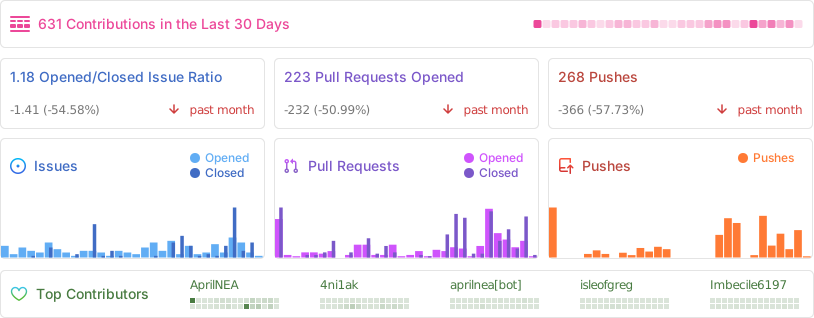
## Repo activity