| name | remove-watermark |
| description | 去水印去文字。带水印 / 文字 / logo 的图 → 干净图,背景纹理自然补全。当用户说「去水印」「去文字」「擦掉 logo」「把字去了」时使用。 |
remove-watermark — 一键去除水印和文字
把图上的水印、文字、角标、优惠券条、装饰边框去掉,并把被挡住的画面补回来。
最常见的用途是给别的技能准备干净输入:带文字的图丢给 fission-pattern 或 clothing-grass-planting,那些文字会被复制到每一张衍生图里。
生成效果示例
| 输入:带水印文字的图 |
|---|
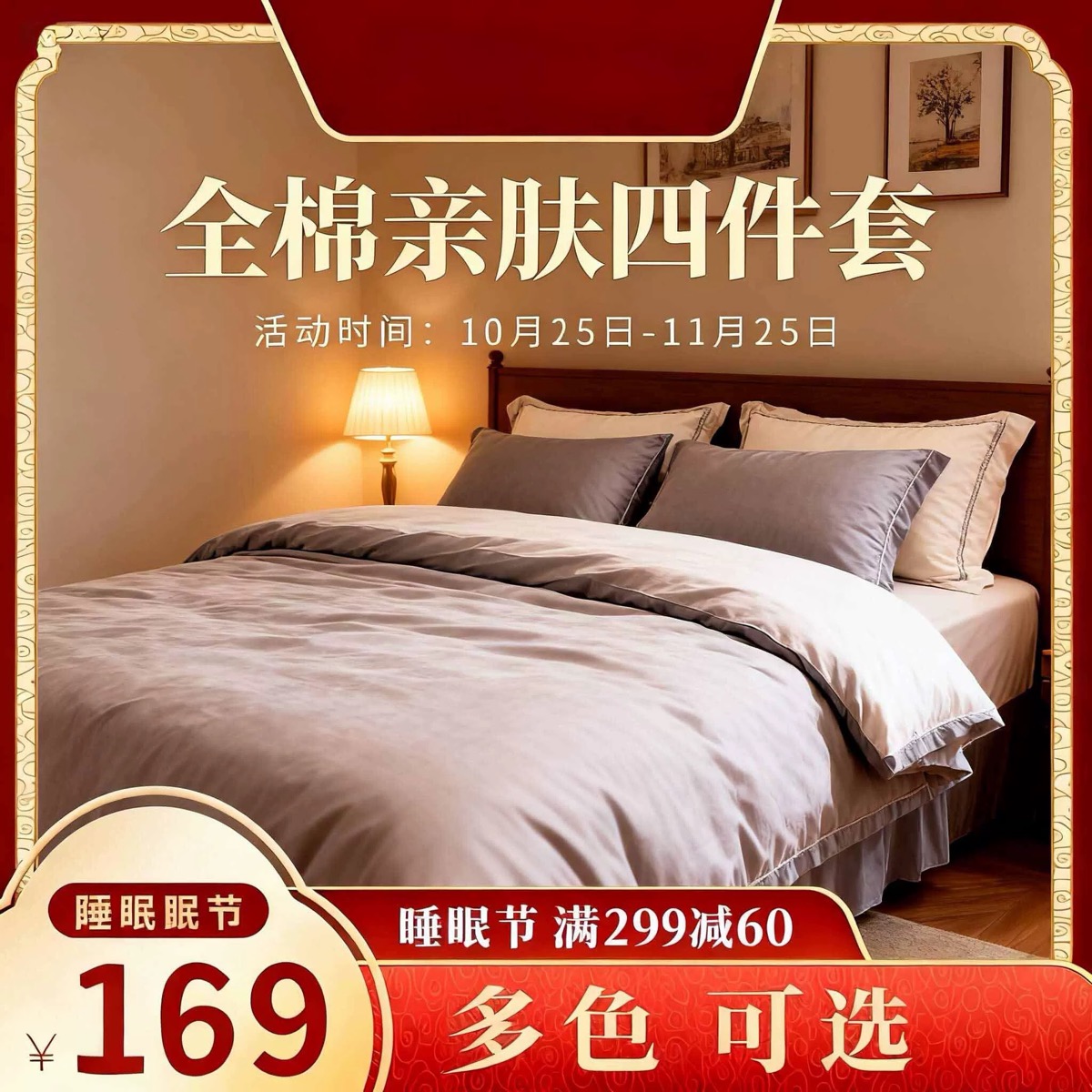 |
source-watermarked.jpg — 家纺促销主图:红金边框 + 标题 + 活动时间 + 价格气泡 + 满减券条 + 多色可选角标 |
实际执行的命令:
dlazy gpt-image-2 \
  --prompt 'Remove every piece of text, price tag, badge, ribbon and decorative promotional frame from this image, and reconstruct what was behind them. Delete the red-and-gold border frame, the large headline, the date line, the price bubble with the number, the coupon banner and the bottom-right colour label. Keep the photograph itself completely unchanged: same bedroom, same bed, same taupe and cream bedding set, same table lamp, same wall art, same perspective, same colour grading and same resolution. Inpaint the cleared areas so the room continues naturally — walls, headboard, floor and bedding must look seamless, with no ghosting, blur patches or leftover letter shapes. Clean product photo, absolutely no text.' \
  --images docs/remove-watermark/source-watermarked.jpg \
  --size 1024x1024 --quality medium --imageFormat jpeg \
  --save docs/remove-watermark/example-output.jpg
输出
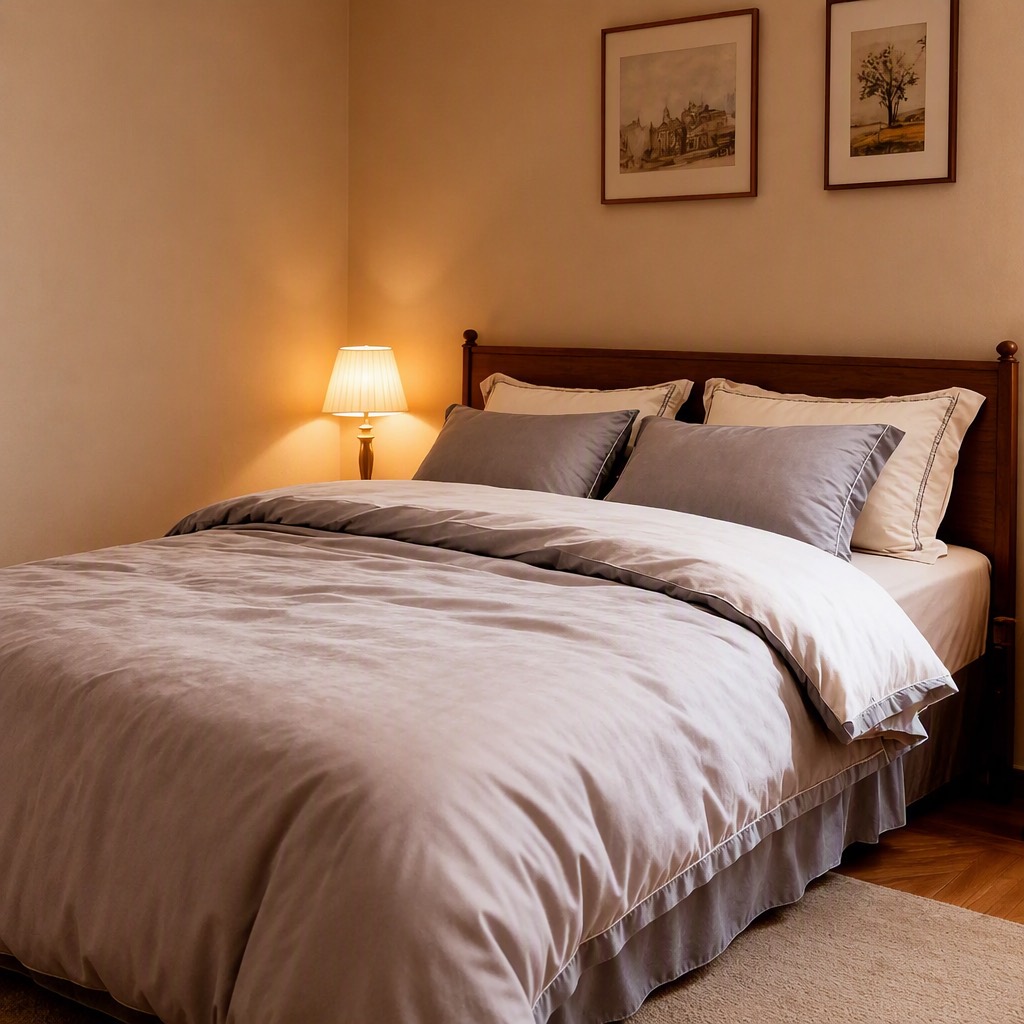
example-output.jpg — 1024×1024。红金边框、标题、活动时间、价格气泡、满减券条与角标全部清除,墙面、床头、地板与四件套接续自然,无字形残影;卧室、床品配色、台灯与墙上装饰画保留。
注意:对比原图可以看到房间透视被轻微重构了——这是重建而非像素级修补的正常结果。要严格保留原始像素请用专业修图工具。
1、能力边界
| 能去掉 | 说明 |
|---|---|
| 半透明水印 | 平台水印、店铺水印、防盗水印 |
| 促销文字 | 标题、卖点文案、活动时间 |
| 价格角标 | 圆形/异形价格气泡、满减角标 |
| 优惠券条 | 底部横条、色块条 |
| 装饰边框 | 边框、花纹、丝带 |
| 贴纸 | 表情、箭头、指示图形 |
重要限制:本技能是重建而不是像素级修补。被覆盖区域的内容是模型推断出来的,画面的其余部分也可能被轻微重绘(透视、纹理有细微变化)。要严格保留原始像素,请用专业修图工具。
不做:不用于抹除他人的版权水印后冒用图片;不用于抹除品牌标识后冒充自有商品;不用于去除法定标识(认证标、警示语、成分标)。
2、输入素材规则
生成前先自检这几条硬性约束:
- 大小:20KB ~ 15MB
- 分辨率:大于 400×400
- 格式:jpg / jpeg / png / webp
输入建议
| 做法 | 说明 |
|---|---|
| ✅ 文字区域背景简单 | 纯色墙、纯色台面上的文字最容易补 |
| ✅ 分辨率高 | 重建质量随原图分辨率提升 |
| ✅ 逐项列出要删的元素 | 只说「去水印」会漏掉边框和角标 |
| ⚠️ 文字压在商品主体上 | 商品被文字挡住的部分是推断的,要人工核对 |
| ❌ 文字覆盖面积超过一半 | 重建出来基本是新图,建议重新做图 |
3、逐项点名 + 保真锁定
去印的 prompt 是两个清单:删除清单和保留清单。
【删除清单】Delete: the [边框描述], the [标题文字], the [日期行],
the [价格气泡], the [优惠券条], the [角标].
【保留清单】Keep the photograph itself completely unchanged: same [主体],
same [环境元素逐项], same perspective, same colour grading, same resolution.
【重建要求】Inpaint the cleared areas so the [场景] continues naturally —
[被遮挡的结构] must look seamless, with no ghosting, blur patches or leftover letter shapes.
【硬约束】absolutely no text anywhere in the output.
no ghosting, blur patches or leftover letter shapes 这句很关键——不写的话经常留下模糊的字形轮廓。
保留清单要逐项列,只写「保持画面不变」时模型会重构透视。
4、工具调用
本技能使用 dLazy 的 gpt-image-2(图像编辑模型;去印的本质是「区域清除 + 语义重建 + 其余保持」,需要能理解画面结构才能把被挡住的部分补得合理)。
调用方式
两种等价写法,选一种。统一入口会自动选后端、失败重试、建目录落盘、估算成本:
# A. 统一入口(推荐):可切任意后端,加 --dry-run 不计费空跑
node scripts/gen.mjs --task remove-watermark \
  --prompt '<见下方 Prompt 模板>' \
  --images <按下表顺序> \
  --save output/remove-watermark-<sku>.jpg

# B. 直接用 dLazy CLI(不想引入 Node 依赖时,效果等价)
dlazy gpt-image-2 --prompt '...' --images ... --save output/remove-watermark.jpg
参数约定(本技能固定用法)
| 参数 | 取值 | 理由 |
|---|---|---|
--images | [原图] | 单图输入 |
--size | 与原图比例一致 | 去印不该改构图比例 |
--quality | high(重建区域面积大)/ medium(只有小水印) | 重建质量与档位正相关 |
--imageFormat | jpeg | 通用格式 |
--batch | 2 ~ 3 | 重建内容有随机性,挑一张最合理的 |
--save | docs/remove-watermark/output-<sku>-clean.jpg | 洗干净的版本单独归档 |
Command Examples
# basic call: 去掉水印和文字
dlazy gpt-image-2 \
  --prompt 'Remove every piece of text, watermark, badge and decorative frame from this image and reconstruct what was behind them. Keep the photograph itself unchanged: same subject, same environment, same perspective, same colour grading. Inpaint the cleared areas so the scene continues naturally, with no ghosting, blur patches or leftover letter shapes. Absolutely no text.' \
  --images docs/remove-watermark/source-watermarked.jpg \
  --size 1024x1024 --quality medium

# complex call: 逐项点名 + 保真锁定 + 出 3 张挑最合理的重建
dlazy gpt-image-2 \
  --prompt 'Remove every piece of text, price tag, badge, ribbon and decorative promotional frame from this image, and reconstruct what was behind them. Delete: the red-and-gold border frame, the large headline, the date line, the price bubble with the number, the coupon banner and the bottom-right colour label. Keep the photograph itself completely unchanged: same bedroom, same bed, same bedding set, same table lamp, same wall art, same perspective, same colour grading and same resolution. Inpaint the cleared areas so the room continues naturally — walls, headboard, floor and bedding must look seamless, with no ghosting, blur patches or leftover letter shapes. Clean product photo, absolutely no text.' \
  --images docs/remove-watermark/source-watermarked.jpg \
  --size 1024x1024 --quality high --imageFormat jpeg \
  --batch 3 --save docs/remove-watermark/output-bedding-clean.jpg

# 批量洗图:作为其他技能的前置步骤
for f in docs/remove-watermark/raw/*.jpg; do
  dlazy gpt-image-2 \
    --prompt 'Remove all watermarks, text, badges and decorative frames; reconstruct the covered areas seamlessly. Keep the photograph unchanged in subject, perspective and colour grading. No ghosting, no blur patches, no leftover letter shapes. Absolutely no text.' \
    --images "$f" --size 1024x1024 --quality high --imageFormat jpeg \
    --save "docs/remove-watermark/clean/$(basename $f)"
done

# 先估价不真跑
dlazy gpt-image-2 --dry-run --prompt '...' --images a.jpg --size 1024x1024 --quality high
延伸阅读
| 要查什么 | 去哪 |
|---|---|
| 认证、多后端配置、输出结构、错误码 | references/provider-cli.md |
gpt-image-2 的全部可用参数 | references/model-flags.md |
| 统一入口的全部选项 | node scripts/gen.mjs --help |
5、Prompt 模板
Remove every piece of text, watermark, badge, ribbon and decorative promotional frame
from this image, and reconstruct what was behind them.

Delete: the [边框], the [标题文字], the [日期/说明行], the [价格气泡],
the [优惠券条], the [角标/贴纸].

Keep the photograph itself completely unchanged: same [主体], same [环境元素逐项],
same perspective, same colour grading and same resolution.

Inpaint the cleared areas so the [场景] continues naturally — [被遮挡的结构逐项]
must look seamless, with no ghosting, blur patches or leftover letter shapes.

Clean product photo, absolutely no text.
按问题追加的修正句
| 问题 | 追加到 prompt 末尾 |
|---|---|
| 留下模糊字形 | No residual glyph shapes, no smudged rectangles where text used to be. |
| 只删了一部分 | 把漏掉的逐项补进删除清单,并追加 Every one of the listed elements must be gone. |
| 画面被重构了 | Do not re-compose the photograph: keep the same camera angle, the same object positions and the same wall/floor lines. |
| 重建区域纹理不接 | Continue the existing [墙面/木纹/织物] texture across the cleared area with matching scale and direction. |
| 商品被文字挡住的部分错了 | Reconstruct the occluded part of the product from symmetry and the visible portion; do not invent new features. |
6、执行流程
- 列删除清单:把画面里每一个文字/图形元素点名(边框、标题、日期、价格、券条、角标、贴纸)。
- 列保留清单:主体 + 环境元素逐项 + 透视 + 色调 + 分辨率。
- 写重建要求:明确哪些结构要接得上,并加「无字形残留」句。
--quality high(重建面积大时)→--batch 2~3挑最合理的一张。- 质检:文字是否全清、有没有字形残影、透视是否被改、被挡住的商品部分是否合理。
- 交付时说明:重建区域是推断内容,需要像素级保真请走专业修图。
7、常见问题
| 现象 | 原因 | 处理 |
|---|---|---|
| 留下模糊的字形轮廓 | 未写无残留约束 | 追加 no residual glyph shapes 句 |
| 只删掉了一部分元素 | 删除清单不全 | 逐项补齐 + Every one of the listed elements must be gone. |
| 透视/构图变了 | 未锁定构图 | 追加禁止重构构图句;这是本技能的固有局限 |
| 重建区域纹理断裂 | 未要求纹理接续 | 追加纹理接续句,指明纹理种类与方向 |
| 被文字挡住的商品补错了 | 那部分是推断的 | 追加对称推断句;关键部位人工核对 |
| 文字覆盖超过一半 | 超出能力边界 | 重新做图,别洗 |
Tips
Visit https://dlazy.com for more information.
