| name | iblai-vibe-agent-audit |
| description | Add the agent Audit tab (audit log of who changed what and when, with user/date/action filters) to your Next.js app |
| globs | null |
| alwaysApply | false |
/iblai-vibe-agent-audit
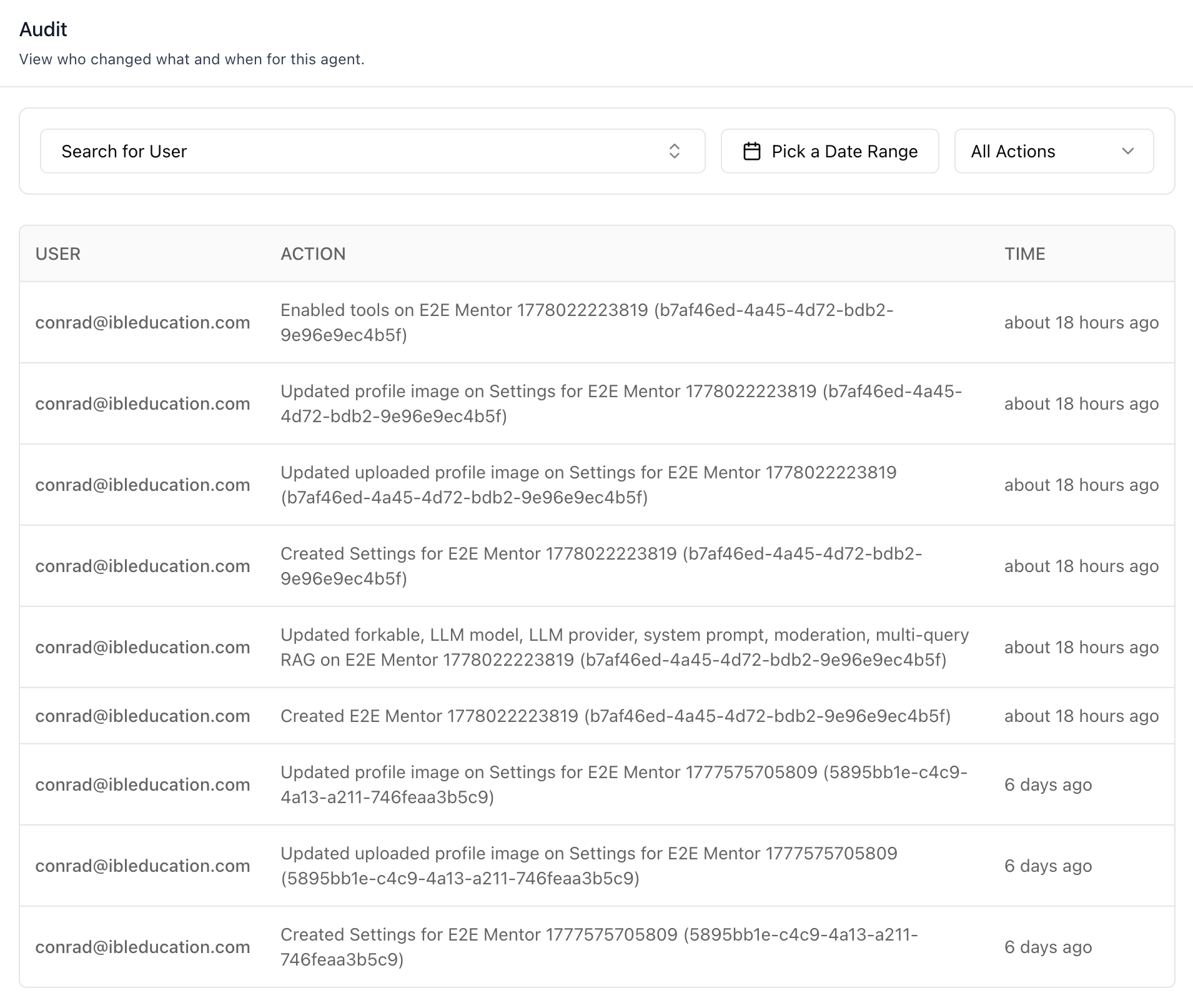
Add the agent Audit tab -- a paginated audit log of agent-scoped
changes (create / update / delete) with humanized action summaries
(e.g. "Enabled tools on E2E Agent 123 (uuid)", "Updated forkable, LLM
model, ... on Settings for E2E Agent"), filterable by actor email,
date range, and action type. Renders an empty state, an error state,
and a 403 state for users without audit-read permission.
Do NOT add custom styles, colors, or CSS overrides to ibl.ai SDK components.
They ship with their own styling. Keep the components as-is.
Do NOT implement dark mode unless the user explicitly asks for it.
When building custom UI around SDK components, use the ibl.ai brand:
- Primary:
#0058cc, Gradient: linear-gradient(135deg, #00b0ef, #0058cc)
- Button:
bg-gradient-to-r from-[#2563EB] to-[#93C5FD] text-white
- Font: System sans-serif stack, Style: shadcn/ui new-york variant
- Follow the component hierarchy: use ibl.ai SDK components
(
@iblai/iblai-js) first, then shadcn/ui for everything else
(npx shadcn@latest add <component>). Do NOT write custom components
when an ibl.ai or shadcn equivalent exists. Both share the same
Tailwind theme and render in ibl.ai brand colors automatically.
- Follow BRAND.md for
colors, typography, spacing, and component styles.
You MUST run /iblai-vibe-ops-test before telling the user the work is ready.
After all work is complete, start a dev server (pnpm dev) so the user
can see the result at http://localhost:3000.
iblai.env is NOT a .env.local replacement — it only holds the 3
shorthand variables (DOMAIN, PLATFORM, TOKEN). Next.js still reads
its runtime env vars from .env.local.
Use pnpm as the default package manager. Fall back to npm if pnpm
is not installed.
Common setup (brand, conventions, env files, verification): see docs/skill-setup.md.
Prerequisites
- Auth must be set up first (
/iblai-vibe-auth)
- MCP server + skills configured (
@iblai/mcp in .mcp.json)
- Ask the user for a real
mentorId (agent UUID). Do NOT invent one.
- The current user must have
Ibl.Analytics/Core/read (viewer) or
Ibl.* (tenant admin) permission. Without it the component renders
the 403 state — no tenantKey mismatch, just RBAC.
Step 1: Check Environment
Before proceeding, check for an iblai.env in the project root. Look for
PLATFORM, DOMAIN, and TOKEN variables. If the file does not exist or
is missing these variables, tell the user:
"You need an iblai.env with your platform configuration. Download the
template and fill in your values:
curl -o iblai.env https://raw.githubusercontent.com/iblai/vibe/refs/heads/main/iblai.env"
Step 2: Mount AnalyticsAuditLogStats
AnalyticsAuditLogStats does not read from AgentSettingsProvider
— it takes tenantKey, mentorId, and userId as required props. The
host page is responsible for resolving them (typically from
localStorage after auth).
"use client";
import { useEffect, useState } from "react";
import { useParams } from "next/navigation";
import { AnalyticsAuditLogStats } from "@iblai/iblai-js/web-containers";
export default function AgentAuditPage() {
const { mentorId } = useParams<{ mentorId: string }>();
const [tenantKey, setTenantKey] = useState("");
const [userId, setUserId] = useState("");
useEffect(() => {
try {
const raw = localStorage.getItem("userData");
if (raw) {
const parsed = JSON.parse(raw);
setUserId(parsed.user_nicename ?? parsed.username ?? "");
}
const resolvedTenant =
localStorage.getItem("app_tenant") ??
(() => {
try {
return JSON.parse(localStorage.getItem("current_tenant") ?? "{}").key;
} catch { return undefined; }
})() ??
localStorage.getItem("tenant") ??
"";
setTenantKey(resolvedTenant);
} catch {}
}, []);
if (!tenantKey || !userId) return null;
return (
<div className="flex h-full flex-col bg-white p-6">
<div className="mb-6">
<h2 className="text-lg font-semibold text-gray-900">Audit</h2>
<p className="text-sm text-gray-500">
View who changed what and when for this agent.
</p>
</div>
<AnalyticsAuditLogStats
tenantKey={tenantKey}
mentorId={mentorId}
userId={userId}
/>
</div>
);
}
The component renders the filters, table, and pagination only. The
"Audit" header / description shown in the screenshot is host-page
chrome — copy the <h2> + <p> block above to match.
Switching the audited agent at runtime
When the audit view is part of an agent picker (e.g. an admin browsing
multiple agents), pass selectedMentorId to override the default
mentorId without re-mounting:
<AnalyticsAuditLogStats
  tenantKey={tenantKey}
  mentorId={mentorId}
  userId={userId}
  selectedMentorId={pickerSelection ?? mentorId}
/>
selectedMentorId takes precedence when set; otherwise mentorId is
used.
Step 3: Use MCP Tools for Customization
get_component_info("AnalyticsAuditLogStats")
get_hook_info("useAuditLog")
get_api_query_info("useGetAuditLogsQuery")
<AnalyticsAuditLogStats> Props
Import from @iblai/iblai-js/web-containers.
| Prop | Type | Required | Description |
|---|
tenantKey | string | Yes | Current platform key (org slug) |
mentorId | string | Yes | The agent UUID whose audit log to display |
userId | string | Yes | Requesting user's id (used for RBAC + audit, not the user being filtered) |
selectedMentorId | string | No | Override mentorId at runtime; falls back to mentorId when omitted |
The actor filter, date range, and action filter are managed
internally by useAuditLog — there is no prop to seed them.
What the tab renders
- Filters bar — actor combobox (populated from the current page's
actor_email values), date-range picker, action select
(All Actions / Create / Update / Delete).
- Table —
USER, ACTION, TIME (relative,
formatDistanceToNow).
- Action humanization — single-field boolean toggles render as
Enabled <field> on <target> / Disabled <field> on <target>;
multi-field updates list the changed fields with a built-in label
map (e.g. enable_multi_query_rag → multi-query RAG, llm_name
→ LLM model). Unknown fields fall back to a snake_case →
human-readable transform with common abbreviations (LLM, RAG, API,
…) preserved in uppercase.
- Resource targets —
mentorsettings is shown as mentor settings,
trailing UUID is preserved so name collisions stay distinguishable
(Settings for Foo (fbac00ea-...)).
- Pagination — 20 per page via
IblPagination, server-side via
limit/offset.
- Empty / error / 403 states — the component handles all three.
403 renders a card with "You do not have permission to view audit
logs."
Custom UI: useAuditLog hook
Re-use the same query-state machinery the tab uses (server-side
filters, action-code → name normalization, page/total math) when
building a custom view:
import { useAuditLog } from "@iblai/iblai-js/web-containers";

const {
  data, isLoading, error,
  page, setPage, totalPages,
  actionFilter, setActionFilter,
  actorFilter, setActorFilter,
  dateRange, setDateRange,
} = useAuditLog({ tenantKey, userId, mentorId });
actionFilter is the integer code (0=create, 1=update, 2=delete)
that the backend filter accepts, not the string the response
returns. The hook normalizes both directions (the backend's create
filter is currently dropped server-side, so the hook re-filters
client-side as a safety net).
Related Exports
From @iblai/iblai-js/web-containers:
AnalyticsAuditLogStats — the tab component.useAuditLog — the query/state hook.AuditLogDateRange — { from?: Date; to?: Date }.
From @iblai/data-layer:
useGetAuditLogsQuery — the underlying RTK Query hook.AuditLogEntry, AuditLogsParams, AuditLogsResponse — payload
types.
Step 4: Verify
Run /iblai-vibe-ops-test before telling the user the work is ready:
pnpm build -- must pass with zero errorspnpm test -- vitest must pass- Start dev server and touch test:
pnpm dev &
npx playwright screenshot http://localhost:3000/agents/<id>/audit /tmp/agent-audit.png
Important Notes
- Redux store: Must include
mentorReducer and mentorMiddleware
initializeDataLayer(): 5 args (v1.2+)@reduxjs/toolkit: Deduplicated via webpack aliases in next.config.ts- Peer deps:
sonner and @iblai/iblai-web-mentor must be installed
(pnpm add sonner @iblai/iblai-web-mentor)
- No
AgentSettingsProvider: Unlike AgentHistoryTab /
AgentLLMTab / McpTab, this component takes raw props. If your
app already mounts AgentSettingsProvider, you can read its values
via useAgentSettings() in the page wrapper and forward them.
- RBAC:
Ibl.Analytics/Core/read (viewer) or Ibl.* (tenant
admin). The 403 state already covers users without permission — do
not gate the route at the layout level; let the component render
the explanatory message.
- Brand guidelines: BRAND.md
Audit Logs REST API
For custom UI beyond <AnalyticsAuditLogStats>. All endpoints are
prefixed with ${dmUrl}/api/ai-mentor/orgs/{org}/users/{user_id}/
where dmUrl is NEXT_PUBLIC_API_BASE_URL. Auth: Authorization: Token <token>.
| Method | Path | Purpose |
|---|
| GET | audit-logs/ | Paginated audit log entries |
Query parameters
| Parameter | Type | Description |
|---|
limit | int | Page size (default 20) |
offset | int | Result offset (page-1) × limit |
mentor | uuid | Filter to one agent |
action | int | 0=create, 1=update, 2=delete |
actor_email | string | Filter by actor's email (exact match) |
from_date | YYYY-MM-DD | Inclusive lower bound (timestamp date) |
to_date | YYYY-MM-DD | Inclusive upper bound |
Response shape
{
  "count": 137,
  "next": "...",
  "previous": null,
  "results": [
    {
      "id": 42,
      "action": "update",
      "actor_email": "conrad@ibleducation.com",
      "resource_type": "mentorsettings",
      "resource_id": 9,
      "resource_repr": "Settings for E2E Mentor 123 (b7af46ed-...)",
      "changes": {
        "enable_multi_query_rag": ["False", "True"],
        "llm_name": ["gpt-4o-mini", "gpt-4o"]
      },
      "timestamp": "2026-05-05T22:14:09Z"
    }
  ]
}
action in the response is the string form (create / update
/ delete); the ?action= filter takes the integer code.changes is { [field]: [oldValue, newValue] }. Booleans serialize
as the Python strings "True" / "False".resource_repr ends with (uuid) for agent-scoped resources —
preserve it so name collisions remain disambiguated.
Known quirks
?action=0 (Create) is currently dropped server-side. The
useAuditLog hook re-filters the response client-side to compensate;
any custom UI should do the same until the backend fix lands.- The trailing UUID in
resource_repr is the agent's unique_id,
not its primary key — useful for cross-referencing with agent
settings APIs that key on unique_id.
Common errors
403 Forbidden — caller lacks Ibl.Analytics/Core/read. The tab
component handles this state automatically; raw consumers should
detect error.status === 403 and surface a permission notice
rather than treating it as a generic failure.
