# Dear ImGui Bundle
> *Interactive Python & C++ apps for desktop, mobile, and web - powered by Dear ImGui.*
>
> Stop fighting GUI frameworks. Start building.
>
> [https://imgui-bundle.pages.dev](https://imgui-bundle.pages.dev)
Dear ImGui Bundle is a framework built on top of [Dear ImGui](https://github.com/ocornut/imgui), for both C++ and Python. It comes with batteries included: plotting, Markdown, node editors, image inspection, and more.
**What for?**
- **Real-time tools:** live data, instruments, simulations, scientific viewers, dashboards.
- **Science, education and teaching:** interactive lessons that open from a link, on a computer or a phone. For example, [Grokking](https://imgui-bundle.pages.dev/playground/?demo=explorables/grokking/grokking.py), a narrated lesson where a small neural network memorizes, then suddenly generalizes; or the [logistic map](https://imgui-bundle.pages.dev/playground/?demo=explorables/logistic_map.py), a very simple equation that leads to chaos.
- **Playful sketches with sliders:** creative coding and math toys, shared with friends through a link.
**The same code everywhere:** on the desktop, in the browser and on phones. In the browser, no server is needed: a static page is enough.
**Made for AI assistants:** given [llms.txt](https://imgui-bundle.pages.dev/llms.txt), an AI can write an app with the bundle, run it, and check it with screenshots and the test engine, even in a chat's sandbox.
**In the wild:** projects that use the bundle include [Newton](https://github.com/newton-physics/newton) and [Isaac Lab](https://github.com/isaac-sim/IsaacLab) (robotics simulation), [Genesis](https://github.com/Genesis-Embodied-AI/Genesis) (physics for robotics, 30k stars), the [Gaussian splatting viewer](https://github.com/graphdeco-inria/graphdecoviewer) of Inria's GRAPHDECO lab, [splatviz](https://github.com/Florian-Barthel/splatviz), Meta's [Nymeria](https://github.com/facebookresearch/nymeria_dataset), and [fastplotlib](https://github.com/fastplotlib/fastplotlib). More on the [home page](https://imgui-bundle.pages.dev).
**Install:** `pip install imgui-bundle`, then `from imgui_bundle import imgui`.
*Not to be confused with pyimgui* (`pip install imgui`, then `import imgui`): another Python binding of Dear ImGui, with another API.
**See it in action:**
*No install needed!*
* Launch the [Interactive Explorer](https://imgui-bundle.pages.dev/explorer/): a full demonstration: showcases all libraries with browsable C++ and Python source. Acts as a living reference manual.
* Open the [Playground](https://imgui-bundle.pages.dev/playground/): a live python sandbox with ready to use demos, based on pyodide. Edit code, see results instantly.
<a href="https://imgui-bundle.pages.dev/playground/?demo=webgl_background_shader.py"><img src="https://imgui-bundle.pages.dev/resources/playground/webgl_background_shader.jpg" height="110" alt="An ocean shader, in the browser"></a> <a href="https://imgui-bundle.pages.dev/playground/?demo=explorables/julia_map/julia_map.py"><img src="https://imgui-bundle.pages.dev/resources/playground/julia_map.jpg" height="110" alt="The Mandelbrot and Julia sets"></a> <a href="https://imgui-bundle.pages.dev/playground/?demo=explorables/neural_spiral/neural_spiral.py"><img src="https://imgui-bundle.pages.dev/resources/playground/neural_spiral.jpg" height="110" alt="A neural network learns a spiral"></a> <a href="https://imgui-bundle.pages.dev/playground/?demo=explorables/logistic_map.py"><img src="https://imgui-bundle.pages.dev/resources/playground/logistic_map.jpg" height="110" alt="The logistic map"></a>
[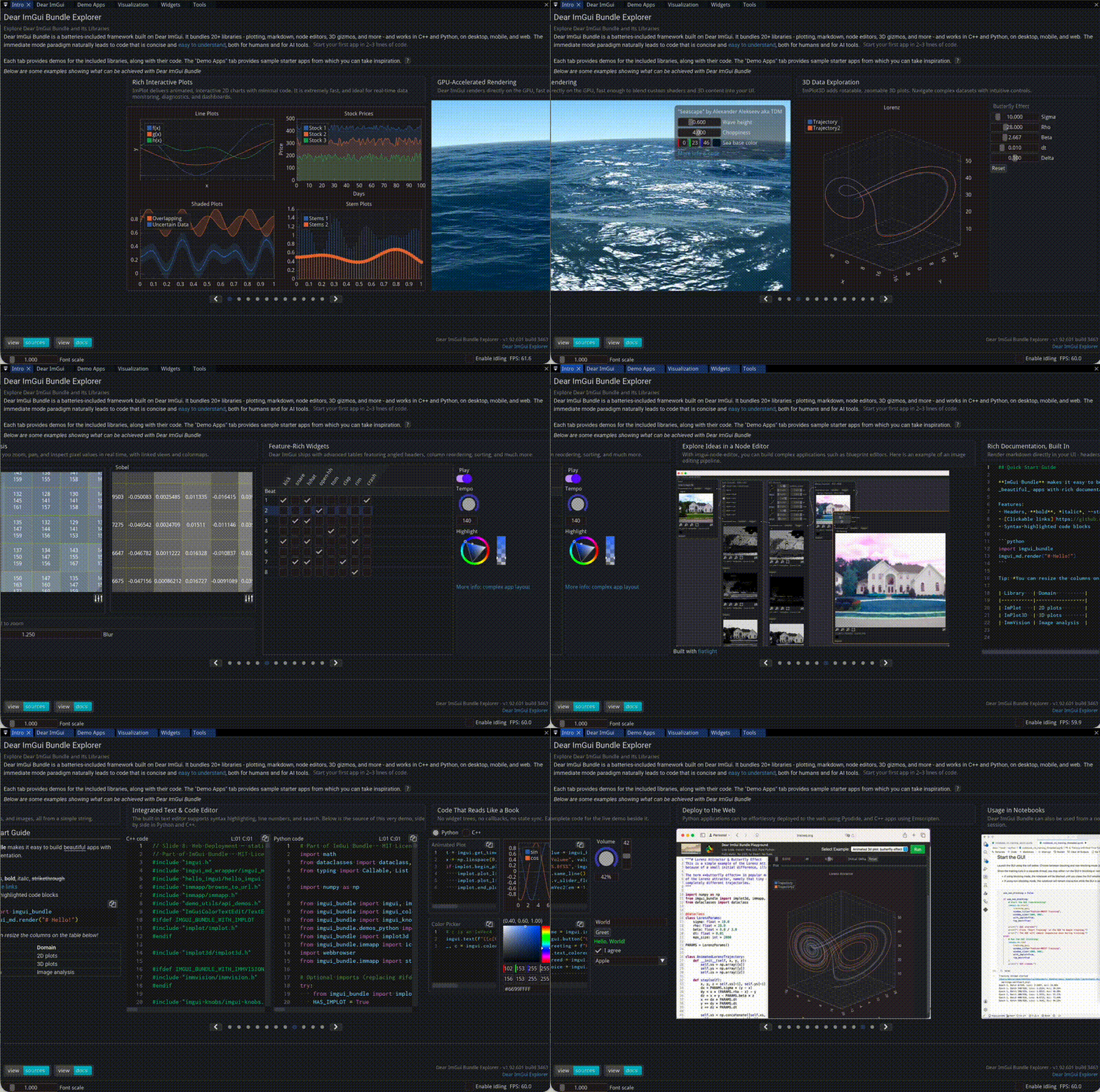](https://imgui-bundle.pages.dev/explorer/)
## Key features
- **Cross-platform:** Windows, macOS, Linux, iOS, Android, and WebAssembly.
- **C++ and Python:** APIs with very similar structure.
- **Integrated ecosystem:**
- Dear ImGui (core widgets)
- ImPlot / ImPlot3D (2D and 3D plotting)
- ImmVision (image inspection)
- RichMd (Markdown documents: math, diagrams, a search; [a 40 s video](https://github.com/pthom/imgui_rich_md))
- ImAnim (animations), and your Matplotlib figures inside the GUI (`imgui_fig`)
- imgui-node-editor, ImGuizmo, file dialogs, knobs, spinners, toggles, command palette, a terminal, and more.
- **Optional high-level runners:**
- Hello ImGui: window, backend, docking, and assets management.
- ImmApp: easy activation of add-ons (ImPlot, Markdown, etc.).
- **Web-ready:**
- C++ via Emscripten
- Python via Pyodide (online playground and deployable HTML templates)
- Touch screens: on a phone, a swipe scrolls, a pinch scales the app, and a keyboard button appears next to a text field.
- **Jupyter:** the notebook stays usable while your app runs (`immapp.nb.start()`).
- **Themes:** 17 themes, tweaked live.
- **Power save:** an idle app lowers its frame rate.
- **Tests and automation:** [ImGui Test Engine](https://github.com/ocornut/imgui_test_engine) drives your GUI from a script, for tests, demos or screenshots (it has [its own license](https://www.dearimgui.com/licenses)).
***
### Documentation
The documentation is [available here](https://imgui-bundle.pages.dev/doc), with the [API reference](https://imgui-bundle.pages.dev/doc/api/) of every library. [All the resources](https://imgui-bundle.pages.dev/doc/intro/resources/) (the docs, the interactive manuals, the videos, the community) are listed in one page.
**For AI assistants:** [llms.txt](https://imgui-bundle.pages.dev/llms.txt), a guide to write apps with the bundle, and to run and check them.
### Community
Join the [Discord server](https://discord.gg/xkzpKMeYN3) for questions, showcase, and discussion (new!).
**FAQ:** answers to common questions, in the [FAQ issues](https://github.com/pthom/imgui_bundle/issues?q=is%3Aissue+label%3AFAQ).
### DeepWiki
[](https://deepwiki.com/pthom/imgui_bundle)
_DeepWiki is an AI based doc where you can ask questions about Dear ImGui Bundle and get answers. It is trained on the full documentation and the source code of the Dear ImGui Bundle. Expect some inconsistencies, but it is still helpful._
### Build status
**The project:** more than 40 releases since 2022, each new Dear ImGui version followed within days. One maintainer, with contributions from about twenty people. The CI covers 10 platforms and backends:
| OpenGL renderer | Python bindings | Alternative renderers | Mobile |
|-----------------|-----------------|-----------------------|--------|
| [](https://github.com/pthom/imgui_bundle/actions/workflows/cpp_lib.yml)<br>[](https://github.com/pthom/imgui_bundle/actions/workflows/emscripten.yml) | [](https://github.com/pthom/imgui_bundle/actions/workflows/pip.yml)<br>[](https://github.com/pthom/imgui_bundle/actions/workflows/wheels.yml)<br>[](https://github.com/pthom/imgui_bundle/actions/workflows/pyodide.yml)<br>[](https://github.com/pthom/imgui_bundle/actions/workflows/cpp_lib_with_bindings.yml) | [](https://github.com/pthom/imgui_bundle/actions/workflows/Metal.yml)<br>[](https://github.com/pthom/imgui_bundle/actions/workflows/DirectX.yml)<br>[](https://github.com/pthom/imgui_bundle/actions/workflows/Vulkan.yml) | [](https://github.com/pthom/imgui_bundle/actions/workflows/ios.yml)<br>[](https://github.com/pthom/imgui_bundle/actions/workflows/android.yml) |