<p align='center'>
<img src='./build/icon.png' width="150" height="150" alt="DeepChat AI Assistant Icon" />
</p>
<h1 align="center">DeepChat - Open-Source Local-First AI Agent Desktop Client</h1>
<p align="center">DeepChat is an open-source, local-first AI agent desktop client with rich agent capabilities, designed around the Tape.systems philosophy, with support for MCP, Skills, ACP, and remote control integrations for messaging apps.</p>
<p align="center">
<a href="https://github.com/ThinkInAIXYZ/deepchat/stargazers"><img src="https://img.shields.io/github/stars/ThinkInAIXYZ/deepchat" alt="Stars Badge"/></a>
<a href="https://github.com/ThinkInAIXYZ/deepchat/network/members"><img src="https://img.shields.io/github/forks/ThinkInAIXYZ/deepchat" alt="Forks Badge"/></a>
<a href="https://github.com/ThinkInAIXYZ/deepchat/pulls"><img src="https://img.shields.io/github/issues-pr/ThinkInAIXYZ/deepchat" alt="Pull Requests Badge"/></a>
<a href="https://github.com/ThinkInAIXYZ/deepchat/issues"><img src="https://img.shields.io/github/issues/ThinkInAIXYZ/deepchat" alt="Issues Badge"/></a>
<a href="https://github.com/ThinkInAIXYZ/deepchat/blob/main/LICENSE"><img src="https://img.shields.io/github/license/ThinkInAIXYZ/deepchat" alt="License Badge"/></a>
<a href="https://github.com/ThinkInAIXYZ/deepchat/releases/latest"><img src="https://img.shields.io/endpoint?url=https://api.pinstudios.net/api/badges/downloads/ThinkInAIXYZ/deepchat/total" alt="Downloads"></a>
</p>
<div align="center">
<a href="https://trendshift.io/repositories/15162" target="_blank"><img src="https://trendshift.io/api/badge/repositories/15162" alt="ThinkInAIXYZ%2Fdeepchat | Trendshift" style="width: 250px; height: 55px;" width="250" height="55"/></a>
</div>
<div align="center">
<a href="./README.zh.md">中文</a> / <a href="./README.md">English</a> / <a href="./README.jp.md">日本語</a>
</div>
## ❤️ Sponsor
<table>
<tr>
<td width="25%" align="center">
<a href="https://www.openmodel.ai?ref=ZGLyq8YQ">
<img src="./assets/sponsors/openmodel.png" alt="OpenModel" width="240" />
</a>
</td>
<td width="75%">
Thanks to OpenModel for sponsoring this project! OpenModel offers client-specific discounts of
up to 90% for Codex and 60% for Claude Code across supported models, helping developers cut API
costs without changing how they work. Just connect your OpenModel API key and keep using Codex
or Claude Code as usual — supported clients are detected automatically and discounted routes
are applied with no extra parameters or manual routing required. You can also configure
fallback behavior per API key, choosing whether to continue at standard pricing or stop when a
discounted route is temporarily unavailable. DeepChat users can register via <a
href="https://www.openmodel.ai?ref=ZGLyq8YQ">this link</a>.
</td>
</tr>
<tr>
<td width="25%" align="center">
<a href="https://www.packyapi.ai/register?aff=0A33">
<img src="./assets/sponsors/packycode.png" alt="PackyCode" width="240" />
</a>
</td>
<td width="75%">
PackyCode is a stable, high-performance API relay provider, offering relay services for Claude
Code, Codex, Gemini, and more. With automatic failover, smart routing, and unlimited
concurrency, it turns AI into a real productivity tool. Register via <a
href="https://www.packyapi.ai/register?aff=0A33">this link</a> and get started!
</td>
</tr>
</table>
## 📑 Table of Contents
- [📑 Table of Contents](#-table-of-contents)
- [🚀 Project Introduction](#-project-introduction)
- [💡 Why Choose DeepChat](#-why-choose-deepchat)
- [📦 Quick Start](#-quick-start)
- [Download and Install](#download-and-install)
- [Configure Models](#configure-models)
- [Start Conversations](#start-conversations)
- [🔥 Main Features](#-main-features)
- [📼 Tape & Trace](#-tape--trace)
- [🧠 Skills Support](#-skills-support)
- [🧩 ACP Integration (Agent Client Protocol)](#-acp-integration-agent-client-protocol)
- [📡 Remote Control](#-remote-control)
- [🤖 Supported Model Providers](#-supported-model-providers)
- [Compatible with any model provider in OpenAI/Gemini/Anthropic API format](#compatible-with-any-model-provider-in-openaigeminianthropic-api-format)
- [🔍 Use Cases](#-use-cases)
- [💻 Development Guide](#-development-guide)
- [Install Dependencies](#install-dependencies)
- [Start Development](#start-development)
- [Build](#build)
- [👥 Community \& Contribution](#-community--contribution)
- [⭐ Star History](#-star-history)
- [👨💻 Contributors](#-contributors)
- [📃 License](#-license)
## 🚀 Project Introduction
DeepChat is a powerful open-source, local-first AI agent desktop client that brings together models, tools, Skills, agent runtimes, Tape, and long-running sessions in one desktop app. Whether you're using cloud APIs like OpenAI, Gemini, Anthropic, or locally deployed Ollama models, DeepChat delivers a smooth user experience.
DeepChat's sessions and agent processes follow the Tape.systems philosophy: keep the process, so context, tool calls, requests, and results stay recoverable, traceable, and inspectable. It also provides strong MCP support, installable Skills, ACP agent integration, and remote control for Telegram, Feishu/Lark, QQBot, Discord, WeChat iLink, and other messaging workflows.
<table align="center">
<tr>
<td align="center" style="padding: 10px;">
<img src='./assets/screenshots/main-light.png' alt="DeepChat main interface in light mode" width="400"/>
<br/>
</td>
<td align="center" style="padding: 10px;">
<img src='./assets/screenshots/main-dark.png' alt="DeepChat main interface in dark mode" width="400"/>
<br/>
</td>
</tr>
</table>
## 💡 Why Choose DeepChat
Compared to other AI tools, DeepChat offers the following unique advantages:
- **Local-First Agent Desktop Client**: Run DeepChat agents, ACP agents, and remote-ready bots in one local app
- **Tape.systems Philosophy**: Preserve recoverable session history, trace request context, and inspect token budgets when agent work gets complex
- **Skills That Travel**: Install, import, export, and enable reusable Skills per conversation for code review, documents, frontend work, Office/PDF tasks, and more
- **Native ACP Integration**: Run ACP-compatible coding and task agents as first-class entries in the model selector
- **Strong MCP Support**: Support Resources, Prompts, Tools, multiple transports, inMemory services, and one-click installation
- **Remote-Ready Workflows**: Control DeepChat sessions from Telegram, Feishu/Lark, QQBot, Discord, and WeChat iLink
- **Unified Multi-Model Management**: One application supports mainstream cloud LLMs and local Ollama models, eliminating the need to switch between multiple apps
- **Privacy-Focused**: Local data storage and network proxy support reduce the risk of information leakage
- **Business-Friendly**: Embraces open source under the Apache License 2.0, suitable for both commercial and personal use
## 📦 Quick Start
### Download and Install
You can install DeepChat using one of the following methods:
**Option 1: GitHub Releases**
Download the latest version for your system from the [GitHub Releases](https://github.com/ThinkInAIXYZ/deepchat/releases) page:
- Windows: `.exe` installation file
- macOS: `.dmg` installation file
- Linux: `.AppImage` or `.deb` installation file
**Option 2: Official Website**
Download from the [official website](https://deepchatai.cn/#/download).
**Option 3: Homebrew (macOS only)**
For macOS users, you can install DeepChat using Homebrew:
```bash
brew install --cask deepchat
```
### Configure Models
1. Launch the DeepChat application
2. Click the settings icon
3. Select the "Model Providers" tab
4. Add your API keys or configure local Ollama
### Start Conversations
1. Click the "+" button to create a new conversation
2. Select the model you want to use
3. Start communicating with your AI assistant
## 🔥 Main Features
- 🤖 **Local-First Agent Desktop Client**
- Select DeepChat, ACP, and remote-capable agents from one model-like entry point
- Run long-lived sessions with project folders, permission modes, tool output, and resumable context
- 📼 **Tape & Trace**
- Session Tape records structured work history for recovery, resume, and future agent memory flows
- Trace previews show request sequences, provider/model metadata, Tape view manifests, included entries, and token budgets
- 🧠 **Skills**
- Install Skills from folders, ZIP files, or URLs
- Enable Skills per conversation so DeepChat can load task-specific instructions, references, and optional scripts
- Import and export Skills with Claude Code, Codex, Cursor, Windsurf, GitHub Copilot, and other compatible tools
- 🤝 **ACP (Agent Client Protocol) Agent Integration**
- Run ACP-compatible agents (built-in or custom commands) as selectable “models”
- ACP workspace UI for structured plans, tool calls, and terminal output when provided by the agent
- 📡 **Remote Control**
- Control DeepChat sessions from Telegram, Feishu/Lark, QQBot, Discord, and WeChat iLink
- Bind remote endpoints to sessions, switch models, answer pending interactions, stop runs, and open desktop sessions remotely
- 🌐 **Multiple Cloud LLM Provider Support**: DeepSeek, OpenAI, Moonshot/Kimi, Grok, Gemini, Anthropic, and more
- 🏠 **Local Model Deployment Support**:
- Integrated Ollama with comprehensive management capabilities
- Control and manage Ollama model downloads, deployments, and runs without command-line operations
- 🚀 **Rich and Easy-to-Use Chat Capabilities**
- Complete Markdown rendering with code block rendering based on industry-leading [CodeMirror](https://codemirror.net/)
- Multi-window + multi-tab architecture supporting parallel multi-session operations across all dimensions, use large models like using a browser, non-blocking experience brings excellent efficiency
- Supports Artifacts rendering for diverse result presentation
- Messages support retry to generate multiple variations; conversations can be forked freely, ensuring there's always a suitable line of thought
- Supports rendering images, Mermaid diagrams, and other multi-modal content; supports GPT-4o, Gemini, Grok text-to-image capabilities
- Supports highlighting external information sources like search results within the content
- 🔍 **Robust Search Extension Capabilities**
- Built-in integration with leading search APIs like Bocha Search and Brave Search, allowing the model to intelligently decide when to search
- Supports mainstream search engines like Google, Bing, Baidu, and Sogou Official Accounts search by simulating user web browsing, enabling the LLM to read search engines like a human
- Supports reading any search engine; simply configure a search assistant model to connect various search sources, whether internal networks, API-less engines, or vertical domain search engines, as information sources for the model
- 🔧 **Strong MCP (Model Context Protocol) Support**
- Full support for Resources / Prompts / Tools
- Supports StreamableHTTP, SSE, Stdio, and other transports
- Official Node.js toolchain for npx/node-style services, installed from Settings when needed
- inMemory services for code execution, web information retrieval, file operations, and other common utilities
- Clear tool-call display with parameter and return-data debugging
- DeepLink support for one-click MCP service installation
- 💻 **Multi-Platform Support**: Windows, macOS, Linux
- 🎨 **Beautiful and User-Friendly Interface**, user-oriented design, meticulously themed light and dark modes
- 🔗 **Rich DeepLink Support**: Initiate conversations via links for seamless integration with other applications, including one-click MCP service installation.
- 🚑 **Security-First Design**: Chat data and configuration data have reserved encryption interfaces and code obfuscation capabilities
- 🛡️ **Privacy Protection**: Supports screen projection hiding, network proxies, and other privacy protection methods to reduce the risk of information leakage
- 💰 **Business-Friendly**:
- Embraces open source, based on the Apache License 2.0 protocol, enterprise use without worry
- Enterprise integration requires only minimal configuration code changes to use reserved encrypted obfuscation security capabilities
- Clear code structure, both model providers and MCP services are highly decoupled, can be freely customized with minimal cost
- Reasonable architecture, data interaction and UI behavior separation, fully utilizing Electron's capabilities, rejecting simple web wrappers, excellent performance
## 📼 Tape & Trace
DeepChat's session Tape follows the Tape.systems philosophy and keeps agent work recoverable and inspectable. Trace previews expose request sequences, provider/model metadata, Tape view manifests, included or excluded entries, and token budgets, making long-running agent sessions easier to debug and resume.
## 🧠 Skills Support
DeepChat Skills are designed to be compatible with the standard Agent Skills specification. A Skill can include task instructions, reference files, assets, and optional scripts, so DeepChat can act more like a domain specialist after it is enabled.
You can install Skills from folders, ZIP files, or URLs, and import/export them with Claude Code, Codex, Cursor, Windsurf, GitHub Copilot, Kiro, Antigravity, OpenCode, Goose, Kilo Code, and other compatible tools.
Built-in Skills cover algorithmic art, code review, DeepChat CLI, DeepChat settings, document collaboration, DOCX, frontend design, git commit messages, infographic syntax, MCP building, memory management, PDF, PPTX, Skill creation, and XLSX workflows.
Quick start:
1. Open **Settings → Skills**
2. Install or import a Skill
3. Enable it in conversations that need that capability
## 🧩 ACP Integration (Agent Client Protocol)
DeepChat has built-in support for [Agent Client Protocol (ACP)](https://agentclientprotocol.com), allowing you to integrate external agent runtimes into DeepChat with a native UI. Once enabled, ACP agents appear as first-class entries in the model selector, so you can use coding agents and task agents directly inside DeepChat.
Quick start:
1. Open **Settings → ACP Agents** and enable ACP
2. Enable a built-in ACP agent or add a custom ACP-compatible command
3. Select the ACP agent in the model selector to start an agent session
To explore the ecosystem of compatible agents and clients, see: https://agentclientprotocol.com/overview/clients
## 📡 Remote Control
DeepChat can be controlled from messaging apps, so you can keep a session running even when you are away from the desktop. Configure remote channels under **Settings → Remote**.
Supported channels include Telegram, Feishu/Lark, QQBot, Discord, and WeChat iLink. Remote endpoints can bind to one DeepChat session, then create new sessions, list and switch recent sessions, stop generation, open the current session on desktop, answer pending questions or permission prompts, switch models, and check runtime status.
Common commands include `/start`, `/help`, `/pair`, `/new`, `/sessions`, `/use`, `/stop`, `/open`, `/pending`, `/model`, and `/status`.
## 🤖 Supported Model Providers
<table>
<tr align="center">
<td>
<img src="./src/renderer/src/assets/llm-icons/deepseek-color.svg" width="50" height="50" alt="Deepseek Icon"><br/>
<a href="https://deepseek.com/">Deepseek</a>
</td>
<td>
<img src="./src/renderer/src/assets/llm-icons/moonshot.svg" width="50" height="50" alt="Moonshot Icon"><br/>
<a href="https://moonshot.ai/">Moonshot</a>
</td>
<td>
<img src="./src/renderer/src/assets/llm-icons/openai.svg" width="50" height="50" alt="OpenAI Icon"><br/>
<a href="https://openai.com/">OpenAI</a>
</td>
<td>
<img src="./src/renderer/src/assets/llm-icons/gemini-color.svg" width="50" height="50" alt="Gemini Icon"><br/>
<a href="https://gemini.google.com/">Gemini</a>
</td>
</tr>
<tr align="center">
<td>
<img src="./src/renderer/src/assets/llm-icons/ollama.svg" width="50" height="50" alt="Ollama Icon"><br/>
<a href="https://ollama.com/">Ollama</a>
</td>
<td>
<img src="./src/renderer/src/assets/llm-icons/qiniu.svg" width="50" height="50" alt="Qiniu Icon"><br/>
<a href="https://www.qiniu.com">Qiniu</a>
</td>
<td>
<img src="./src/renderer/src/assets/llm-icons/newapi.svg" width="50" height="50" alt="New API Icon"><br/>
<a href="https://www.newapi.ai/">New API</a>
</td>
<td>
<img src="./src/renderer/src/assets/llm-icons/grok.svg" width="50" height="50" alt="Grok Icon"><br/>
<a href="https://x.ai/">Grok</a>
</td>
</tr>
<tr align="center">
<td>
<img src="./src/renderer/src/assets/llm-icons/zhipu-color.svg" width="50" height="50" alt="Zhipu Icon"><br/>
<a href="https://open.bigmodel.cn/">Zhipu</a>
</td>
<td>
<img src="./src/renderer/src/assets/llm-icons/ppio-color.svg" width="50" height="50" alt="PPIO Icon"><br/>
<a href="https://ppinfra.com/">PPIO</a>
</td>
<td>
<img src="./src/renderer/src/assets/llm-icons/minimax-color.svg" width="50" height="50" alt="MiniMax Icon"><br/>
<a href="https://platform.minimaxi.com/">MiniMax</a>
</td>
<td>
<img src="./src/renderer/src/assets/llm-icons/fireworks-color.svg" width="50" height="50" alt="Fireworks Icon"><br/>
<a href="https://fireworks.ai/">Fireworks</a>
</td>
</tr>
<tr align="center">
<td>
<img src="./src/renderer/src/assets/llm-icons/aihubmix.png" width="50" height="50" alt="AIHubMix Icon"><br/>
<a href="https://aihubmix.com/">AIHubMix</a>
</td>
<td>
<img src="./src/renderer/src/assets/llm-icons/doubao-color.svg" width="50" height="50" alt="Doubao Icon"><br/>
<a href="https://console.volcengine.com/ark/">Doubao</a>
</td>
<td>
<img src="./src/renderer/src/assets/llm-icons/alibabacloud-color.svg" width="50" height="50" alt="DashScope Icon"><br/>
<a href="https://www.aliyun.com/product/bailian">DashScope</a>
</td>
<td>
<img src="./src/renderer/src/assets/llm-icons/groq.svg" width="50" height="50" alt="Groq Icon"><br/>
<a href="https://groq.com/">Groq</a>
</td>
</tr>
<tr align="center">
<td>
<img src="./src/renderer/src/assets/llm-icons/jiekou-color.svg" width="50" height="50" alt="JieKou.AI Icon"><br/>
<a href="https://jiekou.ai?utm_source=github_deepchat">JieKou.AI</a>
</td>
<td>
<img src="./src/renderer/src/assets/llm-icons/zenmux-color.svg" width="50" height="50" alt="ZenMux Icon"><br/>
<a href="https://zenmux.ai/">ZenMux</a>
</td>
<td>
<img src="./src/renderer/src/assets/llm-icons/github.svg" width="50" height="50" alt="GitHub Models Icon"><br/>
<a href="https://github.com/marketplace/models">GitHub Models</a>
</td>
<td>
<img src="./src/renderer/src/assets/llm-icons/lmstudio.svg" width="50" height="50" alt="LM Studio Icon"><br/>
<a href="https://lmstudio.ai/docs/app">LM Studio</a>
</td>
</tr>
<tr align="center">
<td>
<img src="./src/renderer/src/assets/llm-icons/hunyuan-color.svg" width="50" height="50" alt="Hunyuan Icon"><br/>
<a href="https://cloud.tencent.com/product/hunyuan">Hunyuan</a>
</td>
<td>
<img src="./src/renderer/src/assets/llm-icons/302ai.svg" width="50" height="50" alt="302.AI Icon"><br/>
<a href="https://302ai.cn/">302.AI</a>
</td>
<td>
<img src="./src/renderer/src/assets/llm-icons/together-color.svg" width="50" height="50" alt="Together Icon"><br/>
<a href="https://www.together.ai/">Together</a>
</td>
<td>
<img src="./src/renderer/src/assets/llm-icons/poe-color.svg" width="50" height="50" alt="Poe Icon"><br/>
<a href="https://poe.com/">Poe</a>
</td>
</tr>
<tr align="center">
<td>
<img src="./src/renderer/src/assets/llm-icons/vercel.svg" width="50" height="50" alt="Vercel AI Gateway Icon"><br/>
<a href="https://vercel.com/ai">Vercel AI Gateway</a>
</td>
<td>
<img src="./src/renderer/src/assets/llm-icons/openrouter.svg" width="50" height="50" alt="OpenRouter Icon"><br/>
<a href="https://openrouter.ai/">OpenRouter</a>
</td>
<td>
<img src="./src/renderer/src/assets/llm-icons/azure-color.svg" width="50" height="50" alt="Azure OpenAI Icon"><br/>
<a href="https://azure.microsoft.com/en-us/products/ai-services/openai-service">Azure OpenAI</a>
</td>
<td>
<img src="./src/renderer/src/assets/llm-icons/tokenflux-color.svg" width="50" height="50" alt="TokenFlux Icon"><br/>
<a href="https://tokenflux.ai/">TokenFlux</a>
</td>
</tr>
<tr align="center">
<td>
<img src="./src/renderer/src/assets/llm-icons/burncloud-color.svg" width="50" height="50" alt="BurnCloud Icon"><br/>
<a href="https://www.burncloud.com/">BurnCloud</a>
</td>
<td>
<img src="./src/renderer/src/assets/llm-icons/openai.svg" width="50" height="50" alt="OpenAI Responses Icon"><br/>
<a href="https://openai.com/">OpenAI Responses</a>
</td>
<td>
<img src="./src/renderer/src/assets/llm-icons/cherryin-color.png" width="50" height="50" alt="CherryIn Icon"><br/>
<a href="https://open.cherryin.ai/console">CherryIn</a>
</td>
<td>
<img src="./src/renderer/src/assets/llm-icons/modelscope-color.svg" width="50" height="50" alt="ModelScope Icon"><br/>
<a href="https://modelscope.cn/">ModelScope</a>
</td>
</tr>
<tr align="center">
<td>
<img src="./src/renderer/src/assets/llm-icons/aws-bedrock.svg" width="50" height="50" alt="AWS Bedrock Icon"><br/>
<a href="https://aws.amazon.com/bedrock/">AWS Bedrock</a>
</td>
<td>
<img src="./src/renderer/src/assets/llm-icons/voiceai.svg" width="50" height="50" alt="Voice.ai Icon"><br/>
<a href="https://voice.ai/">Voice.ai</a>
</td>
<td>
<img src="./src/renderer/src/assets/llm-icons/vertexai-color.svg" width="50" height="50" alt="Vertex AI Icon"><br/>
<a href="https://cloud.google.com/vertex-ai">Vertex AI</a>
</td>
<td>
<img src="./src/renderer/src/assets/llm-icons/githubcopilot.svg" width="50" height="50" alt="GitHub Copilot Icon"><br/>
<a href="https://github.com/features/copilot">GitHub Copilot</a>
</td>
</tr>
<tr align="center">
<td>
<img src="./src/renderer/src/assets/llm-icons/xiaomi.png" width="50" height="50" alt="Xiaomi Icon"><br/>
<a href="https://platform.xiaomimimo.com/#/docs/quick-start/first-api-call">Xiaomi</a>
</td>
<td>
<img src="./src/renderer/src/assets/llm-icons/o3-fan.png" width="50" height="50" alt="o3.fan Icon"><br/>
<a href="https://o3.fan">o3.fan</a>
</td>
<td>
<img src="./src/renderer/src/assets/llm-icons/novitaai.svg" width="50" height="50" alt="Novita AI Icon"><br/>
<a href="https://novita.ai/">Novita AI</a>
</td>
<td>
<img src="./src/renderer/src/assets/llm-icons/astraflow.png" width="50" height="50" alt="Astraflow Icon"><br/>
<a href="https://astraflow.ucloud.cn/">Astraflow</a>
</td>
</tr>
<tr align="center">
<td>
<img src="./src/renderer/src/assets/llm-icons/anthropic.svg" width="50" height="50" alt="Anthropic Icon"><br/>
<a href="https://www.anthropic.com/">Anthropic</a>
</td>
<td>
<img src="./src/renderer/src/assets/llm-icons/siliconcloud-color.svg" width="50" height="50" alt="SiliconFlow Icon"><br/>
<a href="https://www.siliconflow.cn/">SiliconFlow</a>
</td>
<td>
<img src="./src/renderer/src/assets/llm-icons/orcarouter.svg" width="50" height="50" alt="OrcaRouter Icon"><br/>
<a href="https://www.orcarouter.ai/">OrcaRouter</a>
</td>
<td>
<img src="./src/renderer/src/assets/llm-icons/synthorai.svg" width="50" height="50" alt="Synthorai Icon"><br/>
<a href="https://synthorai.io/">Synthorai</a>
</td>
</tr>
<tr align="center">
<td>
<img src="./src/renderer/src/assets/llm-icons/requesty.png" width="50" height="50" alt="Requesty Icon"><br/>
<a href="https://www.requesty.ai/">Requesty</a>
</td>
<td>
<img src="./src/renderer/src/assets/llm-icons/litellm.svg" width="50" height="50" alt="LiteLLM Icon"><br/>
<a href="https://www.litellm.ai/">LiteLLM</a>
</td>
<td>
<img src="./src/renderer/src/assets/llm-icons/opper.svg" width="50" height="50" alt="Opper Icon"><br/>
<a href="https://opper.ai/">Opper</a>
</td>
<td>
<img src="./src/renderer/src/assets/llm-icons/aistupidlevel.svg" width="50" height="50" alt="AI Stupid Level Icon"><br/>
<a href="https://aistupidlevel.info/">AI Stupid Level</a>
</td>
</tr>
</table>
### Compatible with any model provider in OpenAI/Gemini/Anthropic API format
Any service that speaks the OpenAI, Gemini, or Anthropic API format can be added as a custom provider next to the built-in ones.
## 🔍 Use Cases
DeepChat is suitable for various AI application scenarios:
- **Daily Assistant**: Answering questions, providing suggestions, assisting with writing and creation
- **Development Aid**: Code generation, debugging, technical problem solving
- **Learning Tool**: Concept explanation, knowledge exploration, learning guidance
- **Content Creation**: Copywriting, creative inspiration, content optimization
- **Data Analysis**: Data interpretation, chart generation, report writing
## 💻 Development Guide
Please read the [Contribution Guidelines](./CONTRIBUTING.md)
Windows and Linux are packaged by GitHub Action.
For Mac-related signing and packaging, please refer to the [Mac Release Guide](https://github.com/ThinkInAIXYZ/deepchat/wiki/Mac-Release-Guide).
### Install Dependencies
```bash
$ pnpm install
$ pnpm run installRuntime
# if got err: No module named 'distutils'
$ pip install setuptools
```
* For Windows: To allow non-admin users to create symlinks and hardlinks, enable `Developer Mode` in Settings or use an administrator account. Otherwise `pnpm` ops will fail.
### Start Development
```bash
$ pnpm run dev
```
### Build
```bash
# For Windows
$ pnpm run build:win
# For macOS
$ pnpm run build:mac
# For Linux
$ pnpm run build:linux
# Specify architecture packaging
$ pnpm run build:win:x64
$ pnpm run build:win:arm64
$ pnpm run build:mac:x64
$ pnpm run build:mac:arm64
$ pnpm run build:linux:x64
$ pnpm run build:linux:arm64
```
For a more detailed guide on development, project structure, and architecture, please see the [Developer Guide](./docs/guides/getting-started.md) and the maintained [documentation index](./docs/README.md).
## 👥 Community & Contribution
DeepChat is an active open-source community project, and we welcome various forms of contribution:
- 🐛 [Report issues](https://github.com/ThinkInAIXYZ/deepchat/issues)
- 💡 [Submit feature suggestions](https://github.com/ThinkInAIXYZ/deepchat/issues)
- 🔧 [Submit code improvements](https://github.com/ThinkInAIXYZ/deepchat/pulls)
- 📚 [Improve documentation](https://github.com/ThinkInAIXYZ/deepchat/wiki)
- 🌍 [Help with translation](https://github.com/ThinkInAIXYZ/deepchat/tree/main/src/renderer/src/i18n)
Check the [Contribution Guidelines](./CONTRIBUTING.md) to learn more about ways to participate in the project.
## ⭐ Star History
[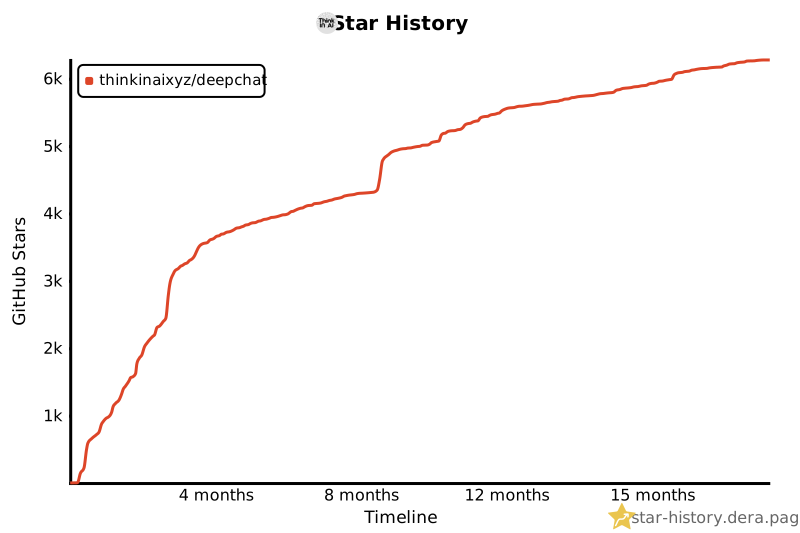](https://star-history.dera.page/#ThinkInAIXYZ/deepchat&Timeline)
## 👨💻 Contributors
Thank you for considering contributing to deepchat! The contribution guide can be found in the [Contribution Guidelines](./CONTRIBUTING.md).
<a href="https://openomy.com/thinkinaixyz/deepchat" target="_blank" style="display: block; width: 100%;" align="center">
<img src="https://openomy.com/svg?repo=thinkinaixyz/deepchat&chart=bubble&latestMonth=3" target="_blank" alt="Contribution Leaderboard" style="display: block; width: 100%;" />
</a>
## 🙏🏻 Thanks
This project is built with the help of these awesome libraries and projects:
- [Vue](https://vuejs.org/)
- [Electron](https://www.electronjs.org/)
- [Electron-Vite](https://electron-vite.org/)
- [oxlint](https://github.com/oxc-project/oxc)
- [Bub](https://github.com/bubbuild/bub), whose tape model inspired DeepChat's session tape design. For the underlying tape architecture, visit [tape.systems](https://tape.systems/).
## 📃 License
[LICENSE](./LICENSE)