# Sourcerer
**Ask the source.** Sourcerer is a code research agent for understanding complex
versioned software deployments. It indexes git repos over time, searches them,
and grounds its answers in the source, scaling to hundreds of repos and billions
of lines of code. See the [research blog](https://www.elastic.co/search-labs/blog/code-search-sourcerer-elasticsearch).
---
1. [Quickstart](#quickstart)
2. [Configuration](#configuration)
3. [Integrations](#integrations)
4. [Upgrades](#upgrades)
5. [Benchmarks](#benchmarks)
6. [Development](#development)
---
### Why Sourcerer
**Get trusted answers from the source.** Sourcerer indexes snapshots of git repos
so that AI agents can search the code, generate authoritative answers, and provide
inline citations for verification. It ships with configurations for [Elastic Agent Builder](https://www.elastic.co/docs/explore-analyze/ai-features/elastic-agent-builder),
which searches your code in Elasticsearch the way a coding agent would search it
on a filesystem. Its value shines for questions that span multiple repos or
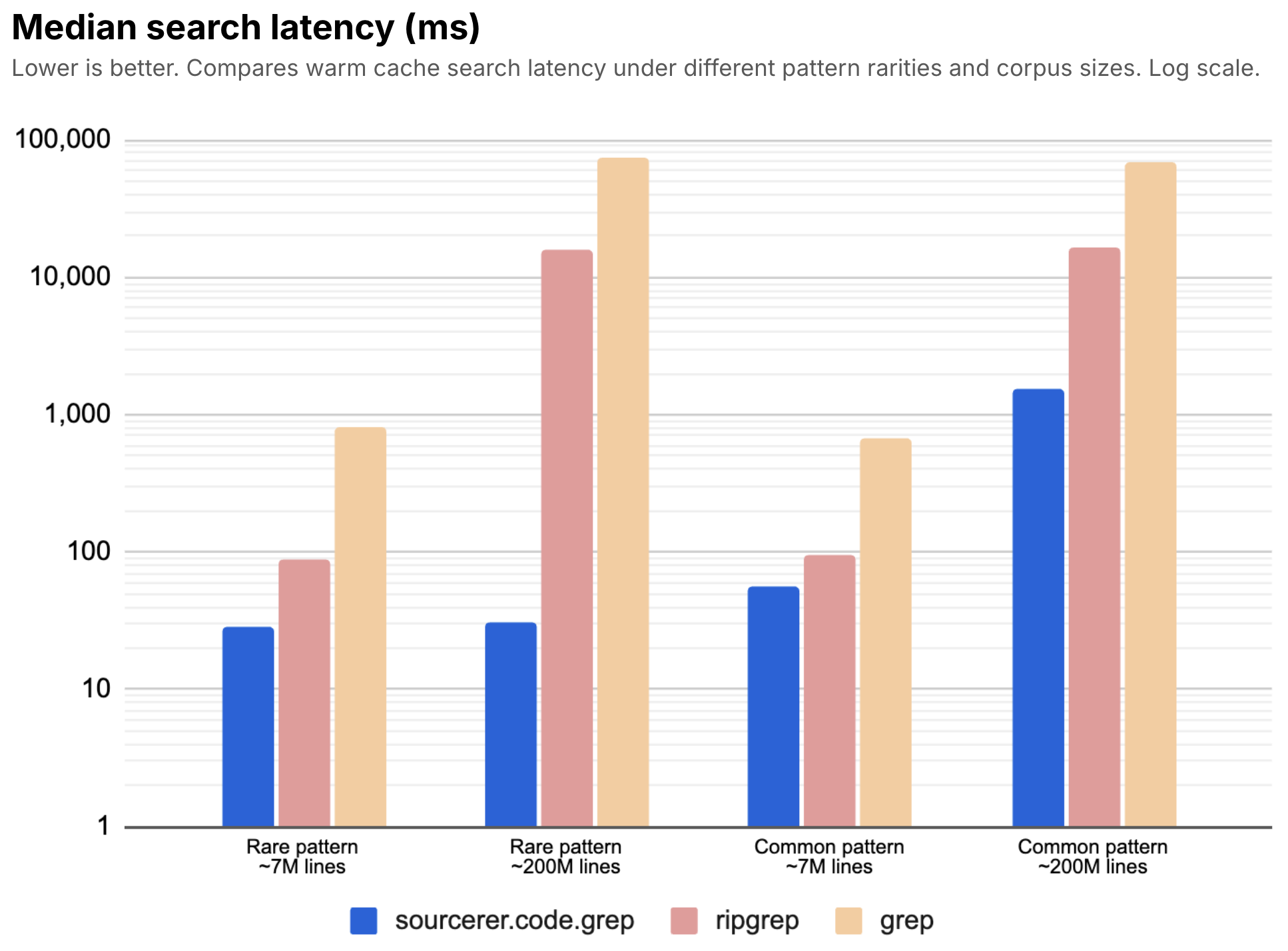
versions: Sourcerer will find the right snapshot and grep a billion lines of
code in seconds.
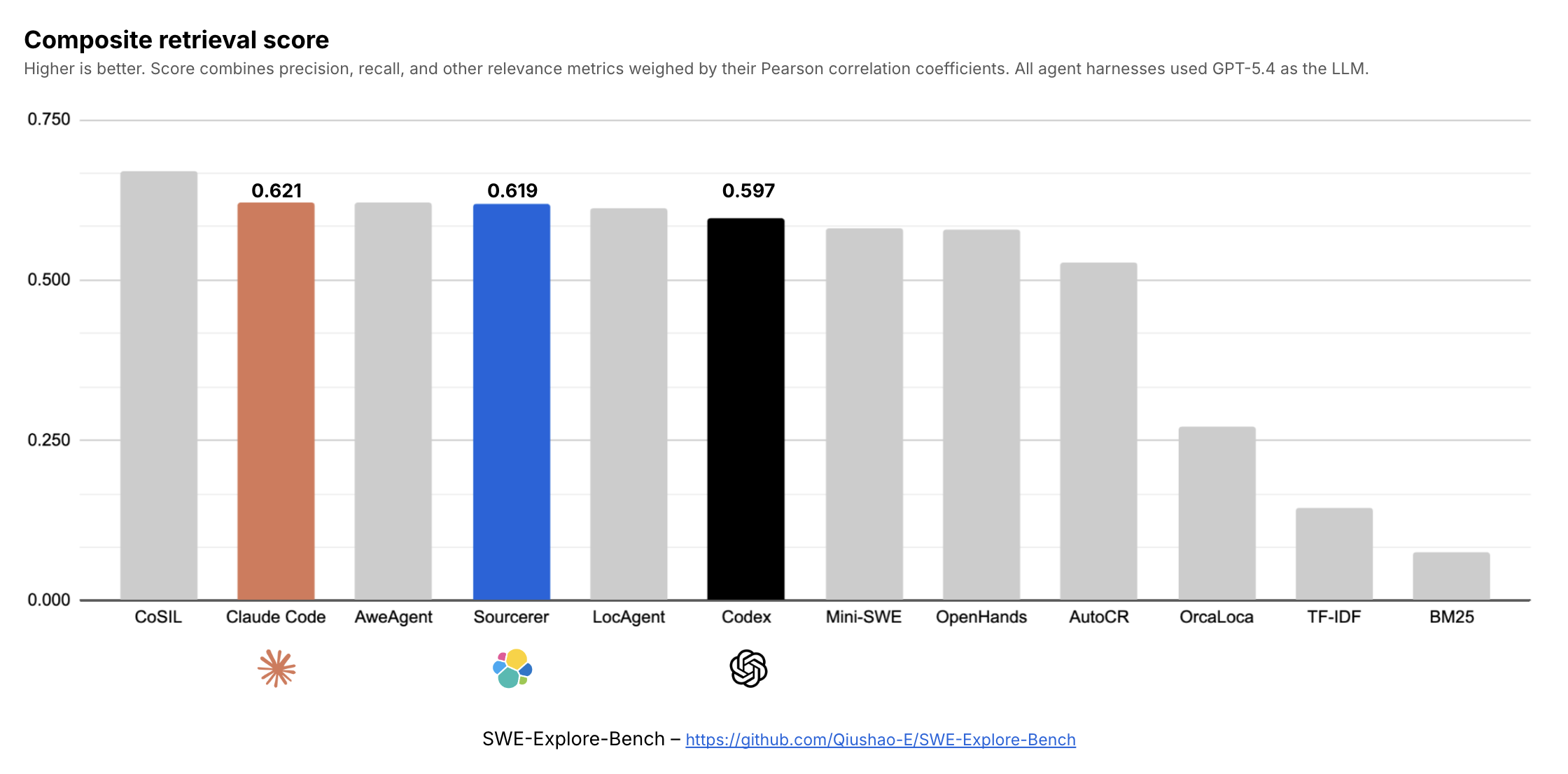
**Search like a coding agent at scale.** Sourcerer is statistically tied with frontier coding agents for code retrieval based on its results from [SWE-Explore-Bench](https://github.com/Qiushao-E/SWE-Explore-Bench) (see chart below). You can expect Sourcerer to search your code as well as any coding agent, while scaling across many historical repository snapshots as if it was a single repo.
**Code is the source of truth for its own behavior.** Always authoriative,
never outdated. While documentation and tribal knowledge offers context, they
can never be the primary source of truth for its implementation.
**Go with the grain on how model are trained.** LLMs used by coding agents are
trained to use terminal commands, and [grep has worked exceptionally well](https://arxiv.org/abs/2605.15184).
Sourcerer searches code with the same semantics (e.g. grep, ls, cat, head, tail)
over multiple code repositories indexed in Elasticsearch for greater speed,
scale, relevance, security, collaboration, and customization.
## Quickstart
**Prerequisites**
- [uv](https://docs.astral.sh/uv/) and [git](https://git-scm.com/downloads/) on your machine
- [Elasticsearch and Kibana](https://www.elastic.co/cloud/serverless) (v9.5.0+) reachable from your machine
**Setup**
1. Install the `sourcerer` CLI:
```sh
uv tool install "git+https://github.com/elastic/sourcerer.git@v3.0.3"
```
2. Add connection details. Create a `.env` in your working directory, then fill it in:
```sh
cat > .env <<'EOF'
ELASTICSEARCH_URL=
KIBANA_URL=
# Authentication (use either API Key or both of Username and Password)
ELASTICSEARCH_API_KEY=
#ELASTICSEARCH_USERNAME=
#ELASTICSEARCH_PASSWORD=
EOF
```
3. Define the sources to index. Create `sourcerer.yml`, then edit it according to the [`sourcerer.yml` specification](specs/sourcerer-yml.md):
```sh
cat > sourcerer.yml <<'EOF'
sources:
# Example: Index and retain only the latest snapshot of the "main" branch
- git: { host: "github", org: "elastic", repo: "docs-content", ref_type: "branch" }
match: "main"
retain.count: 1
# Example: Index and retain only the latest patch release snapshot of every minor release for the last two major releases
- git: { host: "github", org: "elastic", repo: "elasticsearch", ref_type: "tag" }
match: "v{major}.{minor}.{patch}"
since.ref: "v8.17.0"
retain.version: { majors: 2, patches: 1 }
EOF
```
Each source is scoped to a `git.host`, `git.org`, `git.repo`, and `git.ref_type` (can be `tag`, `branch`, or `commit`). `match` defines the names of tags, branches, or commit hashes to index based on a pattern like `v{major}.{minor}.{patch}` or a fixed string like `main`. `since` defines where to begin indexing in the commit history. `retain` defines how long to keep indexed refs before they qualify for pruning.
4. Set up the indices and agent: `sourcerer setup --config sourcerer.yml`
5. Index the repos: `sourcerer index --config sourcerer.yml`
6. Chat about your software with the Sourcerer agent in Kibana under "Agents".
## Configuration
The [`sourcerer.yml` specification](specs/sourcerer-yml.md) has the full reference of fields supported by the configuration file.
### Snapshot vs. delta indexing (`mode`)
Each source can set `mode: snapshot` (the default) or `mode: delta` (branch or tag). Every
Agent Builder content tool exposes the same optional filters either way — `git_commit`,
`git_ref`, and `git_ref_type` (all support `*`/`?` wildcards) — and resolves each result to a
concrete commit the same way regardless of mode.
- **`snapshot`** (default): content is commit-addressed. Every ref (branch, tag, or pinned commit)
that resolves to the same commit collapses to one snapshot. A moving branch's HEAD advance indexes
a brand-new snapshot under the new commit.
- **`delta`** (branch or tag): content is ref-addressed instead. Content docs carry
`git.ref_pattern` (the stream identity) but no `git.commit` of their own — the ref's current
commit lives only on its refs join doc, resolved at query time via a LOOKUP JOIN. A HEAD advance re-indexes only the files
`git diff --name-status` reports changed (add/modify/delete), not the whole tree, so
staying current on a fast-moving branch or tag is cheap. Particularly useful for fast-moving
tags that are force-updated frequently (e.g. `deploy@8`-style Serverless promotion tags) where
snapshot mode would mint a full snapshot per move. `since` and `retain` don't apply to a
delta-mode source (there is no per-commit history to filter or retain) and are rejected if given.
```yaml
sources:
- git: { host: "github", org: "elastic", repo: "serverless-gitops", ref_type: "branch" }
match: "main"
mode: delta
```
#### Delta mode with tags
A delta **tag** source is a *moving stream* whose identity is the `match` **pattern**, not any
one tag name. On every `index` run Sourcerer finds the tags matching the pattern, picks the
**newest one by tag-creation date**, and delta-updates from the last indexed commit to that
tag's commit (only the changed files).
Because the pattern is the identity, every tag it matches folds into a **single** stream that
always reflects the newest matching tag. Only that latest tag stays queryable — earlier ones
are replaced in place, not kept as separate snapshots. Reach for a delta tag when you want to
*track the latest* cheaply; use `snapshot` mode (optionally with `retain`) when you want each
release kept and independently searchable.
**Good fit — one force-updated tag.** A promotion tag that is re-pointed over time (e.g. a
`deploy@N`-style Serverless tag) is a single moving pointer. Each re-point delta-updates in
place instead of minting a new snapshot:
```yaml
- git: { host: "github", org: "elastic", repo: "serverless-gitops", ref_type: "tag" }
match: "deploy@*"
mode: delta
```
**Careful — "newest" means newest by date, not highest version.** Version placeholders
(`{major}.{minor}.{patch}`) only *filter* which tags match; they do **not** order the
selection. If a repo tags several release lines in overlapping windows, a broad pattern has no
stable "newest." Kibana, for example, ships `9.5.x`, `9.4.x`, and `8.19.x` at the same time,
and a backport such as `v8.19.20` is often tagged *after* `v9.5.1` — so a single stream
matching them all would jump between lines and re-index large, meaningless cross-line diffs:
```yaml
# Unstable on a multi-line repo: the newest tag by date flips between release lines.
- git: { host: "github", org: "elastic", repo: "kibana", ref_type: "tag" }
match: "v{major}.{minor}.{patch}"
mode: delta
```
Pin the pattern to a single release line with a glob so the newest match is always monotonic:
```yaml
# Track the latest 9.5.x patch as one stable stream.
- git: { host: "github", org: "elastic", repo: "kibana", ref_type: "tag" }
match: "v9.5.*"
mode: delta
```
If you instead want every release kept and independently searchable, use snapshot mode with
retention rather than delta:
```yaml
# One snapshot per release; keep the newest patch of the two latest majors.
- git: { host: "github", org: "elastic", repo: "kibana", ref_type: "tag" }
match: "v{major}.{minor}.{patch}"
retain: { version: { majors: 2, patches: 1 } }
```
### Cloning with SSH
By default, `sourcerer` clones repos using HTTPS. You can override this in `sourcerer.yml` by setting the `urls.clone` of a Git host to an SSH-compatible URL template.
Example `sourcerer.yml` override for GitHub:
```yaml
hosts:
- id: github
urls.clone: "git@github.com:{git.org}/{git.repo}.git"
```
Example `sourcerer.yml` overrides for built-in Git hosts:
```yaml
hosts:
# Bitbucket
- id: bitbucket
urls.clone: "git@bitbucket.org:{git.org}/{git.repo}.git"
# Codeberg
- id: codeberg
urls.clone: "git@codeberg.org:{git.org}/{git.repo}.git"
# Forgejo
- id: forgejo
urls.clone: "git@code.forgejo.org:{git.org}/{git.repo}.git"
# GCP Cloud Source
- id: gcp-cloud-source
urls.clone: "ssh://source.developers.google.com:2022/p/{git.org}/r/{git.repo}"
# Gitea
- id: gitea
urls.clone: "git@gitea.com:{git.org}/{git.repo}.git"
# GitHub
- id: github
urls.clone: "git@github.com:{git.org}/{git.repo}.git"
# GitLab
- id: gitlab
urls.clone: "git@gitlab.com:{git.org}/{git.repo}.git"
# Launchpad
- id: launchpad
urls.clone: "git+ssh://git.launchpad.net/{git.repo}"
# SourceHut
- id: sourcehut
urls.clone: "git@git.sr.ht:~{git.org}/{git.repo}"
```
### AWS CodeCommit, Azure DevOps, and Google SSM
AWS CodeCommit, Azure DevOps, and Google Secure Source Manager (SSM) require
non-standard fields beyond `git.org` and `git.repo` to properly namespace code.
Therefore you must define them by hand in `sourcerer.yml` under `hosts`.
Example `sourcerer.yml` for AWS CodeCommit, Azure DevOps, and GCP Secure Source Manager using HTTPS URLs for clones:
```yaml
hosts:
# AWS CodeCommit
# Note: Replace REGION by hand.
- id: aws-codecommit-REGION
urls:
clone: "https://git-codecommit.REGION.amazonaws.com/v1/repos/{git.repo}"
directory: "https://console.aws.amazon.com/codesuite/codecommit/repositories/{git.repo}/browse/{git.commit}/--/{file.directory}"
file: "https://console.aws.amazon.com/codesuite/codecommit/repositories/{git.repo}/browse/{git.commit}/--/{file.path}"
line: "https://console.aws.amazon.com/codesuite/codecommit/repositories/{git.repo}/browse/{git.commit}/--/{file.path}?lines={line.number}"
line_range: "https://console.aws.amazon.com/codesuite/codecommit/repositories/{git.repo}/browse/{git.commit}/--/{file.path}?lines={line.number_start}-{line.number_end}"
# Azure DevOps
# Note: Replace PROJECT by hand.
# Note: Untested
- id: azure-devops-PROJECT
urls:
clone: "https://dev.azure.com/{git.org}/PROJECT/_git/{git.repo}"
directory: "https://dev.azure.com/{git.org}/PROJECT/_git/{git.repo}?path=/{file.directory}&version=GC{git.commit}"
file: "https://dev.azure.com/{git.org}/PROJECT/_git/{git.repo}?path=/{file.path}&version=GC{git.commit}"
line: "https://dev.azure.com/{git.org}/PROJECT/_git/{git.repo}?path=/{file.path}&version=GC{git.commit}&line={line.number}&lineEnd={line.number_plus_one}&lineStartColumn=1&lineEndColumn=1&lineStyle=plain"
line_range: "https://dev.azure.com/{git.org}/PROJECT/_git/{git.repo}?path=/{file.path}&version=GC{git.commit}&line={line.number_start}&lineEnd={line.number_end_plus_one}&lineStartColumn=1&lineEndColumn=1&lineStyle=plain"
# GCP Secure Source Manager
# Note: Replace INSTANCE_ID, PROJECT_NUMBER, and LOCATION by hand in all places.
# Note: Untested
- id: gcp-ssm-INSTANCE_ID-PROJECT_NUMBER
urls:
clone: "https://INSTANCE_ID-PROJECT_NUMBER-git.sourcemanager.dev/{git.org}/{git.repo}.git"
directory: "https://INSTANCE_ID-PROJECT_NUMBER.LOCATION.sourcemanager.dev/{git.org}/{git.repo}/src/commit/{git.commit}/{file.directory}"
file: "https://INSTANCE_ID-PROJECT_NUMBER.LOCATION.sourcemanager.dev/{git.org}/{git.repo}/src/commit/{git.commit}/{file.path}"
line: "https://INSTANCE_ID-PROJECT_NUMBER.LOCATION.sourcemanager.dev/{git.org}/{git.repo}/src/commit/{git.commit}/{file.path}#L{line.number}"
line_range: "https://INSTANCE_ID-PROJECT_NUMBER.LOCATION.sourcemanager.dev/{git.org}/{git.repo}/src/commit/{git.commit}/{file.path}#L{line.number_start}-L{line.number_end}"
```
Use these values for `urls.clone` if you prefer to use SSH for clones:
* AWS CodeCommit: `"ssh://git-codecommit.REGION.amazonaws.com/v1/repos/{git.repo}"`
* Azure DevOps: `"git@ssh.dev.azure.com:v3/{git.org}/PROJECT/{git.repo}"`
* Google SSM: `"ssh://INSTANCE_ID-PROJECT_NUMBER-git.sourcemanager.dev/{git.org}/{git.repo}.git"`
### Git authentication
`sourcerer` must be able to run these `git` commands, which requires its shell environment to have persistent, non-interactive authentication configured for your remote Git hosts:
* [`git clone`](https://git-scm.com/docs/git-clone)
* [`git fetch`](https://git-scm.com/docs/git-fetch)
* [`git ls-remote`](https://git-scm.com/docs/git-ls-remote)
#### Authentication guides by Git host
|Git host|Authentication guide|
|--------|--------------------|
|AWS CodeCommit|[ssh](https://docs.aws.amazon.com/codecommit/latest/userguide/setting-up-ssh-unixes.html), [https](https://docs.aws.amazon.com/console/codecommit/connect-gc-np), [git-remote-codecommit](https://docs.aws.amazon.com/codecommit/latest/userguide/setting-up-git-remote-codecommit.html)|
|Azure DevOps|[ssh](https://learn.microsoft.com/en-us/azure/devops/repos/git/use-ssh-keys-to-authenticate?view=azure-devops), [https](https://learn.microsoft.com/en-us/azure/devops/repos/git/set-up-credential-managers?view=azure-devops)|
|Bitbucket|[ssh](https://support.atlassian.com/bitbucket-cloud/docs/set-up-an-ssh-key/), [https](https://support.atlassian.com/bitbucket-cloud/docs/create-an-api-token/)|
|Codeberg|[ssh](https://docs.codeberg.org/security/ssh-key/), [https](https://docs.codeberg.org/advanced/access-token/)|
|GCP Cloud Source|[ssh](https://docs.cloud.google.com/source-repositories/docs/authentication), [https](https://docs.cloud.google.com/source-repositories/docs/authentication)|
|GCP Secure Source Manager|[ssh](https://cloud.google.com/secure-source-manager/docs/ssh-keys), [https](https://cloud.google.com/secure-source-manager/docs/use-git)|
|GitHub|[ssh](https://docs.github.com/en/authentication/connecting-to-github-with-ssh/generating-a-new-ssh-key-and-adding-it-to-the-ssh-agent), [https](https://docs.github.com/en/get-started/git-basics/caching-your-github-credentials-in-git)|
|GitLab|[ssh](https://docs.gitlab.com/ee/user/ssh.html), [https](https://docs.gitlab.com/user/profile/personal_access_tokens/)|
|Gitea|[ssh](https://docs.gitea.com/help/faq), [https](https://docs.gitea.com/development/api-usage)|
|Forgejo|[ssh](https://docs.codeberg.org/security/ssh-key/), [https](https://docs.codeberg.org/advanced/access-token/)|
|Launchpad|[ssh](https://documentation.ubuntu.com/launchpad/user/how-to/import-ssh-keys/), [https](https://documentation.ubuntu.com/launchpad/user/explanation/working-with-code/git-hosting/)|
|SourceHut|[ssh](https://man.sr.ht/tutorials/set-up-account-and-git.md)|
## Integrations
After running `sourcerer setup`, you can use Sourcerer's skills and tools from [Claude Desktop](https://claude.com/download) or [Claude Code](https://claude.com/product/claude-code). Both connect to the same Agent Builder MCP endpoint at `{KIBANA_URL}/api/agent_builder/mcp`.
### Claude Desktop
#### Install the plugin
1. Open Claude Desktop
2. Go to Customize > Plugins
3. Select Add > Add marketplace
4. Click "Add from a repository"
5. Type `elastic/sourcerer` and press "enter"
6. Leave "Sync automatically" enabled
7. Click "Sync"
#### Configure the connector
1. Open `claude_desktop_config.json` under Customize > Developer > Edit Config, or you can open the file directly:
* macOS: `~/Library/Application\ Support/Claude/claude_desktop_config.json`
* Windows: `%APPDATA%\Claude\claude_desktop_config.json`
* Linux: `~/.config/Claude/claude_desktop_config.json`
2. Copy the contents of `"sourcerer"` below and paste it under the `"mcpServers"` section of `claude_desktop_config.json`:
```json
{
"mcpServers": {
"sourcerer": {
"command": "sourcerer",
"args": [ "mcp-proxy" ],
"env": {
"KIBANA_URL": "<your-kibana-url>",
"ELASTICSEARCH_API_KEY": "<your-api-key>"
}
}
}
}
```
You can use an `.env` file instead of hard-coding `"env"`:
```json
{
"mcpServers": {
"sourcerer": {
"command": "sourcerer",
"args": [ "mcp-proxy", "-e", "/absolute/path/to/.env" ],
}
}
}
```
3. Save `claude_desktop_config.json`
4. Restart Claude Desktop
5. Test the installation with this prompt:
```
/repo-discovery How many repos do I have indexed?
```
#### Uninstall the connector and plugin
1. Remove the `"sourcerer"` entry from `"mcpServers"` in `claude_desktop_config.json`
2. Open Claude Desktop
3. Go to Customize > Plugins
4. Click "Sourcerer"
5. Click the triple dot menu button, then click "Uninstall"
6. Restart Claude Desktop for both to take effect
### Claude Code
#### Install the plugin
1. Add the Sourcerer marketplace (one-time):
```sh
claude plugin marketplace add elastic/sourcerer
```
2. Install the plugin:
```sh
claude plugin install sourcerer
```
3. Configure the endpoint and credentials by running `/plugin configure sourcerer@elastic-sourcerer` inside Claude Code, or pass them directly from the terminal:
```sh
claude plugin install sourcerer \
--config kibana_url=https://<your-kibana-url> \
--config api_key=<your-api-key>
```
4. Run claude code:
```sh
claude
```
5. Test the installation with this prompt:
```
/repo-discovery How many repos do I have indexed?
```
#### Uninstall the plugin
```sh
claude plugin uninstall sourcerer
claude plugin marketplace remove elastic-sourcerer
```
## Upgrades
To upgrade, reinstall from the desired release tag, replacing `v3.0.3` with the release you want:
```sh
uv tool install --reinstall "git+https://github.com/elastic/sourcerer.git@v3.0.3"
```
Git tag installations remain pinned to that release. `uv tool upgrade sourcerer` does not automatically discover a newer GitHub tag.
## Benchmarks
Sourcerer includes a benchmark harness that measure how well the agent locates the right
source code for a task. The current benchmark, `swe_explore_bench`
([SWE-Explore-Bench](https://github.com/Qiushao-E/SWE-Explore-Bench)), scores
whether, given an issue, the agent cites the correct file regions.
List what's available:
```sh
sourcerer benchmark list
```
Run a benchmark in three steps (from a directory with a `.env`, as in the
Quickstart):
1. Download and build the dataset into `./benchmarks/<name>/` (needs `git`, `uv`,
and network access to GitHub + HuggingFace):
```sh
sourcerer benchmark get swe_explore_bench
```
2. Index the benchmark's base commits into Elasticsearch (uses the benchmark's
packaged `repos.yml`):
```sh
sourcerer benchmark index swe_explore_bench
```
3. Run the eval against the Sourcerer agent (needs `KIBANA_URL` and
`ELASTICSEARCH_API_KEY`):
```sh
sourcerer benchmark run swe_explore_bench
```
Useful `run` options: `-k/--top-k` (comma-separated cutoffs, e.g. `-k 5,10,20`;
default `5`), `-j/--concurrency` (instances explored in parallel; default `1`),
`--connector-id` (pick the Agent Builder LLM connector), and `--resume` (skip
instances already completed). `run` will download the dataset automatically if
step 1 was skipped.
### Results and traces
Each run writes to a timestamped directory:
```
./benchmarks/<name>/results/sourcerer-<YYYYMMDDHHMMSS>/
├── top5.jsonl # one file per --top-k value: per-instance regions + metrics
└── traces.jsonl # full request/response trace for every instance
```
Aggregate metric averages for each `top_k` also print to the console when the run
finishes.
## Development
To run the CLI from a local checkout without installing it globally, use `uv run` from
the repo root. uv reads `pyproject.toml`, provisions a matching Python, and syncs the
dependencies into an isolated `./.venv` (gitignored) on first run:
```sh
uv sync --extra dev
uv run sourcerer help
uv run sourcerer setup
uv run sourcerer index elastic/elasticsearch -b main
uv run sourcerer index --config sourcerer.yml
```
The project is installed in editable mode, so edits under `src/` take effect immediately -
no reinstall needed. Because the environment is isolated in `./.venv`, this never conflicts
with a globally installed `sourcerer` (e.g. from `uv tool install`).
Equivalently, you can invoke the module directly: `uv run python -m sourcerer.cli <command>`.
### Tests
```sh
uv run pytest tests/
```
### Releases
#### Prepare a release
```sh
./scripts/release.sh prepare v3.0.3
```
`prepare` bumps the version numbers in `pyproject.toml`, `uv.lock`,
`.claude-plugin/marketplace.json`, and `README.md`. The version number must
match the pattern `v{major}.{minor}.{patch}`.
#### Publish the release
Review the commit you prepared, then open a pull request and merge it to `main`.
Then from an up-to-date `main` with no tracked changes, publish the tag to make
an official release:
```sh
./scripts/release.sh publish v3.0.3
```
`publish` verifies that all version files are consistent, `main` matches
`origin/main`, the tag is new, the lockfile is clean, tests pass, and the
package builds. After confirmation it creates and pushes an annotated tag.
The tag-triggered GitHub Actions workflow repeats the checks and creates the
GitHub release only if they pass.
README-Quelldatei lesen