<div align="center">
[![Banner][banner-img]][leancode-landing]
</div>
[](https://pub.dev/packages/advanced_forms)
[](https://github.com/leancodepl/advanced_forms/actions/workflows/test.yml)
[![License: Apache 2.0][license-badge]][license-badge-link]
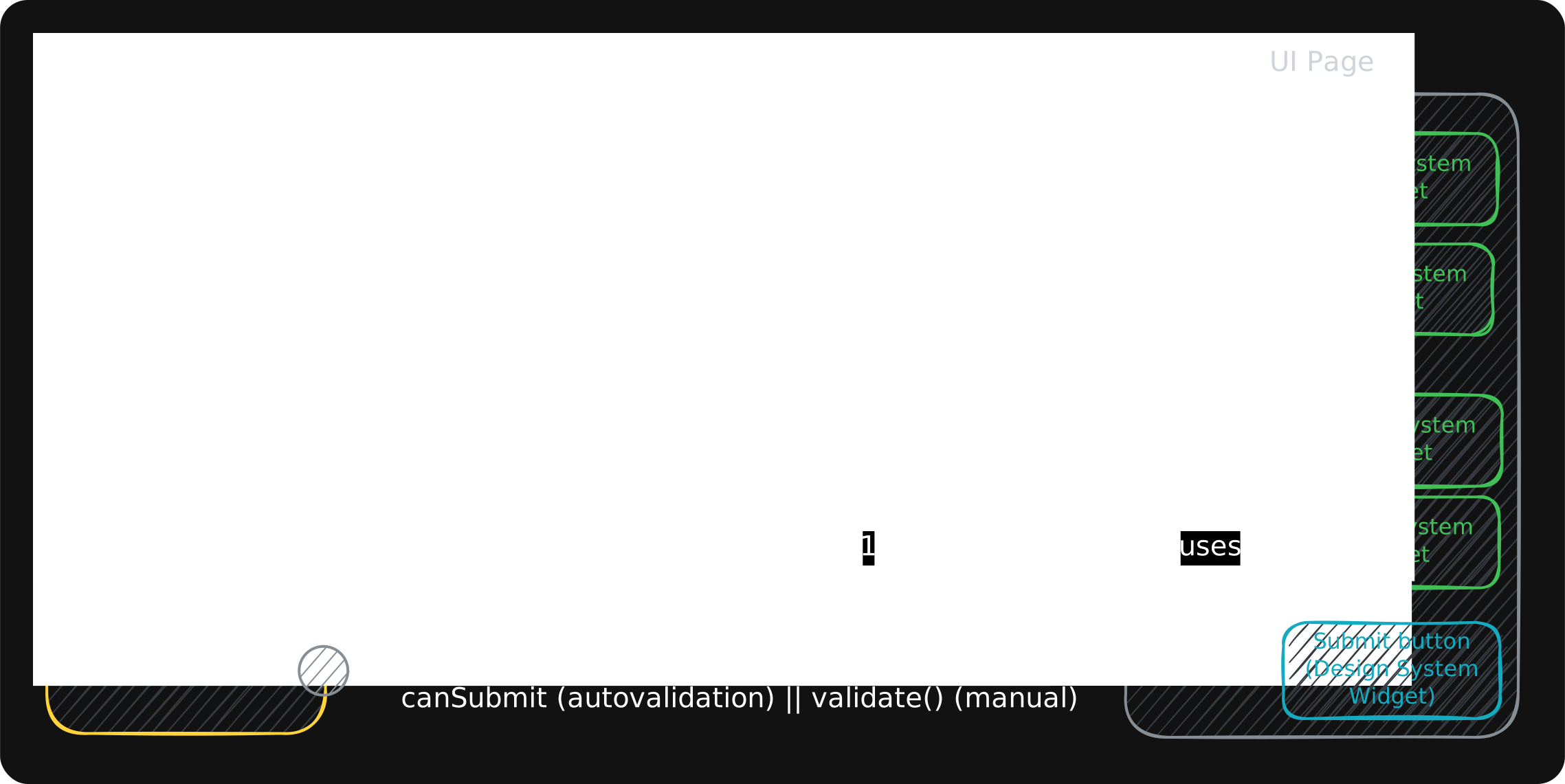
**Build simple and complicated Flutter forms the same way.** Validation, async server-side checks, cross-field rules, subforms and fields added at runtime come out of the box, so a two-field login and a five-step wizard are wired with the same few lines of code.
`advanced_forms` is Flutter form validation and state management with no framework on top: typed field controllers, composable validators, and form-level state, built on `ChangeNotifier` and `ValueListenable`, so it fits whatever state management your app already uses.
- **Typed field controllers** — text fields, checkboxes and switches, dropdowns and radio groups, and multi-select fields, each with its own value type *and* its own error type.
- **Validators that compose** — `filled`, `notEmpty`, `notNull`, `mustBeTrue`, `atLeastLength`, `notLongerThan`, `exactly` and numeric checks, combined with `&` and `|`, or any `E? Function(T)` you write yourself.
- **Async validation** — debounced server-side checks ("is this email taken?") with a timeout, failure handling and cached answers.
- **Cross-field validation** — re-run a validator when the fields it depends on change, or derive one field's value from another.
- **Validation modes** — validate on submit, on every keystroke, on unfocus, or on unfocus first and every keystroke after. Set once, applied to the whole form. When none of them fits, write your own rule in one line with `ValidationMode.custom`.
- **Subforms** — attach and detach nested form controllers; their fields join the parent's validate, reset, read-only and error handling.
- **Form-level state** — `canSubmit`, `wasModified`, `validating` and `validationErrors`, ready to bind to a submit button.
- **Read-only fields and server-side errors** — freeze a value, or push an error in from an API response.
- **Granular rebuilds** — one builder per field, so a keystroke rebuilds one subtree and nothing else.
> [!TIP]
> **Using Claude Code (or another agent that supports Agent Skills)?** This package ships an [Agent Skill](https://advanced-forms.leancode.co/docs/agent-skill) that teaches your agent the full API, so it generates fields, validation, cross-field logic, and subforms idiomatically. With `advanced_forms` in your `pubspec.yaml`, one command installs it into your agent's skills folder:
>
> ```sh
> dart run skills@ get
> ```
>
> Then say *"build me a sign-up form"*. After a package upgrade, run the same command again and the skill follows.
## Website: interactive examples and docs
[![Try it live at advanced-forms.leancode.co — interactive Flutter examples and full documentation][website-img]][site]
Every example on **[advanced-forms.leancode.co][site]** is a real Flutter form running in your browser — type into it,
break it, watch it validate — next to the code that builds it. The documentation there goes well beyond this README:
validation modes, async and cross-field validation, subforms, server errors, testing, and how it works under the hood.
## General overview
## Installation
```sh
flutter pub add advanced_forms
```
Migrating from 0.1.x, the bloc-based version? See [MIGRATION.md](https://github.com/leancodepl/advanced_forms/blob/main/MIGRATION.md).
## Your first form
A form is two classes: a **controller** that declares the fields and decides what submit means, and a **widget** that binds each field to an input.
**1. The form controller** — declares the fields, registers them once, and owns `submit`:
```dart
class SignupFormController extends AdvancedFormController {
SignupFormController() {
registerFields([firstName, lastName]);
}
final firstName = AdvancedTextFieldController(
validator: filled('First name is required'),
);
final lastName = AdvancedTextFieldController(
validator: filled('Last name is required'),
);
Future<void> submit() async {
if (await validate()) {
// send it
}
}
}
```
**2. The form widget** — owns the controller, disposes it, and lays the fields out:
```dart
class SignupForm extends StatefulWidget {
const SignupForm({super.key});
@override
State<SignupForm> createState() => _SignupFormState();
}
class _SignupFormState extends State<SignupForm> {
final _form = SignupFormController();
@override
void dispose() {
_form.dispose(); // disposes the registered fields too
super.dispose();
}
@override
Widget build(BuildContext context) {
return Column(
children: [
_SignupTextField(field: _form.firstName, label: 'First name'),
_SignupTextField(field: _form.lastName, label: 'Last name'),
ElevatedButton(onPressed: _form.submit, child: const Text('Submit')),
],
);
}
}
```
**3. The field widget** — one `AdvancedFieldBuilder` per field, so a keystroke rebuilds one subtree:
```dart
class _SignupTextField extends StatelessWidget {
const _SignupTextField({required this.field, required this.label});
final AdvancedTextFieldController<String> field; // <String> is the error type
final String label;
@override
Widget build(BuildContext context) {
return AdvancedFieldBuilder<String, String>(
field: field,
builder: (context, state, _) => TextFormField(
controller: field.textController,
decoration: InputDecoration(labelText: label, errorText: state.error),
),
);
}
}
```
That is the whole form. Submitted empty, every field says why — the validator's error, rendered by `errorText`:
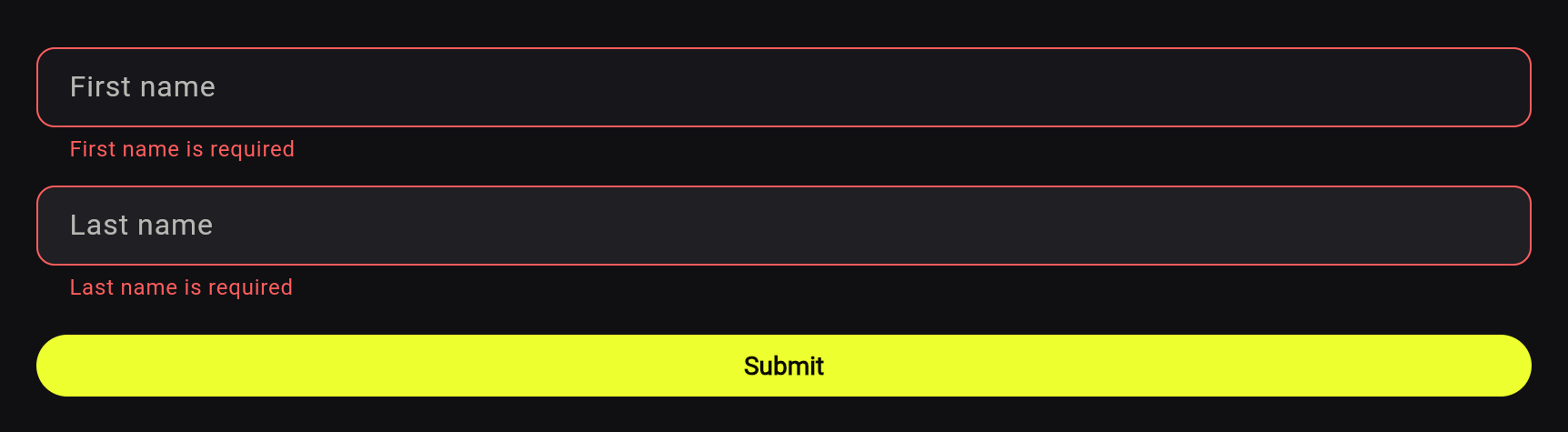
Fields stay quiet until the first `validate()`, then give live feedback. This form runs in your browser on [advanced-forms.leancode.co][first-form-live], next to the code above.
Two rules to remember:
- **Call `registerFields()` once, with every field.** The form then owns their lifecycle — it disposes them, tracks whether anything was modified, and includes them in `validate()`, `resetAll()`, and the other form-wide operations. Calling it a second time *replaces* the field list, so the earlier batch stops participating while still being disposed at teardown.
- **Bind widgets to `field.textController`**, not to a controller of your own. See [Rendering fields](#rendering-fields).
Own the controller wherever you like — it's a `ChangeNotifier`, so any DI package works as well as the `StatefulWidget` above. `ChangeNotifierProvider` from `provider` is one widget, and it disposes the controller for you (`provider` is used in the snippets below; it is not a dependency of this package). Whoever owns the form controller disposes it, and that one call disposes the registered fields and the attached subforms.
## Where to next
- [MIGRATION.md](https://github.com/leancodepl/advanced_forms/blob/main/MIGRATION.md) — coming from 0.1.x.
- `example/` — a runnable app where every pattern in these docs has a working screen. See [example/example.md](https://github.com/leancodepl/advanced_forms/blob/main/example/example.md) for the screen guide.
- [API reference](https://pub.dev/documentation/advanced_forms/latest/) — the generated dartdoc, for every member and its edge cases.
- [Agent Skill](https://advanced-forms.leancode.co/docs/agent-skill) — `skills/advanced-forms-build-forms/`, a skill that teaches your agent the full API, so it generates fields, validation, cross-field logic, and subforms idiomatically. `dart run skills@ get` installs it into your project's agent skills folder.
## Rendering fields
`AdvancedFieldBuilder` rebuilds a subtree whenever its field notifies:
```dart
AdvancedFieldBuilder<String, MyError>(
field: firstName,
builder: (context, state, _) => TextFormField(
controller: firstName.textController,
decoration: InputDecoration(
errorText: state.error != null ? translate(state.error!) : null,
),
),
);
```
It wraps `ValueListenableBuilder`, so the SDK widget works too if you'd rather spell out `ValueListenableBuilder<AdvancedFieldState<String, MyError>>` — the wrapper exists to hide that type argument.
Note what's *not* in the snippet: no `TextEditingController` allocation, no `onChanged`, no `initialValue` seeding. `AdvancedTextFieldController` owns its `TextEditingController` (`field.textController`) and keeps it in two-way sync — user input flows into the field state, and programmatic changes (`setValue`, `reset`) flow back into the visible text. It also owns a `FocusNode` (`field.focusNode`), so "jump to the first invalid field" is `field.focus()`. Working example: the "Scroll Form" screen in the example app (`example/lib/screens/scroll_form.dart`).
Rebuilds are granular by construction: each builder subscribes to one field, so a keystroke rebuilds that field's subtree and nothing else. `AdvancedFieldState` is value-equal, so setting a field to the value it already holds notifies nobody.
`builder`'s third parameter is a `child:` you can pass for a subtree that doesn't depend on field state — built once and reused on every rebuild. See `example/lib/widgets/form_text_field_with_icon.dart` and the "Optimized Rendering" screen in the example app.
For parent widgets, grab the controller with `context.read<SignupFormController>()` — no subscription, no parent rebuilds — and let each field widget subscribe to its own field.
## Form-level state
`AdvancedFormController` is itself a `ValueListenable<AdvancedFormState>`, so form-wide state renders the same way a field does:
```dart
ValueListenableBuilder<AdvancedFormState>(
valueListenable: form,
builder: (context, state, _) => ElevatedButton(
onPressed: state.wasModified ? form.submit : null,
child: const Text('Submit'),
),
);
```
`AdvancedFormState` carries `wasModified` (any field changed since `registerFields`), `fields` / `subforms`, `validationEnabled`, and `validationMode` — the configured mode, not reduced by `validationEnabled`. Four members are derived from the fields on every read, so they never report a field or subform that has since been removed:
| Member | Meaning |
| --- | --- |
| `validating` | An async check is in flight somewhere in the tree |
| `canSubmit` | Every field is `valid` **right now** — a snapshot of *known* errors, so it is true on a quiet form nobody has checked yet, and false while any check is pending or in flight. `await form.validate()` is the guarantee |
| `hasFailedValidation` | Some field's async check could not run — it threw or timed out. Drives one form-level banner |
| `validationErrors` | Every error in the form tree, sync or async, keyed by field, for an error summary |
With `provider`, `context.select<SignupFormController, bool>((c) => c.value.validating)` subscribes to one slice.
To react outside a builder, `form.onValuesChanged` and `form.onStatusChanged` are `Listenable`s covering the whole tree, subforms included. Pass a named callback so you can `removeListener` it later.
`AdvancedFormController` takes two optional constructor arguments: `debugName`, a label for logging across nested subforms, and `validateAll` — when true, a change to any field re-runs the **sync** validator on every *other* autovalidating field, which is what you want when fields validate against each other. No async check is restarted: a field whose own value did not change keeps its last answer, so typing starts no async checks. It is the blunt version of `subscribeToFields`, reaching the whole tree instead of the dependencies you name.
## Validation
A validator is a function — the `Validator<T, E extends Object>` typedef, `E? Function(T)`: value in, error out, `null` means valid. `E` is whatever type you choose, so plain `String`s are fine to start and a form can switch to an enum or sealed class later, independently of every other form:
```dart
final firstName = AdvancedTextFieldController(
validator: (value) => value.isEmpty ? 'First name cannot be empty' : null,
);
```
Three rules cover every case:
1. **The validation mode decides which events make a field validate itself.** Set it once on the form; it reaches every field and subform.
2. **A field the user has never edited validates nothing on its own**, in every mode. `validate()` is what checks those, so a prefilled form does not greet the user with errors.
3. **A round runs the sync validator first, and the async validator only if sync passed.**
| `ValidationMode` | What the user sees |
| --- | --- |
| `manual` (default) | Nothing validates until submit. Editing a field still clears the error that described its old value |
| `onUserInteraction` | Every keystroke validates the field being edited; the async check waits out its debounce |
| `onUnfocus` | Leaving a field the user edited validates it. Tabbing through it, or leaving it unchanged, costs nothing |
| `afterFirstUnfocus` | Quiet while the user types, until the field is first left after an edit. From then on every edit validates it, so an error disappears the moment the value is fixed |
```dart
final form = AdvancedFormController(
validationMode: ValidationMode.onUnfocus,
);
// One field can opt out and manage its own mode from then on.
form.email.setValidationMode(ValidationMode.onUserInteraction);
```
`onUnfocus` and `afterFirstUnfocus` need to know when the field loses focus. A text field gets that by binding the field's `focusNode` to the widget. A picker or a dropdown that handles focus itself calls `field.handleUnfocus()` when the interaction ends.
### Your own validation mode
When none of the four modes says what a form needs, write the rule yourself: extend `CustomValidationMode` and override `decide`. The package treats it like a built-in mode: set it on the form and it reaches every field and subform; set it on one field and that field keeps it.
```dart
// The e-mail syntax on every keystroke, the server only when the field is left.
final class LiveSyntaxServerOnLeave extends CustomValidationMode {
const LiveSyntaxServerOnLeave();
@override
ValidationAction decide(ValidationContext c) =>
c.event == ValidationEvent.unfocus ? ValidationAction.full : ValidationAction.sync;
}
final email = AdvancedTextFieldController(
validator: emailSyntax('Not an e-mail address'), // on every keystroke
asyncValidation: AsyncValidation(validator: isTaken), // only when the field is left
)..setValidationMode(const LiveSyntaxServerOnLeave());
```
`decide` gets a `ValidationContext` and answers a `ValidationAction`:
- The context says which event is happening (`valueChanged`, `unfocus` or `dependencyChanged`), whether the user ever left the field after an edit, whether `validate()` ever ran on it, and how the last finished check ended. It never carries the live status or the errors, because every edit clears them and a rule reading them would stop validating as the user started fixing the value.
- The action is `none`, `sync` (the sync validator only) or `full` (sync, then async if sync passed).
The three rules above still hold: an untouched field validates nothing whatever the rule says, `validate()` ignores the mode, and sync runs before async.
Modes compare by type, and a mode with settings lists them in `props`. The [docs](https://advanced-forms.leancode.co/docs/validation/custom-modes) have more examples, including "live while invalid" and "live after the first submit", and how to test a rule.
The field makes and owns that `focusNode`. Pass `focusNode:` to the constructor to bind one you already own instead — the field listens to it but never disposes it.
`await form.validate()` walks every field and subform, runs their async validators too, and returns `false` if anything is invalid. It neither consults the mode nor changes it: the mode you set is the mode the form keeps for its whole life.
To write a value the user did not type — prefilling from a profile fetch, for instance — use `field.prefill(value)`. It stores the value and clears the errors without making the field count as edited.
`validate()` is asynchronous because it may have to wait on the server. **Await it** — the result is the only thing that says the values were actually checked. Calling it again while async checks are in flight awaits them instead of starting new ones, so a double-tapped submit button makes one set of server calls; the sync validators run again on every call, so the answer is never stale.
```dart
Future<void> submit() async {
if (await form.validate()) {
await api.signUp(...);
}
}
```
The form-level result is just a `bool` — "may this submit proceed?". The errors themselves stay on the fields, where the widgets displaying them are already subscribed.
Note that `valid` means *no error recorded*, not *checked and passed*: a field nobody has validated yet is `valid`, which is why `canSubmit` is fine for enabling a button but not for deciding a submit.
### Ready-to-use validators
- `filled`, `notEmpty`, `notNull` — reject empty strings (whitespace-only included), empty lists, and nulls,
- `mustBeTrue` — reject `false` and null,
- `notLongerThan`, `atLeastLength`, `exactly`, `nothing` — string length bounds, an exact match, and "must be empty",
- `positiveInteger`, `nonNegativeInteger`, `boundedNonNegativeInteger`, `positiveDecimal`, `nonNegativeDecimal` — numeric strings,
- `and` / `or` (also `&` and `|`), `conditionalValidator`, `dynamicValidator` — combine two validators, run one only while a condition holds, or rebuild one on each run for parameters that change at runtime.
```dart
final email = AdvancedTextFieldController(
validator: filled(MyError.required) & atLeastLength(5, MyError.tooShort),
);
```
### Async validation
Some checks live on the server — "is this username taken?". Pass an `asyncValidation`, which all four field controllers accept:
```dart
final email = AdvancedTextFieldController(
validator: filled(MyError.required),
asyncValidation: AsyncValidation(
validator: _checkEmailTaken, // Future<MyError?> Function(String)
debounce: const Duration(milliseconds: 500), // default 300ms
timeout: const Duration(seconds: 5), // optional, default: no bound
onFailure: _reportCheckFailure, // optional
failureToError: (e, s) => MyError.checkFailed, // optional
),
);
```
A taken username, caught by the check and reported on the field — [try it live][async-live]:
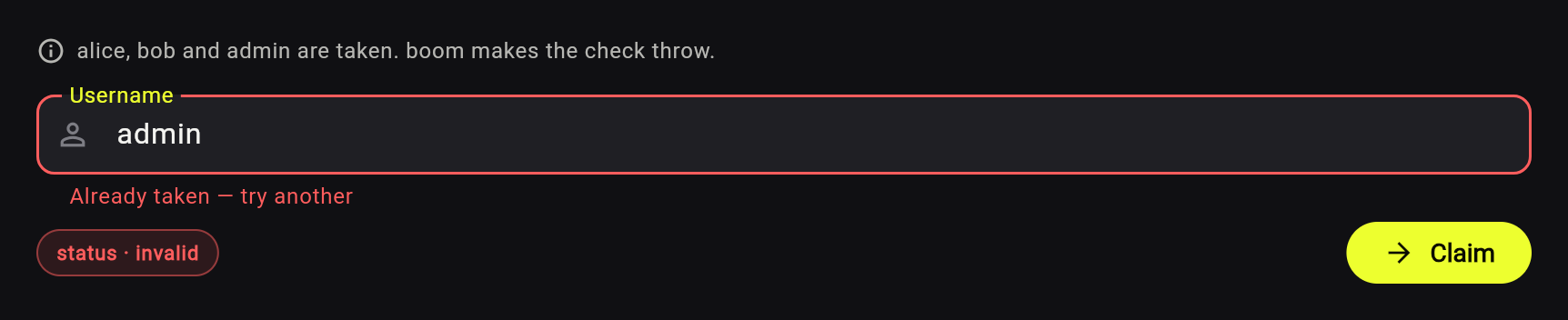
The pass is debounced, and `await validate()` runs a waiting check at once rather than reporting the field bad for being busy. Changing the value — or `setError`, `clearErrors`, `reset`, `markReadOnly`, `dispose` — kills a live pass, and its later result is dropped. A settled answer is reused while it still describes the value, so a second submit press on an unchanged form makes no calls; a check that depends on state *outside* the value must be invalidated with `clearErrors()`. The status walks `pending` → `validating` → `valid`/`invalid`, so a spinner is one `state.isInProgress` check.
A validator that throws, or a pass that times out, is a *failure* — a technical fault, not a verdict on the value. The field lands on `FieldStatus.failedValidation` (`state.isFailedValidation`) instead of hanging on `validating`, it does not count as valid, and `form.value.hasFailedValidation` drives one banner for the whole form. Failure is not sticky, so the next `await validate()` retries it.
Every parameter is documented in the dartdoc on [`AsyncValidation`](https://pub.dev/documentation/advanced_forms/latest/advanced_forms/AsyncValidation-class.html). Working example: `SimpleFormScreen` in the example app.
### Validation that depends on another field
`subscribeToFields` re-runs this field's **sync** validator whenever the fields it depends on change value — that one thing, and nothing at all while this field is in `ValidationMode.manual`, or on a field the user has never edited:
```dart
final password = AdvancedTextFieldController(
validator: atLeastLength(8, 'Password is too short'),
);
late final repeatPassword = AdvancedTextFieldController(
validator: (value) =>
value == password.fieldValue ? null : 'Passwords do not match',
)..subscribeToFields([password]);
```
It does exactly one thing: **re-run this field's sync validator.** It does not copy or derive values. For "when B changes, set A" — recompute a total, mirror one field into another, clear a dependent selection — use the form's `addRelation`:
```dart
addRelation(quantity, (value) => value, (qty) => total.setValue(qty * unitPrice));
```
`addRelation(source, select, onChange)` calls `onChange` whenever the part of `source`'s value picked by `select` changes (compared with `==`; status-only changes never fire). The form removes the listener in its own `dispose()`, so there is nothing to clean up.
Working example: `PasswordFormScreen` in the example app.
## Field controllers
- `AdvancedTextFieldController` — `String` value; owns a `TextEditingController` and a `FocusNode`,
- `AdvancedBooleanFieldController` — `bool` value, for checkboxes and switches,
- `AdvancedSingleSelectFieldController` — one choice from `options` (dropdowns, radio groups),
- `AdvancedMultiSelectFieldController` — a set of choices, with `toggleElement` / `addValue` / `removeValue`.
All support `reset()`, `markReadOnly()` / `unmarkReadOnly()`, and both sync and async validation. The text and boolean controllers default their `initialValue`; the two select controllers require both `initialValue` and `options`. All accept an optional `name`, which labels the field in diagnostics and gives logging or serialization a stable handle. Working example: `ComplexFormScreen` in the example app.
### Reading the current state
The full state is `field.value`, an `AdvancedFieldState<T, E>`. Two shortcuts cover most reads:
```dart
field.fieldValue; // the current value — short for field.value.value
field.error; // the current error, or null — short for field.value.error
```
### Read-only fields and server-side errors
```dart
field.markReadOnly(); // setValue becomes a no-op unless force: true
field.setError(MyError.emailTaken); // push an error in from outside, e.g. a server response
field.clearErrors(); // clear everything, including the last async answer
```
`markReadOnly()` freezes the value; how the widget *looks* is yours to decide. Widgets with a nullable callback — `Switch`, `Checkbox`, `DropdownButton` — grey out on their own once `getValueSetter()` returns `null`. A text field does not: `TextField.readOnly` blocks typing but keeps the enabled styling, so pass `enabled: !state.readOnly` too when a frozen field should also look frozen.
`setError(null)` is what makes the "apply the server's response to every field" pattern work: fields the server accepted end up `valid` with nothing to show, rather than `invalid` with nothing to show.
`setError` writes `validationError` only. A code an async check recorded survives it, and the field stays `invalid` showing that code — use `clearErrors()` when you mean "forget everything, including the async answer". A pushed error is also not protected from the validators: once the field validates itself, anything that re-runs its sync validator — an edit, `subscribeToFields`, `validateAll` — overwrites `validationError` with whatever the validator returns.
`reset()` restores the initial value, clears both errors, and makes the field count as untouched again. It **keeps** its validation mode and `readOnly` — those are configuration, and configuration changes only through its own API.
`AdvancedFormController` has `markReadOnly()`, `clearErrors()`, and `setValidationEnabled(bool)` for the whole tree.
Working example: `QuizFormScreen` in the example app applies a server response with `setError`.
### Writing your own
Extend `AdvancedFieldController` — your value type, your error type, your domain methods, with validation and lifecycle contributed by the base class:
```dart
class IntegerFieldController<E extends Object> extends AdvancedFieldController<int, E> {
IntegerFieldController({
super.initialValue = 0,
super.validator,
super.asyncValidation,
super.name,
});
bool get isNegative => fieldValue.isNegative;
void negate() => setValue(-fieldValue);
}
```
This is the intended way to use the library. `example/lib/controllers/password_field_controller.dart` is a text field whose error type is `List<ValidationError>`, so one field reports several rule violations at once.
## Subforms
`addSubform` attaches another `AdvancedFormController` as a child, and its fields join the parent's `validate`, `markReadOnly`, `setValidationEnabled`, and the other broadcast operations. Use it for sections that appear dynamically, or to split a large form into readable pieces:
```dart
class BaseFormController extends AdvancedFormController {
BaseFormController() {
registerFields([field]);
}
final field = AdvancedTextFieldController();
final subform = SubformController();
void extendForm() => addSubform(subform);
}
```
Fields added at runtime, one subform per guest, all validated by the parent's `validate()` — [try it live][subforms-live]:
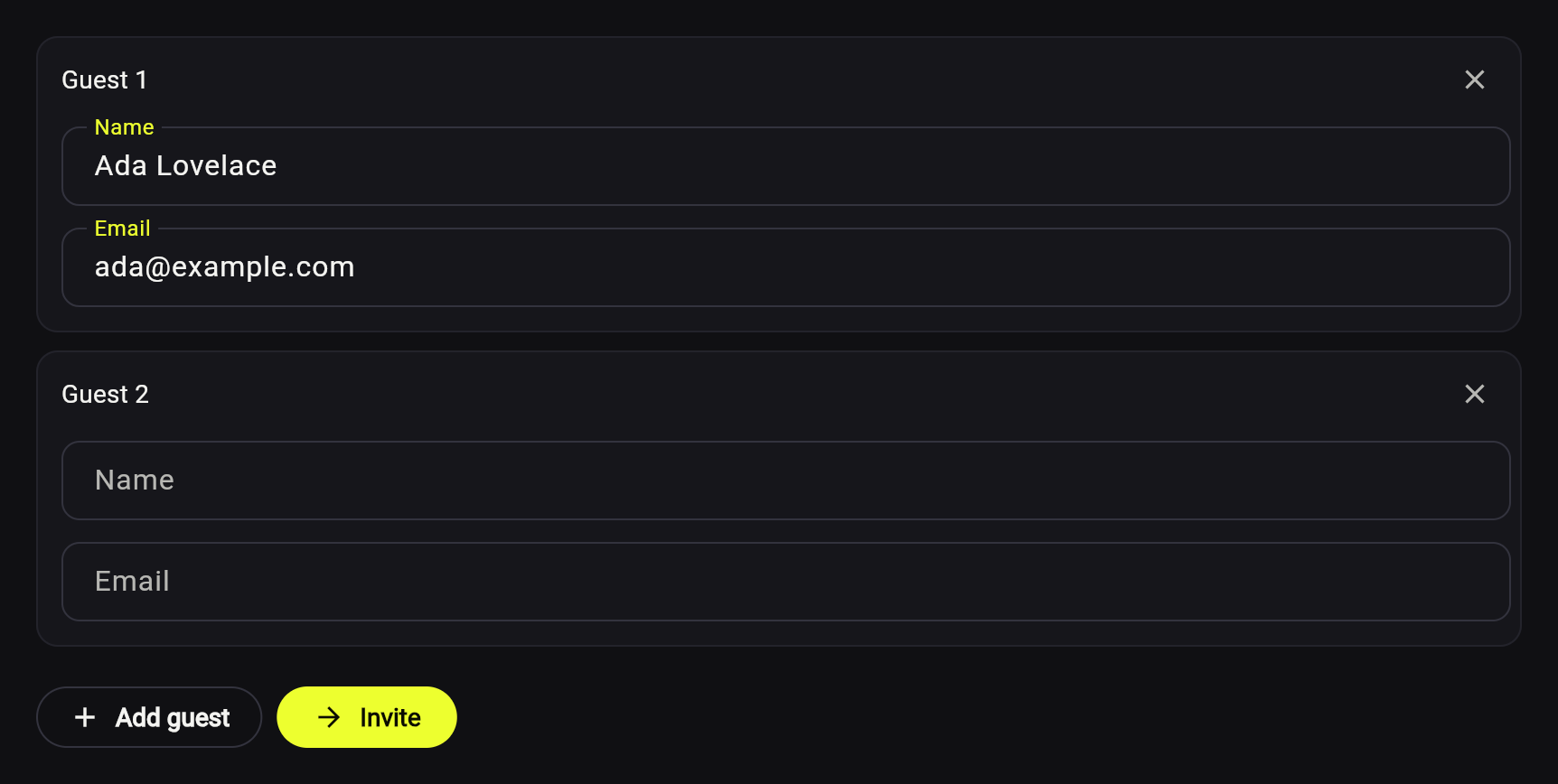
`void removeSubform(form)` detaches a subform: it stops validating, notifying and counting towards the parent's state, and can be re-attached later with `addSubform`. It does not dispose it — the parent owns every subform it was ever given and disposes them all in its own `dispose()`, the same way it owns registered fields. So don't dispose subforms yourself; if you do, the parent skips them rather than disposing them twice. Calling `addSubform` with — or on — a disposed controller throws a descriptive `StateError` rather than crashing later, and so do `registerFields`, `setValidationEnabled` and `removeSubform` on one.
Working examples: `DeliveryListFormScreen` (a dynamic list), `ComplexFormScreen` (swapping one subform for another) and `StepFormScreen` (a wizard: one subform per step).
### A wizard, validated step by step
One subform per step is what makes per-step validation one line — `await step.validate()` reaches that step's fields and nothing else, so a field on a later step is never flagged before the user gets there. The final submit calls the parent's `validate()`, which walks every attached subform, so a step the user walked back over is checked again:
```dart
Future<bool> next() async {
final step = currentStep;
if (!await step.validate()) {
// The step has shown its errors once — let it correct itself as the user
// types. A subform's own mode wins over the parent's, so the steps ahead
// stay quiet.
step.setValidationMode(ValidationMode.onUserInteraction);
return false;
}
_goTo(currentIndex + 1);
return true;
}
```
Which step is on screen is navigation, not form state: keep it on your own controller, and create that controller above the pages — a wizard controller built inside a step page dies with it, taking that step's values and errors along. Working example: `StepFormScreen` (`example/lib/screens/step_form.dart`).
## Reusable field widgets
The package deliberately ships no styled widgets — it gives you what a widget needs to bind to: the text controller, the focus node, the typed state, the error. For the extract-once pattern see the full set in `example/lib/widgets/`, ready to copy and restyle.
---
## 🛠️ Maintained by LeanCode
<div align="center">
[<img src="https://leancodepublic.blob.core.windows.net/public/wide.png" alt="LeanCode Logo" width="300" />][leancode-landing]
</div>
This package is built with 💙 by **[LeanCode][leancode-landing]**.
We are **top-tier experts** focused on Flutter Enterprise solutions.
### Why LeanCode?
- **Creators of [Patrol][patrol-landing]** – the next-gen testing framework for Flutter.
- **Production-Ready** – We use this package in apps with millions of users.
- **Full-Cycle Product Development** – We take your product from scratch to long-term maintenance.
<div align="center">
<br />
**Need help with your Flutter project?**
[**👉 Hire our team**][leancode-estimate]
•
[Check our other packages][leancode-packages]
</div>
Licensed under the [Apache License 2.0](./LICENSE).
[banner-img]: https://raw.githubusercontent.com/leancodepl/advanced_forms/refs/heads/main/doc/banner.png
[website-img]: https://raw.githubusercontent.com/leancodepl/advanced_forms/refs/heads/main/doc/website.svg
[first-form-live]: https://advanced-forms.leancode.co/docs/first-form?utm_source=github.com&utm_medium=referral&utm_campaign=advanced-forms
[async-live]: https://advanced-forms.leancode.co/docs/validation/async?utm_source=github.com&utm_medium=referral&utm_campaign=advanced-forms
[subforms-live]: https://advanced-forms.leancode.co/docs/subforms?utm_source=github.com&utm_medium=referral&utm_campaign=advanced-forms
[site]: https://advanced-forms.leancode.co/?utm_source=github.com&utm_medium=referral&utm_campaign=advanced-forms
[license-badge]: https://img.shields.io/github/license/leancodepl/advanced_forms
[license-badge-link]: https://github.com/leancodepl/advanced_forms/blob/main/LICENSE
[leancode-landing]: https://leancode.co/?utm_source=github.com&utm_medium=referral&utm_campaign=advanced-forms
[leancode-estimate]: https://leancode.co/get-estimate?utm_source=github.com&utm_medium=referral&utm_campaign=advanced-forms
[leancode-packages]: https://pub.dev/packages?q=publisher%3Aleancode.co&sort=downloads
[patrol-landing]: https://patrol.leancode.co/?utm_source=github.com&utm_medium=referral&utm_campaign=advanced-forms