
dlazy-ai
dlazy-ai/ecommerce-skills
用 Codex 或 Claude 帮你安装 复制这段 Prompt,粘贴到 Codex、Claude 或其他助手里,让它检查 Skill 页面并帮你完成安装。
直接命令不会经过审查 Prompt;运行前请先检查来源。
npx skills add https://github.com/dlazy-ai/ecommerce-skills --skill flat-lay命令会保持在同一行。复制前请横向滚动并检查完整内容。
想先保存到本地?可下载 SkillsMP 当前能够提供的文件。
正在显示 SKILL.md
| name | flat-lay |
| description | 服装平铺图一键上身试穿。服装平铺图 + 姿势参考图 → 模特上身商拍图,款式、颜色、织法、版型保持不变。当用户说「平铺图转模特图」「衣服上身」「虚拟试穿」「AI 试衣」「让模特穿上」时使用。 |
把一张服装平铺图变成模特上身商拍图,不用约模特、不用租场地、不用摄影棚。
本技能用 dLazy 的 gpt-image-2 实现:以「服装图 + 参考图」双图参考做图像编辑合成,服装保真、姿势场景照抄参考图。
| 输入:服装平铺图 | 输入:参考图 |
|---|---|
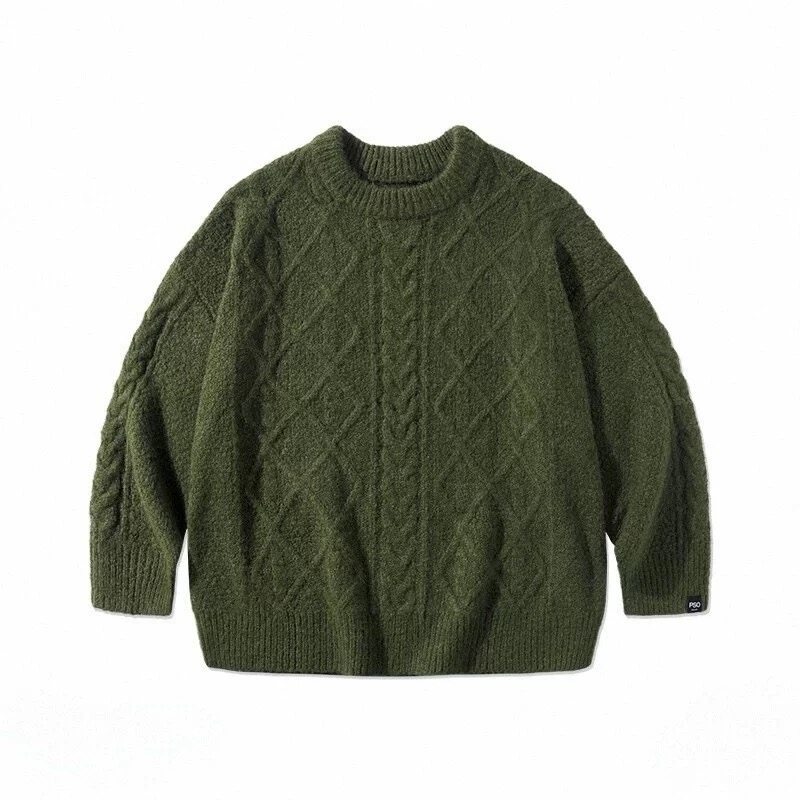 | 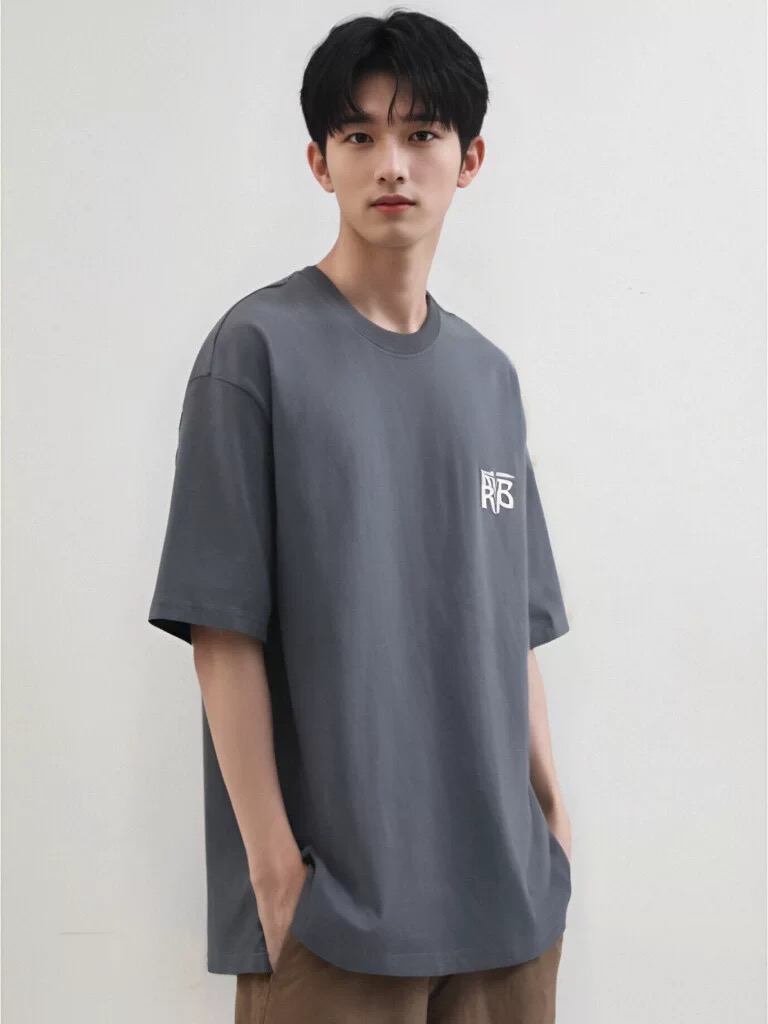 |
garment-flatlay.jpg — 军绿色麻花针织圆领毛衣,800×800 | pose-reference.jpg — 男青年正面站姿、浅灰墙棚拍,768×1024 |
实际执行的命令:
dlazy gpt-image-2 \
  --prompt 'E-commerce on-model product photography. Image 1 is the garment flat-lay: an olive-green cable-knit crewneck sweater. Image 2 is the pose/scene reference. Dress the model from image 2 in the garment from image 1, replacing the grey T-shirt. Keep the garment 100% faithful: identical olive-green color, cable-knit and diamond texture, oversized drop-shoulder fit, ribbed collar and cuffs, and the small woven label on the right cuff. Reproduce the reference exactly for pose, camera angle, crop, body proportions, lighting and the plain light-grey studio wall background. Photorealistic full-frame catalog shot, sharp fabric detail, natural soft light, no text or watermark.' \
  --images docs/flat-lay/garment-flatlay.jpg docs/flat-lay/pose-reference.jpg \
  --size 1024x1536 --quality high --imageFormat jpeg \
  --save docs/flat-lay/example-output.jpg
输出
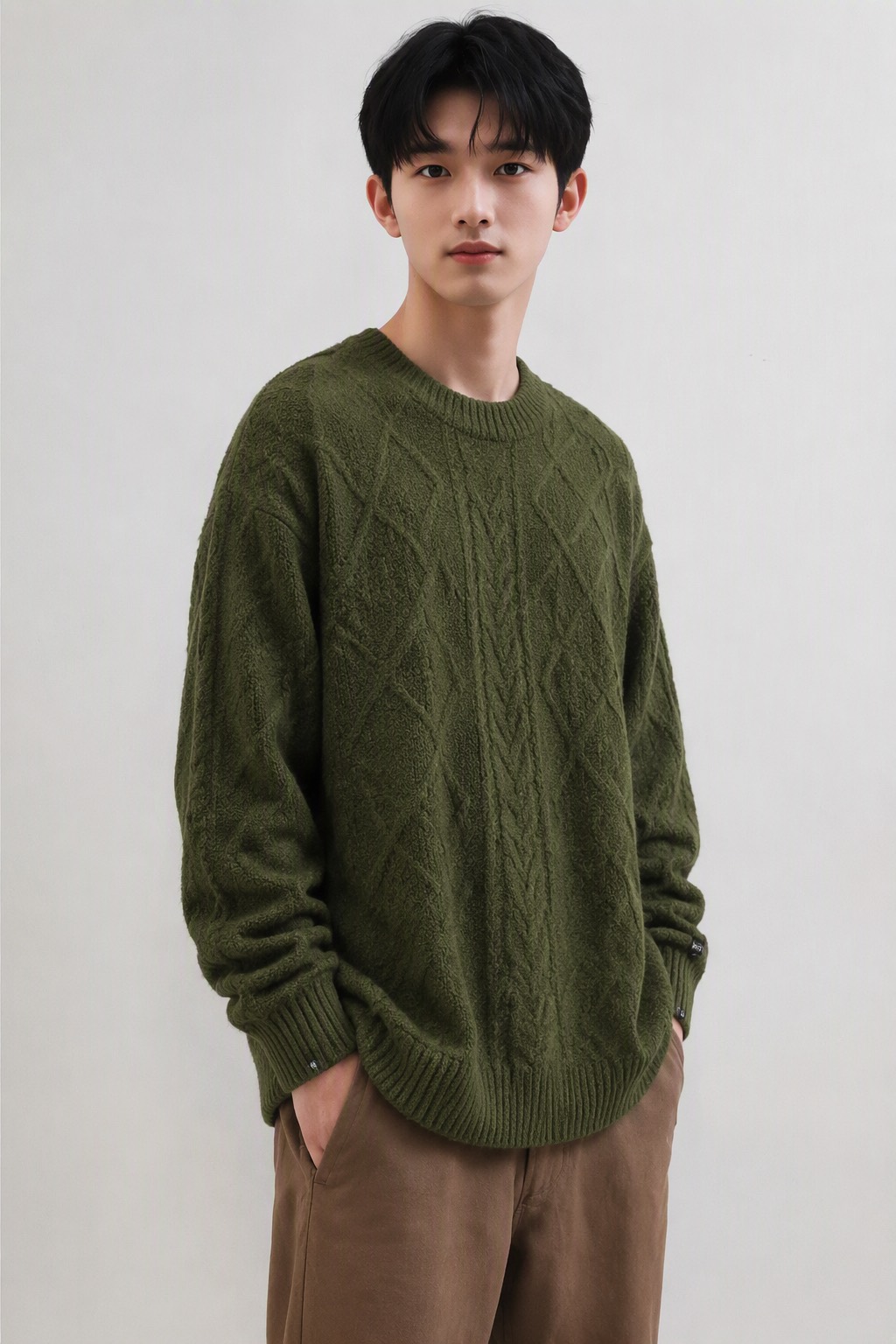
example-output.jpg — 1024×1536,60 credits,约 60s。
麻花织法、菱形提花、落肩版型、袖口罗纹与右袖织标均被保留;姿势、景别、光线与浅灰背景照抄参考图。
| 能力 | 说明 |
|---|---|
| 单件上身 | 上传 1 张单件衣服(上装 / 连衣裙 / 连体衣)平铺图或真人上身图 |
| 多件上身 | 分别上传「上装图」+「下装图」,合成为同一个模特身上的一整套 Look |
| 参考图 | 决定模特姿势、拍摄角度、景别、场景与光线;可用素材库,也可用自有商拍图 |
| 指定模特 | 可选。锁定同一张脸,保证同店铺多 SKU 视觉统一;不指定则由参考图中的模特形象决定 |
| 生成策略 | 通用 / 颜色饱和度优化 / 材质增强 / 崩坏问题优化 / 精准选区 |
不做:不改款式、不改颜色、不改印花、不修改吊牌文字;不用于伪造他人肖像的商业代言。
生成前先自检这几条硬性约束:
推荐的输入类型(✅)
| 类型 | 说明 |
|---|---|
| 上装平铺图 | 纯色背景、平铺展开、完整可见 |
| 连体衣 / 连衣裙平铺图 | 单件整体 |
| 真人上身图 | 已有的真人商拍图,用于换姿势换场景 |
会明显拉低效果的输入(❌)
| 问题 | 说明 |
|---|---|
| 商品被遮挡 | 模特手臂、包袋、道具压住衣服主体 |
| 套装商品 | 一张图里上装+下装+鞋子,单件上身识别不了 → 请改用「多件上身」并拆成两张 |
| 商品不清晰 | 模糊、过曝、低分辨率、强色偏 |
参考图(决定姿势与场景,是出图风格的主导变量)
单图 / 套图女装 / 男装 / 童装(多选)国内 / 海外(多选)电商 / 种草(多选)男 / 女;年龄 婴儿 / 小童 / 大童 / 青少年 / 青年人 / 中年人 / 老年人;肤色 欧美人 / 非洲人 / 亚洲人 / 其他肤色模特(可选,锁定人脸)
选择建议:
本技能使用 dLazy 的 gpt-image-2(多图参考的图像编辑合成模型,最多 5 张参考图,支持 1024×1536 竖版商拍比例)。
两种等价写法,选一种。统一入口会自动选后端、失败重试、建目录落盘、估算成本:
# A. 统一入口(推荐):可切任意后端,加 --dry-run 不计费空跑
node scripts/gen.mjs --task flat-lay \
  --prompt '<见下方 Prompt 模板>' \
  --images <按下表顺序> \
  --save output/flat-lay-<sku>.jpg

# B. 直接用 dLazy CLI(不想引入 Node 依赖时,效果等价)
dlazy gpt-image-2 --prompt '...' --images ... --save output/flat-lay.jpg
参数约定(本技能固定用法)
| 参数 | 取值 | 理由 |
|---|---|---|
--images | [服装图, 参考图](多件上身时 [上装图, 下装图, 参考图]) | 顺序即 prompt 中的 image 1 / 2 / 3 |
--size | 1024x1536(竖版 3:4,商拍主图);平铺细节图用 1024x1024 | 电商主图默认竖版 |
--quality | high | 面料纹理与针织结构需要高质量档位 |
--imageFormat | jpeg | 电商上架通用格式 |
--batch | 2 ~ 4 | 一次多出几张挑图 |
--save | docs/flat-lay/output-<sku>.jpg | 直接落盘,省一步下载 |
# basic call: 单件上身(服装图 + 参考图)
dlazy gpt-image-2 \
  --prompt 'On-model e-commerce photo. Image 1 is the garment flat-lay, image 2 is the pose/scene reference. Dress the model from image 2 in the garment from image 1. Keep the garment identical in color, texture, print and fit. Copy the reference pose, camera angle, crop, lighting and background.' \
  --images docs/flat-lay/garment-flatlay.jpg docs/flat-lay/pose-reference.jpg \
  --size 1024x1536 --quality high

# complex call: 多件上身 + 指定模特 + 一次出 4 张挑图 + 直接落盘
dlazy gpt-image-2 \
  --prompt 'Full-look on-model e-commerce photo. Image 1 is the top flat-lay, image 2 is the bottom flat-lay, image 3 is the pose/scene reference, image 4 is the fixed model face. Dress the model in the top from image 1 and the bottom from image 2. Preserve both garments exactly: color, knit/weave texture, print placement, hem and cuff details. Reproduce image 3 for pose, camera angle, crop, lighting and background. Keep the face and body type from image 4 unchanged. Photorealistic catalog shot, no text, no watermark.' \
  --images docs/flat-lay/top.jpg docs/flat-lay/bottom.jpg docs/flat-lay/pose-reference.jpg docs/flat-lay/model-face.jpg \
  --size 1024x1536 --quality high --imageFormat jpeg \
  --batch 4 --save docs/flat-lay/output-sku001.jpg

# 先估价不真跑
dlazy gpt-image-2 --dry-run --prompt '...' --images a.jpg b.jpg --size 1024x1536
| 要查什么 | 去哪 |
|---|---|
| 认证、多后端配置、输出结构、错误码 | references/provider-cli.md |
gpt-image-2 的全部可用参数 | references/model-flags.md |
| 统一入口的全部选项 | node scripts/gen.mjs --help |
把中括号内容替换后填入 --prompt。英文 prompt 对服装保真更稳定。
E-commerce on-model product photography.
Image 1 is the garment flat-lay: [品类 + 颜色 + 面料,例:an olive-green cable-knit crewneck sweater].
Image 2 is the pose/scene reference.

Dress the model from image 2 in the garment from image 1, replacing the garment they are currently wearing.

Keep the garment 100% faithful: identical [颜色], [面料/织法纹理], [版型,例:oversized drop-shoulder fit],
[领口/袖口/下摆细节], and [印花/logo/吊牌位置].

Reproduce the reference exactly for pose, camera angle, crop, body proportions, lighting and background.

Photorealistic full-frame catalog shot, sharp fabric detail, natural soft light, no text or watermark.
按生成策略追加的句子
| 策略 | 追加到 prompt 末尾 |
|---|---|
| 通用(默认) | 不加 |
| 颜色饱和度优化 | Match the garment color to image 1 exactly — same hue, saturation and brightness; do not boost or wash out the color. |
| 材质增强 | Emphasize fabric micro-texture: visible knit loops / weave grain / pile direction, realistic fiber sheen and soft shadow in the folds. |
| 崩坏问题优化 | Anatomy must be correct: five fingers per hand, symmetric shoulders, no extra limbs, no melted collar or warped sleeve seams. |
| 精准选区 | Change only the garment region. Keep the face, hair, hands, lower body, accessories and background pixel-identical to image 2. |
--dry-run 估价,确认 credits 后去掉该参数真跑。--batch 2~4 出多张挑图,落盘到 docs/flat-lay/。| 现象 | 原因 | 处理 |
|---|---|---|
| 颜色偏了 | 平铺图有色偏 / 模型自行调色 | 追加「颜色饱和度优化」句;prompt 里写死具体色名 |
| 纹理糊成一片 | --quality medium,或平铺图分辨率低 | 改 --quality high;换更清晰的平铺图 |
| 印花 / logo 位置移动 | prompt 未描述位置 | 明确写 logo centered on left chest, 8cm wide 之类 |
| 手指、领口崩坏 | 生成随机性 | 追加「崩坏问题优化」句 + --batch 4 挑图 |
| 背景 / 人脸被改动 | 模型重绘了整图 | 追加「精准选区」句 |
| 只上传套装图,识别不了单件 | 输入违规 | 拆成上装图 + 下装图,走多件上身 |
| 版型明显不对(宽松变紧身) | 参考图景别与品类不匹配 | 上装选半身参考图,连衣裙选全身参考图 |
Visit https://dlazy.com for more information.