| name | iblai-vibe-rbac |
| description | Use when building, auditing, or extending ibl.ai role-based access control — default roles seeded by the platform, the action-definitions endpoint, and the SDK components (Admin, RolesTab, PoliciesTab) that render the Roles + Policies management UI. For agent-scoped sharing (editor / chat roles on a single agent) see /iblai-vibe-agent-access; for mounting the host Account modal see /iblai-vibe-account. |
| globs | null |
| alwaysApply | false |
/iblai-vibe-rbac
Reference skill for the ibl.ai role-based access control system. Lists
the default RBAC roles the platform seeds (Tenant Admin, Students,
Mentor Editor / Viewer, Analytics Viewer, Notification Manager,
Enrollment Manager, CRM roles, etc.) and points to the live endpoint
that returns every action definition. Use this when you need to
build, audit, or extend RBAC behavior — most apps only need the SDK's
drop-in management UI (<Admin> → Roles + Policies tabs) plus
per-resource gating via checkRbacPermission. Mention or open this
skill before writing custom RBAC UI from scratch.
Do NOT add custom styles, colors, or CSS overrides to ibl.ai SDK components.
They ship with their own styling. Keep the components as-is.
Do NOT implement dark mode unless the user explicitly asks for it.
When building custom UI around SDK components, use the ibl.ai brand:
- Primary:
#0058cc, Gradient: linear-gradient(135deg, #00b0ef, #0058cc)
- Button:
bg-gradient-to-r from-[#2563EB] to-[#93C5FD] text-white
- Font: System sans-serif stack, Style: shadcn/ui new-york variant
- Follow the component hierarchy: use ibl.ai SDK components
(
@iblai/iblai-js) first, then shadcn/ui for everything else
(npx shadcn@latest add <component>). Do NOT write custom components
when an ibl.ai or shadcn equivalent exists. Both share the same
Tailwind theme and render in ibl.ai brand colors automatically.
- Follow BRAND.md for
colors, typography, spacing, and component styles.
Common setup (brand, conventions, env files, verification): see docs/skill-setup.md.
SDK components — drop-in Roles + Policies UI
For 99% of apps the management UI doesn't need to be hand-rolled. The
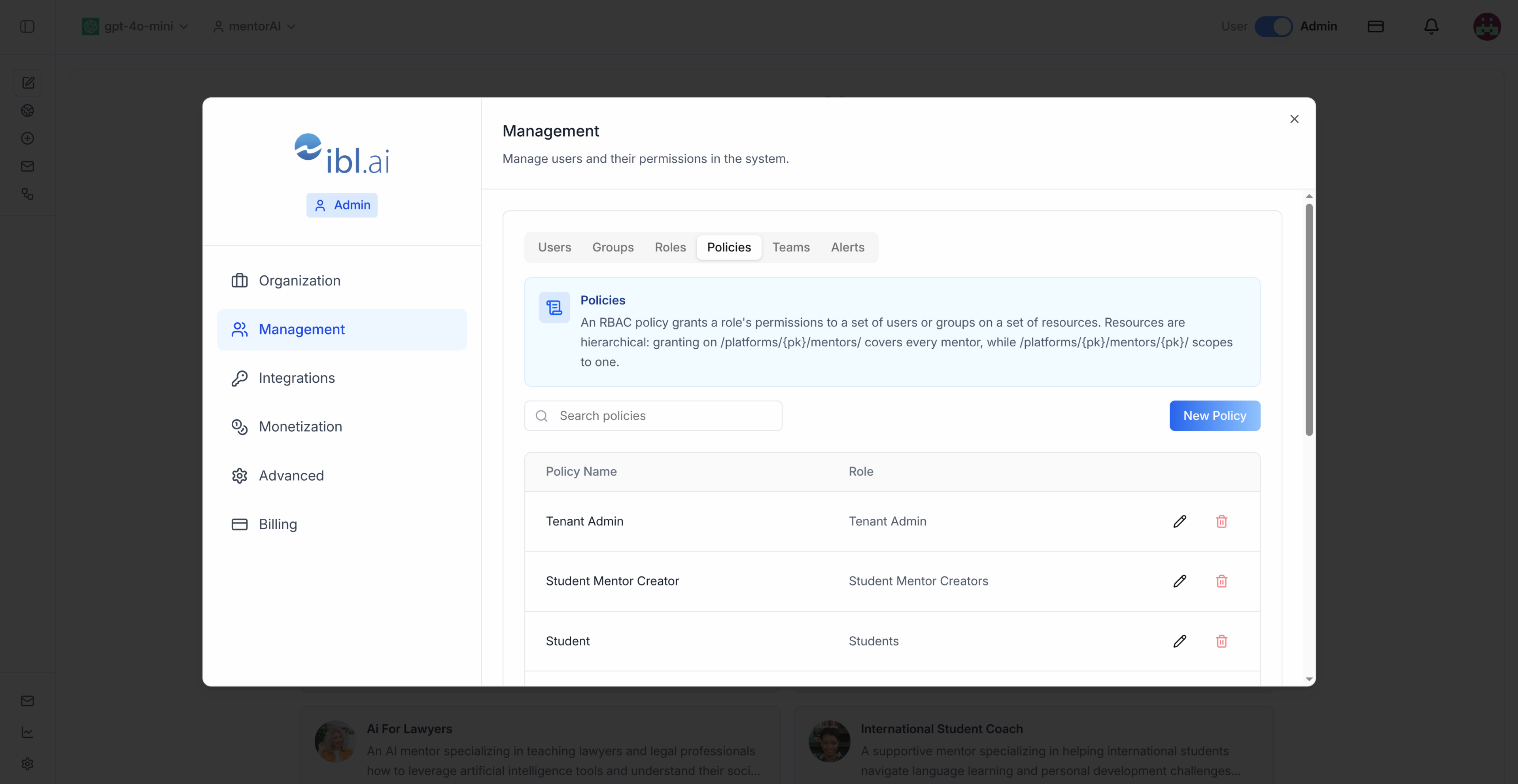
SDK ships the components that the Account dialog uses (the screenshot
above is the Policies tab inside <Admin>):
| Component | Description |
|---|
<Admin> | Full management surface — Users, Groups, Roles, Policies, Teams, Alerts. Tabs are permission-gated via the has*TabPermission props (e.g. hasRolesTabPermission, hasPoliciesTabPermission). Pass enableRbac + rbacPermissions to drive those flags from checkRbacPermission results. Already mounted inside the SDK <Account> modal — most apps reach it via /iblai-vibe-account. |
<RolesTab tenant={key} /> | Standalone Roles tab — table of roles for the tenant + create/edit/delete dialogs. The "actions" / "data_actions" pickers list every action definition from the endpoint below. |
<PoliciesTab tenant={key} /> | Standalone Policies tab — bind a role to a set of resources for users/groups. Resources are hierarchical (/platforms/<pk>/mentors/<pk>/) and the picker handles that. |
All three live in @iblai/iblai-js/web-containers. For agent-scoped
sharing (editor / chat roles on a single agent) use <AgentAccessTab>
from /iblai-vibe-agent-access instead — it wraps the underlying
Ibl.Mentor/ShareMentor/... API. For per-action permission gating in
your own UI use checkRbacPermission(rbacPermissions, path, enableRbac)
from @iblai/iblai-js/web-utils.
Action definitions endpoint
The full list of every action the platform recognizes:
GET https://base.manager.iblai.app/api/core/rbac/actions/definitions/
Authorization: Token <dm-token>
Use this when authoring a custom role's actions / data_actions
array or when validating that an action string is real before you ship
it in a policy migration. <RolesTab> calls this endpoint internally
to populate its action picker.
Default roles
The seed bundles the platform ships with. Use them as starting points
when authoring new roles via <RolesTab> or POST rbac/roles/ (see
/iblai-vibe-agent-access → "Roles CRUD" for the REST contract).
Full Python definitions of every default role (with their actions and
data_actions arrays) live in
references/default-roles.py.
Open or copy that file when you need the exact action strings.
| Role | Summary |
|---|
TENANT_ADMIN | Ibl.* everywhere — full tenant control. |
STUDENT | Chat + read settings/prompts/tools/disclaimers/MCP for agents granted to them; reads field-level agent + settings data. |
STUDENT_MENTOR_VIEWERS | List agents (filtered to what they have access to). |
MENTOR_VIEWER | Read-only agent + settings + prompts + documents + reports + chat. Apply to /platforms/{pk}/mentors/{pk}/. |
MENTOR_EDITOR | Agent read + write across settings, prompts, documents, artifacts, disclaimers, grader. Apply to /platforms/{pk}/mentors/{pk}/. |
MENTOR_CREATORS | Create new agents (Ibl.Mentor/Mentors/action). |
MENTOR_ANALYTICS_VIEWER | View per-agent analytics; subsumes STUDENT. |
ANALYTICS_VIEWER | View the analytics dashboard. Pair with Ibl.Analytics/Core/read or Ibl.Analytics/Reports/read on a user/team scope. |
READ_ANALYTICS | Per-target analytics + report reads. Apply to /platforms/{pk}/users/{pk}/ or /platforms/{pk}/usergroups/{pk}/. |
NOTIFICATION_MANAGER | Send notifications + manage templates (scope-gated). |
SEND_NOTIFICATIONS | Send notifications to a specific user / team. Apply to /platforms/{pk}/users/{pk}/ or /platforms/{pk}/usergroups/{pk}/. |
ENROLLMENT_MANAGER | Manage course / pathway / program enrollments and invitations. |
LIST_USERS / LIST_TEAMS | List users / teams for pickers. |
CREATE_TEAMS | Create a UserGroup (team). |
READ_TEAM / EDIT_TEAM | Per-team read / write. Apply to /platforms/{pk}/usergroups/{pk}/. |
GROUP_MENTOR_MANAGER | List + read RBAC groups. |
LLM_USERS / LLM_MODEL_ACCESS | List or read individual LLM providers / models the user is allowed to use. |
SELL_ITEMS | Gate that allows selling items on the platform. |
BILLING_MANAGER | Read + write platform credit settings. |
CRM_VIEWER / CRM_USER / CRM_MANAGER / CRM_INVITER | Tiered CRM access — read / use / administer / invite leads. |
WATCHED_GROUP_LIST / WATCHED_GROUP_READ | List / read watched groups for alerts. |
WATCHED_GROUP_WATCHER_GRANTS | Extra analytics grants given to watchers on a WatchedGroup. |
Step-by-step: define a custom role
- Pick the action strings. Fetch the live action definitions
endpoint above (or open
references/default-roles.py for known-good
examples). Use Ibl.* wildcards sparingly — they bypass field-level
reads.
- Pick the resources the role applies to. Resources are
hierarchical and rooted at
/platforms/{pk}/.... Granting on
/platforms/{pk}/mentors/ covers every agent; granting on
/platforms/{pk}/mentors/{pk}/ scopes to one.
- Create the role via
<RolesTab> (UI) or POST rbac/roles/ (API).
Body: { name, platform_key, actions[], data_actions[] }. See
/iblai-vibe-agent-access → "Roles CRUD" for the full REST contract.
- Bind the role to users / groups via
<PoliciesTab> (UI) or
POST rbac/policies/. Body: { platform_key, name, role_id, resources[], user_ids[], group_ids[] }. Resources must start with
/platforms/ and end with /.
- Gate UI in your app with
checkRbacPermission(rbacPermissions, path, enableRbac) after calling POST rbac/permissions/check/ to
hydrate rbacPermissions. The permissions object on each resource
response also exposes per-field / per-object flags you can use
directly.
Related skills
/iblai-vibe-agent-access -- agent-scoped sharing (editor / chat roles on
a single agent) via <AgentAccessTab>. Documents the underlying
REST contract (rbac/roles/, rbac/policies/, rbac/groups/,
rbac/mentor-access/, rbac/teams/access/, etc.)./iblai-vibe-account -- mounts the SDK <Account> modal that hosts the
<Admin> management UI (Users · Groups · Roles · Policies · Teams ·
Alerts).- Brand guidelines: BRAND.md
